Teams running Apache Kafka for real-time streaming often face a tradeoff: better performance or lower costs. Now, you can have both. Get faster throughput and lower tail latency from the same cluster, with no increase in infrastructure costs. Amazon Managed Streaming for Apache Kafka (Amazon MSK) Express brokers are now available on AWS Graviton4-based M8g instances. Compared with Express brokers on M7g, Express brokers on M8g have 15 percent lower broker-hour pricing. You also no longer pay the broker-side cost when moving data across Availability Zones for client traffic, which reduces total cross-AZ data transfer costs by 50 percent. With M8g, Express brokers now support a 24xlarge instance size, giving you more headroom to scale. In our testing at the same broker size and load, P99 produce latency was 21–54 percent lower on M8g, and broker CPU was 9–11 percentage points lower. Consumers that fell behind cleared up to 3x more backlog in 30 minutes. P99 produce latency is the time to acknowledge a produced record for the slowest 1 percent of requests, a common measure of tail latency.
In this post, we cover what changes with Express brokers on M8g and how it affects cost. We share benchmark results comparing M8g to M7g, and we show you how to move your cluster to M8g.
Express brokers on M8g
Express brokers give you up to 3x more throughput per broker, up to 20x faster scaling, and up to 90% faster recovery than Standard brokers. Express brokers manage storage and broker tuning for you, so your team spends time on streaming applications instead of cluster maintenance.
Express brokers on M8g keep what Express brokers support on M7g: the same Kafka versions, authentication methods, custom configurations, Amazon CloudWatch metrics, and Open Monitoring with Prometheus. For sizes available on both generations, storage and network throughput per broker are the same as Express brokers on M7g, so you can move to M8g at the size you run today and keep the same per-broker throughput.
The following table compares Express brokers on M7g and M8g.
| Express on M7g | Express on M8g | |
| Broker-hour price | Baseline | 15% lower |
| Amazon MSK broker-side cross-AZ charge for client traffic | Charged | Not charged |
| Amazon MSK EC2-side cross-AZ charge for client traffic | Baseline | Same |
| Largest broker size | 16xlarge | 24xlarge |
| Throughput per broker at each size | Baseline | Same |
| Connection limit per broker | Baseline | Same |
| Data-in and storage pricing | Baseline | Same |
AWS offers Express brokers on M8g in the following sizes. Use the recommended throughput and partition limits when you size a cluster.
| Broker size | vCPUs | Memory (GiB) | Recommended ingress per broker (MBps) | Recommended egress per broker (MBps) | Recommended partitions per broker | Max partitions per broker |
| express.m8g.large | 2 | 8 | 15.6 | 31.2 | 1,000 | 1,500 |
| express.m8g.xlarge | 4 | 16 | 31.2 | 62.5 | 1,000 | 2,000 |
| express.m8g.2xlarge | 8 | 32 | 62.5 | 125 | 2,500 | 4,000 |
| express.m8g.4xlarge | 16 | 64 | 124.9 | 249.8 | 6,000 | 8,000 |
| express.m8g.8xlarge | 32 | 128 | 250 | 500 | 12,000 | 16,000 |
| express.m8g.12xlarge | 48 | 192 | 375 | 750 | 16,000 | 24,000 |
| express.m8g.16xlarge | 64 | 256 | 500 | 1,000 | 20,000 | 32,000 |
| express.m8g.24xlarge | 96 | 384 | 667 | 1,334 | 20,000 | 32,000 |
What this means for your workloads
- Latency-sensitive and bursty workloads – Lower P99 produce latency means fewer slow acknowledgments during traffic spikes, which is where tail latency affects your end users.
- Workloads that have outgrown 16xlarge – With the 24xlarge size, you can run more throughput on each broker. An express.m8g.24xlarge broker supports 667 MBps of recommended ingress, compared with 500 MBps on express.m8g.16xlarge. If you have a throughput-bound workload and run many 16xlarge brokers today, you can run fewer 24xlarge brokers.
- Multi-AZ pipelines – Lower broker-hour pricing and no broker-side cross-AZ charge lower the cost of running a cluster across three Availability Zones, with no change to your application code.
- Workloads that replay data or recover from lag – Consumers that fall behind after an outage, a deployment, or a reprocessing job catch up faster on M8g. In our test, consumers on M8g cleared up to 3x more backlog in 30 minutes than on M7g, so you recover sooner without adding brokers.
Benchmark: Express on M8g compared with Express on M7g
We wanted to see how M8g behaves under the same load as M7g, so we changed only the broker generation and kept everything else the same.
Test setup
- Two Express clusters, one on express.m8g.large and one on express.m7g.large, each with three brokers across three Availability Zones in US East (N. Virginia).
- Kafka version 3.9.x (KRaft mode) on both clusters.
- Transport Layer Security (TLS) encryption in transit and AWS Identity and Access Management (IAM) access control.
- Six topics with 64 partitions each, replication factor 3, and
min.insync.replicas=2. - Producer settings:
acks=all,linger.ms=5,batch.size=65536(64 KiB),compression.type=none. - One consumer group per topic.
- Fixed message size of 512 bytes.
- Three c7i.2xlarge client instances, one in each Availability Zone, running
kafka-producer-perf-testandkafka-consumer-perf-testfrom Apache Kafka 3.9.1 with the Amazon MSK IAM authentication library. Each client drove both clusters at the same time, so both clusters saw the same client and network conditions. Client CPU stayed below 20% and network throughput below 10% of instance capacity at every step, so clients were never the bottleneck.
Express brokers manage server-side settings such as network and I/O threads, so there was nothing to tune on the broker side.
We stepped ingress from 2–16 MBps per broker in 2 MBps increments. We held each step for about 10 minutes and recorded values only after the cluster reached steady state.
P99 produce latency
P99 produce latency was lower on M8g at every step. At 6 MBps per broker, P99 was 34 ms on M8g and 48 ms on M7g, 29 percent lower. At 12 MBps per broker, P99 was 54 ms on M8g and 96 ms on M7g, 44 percent lower. The difference was largest at 14 MBps per broker, where P99 was 54 ms on M8g and 117 ms on M7g, 54 percent lower.
| Ingress per broker (MBps) | M8g P99 (ms) | M7g P99 (ms) | Reduction |
| 2 | 26 | 33 | 21% |
| 4 | 30 | 40 | 25% |
| 6 | 34 | 48 | 29% |
| 8 | 41 | 54 | 24% |
| 10 | 40 | 58 | 31% |
| 12 | 54 | 96 | 44% |
| 14 | 54 | 117 | 54% |
| 16 | 82 | 138 | 41% |
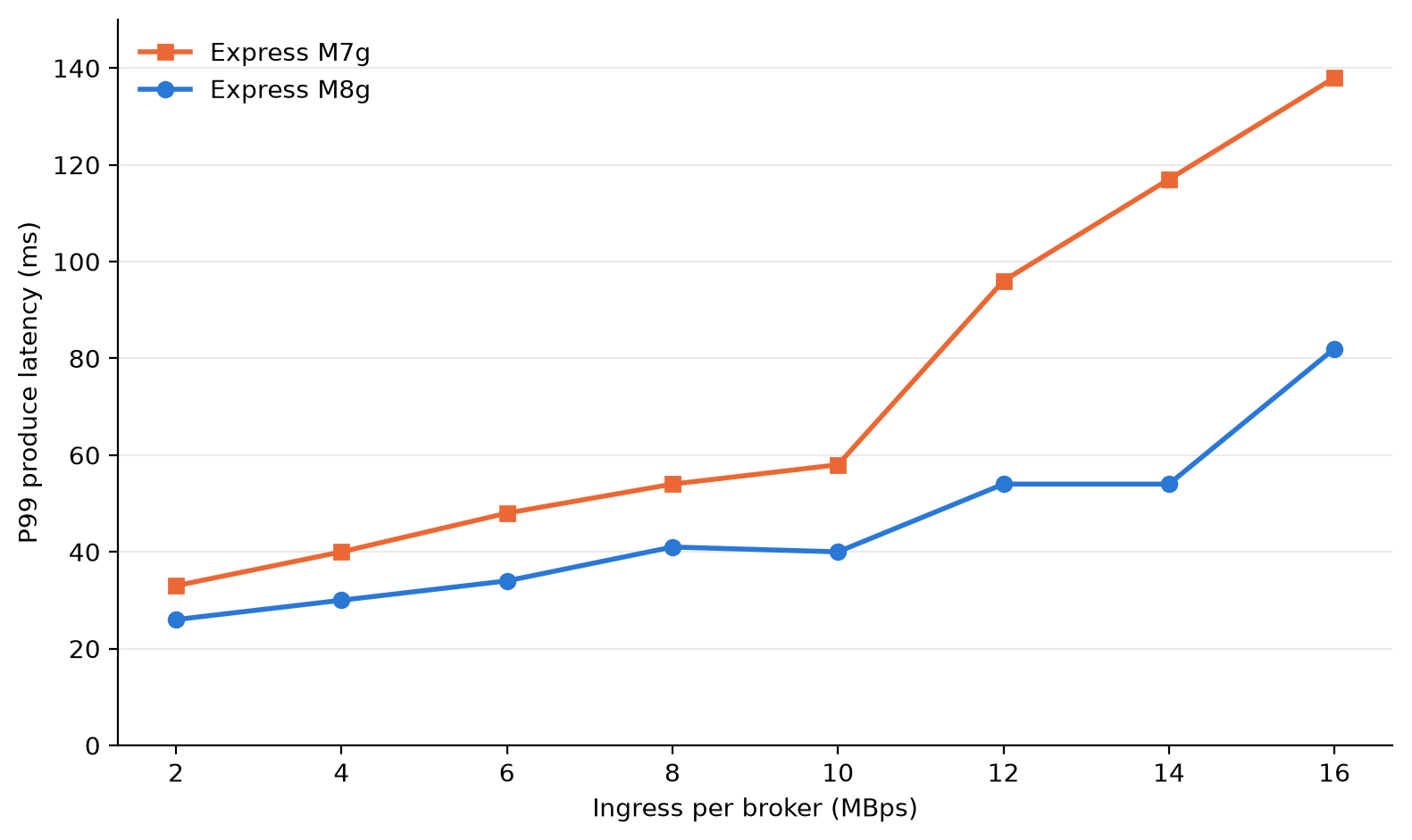
Figure 1: Client P99 produce latency by ingress per broker for express.m8g.large and express.m7g.large
Broker CPU
At the same load, M8g brokers used less CPU. Broker CPU (user plus system, averaged across the three brokers) was 9–11 percentage points lower on M8g at each step. At 6 MBps per broker, M8g ran at 45 percent and M7g at 56 percent. M7g brokers ran at 60 percent or higher from 8 MBps per broker. M8g brokers stayed below 60 percent through 14 MBps per broker. That gives you more room on each broker for traffic spikes and broker maintenance.
| Ingress per broker (MBps) | M8g CPU (%) | M7g CPU (%) |
| 2 | 39 | 49 |
| 4 | 41 | 52 |
| 6 | 45 | 56 |
| 8 | 51 | 61 |
| 10 | 51 | 60 |
| 12 | 56 | 66 |
| 14 | 58 | 68 |
| 16 | 62 | 72 |
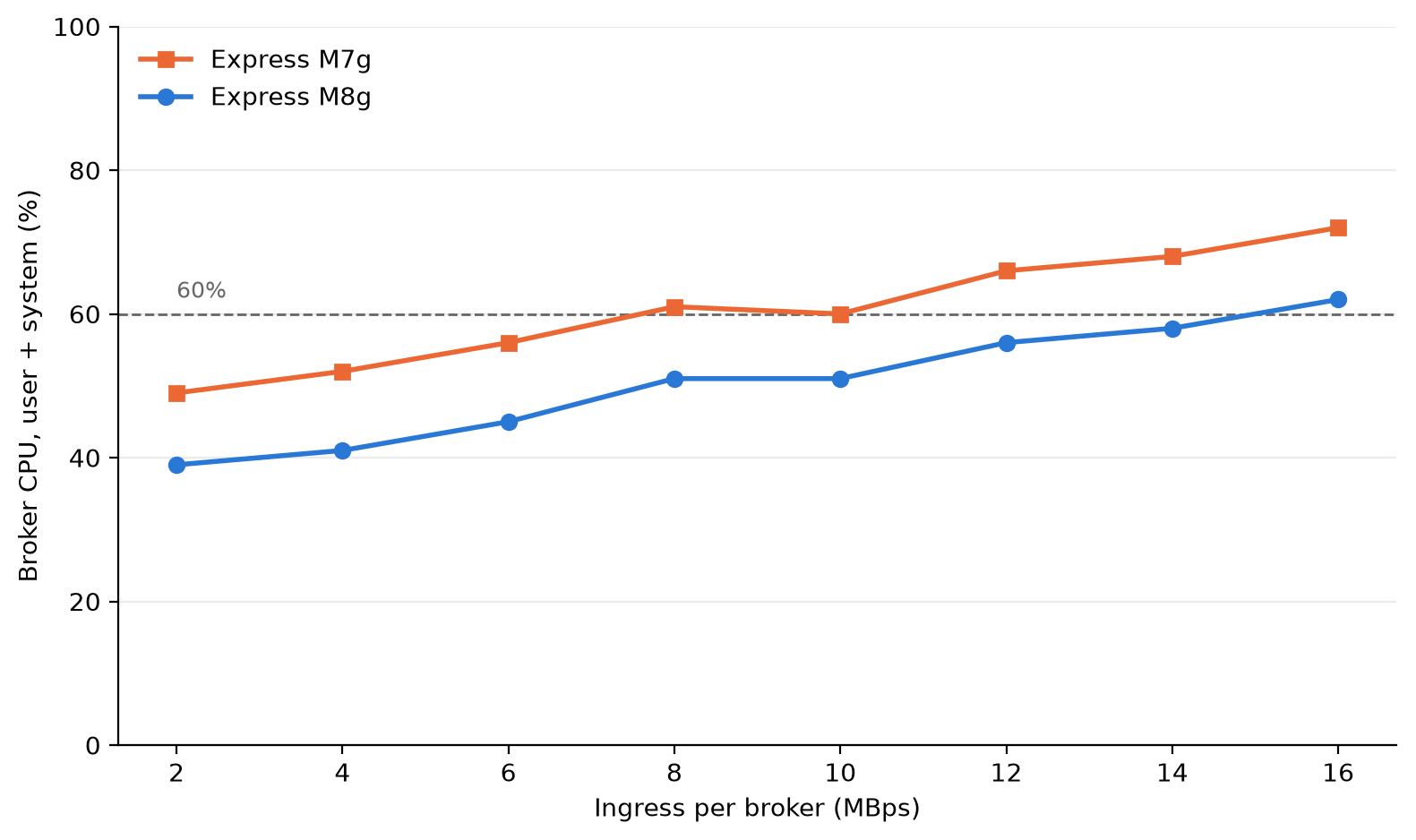
Figure 2: Average broker CPU (user plus system) at each load step for express.m8g.large and express.m7g.large
Consumer catch-up
When consumers fall behind, for example after an outage or a deployment, they must read the backlog while producers keep writing. We ran a separate test to measure how fast consumers catch up on each generation. This test used a new pair of express.m8g.large and express.m7g.large clusters, with the same Kafka version, authentication, and encryption as the latency test, and the following differences:
- Three topics with 440 partitions each and replication factor 3, for 1,320 partition replicas per broker.
- 1 KiB records,
acks=all,batch.size=65536(64 KiB),linger.ms=10, andcompression.type=none. - Producers wrote about 5.7 MBps per broker (35 percent of the recommended ingress for large brokers) for 3 hours, with 2 hours of retention.
- One consumer group read new records as they arrived. Every 30 minutes, two more groups of 30 consumers each restarted with a new group ID and read from the earliest offset. Each cycle then read the whole retained backlog.
- Four c5.4xlarge client instances for each cluster (two for producers and two for consumers). Client CPU stayed below 35 percent, so the clients were never the bottleneck.
With a backlog of about 30 million records (about 30 GB), consumers on M8g caught up in 13–18 minutes. On M7g, consumers had not caught up after 30 minutes and still had 2–9 million records to read. At the largest backlog, about 120 million records, consumers on M8g cleared about 91 million records in 30 minutes, compared with 30–32 million on M7g. That is about 3x more backlog cleared in 30 minutes.
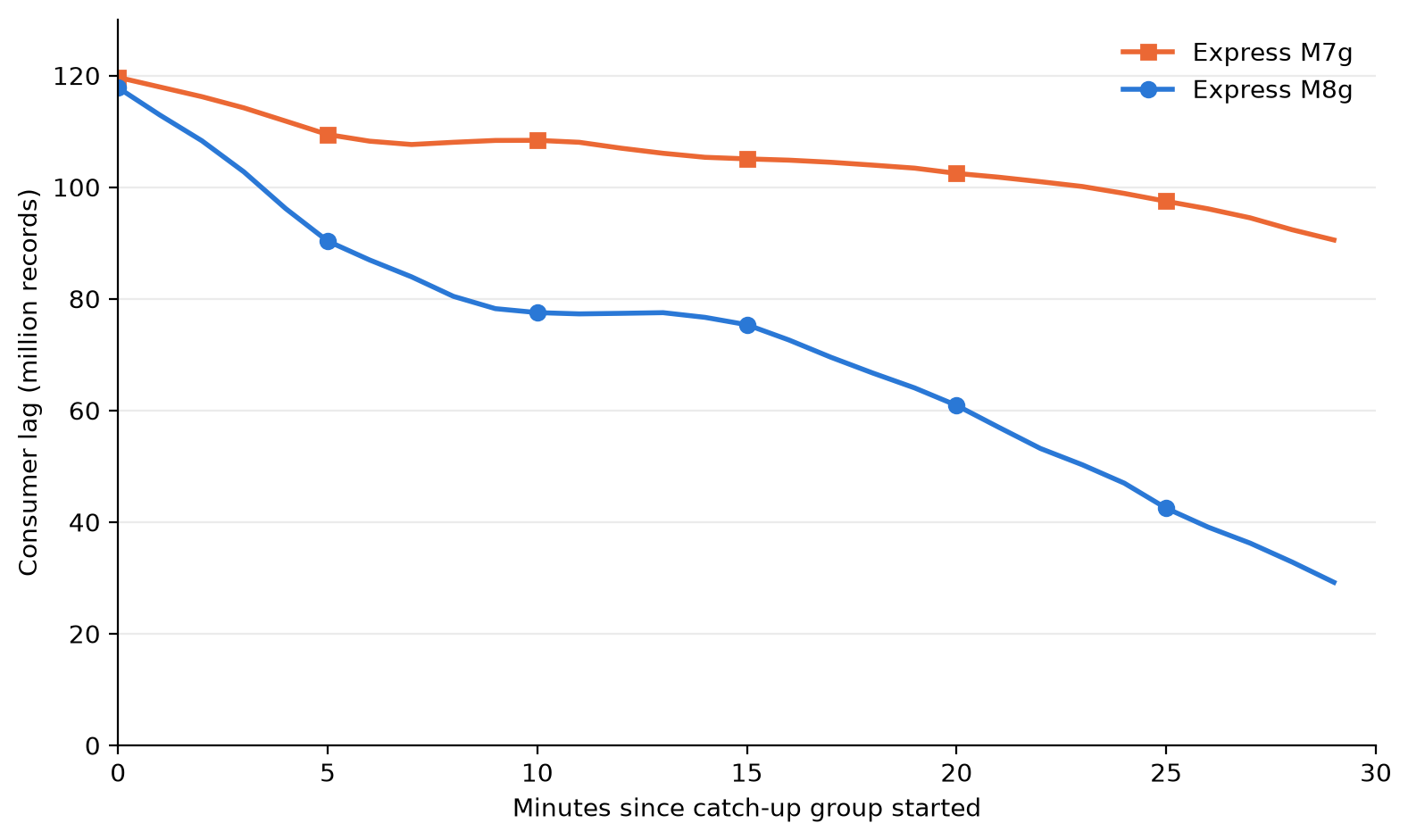
Figure 3: Consumer lag after a catch-up group starts from the earliest offset of a 120-million-record backlog, for express.m8g.large and express.m7g.large
Your results depend on load, message size, batch settings, consumer group count, and broker size. We ran this test on the large size only. To estimate your results, create an Express cluster on M8g and run your own workload against it. When you finish testing, delete the cluster to avoid ongoing charges.
Cost
Express brokers on M8g lower your costs in two ways: lower broker-hour pricing, and no broker-side charge for cross-AZ client traffic.
Broker-hour pricing
Broker-hour pricing for Express brokers on M8g is 15 percent lower than Express brokers on M7g at each size. In US East (N. Virginia), express.m8g.large costs $0.347 per hour and express.m7g.large costs $0.408 per hour. Data-in and storage pricing don’t change.
Cross-AZ data transfer
Many production Kafka clusters run across three Availability Zones. When a client connects to a broker in a different Availability Zone, the traffic between them is cross-AZ traffic. With clients spread evenly across three Availability Zones, about two-thirds of client traffic is cross-AZ. Each request goes to the partition leader, which can be in any Availability Zone.
Standard AWS data transfer charges for cross-AZ traffic in US East (N. Virginia) are $0.01 per GB on the sending side and $0.01 per GB on the receiving side, or $0.02 per GB in total. With Express brokers on M8g, AWS doesn’t charge the broker side, so cross-AZ traffic between your clients and brokers costs $0.01 per GB in total. That’s 50 percent lower than on M7g.
The following table shows the cross-AZ data transfer charge per GB of client traffic for each generation.
| Express on M7g | Express on M8g | |
| Client side | $0.01 per GB | $0.01 per GB |
| Broker side | $0.01 per GB | Not charged |
| Total per GB of cross-AZ client traffic | $0.02 | $0.01 |
You can reduce consumer cross-AZ traffic with rack awareness. Producers must write to the partition leader, which can be in any Availability Zone. Consumers can read from a replica in their own Availability Zone instead. To turn this on, set replica.selector.class to org.apache.kafka.common.replica.RackAwareReplicaSelector in your cluster configuration. Set client.rack on each consumer to the Availability Zone ID it runs in (for example, use1-az1). Consumers that read from a local replica don’t incur cross-AZ traffic, so you pay cross-AZ charges only on the produce side. On Express brokers on M8g, that produce-side cross-AZ traffic costs $0.01 per GB. If you don’t use rack awareness, your consumer cross-AZ traffic also costs 50 percent less on M8g, because AWS doesn’t charge the broker side.
For example, consider a cluster of three large brokers in US East (N. Virginia) with 30 MBps of ingress and two consumer groups (60 MBps of egress). Over a 30-day month, about 155,520 GB of client traffic crosses Availability Zones.
| Monthly cost | Express on M7g | Express on M8g | Express on M8g with rack awareness |
| Broker hours (3 brokers × 720 hours) | $881.28 | $749.52 | $749.52 |
| Cross-AZ produce traffic (51,840 GB) | $1,036.80 | $518.40 | $518.40 |
| Cross-AZ consume traffic (103,680 GB) | $2,073.60 | $1,036.80 | $0 |
| Total | $3,991.68 | $2,304.72 | $1,267.92 |
With rack awareness, the cross-AZ charge in this example drops from $1,555.20 to $518.40 per month. Reading from a follower replica can add a small amount of end-to-end latency, so test with your workload. For setup steps, see Reduce network traffic costs of your Amazon MSK consumers with rack awareness.
Data-in and storage charges are the same on both generations, so they aren’t included.
To estimate your own cross-AZ traffic, add the BytesInPerSec and BytesOutPerSec CloudWatch metrics across your brokers. Each 1 MBps sustained over a 30-day month is about 2,592 GB. Multiply the total by two-thirds if your clients are spread evenly across three Availability Zones. If your consumers use rack awareness, count only BytesInPerSec.
This applies only to traffic between your clients and brokers. Replication traffic between brokers, and between metadata nodes and brokers, isn’t charged on either generation. For details, see Amazon MSK pricing.
Move to Express brokers on M8g
You have three options, depending on where your workload runs today.
Create a cluster on M8g
In the Amazon MSK console, choose Create cluster, choose Express as the broker type, and choose an M8g size. You can also use the CreateClusterV2 API.
Update an Express cluster on M7g
You can change the broker type of a cluster from M7g to M8g in place. Amazon MSK updates brokers one at a time, so clients keep producing and consuming during the update.
Before you update, check that your partition count per broker and your throughput fit within the limits for the target size.
Move from Standard brokers or a self-managed Kafka cluster
Create a new Express cluster on M8g, and then use Amazon MSK Replicator to copy your topics, data, and consumer group offsets to it. For steps, see Migrate from Standard brokers to Express brokers or Migrate from non-MSK Apache Kafka clusters.
Considerations
- Connection limits per broker don’t change.
- The pricing and performance changes in this post apply to Express brokers. M8g is also available for Standard brokers. For Standard broker pricing, see the Amazon MSK pricing page.
Conclusion
Express brokers on Graviton4-based M8g instances lower the cost of running Kafka on Amazon MSK and lower tail latency for the same load. You get 15 percent lower broker-hour pricing, no Amazon MSK broker-side charge for cross-AZ client traffic, and a 24xlarge size for workloads that need more capacity per broker. In our benchmark at the large size, P99 produce latency was 21–54 percent lower, broker CPU was 9–11 percentage points lower, and consumers that fell behind cleared up to 3x more backlog in 30 minutes than on M7g.
To get started, create an Express cluster on M8g or update your Express cluster on M7g. Amazon MSK supports M8g sizes in every AWS Region that supports Express brokers. For pricing, see Amazon MSK pricing. For setup steps, see the Amazon MSK Developer Guide.
If you have questions or feedback, leave a comment on this post or start a thread on AWS re:Post.


