Insurance advisors sell hundreds of products across multiple providers. When a customer asks a question the advisor can’t answer on the spot, the reply often becomes a callback days later, and the sale loses momentum. Advisors also miss cross-sell opportunities because they can’t see the full coverage a customer holds elsewhere.
This friction is a growth problem. In many mature markets premium growth has stalled, so insurers must grow by selling more through the advisors they already have and by bringing new advisors up to speed faster. Frictionless Insurance Advisor moves both levers. It surfaces gaps and matching products during every meeting, and it lets a new advisor hold a credible, coverage-aware conversation from day one.
In this post, we present Frictionless Insurance Advisor, an AI-powered advisory tool built end to end on Amazon Bedrock AgentCore. Advisors can answer customer questions on the spot during meetings or calls, compare products across providers, and identify coverage gaps for existing customers and new prospects. They can also give indicative premiums with an affordability check and start an application that fills itself from the conversation.
Why this matters for insurers
Regulators across the world increasingly expect insurers to demonstrate that AI-assisted advice stays within defined boundaries and that customer data is isolated per advisor. In this architecture those boundaries are enforced in code as well as in prompts, from recording consent before a voice conversation is transcribed to citations the model cannot invent. For insurers evaluating agentic AI under these expectations, the architecture delivers measurable business outcomes:
- Zero wait time. Advisors no longer need to say “let me check and get back to you.” They answer questions in real time during the conversation with their customer, retrieving customer data, product details, and competitive intelligence instantly.
- Increased revenue. Automated coverage-gap analysis identifies cross-sell and upsell opportunities that advisors previously missed because their data was spread across systems.
- Faster prospect onboarding. New prospects can be profiled conversationally, matched to products, and started on an application in a single interaction, which reduces time to first application.
- Consistent advice quality. Every advisor gets the same AI assistant with the same guardrails, eliminating variance between experienced and new advisors.
- Competitive positioning. Advisors upload competitor policy documents or brochures and see coverage, exclusions, and positioning side by side, with no manual comparison.
To deliver these outcomes at scale, the solution also needs to meet the security and governance standards that regulators expect of systems handling customer data and advice. Read more about the Well-Architected FSI Lens updated for Generative and Agentic AI.
Solution overview
Frictionless Insurance Advisor is a multi-surface AI assistant. Advisors sign in to a React single-page application (SPA) hosted on Amazon CloudFront and have access to three capabilities: a text-only agent, a voice agent, and a product comparator.
Each capability matches a moment in the advisor’s week. The text agent supports preparation and follow-up at the desk, the voice agent supports the live meeting, and the comparator supports the competitive conversation when a customer is weighing a switch. All three draw on the same customer record and the same approved product content, so the advice stays consistent whichever one the advisor uses.
The advisor selects a customer and asks the agent questions by text or voice. The agent answers from real customer data through Model Context Protocol (MCP) tools. The tools cover data sources such as profiles and notes, policies, the product catalog, promotions, and company and competitor information. They also perform actions such as third-party document extraction, application form auto-fill, indicative pricing, daily priorities, and web search.
For example, with a customer selected, the advisor can review the full coverage portfolio, find where the customer is under-insured, spot cross-sell and consolidation opportunities, and pull up relevant promotions. The advisor can also drop a third-party policy document into the chat. The agent reads it directly, extracts coverage type, insurer, amounts, dates, and exclusions, and adds the policy to the customer’s record, so the advisor and the agent see everything the customer holds across providers for gap analysis.
The following screenshot shows the Text Assistant with a customer selected.
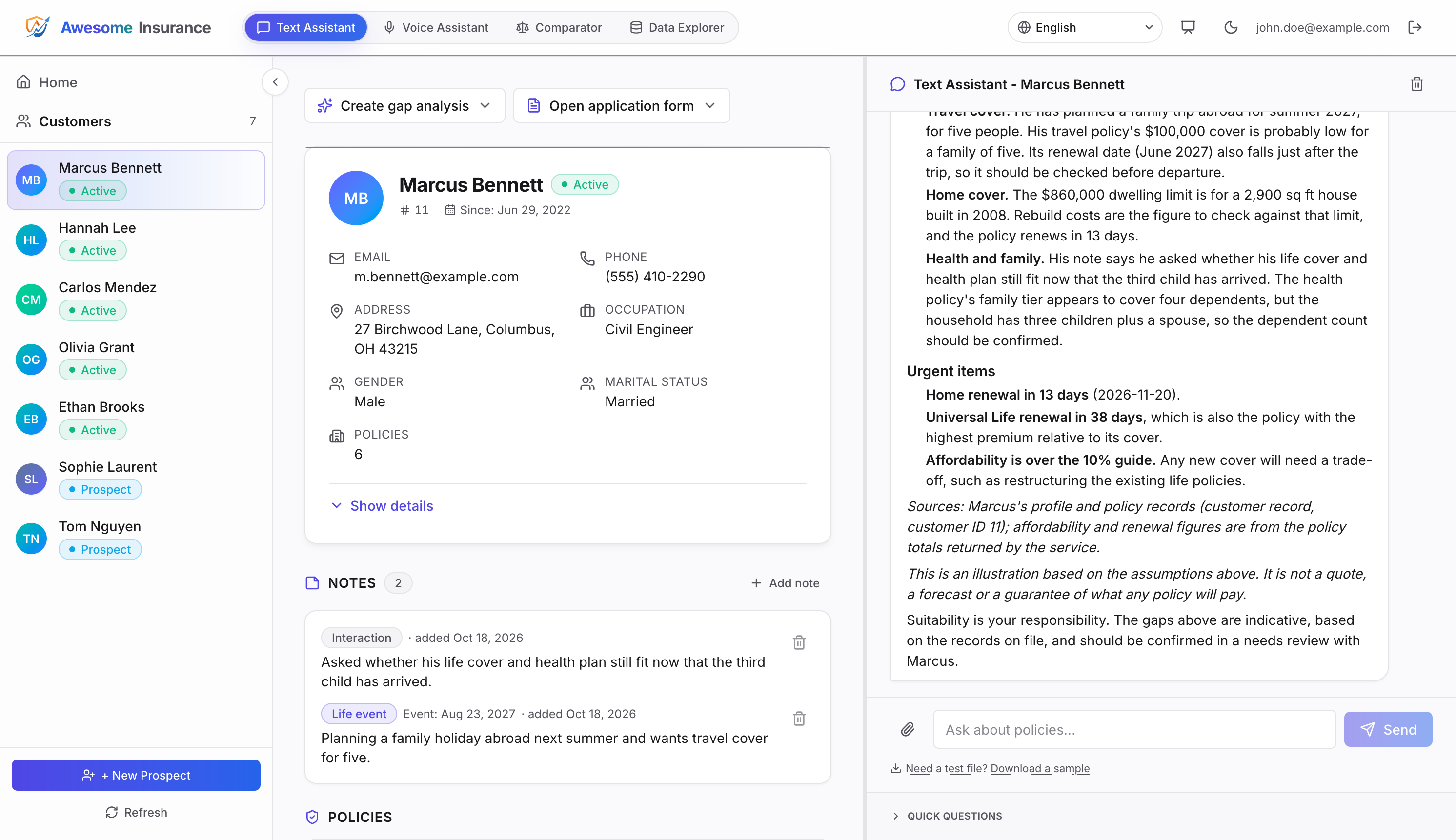
Figure 1: The Text Assistant with a customer selected. The answer draws on the customer’s policies and notes, lists its sources, and ends with an illustration and suitability notice
Before a meeting with a customer, the advisor can launch a quick prompt to return a brief with a customer snapshot, meeting goals, discovery questions, products to discuss, objection handling, and next steps.
For a new prospect, the agent guides onboarding and writes the profile as the conversation progresses.
The advisor does not need to know where to start. With no customer selected, a Dashboard view ranks the customers who most need attention, each with the reason and a one-click action. The action can be Draft email when there is a date to reach out about, Annual review when a customer file is stale, or Prepare meeting for a prospect with no coverage. The Dashboard turns the book of business into a daily work list. It flags overdue reviews, upcoming life events, renewals due or missed, premiums above the affordability guide, and prospects who have gone quiet. Fixed business rules produce the ranking rather than the AI, so a manager can see why a customer sits at the top and the same customer ranks the same way every day.
The following table shows the four tabs of the application.
| Tab | What the advisor does |
| Text Assistant | Text-based streaming chat. Accepts uploaded third-party policy documents for gap analysis, cites its source documents, and helps auto-fill application forms. |
| Voice Assistant | Real-time voice with barge-in, pause, and resume controls. Requests consent before recording, can summarize the transcript into a note, and helps auto-fill application forms. |
| Comparator | Side-by-side comparison of two to four products with an optional uploaded competitor brochure, plus a downloadable customer handout PDF. |
| Data Explorer | Read-only view of the reference documents, rate cards, and brochures that ground the agent, plus the advisor’s own voice transcripts and saved applications. |
The following diagram shows the end-to-end architecture:
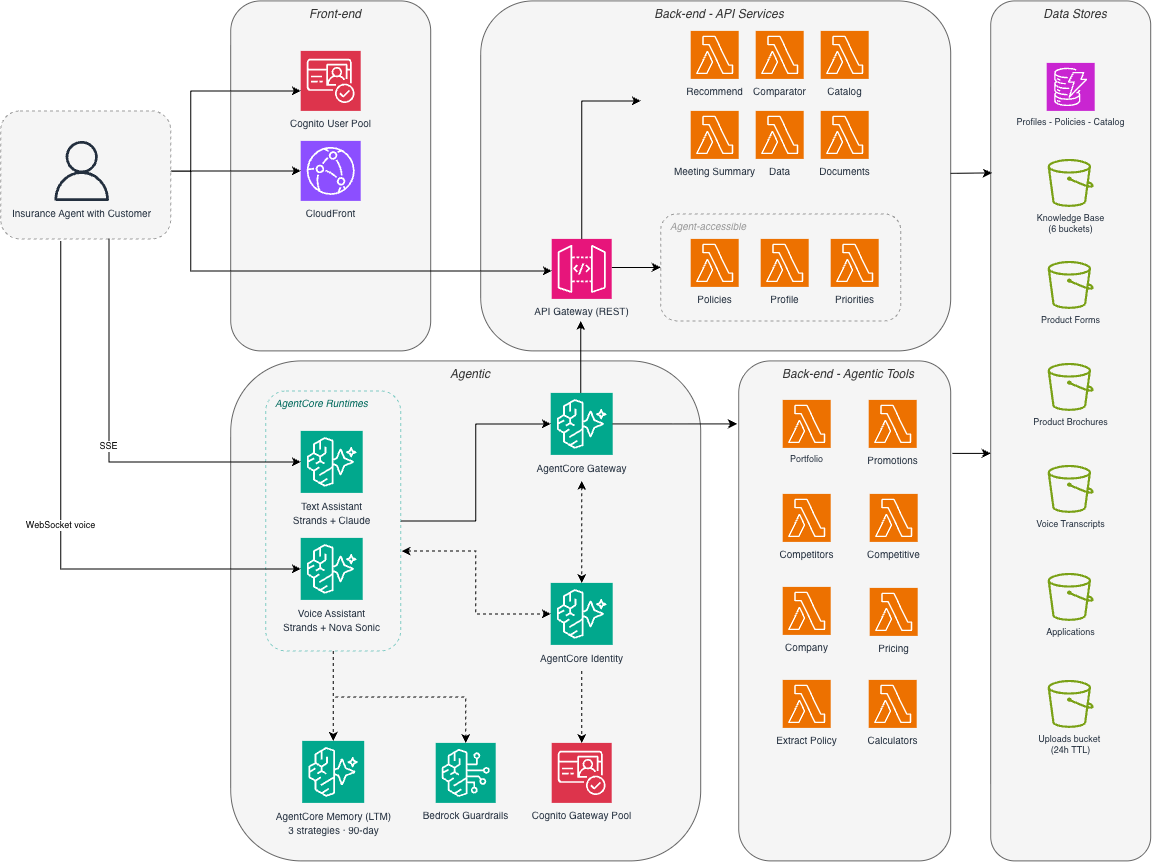
Figure 2: Frictionless Insurance Advisor architecture. Two AgentCore runtimes (text and voice) share one Gateway (20 tools on 12 targets) with a request interceptor that checks the advisor’s identity on every tool call, one Memory, and one Amazon Bedrock guardrail on the Claude model surfaces
AgentCore runtime, a capability of Amazon Bedrock AgentCore, owns the conversation loop and model calls. AgentCore Gateway, a capability of Amazon Bedrock AgentCore, owns tool routing. AgentCore memory, a capability of Amazon Bedrock AgentCore, holds cross-session context. AgentCore Identity, a capability of Amazon Bedrock AgentCore, handles identity and access management. Because of that split, you can swap models, add tools, or add a surface such as voice without restructuring the application.
The application ships in 10 languages (English, Japanese, Korean, Spanish, French, German, Simplified Chinese, Malay, Thai, and Indonesian). The text chat, comparator, recommender, and the interface itself respond in any of them. Voice is the exception, because Amazon Nova 2.5 Sonic supports its own set of spoken languages. Voice conversations work in the languages common to both, and the rest stay text-only. Refer to the Amazon Nova documentation for the current list of languages Nova 2.5 Sonic supports.
The reference implementation ships with mock data (under a fictional insurer called Awesome Insurance) so you can try every feature right after deployment. Per-customer data (profiles, policies, prospects, and notes) lives in Amazon DynamoDB under per-advisor access control. Shared reference content (catalog, promotions, company and competitive information, form schemas, and rate files) lives as Markdown and JSON files in Amazon Simple Storage Service (Amazon S3). That split mirrors a real insurer, where the book of business sits in a transactional system and product content is published once for all advisors to use. At deploy time, an AWS Lambda function seeds customer profiles for three demo advisors, along with policies, notes, a 28-product catalog, three fictional competitors, and their sample brochures.
A Data Explorer tab shows the corpus behind the agent’s answers. Each advisor also finds their own voice transcripts and saved applications there.
The full source code is available as an open-source reference on the AWS Samples GitHub repository.
Disclaimer: This post and its code are a reference implementation for demonstration. Awesome Insurance, its products, competitors, and customers are fictional, and nothing the assistants say is insurance, legal, tax, or investment advice. Review the code against your own security, privacy, and regulatory requirements before any production use.
How it works: From question to answer
A question from the advisor passes through five layers before the answer reaches the screen.
- The advisor signs in and asks the agent a question. Every answer is limited to that advisor’s own customers.
- The agent chooses which tools to call, so answers come from the insurer’s own data rather than the model’s general knowledge.
- The Gateway checks the advisor’s identity on every tool call, which leaves an access record compliance can audit.
- The tool retrieves data or acts as that advisor, so one advisor’s book is never visible to another.
- Memory recalls earlier conversations with the customer, and a guardrail checks the text assistant’s input and output.
Each layer maps to an expectation an insurance regulator or compliance team already has. Advisors see only their own customers, answers come from the insurer’s data rather than the model’s general knowledge, every data access is recorded against a named advisor, and the response is checked before it reaches the screen. Every answer drawn from the insurer’s documents ends with a list of its sources. Code builds that list from the documents the tools actually returned, so the AI cannot cite a document it never read. Premium estimates follow the same principle. The agent picks the inputs, and code does the arithmetic against the insurer’s rate tables and checks the total against an affordability guide of 10% of income. Every figure is labeled as an estimate, not a quote. The agent can change a customer record in only three ways (adding a prospect, a third-party policy, or a note), and only when the advisor asks.
MCP tool design
The agent has 20 tools on AgentCore Gateway. The following table highlights the five that matter most in a customer conversation, and the repository README lists the rest.
| Tool | What it does for the advisor | Data scope |
get_profile / create_profile / update_profile | Prepares the advisor before a meeting and onboards new prospects in conversation | Advisor’s own customers |
get_policy and the third-party policy tools | Gives a complete coverage picture across all providers, with yearly premium totals and renewal dates | Advisor’s own customers |
extract_policy_from_document | Reads a competitor’s policy document mid-conversation so the agent can compare it | The uploaded document |
estimate_premium | Answers what a cover would cost and whether the customer can afford it, as an estimate | Insurer rate tables and the customer’s record |
get_priorities | Answers “what should I do today?” and powers the Dashboard’s ranked list | Advisor’s own customers |
Document extraction
Document extraction drives the switch-and-consolidate sales motion. An advisor photographs or uploads a competitor’s policy and gets its coverage, exclusions, and renewal dates back during the meeting. The conversation then moves from “tell me what you have” to “here’s where you’re over- or under-covered,” which is where consolidation and cross-sell opportunities surface.
For the advisor, this removes the re-keying that normally follows a meeting. The agent proposes the fields, and the advisor checks them against the document before anything is saved, so the record stays under the advisor’s control. Each confirmed policy is then stored as structured data rather than a scanned file. The insurer gains a usable view of what its customers hold elsewhere and when those policies renew, which is the raw material for the next cross-sell conversation.
The extract_policy_from_document Lambda function handles an upload in four steps.
- Stores the file in a dedicated S3 uploads bucket.
- Calls Anthropic Claude Haiku in Amazon Bedrock, which reads the PDF or image directly, to extract policy type, insurer, coverage, premium, deductible, dates, and beneficiaries.
- Runs deterministic validators (numeric clamps, date checks, an injection-keyword heuristic, and a rule that rejects Awesome Insurance, the demo insurer, as the insurer on a third-party document).
- Returns the structured fields to the agent, which presents them to the advisor for confirmation before saving.
If the model makes a mistake or a document carries injected instructions, those checks still bound what reaches the database, which protects the integrity of the customer records the advisor relies on.
Comparator and recommender (non-MCP)
The comparator and recommender run as standalone Lambda functions behind Amazon API Gateway, not as MCP tools. The comparator builds a side-by-side table of two to four products with carrier financial-strength ratings, can include one uploaded or sample competitor brochure, and produces a customer handout PDF.
The recommender reads one customer’s profile, policies, the catalog, and promotions, then returns coverage gaps with dollar exposure and the Awesome Insurance products that close them.
These two tools answer the questions a customer asks when comparing insurers, namely whether a product beats what they already hold and what their current cover is missing. The comparator puts products side by side with each carrier’s financial-strength rating, because a customer weighing a switch wants to know the insurer will be there to pay a claim. The recommender expresses each coverage gap as a dollar amount, which turns an abstract need into a figure the customer can weigh against the premium. Both return a fixed format that is checked against the source documents before display, so every advisor presents the same structure and compliance can review one layout instead of free text.
Voice surface
The advisor can also use the voice agent. The voice agent uses the same Gateway tools (minus web search) and Memory as the text agent. Only the model changes. The voice agent uses Amazon Nova 2.5 Sonic for bidirectional, real-time voice with native tool use and barge-in.
The voice agent runs in its own AgentCore runtime container. For a standalone deployment guide, refer to Deploy a full stack voice AI agent with Amazon Nova Sonic.
Before listening, the voice assistant asks the advisor to confirm that the customer agreed to transcription.
Voice suits the face-to-face meeting, where typing into a laptop breaks eye contact and slows the conversation. The advisor talks with the customer while the agent answers questions and fills in the application as they speak. Because the conversation is transcribed, consent comes first, and the system enforces it rather than relying on the advisor to remember. Until the advisor confirms the customer agreed, nothing is added to the customer’s history, no form is filled, and no transcript is kept. A refusal ends the session without saving anything. Transcripts are visible only to that advisor and expire after a day, and the advisor can pause the microphone whenever the customer wants to speak off the record.
Application forms in text and voice
When the advisor and customer agree to start an application, a form for one of the products opens beside the chat or in the voice panel and fills from the conversation and the customer’s record.
Selecting Send for e-Signature saves the completed form as one JSON object in a private, per-advisor S3 bucket. The object records where each value came from (profile, conversation, or typed by hand).
An incomplete application holds up new business, because each missing answer means another call to the customer before underwriting can start. Here the form fills from what the customer has already said and what the insurer already knows, and the advisor sees which answers need a second look. The send button stays disabled until every required field is answered, so an application cannot go out half-complete. The saved application records where each answer came from, which gives underwriting and compliance an audit trail. The assistant never sees or fills sensitive identifiers such as a Social Security number. In a production deployment, this saved application becomes the hand-off point to the insurer’s e-signature and policy administration systems.
Getting started
The README in the GitHub repository covers everything you need to deploy the solution, including the prerequisites, the five AWS Cloud Development Kit (AWS CDK) stacks, the deployment script, and the script that creates the demo advisors. Deploy in a sandbox account first, then sign in as one of the three demo advisors to explore their customers.
To adapt the solution, point the tools at your own data sources, APIs, and MCP servers. When you finish, remove the deployed resources with the destroy script described in the README to avoid ongoing charges.
Conclusion
Amazon Bedrock AgentCore supplies the building blocks. Runtime hosts the agents, Gateway routes MCP tools, Identity issues the machine credentials the agent uses to reach its tools, and Memory carries context across sessions, so new surfaces and tools don’t require a restructure. The controls an insurer needs certainty on (consent, cited sources, premium arithmetic, and record writes) sit in code rather than in the prompt.
For insurers, the payoff is commercial. The same platform helps experienced advisors sell more by surfacing gaps, matching products, and positioning against competitors in real time. It also helps new advisors hold a credible, compliant conversation from their first week. Per-advisor isolation meets regulators’ confidentiality and audit expectations, and customer-keyed memory turns continuity into retention. The guardrail and code-level checks keep every advisor inside the conduct rules for insurance selling, so distribution capacity grows without loosening the controls the business answers for.
In our testing scenarios, advisors answered customer questions in minutes, where the same questions previously required a 24–48 hour callback cycle.
To plan a pilot with your own products and customer data, contact your AWS account team.
The full source code is available as an open-source reference on the AWS Samples GitHub repository.
Related resources
Securely launch and scale your agents and tools on Amazon Bedrock AgentCore Runtime
Configuring Amazon Bedrock AgentCore Gateway for secure access to private resources
Deploy a full stack voice AI agent with Amazon Nova Sonic
Organizing Agents’ memory at scale: Namespace design patterns in AgentCore Memory


