Every millisecond matters in programmatic advertising. When a user loads a webpage or opens a mobile app, an auction for that ad impression starts. The entire cycle from bid request to bid response must complete within tight timeout windows, often 100 milliseconds or less. If your bidding infrastructure goes down, even briefly, you lose more than transactions. You lose revenue, publisher trust, and advertiser confidence.
If you run a supply-side platform (SSP) or demand-side platform (DSP), high availability (HA) isn’t a nice-to-have. It’s a business requirement. A single Availability Zone (AZ) failure during peak traffic can mean millions of failed auctions and direct revenue impact for every partner in your RTB environment.
AWS RTB Fabric takes a different approach from traditional HA architectures. As a fully managed service purpose-built for real-time bidding (RTB), it provides high-availability capabilities as native features, not as additional infrastructure you need to build and maintain. RTB Fabric is designed exclusively for RTB traffic, so your applications can exchange OpenRTB requests and responses with your partners. In this post, we walk through how RTB Fabric delivers high availability for critical bidding workloads, how it compares to the approaches you’re using today, and how to configure your workload for Multi-AZ resilience.
Figure 1 shows how RTB Fabric connects requester and responder applications, both within AWS and with partners outside AWS.
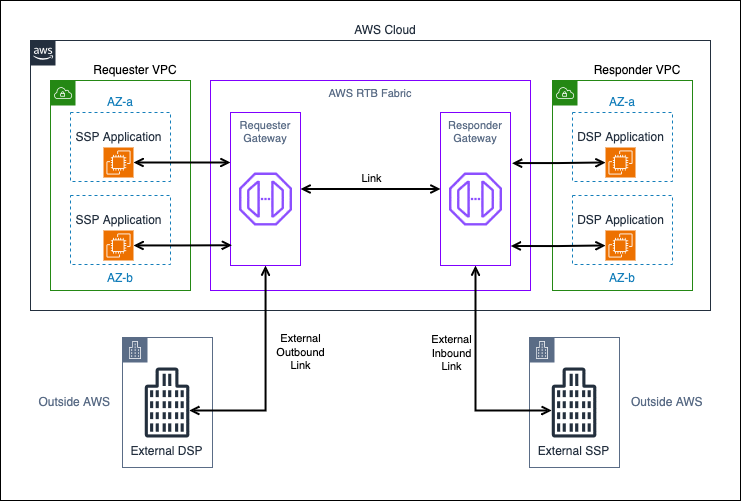
Figure 1: RTB Fabric high-level architecture
SSP applications in a requester virtual private cloud (VPC) run in two Availability Zones (AZ-a and AZ-b) and send bid requests to an RTB Fabric requester gateway. A link carries the requests to an RTB Fabric responder gateway, which forwards them to DSP applications in a responder VPC that also spans AZ-a and AZ-b. Responses return along the same path. Outside AWS, an external DSP receives requests from the requester gateway through an outbound external link, and an external SSP sends requests to the responder gateway through an inbound external link.
High-availability challenges in real-time bidding
Unlike typical web applications where a brief outage results in a retry or a slightly slower page load, RTB auctions are fire-and-forget. If your DSP doesn’t respond within the timeout window (often 100 milliseconds or less), the SSP moves on. There’s no retry. That impression and the revenue it represents are gone.
This creates three distinct HA challenges:
- Zero tolerance for downtime. Every second of unavailability translates directly to lost bid opportunities. For a DSP processing 1 million transactions per second (TPS), even 10 seconds of downtime means 10 million missed bid opportunities.
- Infrastructure failures must be invisible. Failover needs to happen faster than the auction timeout. If it takes 5 seconds to reroute traffic after an instance failure, that’s thousands of lost auctions your SSP partners notice immediately.
- Scale amplifies the impact. At millions of transactions per second, even a partial failure affecting 10% of capacity means hundreds of thousands of failed transactions per minute.
How traditional RTB deployments handle high availability
Before looking at how RTB Fabric delivers high availability, it helps to understand the two approaches most RTB workloads use today: on-premises or colocation infrastructure, and cloud deployments built on load balancers.
On-premises and colocation
High availability in the colocation model typically involves redundant hardware in the same facility, hardware load balancers distributing traffic, and manual or semi-automated failover between sites. This delivers low latency through physical proximity, but you own the hardware lifecycle, capacity planning, and failover orchestration. When a rack fails at 2:00 AM, your on-call team is troubleshooting physical infrastructure instead of optimizing bidding logic.
Cloud with Network Load Balancers
Moving to the cloud improves elasticity, but building HA for RTB workloads with standard cloud networking brings its own complexity:
- Per-partner connectivity management. Managing partner integrations often requires dedicated target groups, health check configurations, and endpoint coordination per connection. With more than 30 partners, this complexity grows linearly and pulls engineering time away from bidding logic.
- Cross-AZ data transfer costs. With a standard Network Load Balancer (NLB), even with cross-zone load balancing turned off (the default), inter-AZ data transfer charges can occur on the inbound path. NLB DNS returns IPs across all AZs by default (0% zonal affinity). A partner in AZ-a might connect to your NLB node in AZ-b, incurring $0.01 per GB at each end. If you turn on cross-zone load balancing for resilience, additional charges apply when the NLB routes from its node to targets in a different AZ. At RTB volumes, these costs add up quickly.
- No AZ-aware routing. Standard NLBs don’t prioritize same-AZ routing. Traffic from an SSP in AZ-a might land on a DSP instance in AZ-c, adding latency and cost.
- Health check tuning. NLB health checks need careful tuning for RTB. If checks are too aggressive, you get false positives during deployments. If they’re too lenient, unhealthy instances receive traffic for too long.
- DNS and endpoint management. Each partner needs your NLB endpoint. Changing infrastructure means coordinating DNS updates across your partner RTB environment.
Figure 2 compares a per-partner load balancer architecture with the same partners connected through RTB Fabric.
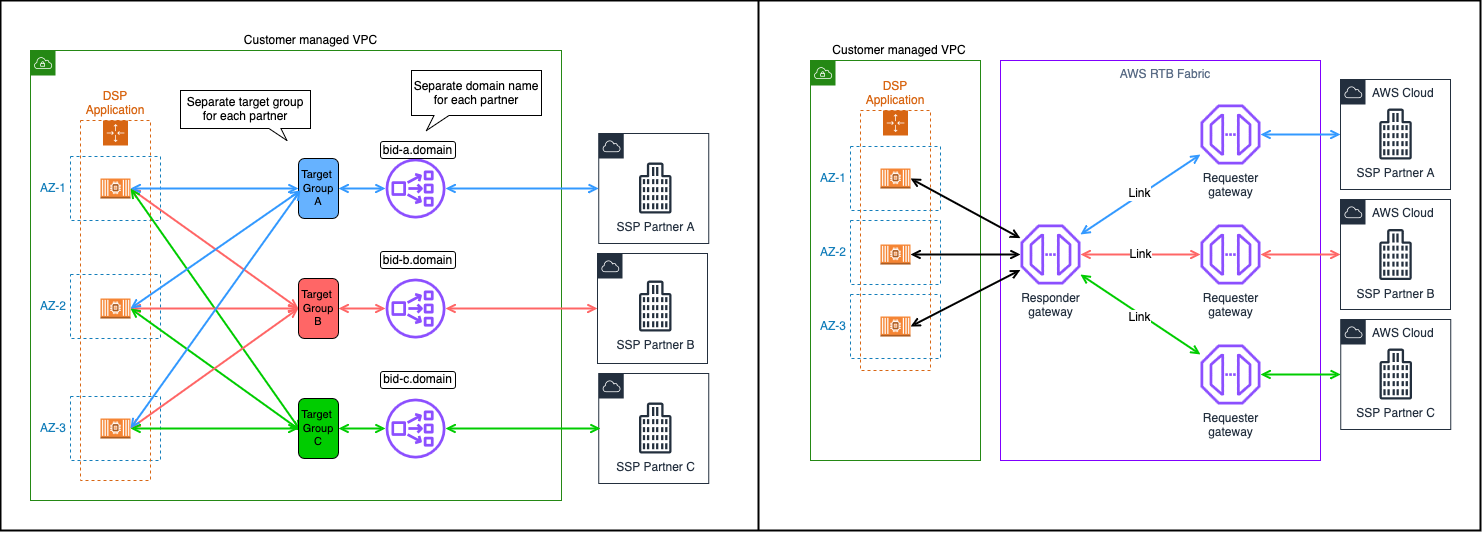
Figure 2: Traditional cloud HA architecture compared with RTB Fabric HA architecture
On the left, a DSP runs an Auto Scaling group across three Availability Zones in a customer-managed VPC. Each of three SSP partners connects through its own domain name, its own Network Load Balancer, and its own target group. Each target group sends traffic to instances in all three AZs. On the right, the same Auto Scaling group sits behind a single RTB Fabric responder gateway. Each SSP partner connects through its own requester gateway and a link to that responder gateway, with no per-partner load balancers, target groups, or domain names.
RTB Fabric building blocks
RTB Fabric connects your RTB applications with your partners through three components:
- Requester gateway: An AWS managed network endpoint that runs alongside your VPC. A requester application, such as an SSP, sends bid requests to it and receives the responses.
- Responder gateway: An AWS managed network endpoint that runs alongside your VPC. It routes incoming bid requests to a responder application, such as a DSP, and returns the responses. RTB Fabric also offers an external responder gateway for receiving traffic from partners outside AWS.
- Link: A managed connection between a requester gateway and a responder gateway. A requester gateway creates the link, and the owner of the responder gateway must accept it before the link becomes active. Links can also connect to partners outside RTB Fabric, as external links.
How AWS RTB Fabric delivers high availability: Responder (DSP) perspective
As a DSP, your bidder fleet receives bid requests through an RTB Fabric responder gateway. RTB Fabric provides several built-in capabilities that keep your responder workloads resilient.
AZ-aware traffic routing
RTB Fabric prioritizes routing requests and responses within the same Availability Zone shared between you and your partners. When your SSP partner and your DSP fleet are both present in AZ-a, RTB Fabric keeps that traffic in-zone, reducing latency and avoiding unnecessary cross-AZ hops. The responder gateway’s client routing policy controls how requester traffic reaches the gateway. The default, AVAILABILITY_ZONE_AFFINITY, sends each requester’s traffic to gateway capacity in the requester’s own AZ. It uses the gateway’s other AZs only when no capacity is available there. ANY_AVAILABILITY_ZONE spreads requester traffic across every AZ the gateway spans. From the gateway to your bidder fleet, RTB Fabric separately prefers targets in the gateway’s own AZ. A gateway with subnets in only one AZ serves every requester from that AZ, which is another reason to configure Multi-AZ gateways (covered later in this post).
Built-in DNS-based load balancing
RTB Fabric uses DNS-based routing to dynamically distribute incoming RTB requests across healthy hosts. As your fleet scales up or down, RTB Fabric automatically adjusts DNS records to route traffic to available, in-zone hosts. With this approach, you don’t need to deploy and manage your own NLBs, target groups, or listener rules.
Health checks with AZ-aware failover
RTB Fabric supports health checks for managed endpoints that continuously monitor the Amazon Elastic Compute Cloud (Amazon EC2) instances in your Amazon EC2 Auto Scaling groups. When you turn on health checks, RTB Fabric:
- Discovers instances by querying your Auto Scaling groups and grouping them by AZ.
- Probes each instance using HTTP or HTTPS health checks on a configurable port and path.
- Uses threshold-based transitions so an instance must fail multiple consecutive probes before being removed from rotation, preventing transient failures from causing unnecessary churn.
- Routes traffic only to healthy instances, tracked per AZ for zone-aware routing decisions.
A key design choice is fail-open behavior: if all instances are marked unhealthy or health checking is temporarily unavailable, RTB Fabric falls back to routing traffic to all discovered instances rather than routing to none. In RTB, sending traffic to a potentially degraded instance is better than dropping it entirely and losing every auction.
Managed endpoints must be turned on for your account before you can use them. To use managed endpoints for your responder gateway, contact your AWS account team to request access.
Health check support by endpoint type
RTB Fabric managed health checks are available for Auto Scaling group-backed responder gateways only. For the latest supported endpoint types, see Health checks for managed endpoints. The following endpoint types are not supported for RTB Fabric managed health checks:
- Amazon Elastic Kubernetes Service (Amazon EKS) endpoints: Use Kubernetes-native liveness and readiness probes to control traffic routing to your pods. Kubernetes removes unhealthy pods from the Endpoints resource that RTB Fabric discovers.
- Domain name endpoints: Implement your own application-level health management or use an external health check mechanism (such as Amazon Route 53 health checks) to make sure traffic reaches only healthy infrastructure behind the domain.
If you run your bidder fleet on Amazon EKS, Kubernetes remains responsible for health checking. RTB Fabric routes traffic to whatever IPs the Kubernetes Endpoints resource exposes. The cluster operator is responsible for making sure those IPs represent healthy pods.
Rate limiting for resilience
With the built-in Rate Limiter module, you can control TPS at the link level to protect your bidding infrastructure from traffic spikes. This prevents a sudden surge from one SSP partner from overwhelming your bidder fleet and causing cascading failures across all your SSP integrations. For active links, you can configure the Rate Limiter on a per-link basis using the aws rtbfabric update-link-module-flow command.
For example, if your bidder fleet can handle 4,000 TPS total and you have five SSP partners, you might configure a rate limit of 800 TPS per link. This way, even if one partner experiences a traffic spike (such as a major live event that drives ad impressions), that partner can’t consume more than its share of your fleet capacity. Without rate limiting, a single partner’s spike could starve your other four partners of bid responses.
Rate limiting also serves as a safety valve during recovery. If your fleet is operating at reduced capacity (for example, after an AZ failure before Auto Scaling replaces instances), rate limiting prevents the remaining capacity from being overwhelmed while your fleet scales back up.
You can also drop unwanted traffic before it reaches your bidder fleet with the OpenRTB Attribute module. It filters bid requests on fields in the OpenRTB payload, such as device country or the Children’s Online Privacy Protection Act (COPPA) flag. For matching requests, it either returns a no-bid response without forwarding the request or adds a custom HTTP header. A holdback percentage lets a share of requests pass through unfiltered, so you can roll out a new filter gradually. Filtered requests never reach your fleet, so this filtering helps protect capacity during traffic spikes and can lower compute and networking costs. As with the Rate Limiter, you configure this module for each link with the aws rtbfabric update-link-module-flow command.
Inbound external links: Receiving traffic from partners outside AWS
If your SSP partners are not using RTB Fabric (for example, they operate outside AWS), you can configure inbound external links on your responder gateway. With inbound external links, external SSP partners can send bid requests to your responder gateway over the public internet. RTB Fabric handles TLS termination and routes the traffic to your bidder fleet by using the same AZ-aware logic and health check capabilities as internal links.
Security considerations for inbound external links:
- Configure TLS for encryption in transit.
- Use rate limiting to protect against unexpected traffic spikes from external sources.
- Consider IP allowlisting where partner IP ranges are known and stable.
Figure 3 shows how an SSP outside AWS reaches your responder gateway through an inbound external link.
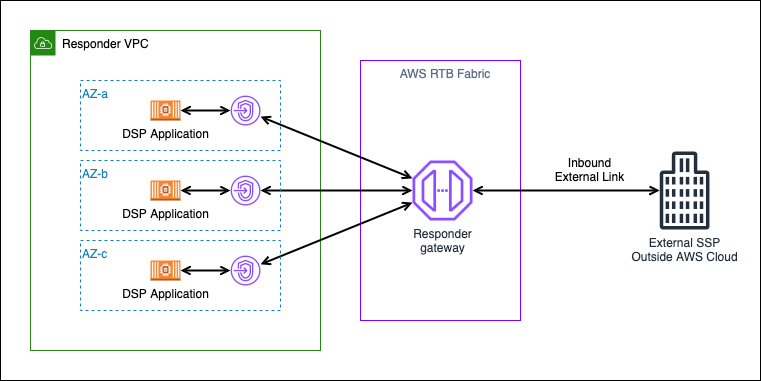
Figure 3: Responder gateway with inbound external link
An external SSP outside AWS sends bid requests over an inbound external link to the RTB Fabric responder gateway. The responder gateway forwards each request through an endpoint in each Availability Zone (AZ-a, AZ-b, and AZ-c) to DSP application instances in the responder VPC. Responses return along the same path.
Managed gateway infrastructure
Whether you operate as a responder or a requester, RTB Fabric gateways are AWS managed. You don’t need to worry about the availability of the networking layer itself. AWS handles the redundancy, patching, and scaling of the gateway infrastructure. Your engineering team can focus on bidding algorithms and campaign optimization instead of load balancers, DNS configurations, or network failover scripts.
How RTB Fabric delivers high availability: Requester (SSP) perspective
As an SSP, your application sends bid requests through an RTB Fabric requester gateway to your DSP partners. RTB Fabric handles the connectivity layer so you can focus on auction logic rather than managing per-partner networking infrastructure.
Fan-out amplification
You send each bid request to multiple DSPs simultaneously. An AZ failure in your requester fleet affects every downstream DSP connection. Multi-AZ deployment is important because the number of DSP partners multiplies the scope of impact.
Outbound external links: Sending traffic to partners outside AWS
If your DSP partners are not using RTB Fabric (for example, they operate outside AWS), you can configure outbound external links on your requester gateway. Outbound external links provide connectivity between your requester gateway and external DSP partner endpoints over the public internet. Your application sends bid requests through the requester gateway as normal, and RTB Fabric routes them to the external partner’s endpoint.
Key considerations for outbound external links:
- Set aggressive timeouts. If a bid response doesn’t arrive within your auction deadline, move on. Don’t let slow responses from one external DSP block your auction.
- Implement circuit breakers per link. If a particular external DSP link is consistently timing out, temporarily reduce traffic to that link to protect your overall auction throughput.
- Monitor latency closely, because external links have more variable latency than internal links between RTB Fabric gateways.
Figure 4 shows a single requester gateway sending bid requests to DSP partners both inside and outside AWS.
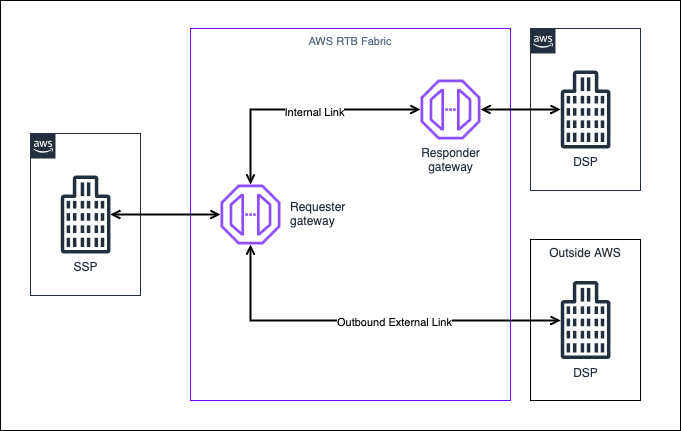
Figure 4: Requester gateway with outbound external link
An SSP in AWS sends bid requests to its RTB Fabric requester gateway. An internal link carries requests to the responder gateway of a DSP that also uses RTB Fabric. An outbound external link carries requests from the same requester gateway to a DSP outside AWS. Responses return along the same paths.
Configuring Multi-AZ gateway resilience
RTB Fabric gateways achieve AZ-level resilience when you designate subnets in multiple Availability Zones at gateway creation time. If one AZ fails, the gateway continues operating in the remaining AZs with no manual intervention.
Prerequisites
Before you configure Multi-AZ gateways, make sure you have the following:
- Access to AWS RTB Fabric in your account, and the AWS CLI installed with support for the
aws rtbfabriccommands. - A VPC with subnets in at least two Availability Zones, with enough available IP addresses for your gateways. For subnet requirements, see Responder gateways.
- Security groups for your gateways and bidder instances. If you use health checks, the instance security groups must allow inbound traffic on the health check port from your VPC CIDR.
- Enough Availability Zones per gateway to cover the AZs you plan to use. Verify the value currently applied to your account in the Service Quotas console, and request an increase if required. For default values, see Quotas for AWS RTB Fabric.
- For managed endpoints: an Auto Scaling group for your bidder fleet, an AWS Identity and Access Management (IAM) role that RTB Fabric can assume to discover its instances, and managed endpoint access enabled for your account by your AWS account team. For the IAM role requirements, see Managed endpoints.
Figure 5 shows a responder gateway with subnets in two Availability Zones, first during normal operation and then when the path through one AZ is unavailable.
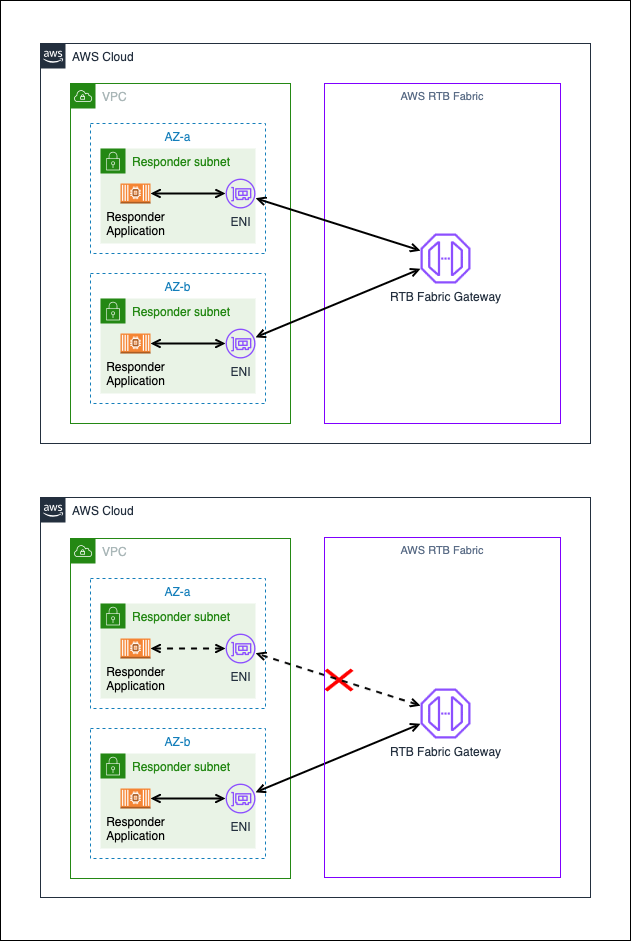
Figure 5: Multi-AZ gateway architecture
In the top panel, responder application instances run in a responder subnet in each of two Availability Zones. Each subnet has an elastic network interface (ENI) that connects the instances to the RTB Fabric gateway, and traffic flows through both ENIs. In the bottom panel, the path through the first AZ is unavailable, which the red X marks, and the gateway sends all traffic through the ENI in the remaining AZ.
How Multi-AZ gateways handle AZ failures
When a gateway is configured with subnets in multiple AZs:
- During normal operation, traffic is routed preferentially within the same AZ (AZ-aware routing).
- If instances in one AZ become unavailable, the gateway automatically directs traffic to healthy instances in the remaining AZs.
- This failover is transparent to partners and requires no manual intervention or partner coordination on your part.
Responder gateway Multi-AZ setup
The following command creates a responder gateway with subnets in two Availability Zones and a managed endpoint that uses RTB Fabric health checks. Replace the VPC ID, subnet IDs, security group ID, Auto Scaling group name, and IAM role ARN with your own values.
Health check tuning for RTB workloads
- Set
unhealthyThresholdCountlow (2) to quickly remove failing instances. Every second an unhealthy instance receives traffic means failed bids. - Set
healthyThresholdCounthigher (5) to make sure instances are fully warmed up (model loading, cache priming, connection pool initialization) before receiving live bid traffic. - Use a dedicated health check port (separate from your bidding port) so health probes don’t compete with bid processing.
- Configure security groups to allow inbound traffic on the health check port from your VPC CIDR.
Graceful shutdown
When instances are terminating (scale-in or deployment), have them return unhealthy status on the health endpoint before the Auto Scaling group terminates them. This gives RTB Fabric time to drain traffic away, preventing error spikes during deployments. Configure an Auto Scaling lifecycle hook to delay termination long enough for RTB Fabric to detect the unhealthy status and reroute traffic.
Rolling deployments
During a rolling update, new instances must pass the healthyThresholdCount (default: 5 consecutive probes at 5-second intervals, or approximately 25 seconds) before RTB Fabric routes traffic to them. Meanwhile, old instances continue serving traffic until they begin their termination sequence. To maintain capacity during rolling deployments:
- Make sure your Auto Scaling group’s minimum healthy percentage accounts for the warm-up period of new instances. A batch size that terminates more instances than can be replaced within the healthy threshold window causes a temporary capacity dip.
- Consider setting a lower
healthyThresholdCount(minimum: 2) for environments where you prefer faster rollout over cautious validation. This setting trades some detection confidence for deployment speed. - For zero-downtime deployments at scale, consider a blue/green pattern. Launch an entirely new Auto Scaling group, wait for all instances to pass health checks, and then switch traffic. This pattern avoids the capacity dip entirely but requires more compute during the transition.
Figure 6 shows how health checks and AZ-aware routing keep bid traffic on healthy instances when an instance fails.
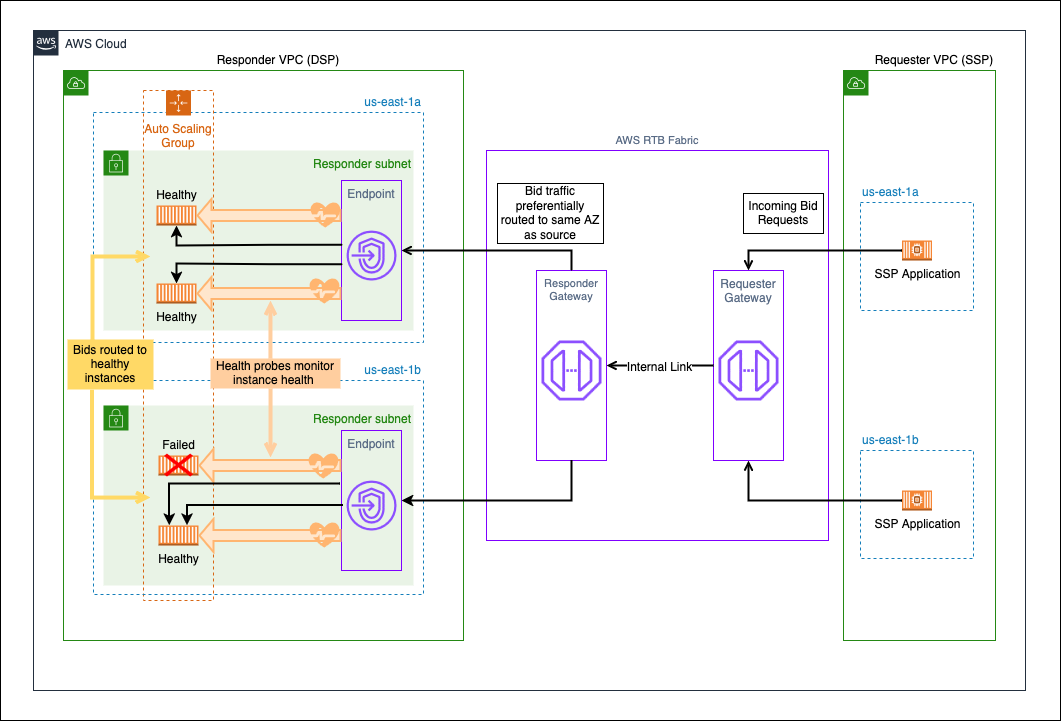
Figure 6: Multi-AZ responder with health checks and failover
SSP application instances in us-east-1a and us-east-1b send bid requests to an RTB Fabric requester gateway, which forwards them over an internal link to the responder gateway. The responder gateway routes bid traffic to an endpoint in the same Availability Zone as the source. In the responder VPC, an Auto Scaling group runs bidder instances in a responder subnet in each AZ, and health probes monitor every instance. In us-east-1b, one instance has failed its health checks, so the gateway routes that AZ’s bids to the remaining healthy instance in the same AZ.
Requester gateway Multi-AZ setup
The following command creates a requester gateway with subnets in two Availability Zones. Replace the VPC ID, subnet IDs, and security group ID with your own values.
Note: Requester gateways do not use managed endpoints or RTB Fabric managed health checks. The requester sends traffic outward through links. It doesn’t receive inbound traffic that needs load balancing across a fleet. You manage the health and availability of your requester application through standard Auto Scaling and your own application monitoring.
Key SSP considerations
- Set a low DNS time to live (TTL) (for example, 30–60 seconds). Because RTB Fabric uses DNS-based routing to distribute traffic across healthy hosts, a low TTL helps your application resolve fresh endpoints promptly during scaling events or failover. Higher TTLs mean your application might continue sending traffic to stale endpoints during exactly the moments when fast rerouting matters most.
- Multi-AZ deployment is important for requesters because of fan-out amplification (described earlier). Make sure your subnets span at least two AZs.
Comparison: On-premises, cloud with NLB, and RTB Fabric
The following table compares how on-premises or colocation deployments, cloud deployments with NLB, and RTB Fabric handle the HA capabilities covered in this post.
| Capability | On-premises or colocation | Cloud with NLB | AWS RTB Fabric |
| AZ-aware routing | N/A (single site) | Not native, requires custom logic | Built-in, default behavior |
| Load balancing | Hardware load balancers you manage | NLB per integration | Native DNS-based, fully managed |
| Health checks | Custom monitoring | NLB health checks (per target group) | Built-in with threshold-based transitions and fail-open |
| Failover speed | Minutes (manual or semi-automated) | Seconds (NLB deregistration delay) | About 10 seconds with defaults (unhealthyThresholdCount=2 x intervalSeconds=5), configurable |
| Cross-AZ cost | N/A | $0.01 per GB each direction (on client-to-NLB cross-AZ hops, NLB-to-target cross-AZ hops, or both) | Optimized: same-AZ routing avoids unnecessary cross-AZ hops |
| Operational overhead | High (hardware lifecycle) | Medium (NLB and target group management) | Low (fully managed gateways) |
| Scaling | Weeks (hardware procurement) | Minutes (Auto Scaling) | Minutes (Auto Scaling and automatic DNS updates) |
| Partner onboarding | Custom per partner | DNS and endpoint coordination | Gateway ID exchange, and RTB Fabric handles routing |
| External partner support | Direct connectivity | Direct connectivity | Inbound and outbound external links |
| Multi-AZ gateway | N/A | NLB is inherently multi-AZ | Supported through multi-subnet designation (quota increase required) |
The preceding comparison covers steady-state capabilities. The following sections address operational patterns for adopting RTB Fabric alongside existing infrastructure.
Incremental traffic migration to RTB Fabric
If you’re migrating from an existing NLB-based architecture, you can adopt RTB Fabric incrementally. Rather than cutting over all traffic at once, you can gradually shift traffic from your existing path to RTB Fabric, validating performance at each step.
Traffic splitting approaches
The right approach depends on whether you are migrating as a responder (DSP) or a requester (SSP):
Responders (DSPs): Migrating inbound traffic from NLB
Your SSP partners might reach your bidder fleet through a DNS name you control, such as bidder.example.com pointing to your NLB. In that case, you can use Route 53 weighted routing to gradually shift that traffic to your RTB Fabric inbound external link endpoint. Start with a low weight for RTB Fabric (for example, 10%) and increase it as you validate results.
Your SSP partners do not need to make any changes. They continue resolving the same DNS name, and the traffic shift is transparent to them.
Requesters (SSPs): Migrating outbound traffic
Implement percentage-based routing logic in your requester application. For each bid request, your application decides whether to send it through the existing direct path (NLB or internet) or through your RTB Fabric requester gateway. This gives you finer-grained control and faster adjustment without DNS propagation delays.
Recommended migration pattern
- Start at 5%–10% of traffic for a single partner connection.
- Validate key metrics: Latency percentiles (p50, p95, p99), error rates, bid win rates, and timeout rates. Compare against your NLB baseline.
- Increase incrementally (25%, 50%, 75%, 100%) with validation at each step.
- Migrate partner by partner: Complete the migration for one partner before starting the next. This limits the scope of impact if issues arise.
- Full cutover: After you validate all partners on RTB Fabric, decommission the NLB path.
Validation criteria before increasing traffic
- Latency p99 within acceptable range compared to NLB baseline.
- Error rate at or below NLB baseline.
- No unexpected timeout spikes.
- Bid win rate consistent (indicates no silent failures).
- Amazon CloudWatch metrics for
healthy-target-ip-countstable.
Using direct NLB connectivity as a backup for RTB Fabric
If you have strict resiliency requirements, are migrating incrementally, or run production proof-of-concept deployments, you can maintain a parallel NLB connectivity path alongside RTB Fabric as an additional safeguard.
Architecture pattern
Maintain your existing NLB infrastructure in a warm standby configuration alongside your RTB Fabric deployment. Traffic normally flows through RTB Fabric, but the NLB path remains available and can be activated if needed.
Implementing the backup path
- Keep your existing NLB operational with the same target group pointing to your bidder fleet. Because your instances serve traffic from both paths, you don’t need additional compute. Validate that your security group rules and network ACLs permit traffic over both the NLB path and the RTB Fabric path.
- Configure a Route 53 health check backed by a CloudWatch alarm on RTB Fabric gateway metrics. For example, create a CloudWatch alarm that triggers when
failure-request-countexceeds your acceptable threshold or whentotal-request-countdrops unexpectedly (which indicates that the RTB Fabric path is degraded). Associate this alarm with a Route 53 health check that monitors a CloudWatch alarm. Use a failover routing policy to direct traffic to your NLB endpoint when the health check status changes to unhealthy. For guidance on creating RTB Fabric CloudWatch alarms, see Creating CloudWatch alarms for RTB Fabric. - Set additional CloudWatch alarms for operational awareness. Beyond the failover trigger, configure alerting thresholds on gateway metrics such as
total-latencyandhealthy-target-ip-countso you are notified of degradation before a full failover is needed. - Coordinate with partners if a failover occurs that changes the endpoint they connect to. For inbound external links, partners need your NLB endpoint as a secondary configuration.
When to consider this pattern
- During initial RTB Fabric adoption when building operational confidence.
- For production proof-of-concept deployments where rollback capability is required.
- When contractual service level agreements (SLAs) with partners require documented redundancy beyond a single connectivity path.
- During incremental traffic migrations (the NLB path naturally serves as the backup for the percentage of traffic not yet on RTB Fabric).
Exiting the backup pattern
After RTB Fabric has run at full production traffic for a sustained period and your team is comfortable with its operational behavior, you can decommission the NLB backup path to reduce overhead and cost. Before decommissioning, confirm the following:
- RTB Fabric has operated at full production traffic for a sufficient validation period.
- Multi-AZ gateway resilience is configured (as described earlier).
- Monitoring and alerting are mature.
- Partner communication is complete regarding the single connectivity path.
Operational monitoring for high availability
High availability isn’t only about architecture. It’s also about knowing when something is wrong before it affects your revenue. RTB Fabric integrates with Amazon CloudWatch for monitoring.
Key metrics to watch:
healthy-target-ip-countcompared totarget-ip-count. The ratio of healthy to total instances. A sudden divergence signals a problem.- Error rates per link. Rising error rates on a specific link can indicate a partner-side issue or a network problem in a particular AZ.
- Latency percentiles. A spike in p99 latency often precedes a full failure. Monitor latency trends to catch degradation early.
Set CloudWatch alarms on these metrics so your team is alerted before a partial degradation becomes a full outage.
Figure 7 shows a sample CloudWatch dashboard during an event in which instances in one Availability Zone fail health checks.
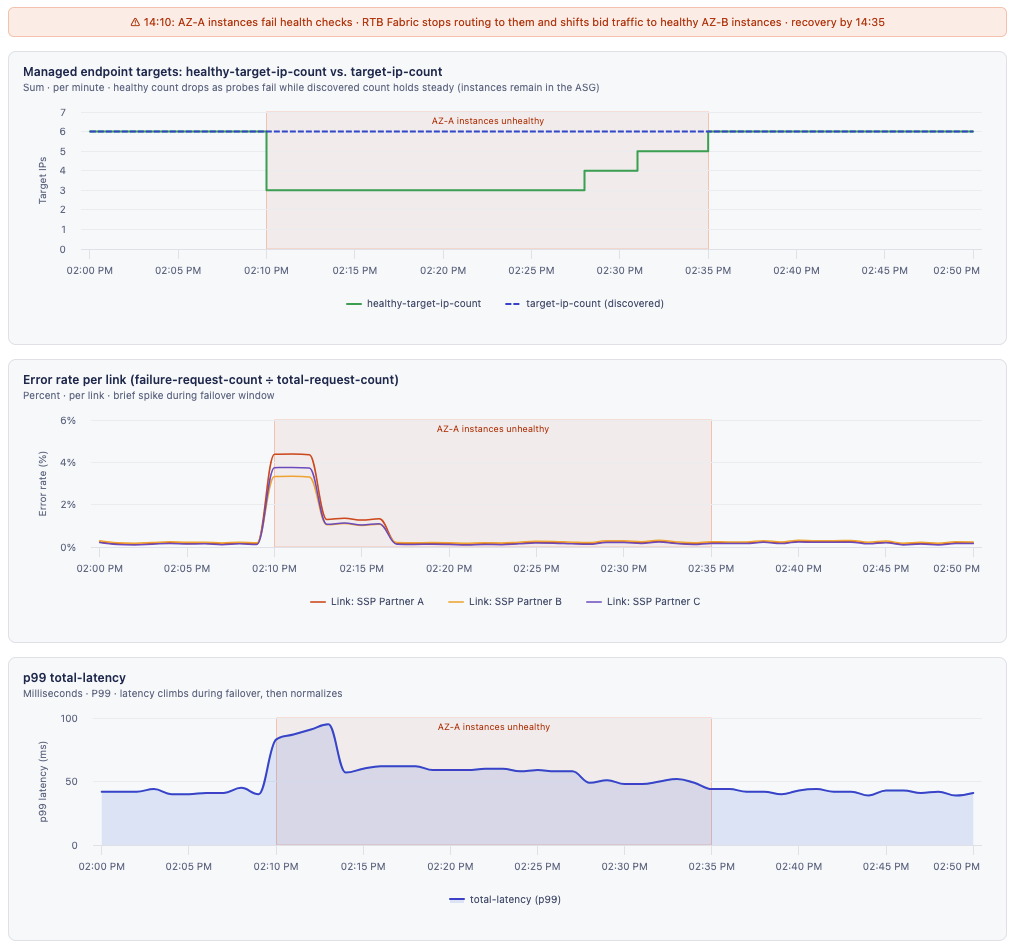
Figure 7: CloudWatch monitoring dashboard for RTB Fabric HA
The dashboard uses illustrative data. The top panel shows healthy-target-ip-count dropping from 6 to 3 at 14:10 while target-ip-count stays at 6. The instances remain in the Auto Scaling group but fail health checks. The healthy count recovers in steps by 14:35. The middle panel shows the error rate for three links spiking to about 4% at the start of the event and returning to baseline within minutes. The bottom panel shows p99 total-latency rising to about 95 ms during failover and then returning to normal.
Multi-Region resilience
RTB Fabric is a Regional service. For workloads requiring geographic redundancy beyond a single Region, you can deploy independent RTB Fabric gateways in multiple Regions and use Amazon Route 53 latency-based routing to direct partners to the nearest Region. This requires partner coordination to make sure capacity exists in each target Region.
Clean up
The create-responder-gateway and create-requester-gateway commands in this post create new gateways, which can incur charges. If you created gateways to test these configurations, delete them when you no longer need them.
Caution: Delete only the test resources you created for this post. If you added test links to gateways that carry production traffic, delete only those test links, not the gateways or their existing links. Deleting a link or gateway is permanent and immediately stops any traffic flowing through it. Before you delete anything, check the resource’s metrics to confirm it isn’t carrying production traffic.
A gateway can’t be deleted while it still has links, so delete its links first. Replace the gateway ID and link ID with your own values.
After you delete all links on a test gateway, delete the gateway. For responder gateways, use delete-responder-gateway. For requester gateways, use delete-requester-gateway.
Conclusion
In this post, we walked through how AWS RTB Fabric provides high availability for critical bidding workloads, from AZ-aware traffic routing and built-in health checks to Multi-AZ gateway resilience, external partner connectivity, and incremental migration patterns.
Compared to on-premises colocation or cloud architectures built on NLBs, RTB Fabric reduces the operational burden of maintaining HA. It also delivers capabilities purpose-built for the demands of real-time bidding: zero tolerance for downtime, invisible failover, and resilience at scale.
Whether you’re an SSP protecting auction integrity across your DSP partners, a DSP helping your bidder fleet absorb AZ failures without interruption, or a platform migrating incrementally from existing infrastructure, you can use RTB Fabric to build resilient bidding infrastructure without the infrastructure overhead.
To get started, visit the AWS RTB Fabric page or see the AWS RTB Fabric User Guide. For a complete reference architecture, see the Guidance for AWS RTB Fabric with Real-Time Bidding Workloads on AWS.


