Searching your old AI chats works fine right up until you have a second account, and then it's pretty much useless :')
I had a ChatGPT for work, another one for myself, Claude for code, Gemini because it came with the Google account, and Grok for that one thing Grok is weirdly good at. Every one of them has a search box, and every one of them searches only itself. So "where did I work out those payment terms?" meant opening four sites, switching accounts in two of them and typing the same word eight times.
I did that for months. Then I built Hubort to fix it. Alone, with Claude Code.
Disclosure: Hubort is mine, and it's what this post ends up walking through. I've tried hard to be fair to the other tools, and everything I say about them comes from their own pages, with the date I read them.
In this post we'll go through why your chats end up scattered, what each service gives you on its own, the other tools that search across services (one of them is the better pick for a lot of you,
and I'll say which), how to set Hubort up, and how it works under the hood for the devs who'd rather read the code than the pitch.
What is covered?
- Why are your AI chats scattered in the first place?
- Can ChatGPT, Claude, Gemini or Grok search your other accounts?
- Which tools search across AI services? (compared)
- The video, if you'd rather watch
- Setting up Hubort, step by step
- Searching every account at once
- Claude Code and Codex sessions in the same search
- Letting your AI apps search your old chats (MCP)
- How it works under the hood
- Is it local? What leaves your computer?
- Things to know before you install
1. Why are your AI chats scattered in the first place?
Three things split them up, and most of us have all three going at once.
Several services. Each company keeps its own history on its own servers and none of them reads the others'. OpenAI ain't gonna ship a search box that finds your Claude chats, and honestly if I were them I wouldn't either.
Several accounts of one service. A work ChatGPT and a personal ChatGPT are two separate histories. OpenAI's own help page on switching accounts says switching doesn't share memory or conversation history between them. Claude's search covers whichever account you're signed in to.
Several browser profiles. A browser profile is signed in to one account per service at a time, so people who keep work and personal apart usually keep a profile for each. Very tidy, right up until you need something and can't remember which profile it was in.

Same question, five search boxes, and each one can only see inside its own account.
Your answer is in there somewhere. The problem is that "there" is five different places, and none of them knows the other four exist.
2. Can ChatGPT, Claude, Gemini or Grok search your other accounts?
No. Each one's search is fine inside its own walls:
- ChatGPT searches the chats of the account you're signed in to.
- Claude's chat search looks at the account you're signed in to.
- Gemini keeps each Google account's chats in that account.
- Grok shows the history of the account signed in to that browser.
None of them searches another service, or even another account of its own. Each one does let you export your data, but that's a zip you download by hand, which is a backup and not something you can search when you need it.
3. Which tools search across AI services?
A few browser extensions search more than one service. These are the ones I'd look at, with what their own sites said when I read them on 2 November, 2026:
| Tool | Services | Where your chats are kept | Several accounts of one service? | Free tier |
|---|---|---|---|---|
| LLMnesia | 15 web tools, plus Claude Code and Codex sessions | In the browser (IndexedDB), on each device | Not mentioned on its site | Free local search; paid Vault adds encrypted sync |
| AI Toolbox | 4 | In the browser, with cloud sync | Not mentioned on its site | First 5 results of every search; paid per module |
| Echoes | 7 | On the device; cloud sync on its paid plan; a desktop app too | Its site says it manages accounts together | 20 searches, 10 summaries, 5 exports a month |
| Hubort | 4, plus Claude Code and Codex sessions | One SQLite file on your own computer, outside the browser | Yes, across browser profiles too | Two sources, every feature |
If you use one account per service, LLMnesia is probably the better pick. It's free, it's local, and it covers way more services than Hubort does. I mean that. Where Hubort is different is the one thing I built it for: several accounts and several browser profiles, in one search, kept in one file on your own computer rather than inside each browser.
I keep a longer, dated comparison at hubort.app/vs, and each page there starts with where the other product is the better choice.
4. The video, if you'd rather watch
The whole thing, from install to searching, in one go:
Chapters: 0:00 The problem · 0:31 Install and pair · 1:56 Search across accounts · 2:32 Claude Code and Codex sessions · 2:53 Ask your AI apps with MCP.
5. Setting up Hubort, step by step
Hubort is two installs: a desktop app (Windows 10 and 11, or macOS 11 and later) and a browser extension (Chrome, Edge or Firefox). The extension reads your chats with the session you're already signed in with. The app keeps them in a file on your computer and searches them.
Step 1. Install the app. Get it from hubort.app/download. It isn't code-signed yet, so Windows shows "Windows protected your PC": choose More info, then Run anyway. On a Mac, macOS says it can't be opened; go to System Settings → Privacy & Security and choose Open Anyway. The download page lists each file's SHA-256 if you want to check it's really mine.
Step 2. Add the extension to each browser profile you use: Chrome from the Chrome Web Store, Edge from Microsoft Edge Add-ons, Firefox from Firefox Add-ons. The links are on the same download page.
Step 3. Pair them. Ask the app for a code (in the app, or from Hubort's icon in the tray, or the menu bar on a Mac) and type the seven digits into the extension. The extension finds the app by itself.
 One code per browser profile. It lasts ten minutes, and it only works on this computer.
Step 4. Tick the services and name each account. The names are only for you: "Work", "Personal", whatever tells them apart in a result.
 The extension's popup in one browser profile. Each service gets a name only you ever see.
Step 5. Press Sync now. The first read of a big account takes a while: Hubort reads a few chats a minute from ChatGPT, Gemini and Grok, so the service never has a reason to slow you down. Claude's goes faster. Anything it has read is searchable straight away, so you don't have to wait for the whole thing.
A second account of the same service lives in another browser profile, so repeat steps 2 to 4 there. Gemini is the exception: one profile can hold several Google accounts, and the popup lists each one.
The full guide, with every snag I've seen people hit, is at hubort.app/help/setup.
6. Searching every account at once
This is the bit the whole thing exists for. One search box, every account, every service:

 "invoice" finds five chats in four accounts on three services. Each result says which account it came from.
Open a result to read the whole chat, with your search word highlighted and a link back to it on its own site, where you can carry on talking:
 The chat opens beside the results. Pin it, file it in a folder, or add a note.
Two accounts of the same service is where it earns its keep. Two ChatGPT accounts can't search each other at all, and in Hubort they just show up in one list, each result tagged Work or Personal. There's a Short of exactly that here: Search two ChatGPT accounts at once.
Hubort only reads. It never sends, renames, archives or deletes anything in ChatGPT, Claude, Gemini or Grok. If you want to keep going with a chat, its link opens it on the service itself, and the next read brings the new replies in.
7. Claude Code and Codex sessions in the same search
If you code with agents, a lot of your best thinking lives in terminal sessions that no web search will ever see. You remember it was "something about time zones, last month", and that's it. Hubort reads Claude Code's and Codex's session files from the computer they ran on (words only, nothing else) and puts them in the same search as your chats:
 "streak" finds the Claude Code and Codex sessions for a habit app, right above the Grok chats that planned it.
The "time zones" search is its own Short: Find a Claude Code session from last month.
That's a Pro feature, and each tool stays off until you switch it on. More at hubort.app/coding-agents.
8. Letting your AI apps search your old chats (MCP)
This one is black magic sorcery the first time you see it work. The MCP Connector lets the AI apps on your computer (Claude, Cursor, VS Code, Codex, Windsurf, Gemini CLI and others) search and read your chats from every account. So you ask Claude "what did I decide about payment terms last month?" and it goes and looks through ChatGPT, Gemini and Grok too.
In Settings you switch on "Let AI apps search your chats", then connect each app:
 Pick the app and Hubort writes its setup for you. Each app gets its own key, and you can take it away any time.
It's read-only, and these are all the tools an app gets:
text search_chats find chats by words, across the accounts the key allows read_chat read one chat in full recent_chats what you talked about lately related_chats chats about the same thing, in any account list_accounts which accounts there are list_folders your folders
Each key can be narrowed to some accounts or folders, and the usual shapes of API keys and passwords in your chats are masked before an app sees them (best effort, so don't treat it as a vault). The details of what it can and can't reach are at hubort.app/mcp. This one is Pro too.
9. How it works under the hood
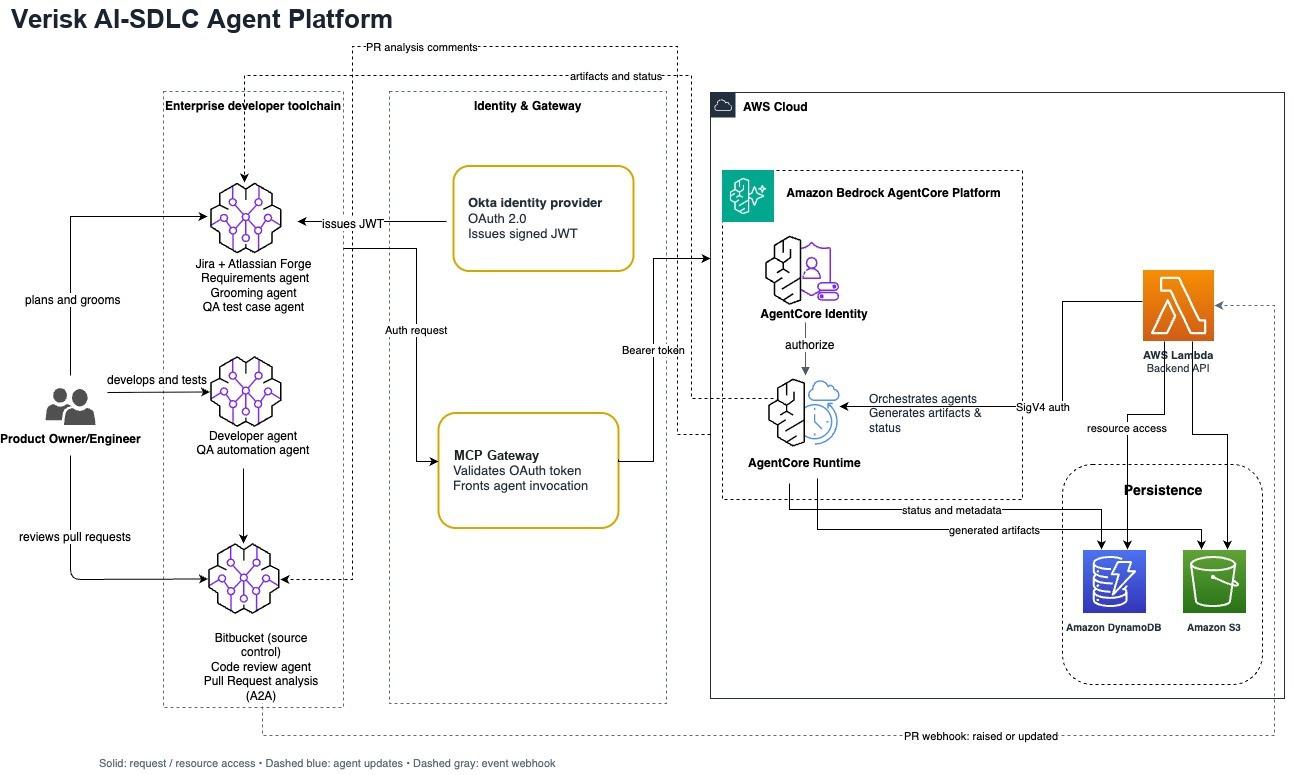
For the devs. Here's the whole picture:
 No Hubort server anywhere in this picture, and that's on purpose.
Three parts, roughly:
text extension-chromium/ one install per browser profile (a Firefox twin sits beside it) background.js does the reading: each service's web app, with your own session content.js watches claude.ai's rate-limit banner, nothing else options.js the popup server/ server.js the hub: Express + better-sqlite3, listening on 127.0.0.1 only lib/ the bits that stand alone: export, MCP, Ask, related chats... web/ the dashboard, React 19 + Tailwind desktop/ a Tauri shell that runs the hub and pairs browsers from the tray
Search is SQLite's FTS5, nothing fancier. One table, with Porter stemming so "invoices" finds "invoice":
sql CREATE VIRTUAL TABLE IF NOT EXISTS search_index USING fts5( conversation_id UNINDEXED, title, body, tokenize = 'porter' );
and the highlighted bit under each result is FTS5's own snippet():
sql snippet(search_index, 2, '<mark>', '</mark>', '…', 12)
The server has three dependencies (better-sqlite3, express, cors) and that's the whole list. The zip export, the Google Drive client and the bits that talk to Anthropic and OpenAI are all hand-rolled on plain fetch. Claude Code one-shotted more of that than I'd like to admit.
A few things that weren't obvious until they bit me:
Why a desktop app at all, and not just an extension? Because a browser profile can't see another profile's storage. If your Work ChatGPT is in one Chrome profile and your Personal one is in another, an extension that keeps everything in the browser has two separate piles. The only way to get one search is somewhere outside both, so each extension hands its chats to the app on 127.0.0.1.
127.0.0.1 is shared by everyone on the PC. I learned this one on a real machine: with two Windows accounts signed in, the second account's Hubort found a hub already running, adopted it and showed the first person's chats. Oops. So now every request needs a credential (a pairing code buys a browser a token that only opens the extension's routes), the hub refuses any Host header but its own, and both the app and the extension make the hub prove who it is with a challenge before they send it anything.
The services don't publish an API for your chat history. Hubort reads the same requests their own web apps make, with your own signed-in session, and reads a few chats a minute so it never looks like a flood. ChatGPT, Claude and Grok are friendly enough. Gemini has no REST API at all, and every field is a position in an array with no names in it, so that adapter was the final boss.
10. Is it local? What leaves your computer?
Yes, it's local, and it's one computer. There's no Hubort server to send your chats to. The extension reads them from the service you're signed in to and hands them to the app on 127.0.0.1, which writes them to a SQLite file on your own disk. Your chats, your searches and your account names never reach me.
That also answers the cross-device question: a browser on your laptop can't reach the app on your desktop, because the app only listens on its own machine. Two computers means two Huborts.
I'm a bit paranoid about this for a reason. In December 2025 Koi Security found four extensions with 8M+ installs between them quietly copying people's AI chats, and in January 2026 OX Security found two more, one of them carrying Google's Featured badge. If you're about to give any extension, mine included, access to your chats, ask where what it reads goes. I wrote the questions I'd ask down at hubort.app/is-hubort-safe.
The only chat text that ever leaves your computer goes because you switched an optional Pro feature on, and it goes where you pointed it:
- Ask Your Archive and Sum up send the chats that answer your question to Anthropic or OpenAI, on your own API key. - The MCP Connector gives what it finds to the AI app you connected, which sends it to that app's own AI. - Live Sync writes to your own Notion if you set it up.
The privacy policy lists every case. And since it's a plain SQLite file, it's yours: you can export everything as Markdown on every plan, free included.
11. Things to know before you install
I'd rather you hear these from me than find them yourself:
- Two installs. An app and an extension, and the extension once per browser profile. - It isn't code-signed or notarized yet, so Windows and macOS warn you the first time. - It can't bring back what you deleted before installing it. It keeps what it has read, from then on. - The services' terms. Reading each service's web app on a schedule may be inconsistent with that service's terms. Read them and decide for yourself. - No Linux, no phones. Windows and Mac only, for now.
Pricing: free for two sources, and every install starts with 14 days of Pro, no card. For more accounts, Personal is $4.99 a month, $29 a year, or $79 once. Pro (coding agents, MCP, Ask Your Archive and the rest) is $9.99 a month, $59 a year, or $149 once.
Why I built it
It started in early September as a side project that searched my Claude accounts and nothing else. The other three services came after, and it grew from there. My own copy now holds 49 accounts and about 4,500 chats, which is the only reason I trust the search to hold up.
If your AI history lives in one account, you don't need any of this, and your service's own search will do the job. If it's spread over a few services, a couple of accounts and more than one browser profile, like mine was, give it a go at hubort.app.
Let me know if you have any questions or feedback in the comments, I read every one. If something breaks, the Report a problem link in the extension comes straight to me, or write to support@hubort.app.
Have a great day! Until next time :)