PostgreSQL 14 receives its final minor release tomorrow, November 12, 2026. No new security or bug fixes ship for it after that. Your database keeps running, but every vulnerability found after that date stays open on your servers.
PostgreSQL 15 follows on November 11, 2027. If you run either version in production, this post covers the three decisions that matter: which version to move to, which method to use, and how to make the switchover a non-event.
Decision 1: the target version
Every major version gets five years of support. The support windows look like this:
- PostgreSQL 15: ends November 11, 2027
- PostgreSQL 16: ends November 9, 2028
- PostgreSQL 17: supported until November 8, 2029
- PostgreSQL 18: supported until November 14, 2030
You can always find up-to-date information here: https://www.postgresql.org/support/versioning/
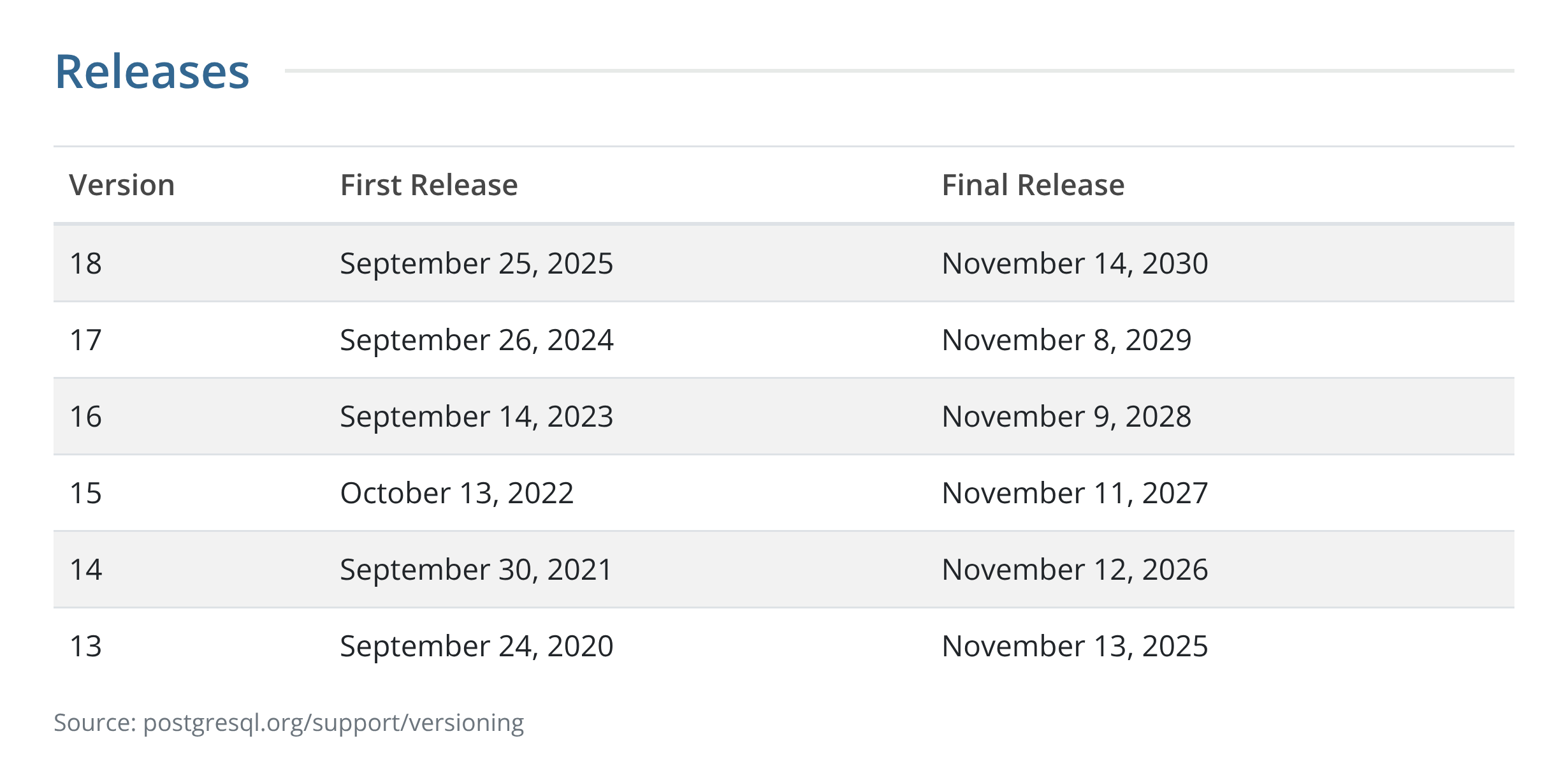
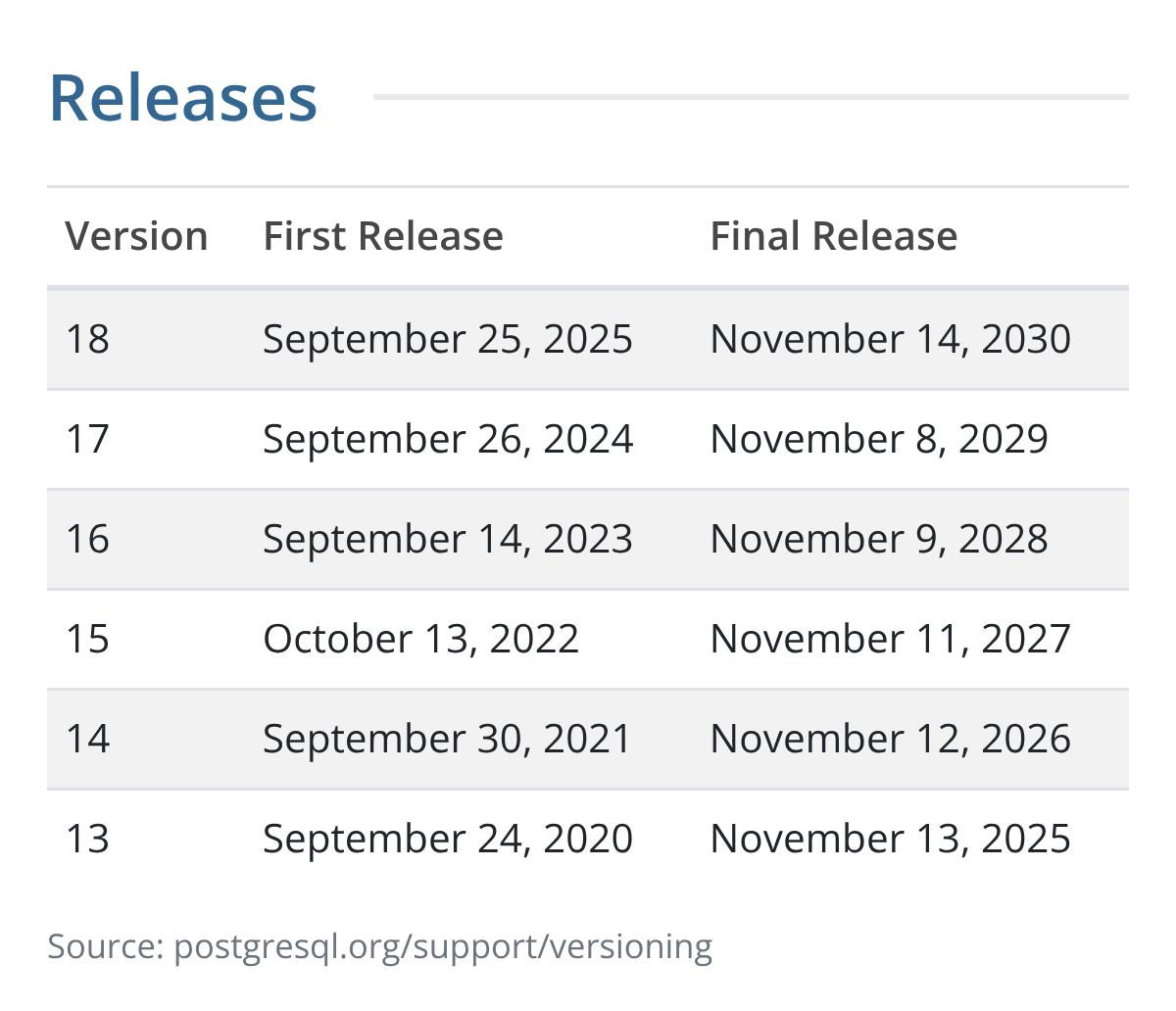
Upgrading from 14 to 15 or 16 buys one or two years for the same effort. Moving to 18 buys four. The work of a major upgrade (checking extensions, testing the application, planning the switchover) is about the same whichever version you pick, so pick the one that keeps you supported longest. Upgrade once, and do it right.
Decision 2: the method
There are three ways to cross a major version, and the method decides how long your application waits.
Dump and restore is the simplest to reason about, but downtime grows with database size. For a multi-terabyte database, it is off the table.
pg_upgrade with --link is the community tool for in-place upgrades. The --link flag creates hard links instead of copying data files, so the upgrade step stays fast regardless of size. For one of our customers, on a 100 GB production database, the pg_upgrade step itself took under 10 minutes of downtime. Two things to plan for: statistics are not carried over, so you run ANALYZE before routing traffic, and once the new cluster has started, the old data directory should be treated as unusable. If you want a rollback path with pg_upgrade, take a filesystem snapshot before you begin.
A blue-green upgrade gets you near-zero downtime. Your current cluster (blue) keeps serving production while a new cluster on the target version (green) is built beside it, and logical replication pipes every change to it in real time. You switch only when green has been tested with your application, and the switchover is a write pause of seconds. Existing connections reconnect to the new cluster.
A blue-green upgrade is the method we use wherever a cluster qualifies. A few things can stop a near-zero cutover: large objects, tables without primary keys, and schema changes during the upgrade. Find these first. When a cluster does not qualify, pg_upgrade --link is the fallback, measured in minutes.
Decision 3: how the switchover runs
A calm switchover is the product of the work done before it. This is the sequence we follow on production upgrades:
- Review. Check the database, extensions, replication, connected pipelines, and connection setup. Flag every risk and clear it before going further.
- Plan. Write a step-by-step runbook with a rollback plan, and agree the switchover window with the application owners.
- Prepare. Build the green cluster on v18 and keep it in sync with production through logical replication.
- Test. Check data, sequences, and key application queries, and rehearse the switchover where a test environment exists.
- Switch over. Move traffic on a live call with the application team, and confirm the application is healthy.
- Support. Keep the blue cluster available as a rollback and monitor green.
Two details deserve their own attention. First, sequences aren’t carried by logical replication, so set their values on the green cluster before cutover. Secondly, connection churn at the switchover can overload a connection pool; make sure the application reconnects automatically and the pooler can absorb the burst.
After the switchover
Run a short validation before calling it done. Confirm the version, check for invalid indexes in pg_index (the query should return zero rows), compare installed extension versions with the available ones, and update anything that lags. Watch the logs through the first hours of real traffic.
Keep the blue cluster for a defined period before you remove it. On our upgrades, the blue cluster stays ready for 5 days after cutover. Replication runs in reverse, from green back to blue, so the application can be pointed back to blue if anything looks wrong, without losing a single write made after cutover.
Managed services follow the same logic
Amazon RDS, Aurora, Cloud SQL, Azure and Supabase each support their own upgrade paths, and the same three decisions apply. The platform shapes the review step and the exact path; the decisions stay the same. On Amazon RDS and Aurora, AWS Blue/Green Deployments use the same logical replication for major version upgrades. Check two limits before you rely on them: they do not support major upgrades from some older minor versions, and they have no built-in rollback after switchover.
We offer the upgrade on every managed service, including these five.
What results look like
- A 100 GB production database upgraded with
pg_upgradein under 10 minutes, where a blue-green upgrade was not an option. - Production clusters for a banking software provider upgraded from PostgreSQL 13 to 17 with close to zero downtime.
Book your upgrade review
Stormatics upgrades production PostgreSQL to v18 from planning and rehearsals to switchover, starting at $9,990 per cluster. Book a 30-minute upgrade review with a PostgreSQL engineer, and you leave with a target version, a method, and a date: https://stormatics.tech/contact-us/
The post Life After PostgreSQL 14 appeared first on Stormatics.


