In many enterprises, a central network team owns every virtual private cloud (VPC) and subnet, and every flow between VPCs must pass a central firewall in both directions. Agents that call internal REST APIs and Model Context Protocol (MCP) servers through Amazon Bedrock AgentCore Gateway, a capability of Amazon Bedrock AgentCore, must meet the same two requirements. Amazon Bedrock AgentCore is a platform to build, connect, and optimize agents at scale, with any framework or model.
This post shows a pattern that meets both requirements. The network team keeps ownership of every subnet, and traffic between the Gateway and your private APIs and MCP servers crosses the central firewall in both directions. It covers where to place the Amazon VPC Lattice resource gateway that the Gateway uses to reach private targets. It also covers who owns each piece, six configuration decisions, and the checks that confirm the pattern works.
We built and tested the pattern in the US East (N. Virginia) AWS Region (us-east-1), in a lab with three member accounts and a management account in AWS Organizations. The AWS CloudFormation templates, test scripts, test evidence, and reference material (address plan, full validation checks, troubleshooting, quotas) are in the companion repository. Use the pattern as a guideline and adjust it to your own account architecture.
Terms used in this post
- Resource gateway: The Amazon VPC Lattice entry point into a VPC: elastic network interfaces (ENIs) in subnets you choose. Backends see its addresses as the source of each connection.
- Resource configuration: A VPC Lattice object that names one backend (here, an internal load balancer or VPC endpoint DNS name and port) behind a resource gateway. You can share it with other accounts through AWS Resource Access Manager (AWS RAM).
- Managed mode and self-managed mode: The two private endpoint options for Gateway targets. In managed mode, AgentCore creates the resource gateway for you. In self-managed mode, you create it and give the target a resource configuration.
When to use this pattern
Use this pattern when all of the following are true:
- A network account owns every VPC, subnet, and AWS Transit Gateway attachment, and shares application subnets through AWS RAM.
- A central firewall in an inspection VPC must inspect traffic entering and leaving every VPC.
- Application teams manage only their own resources and security groups.
Otherwise, one of the options in Table 1 fits better.
Table 1: When another option fits better.
| Your environment | Use |
| The Gateway account can own subnets that reach your tools | Managed mode |
| Traffic between the Gateway and the tools doesn’t need central inspection | Self-managed mode, as documented |
| Tools are reachable on public endpoints | A standard Gateway target |
We also considered managed mode in subnets that AgentCore owns, a resource gateway in each tool VPC or in the central endpoints VPC, and internet-facing load balancers with AWS WAF per tool. The alternatives write-up explains why each falls short under these constraints.
Design requirements for centralized inspection
- The network account owns every subnet. The Gateway and application accounts build only in subnets shared to them through AWS RAM.
- Every flow between VPCs crosses the central firewall, in both directions. The central firewall in the inspection VPC inspects the traffic between the Gateway and your private APIs and MCP servers.
AgentCore Gateway reaches private targets through a VPC Lattice resource gateway, and the two private endpoint modes place it differently. Managed mode creates it in the Gateway account, which fits environments where that account can own the subnets it runs in. Self-managed mode, as documented, places it in subnets with direct access to the backend, which fits environments that do not require inspection between the Gateway and the tool. This environment needs both conditions at once, so the pattern uses self-managed mode with one change. The network account owns the resource gateway and places it in subnets routed through AWS Transit Gateway, so every request and reply passes the inspection VPC.
Solution overview
Give the resource gateway its own VPC and subnets in the network account. Don’t share them, and keep backends out of them. Route them through the transit gateway so every request and reply between VPCs crosses the firewall. Share one resource configuration per backend with the AgentCore account through AWS RAM. Figure 1 shows the accounts, VPCs, and traffic path.
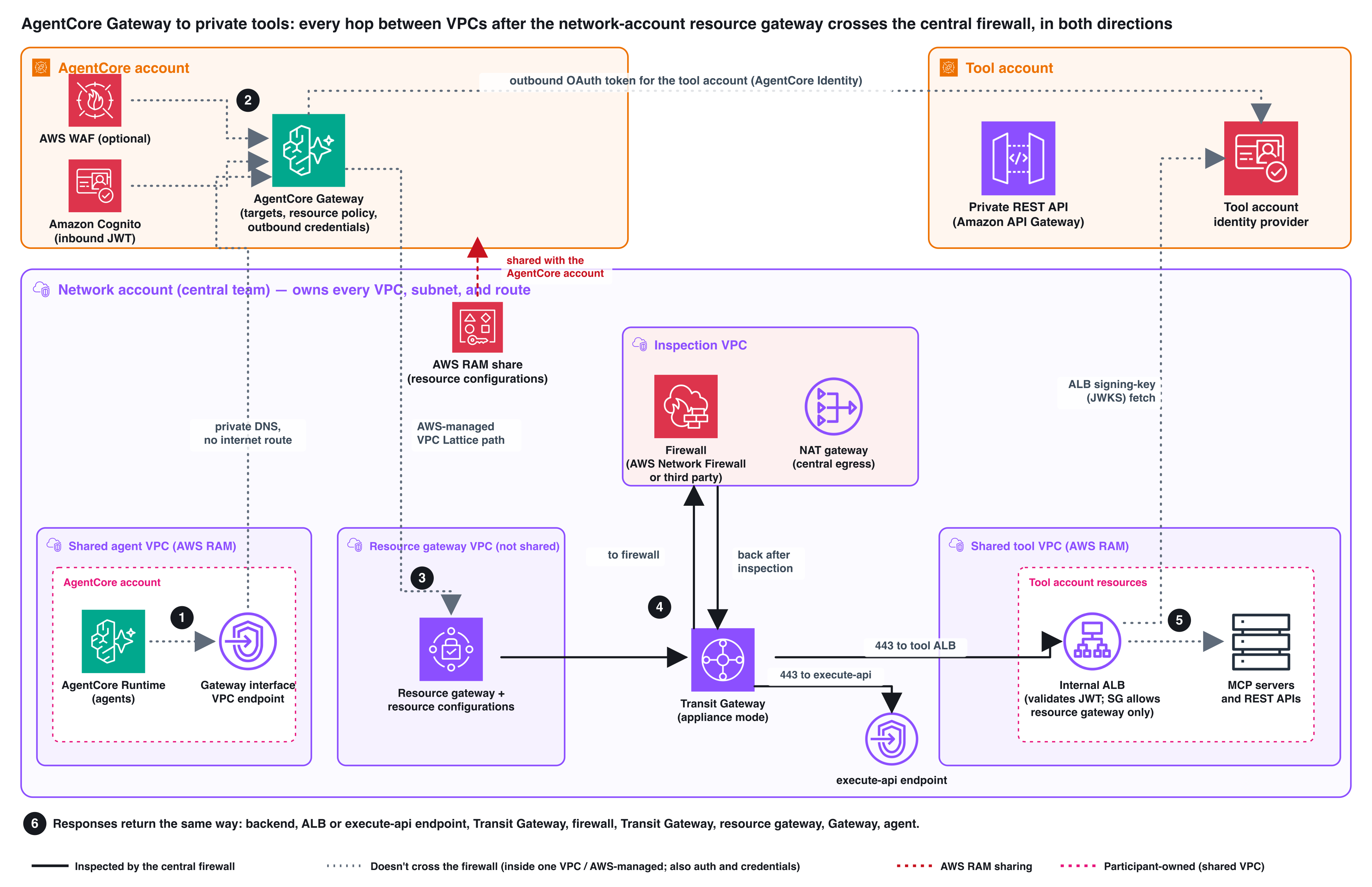
Figure 1: The network account owns every VPC and the resource gateway. The other accounts own only what they place in shared subnets. Solid lines cross the firewall in both directions. Step numbers match the following traffic path
Traffic path
- The agent, in a shared subnet with no internet route, calls the Gateway URL. Private DNS on the Gateway interface endpoint resolves it inside the agent’s VPC.
- AWS WAF, if attached, evaluates the request. The Gateway checks its resource policy and the inbound JSON Web Token (JWT), then picks the target and tool.
- The Gateway gets an outbound OAuth token for the tool account and sends the request through VPC Lattice to the resource gateway in the network account.
- The resource gateway subnets route to the transit gateway, which sends the traffic through the inspection VPC to the tool account’s internal Application Load Balancer (ALB) or
execute-apiendpoint. (Crosses the firewall.) - The ALB or Amazon API Gateway validates the token and forwards the request to the backend.
- The response returns the same way. (Crosses the firewall.)
How does Gateway traffic enter the network account’s VPC without a transit gateway attachment in the AgentCore account? When you create a target, AgentCore associates the shared resource configuration with its own VPC Lattice service network. VPC Lattice then delivers connections from that service network to the resource gateway’s network interfaces in your VPC. AWS operates that hop, and from there your routes and firewall take over.
What this pattern doesn’t do. Check these limits against your requirements before you adopt it:
- No payload inspection – Traffic is TLS end to end from the Gateway to the ALB, with a certificate the Gateway validates. The firewall sees flow metadata and the TLS Server Name Indication (SNI), not payloads. Request content is in the Gateway, AWS WAF, and ALB logs.
- Some legs skip the firewall – The agent-to-interface-endpoint leg and the Gateway-to-resource-gateway leg don’t cross it. Neither do the token requests that AgentCore makes to each identity provider.
- No end-user identity at the tool – With the client credentials grant, every call that reaches the tool carries the Gateway’s client identity. To trace a call to a caller, use the inbound JWT claims in the Gateway application logs.
Who owns what
Table 2: Who creates what.
| One time | New API on a connected ALB | New ALB or tool account | |
| Network team | Resource gateway and its VPC, subnets, and routes. Firewall rules. A default route from the tool VPC to the transit gateway for the ALB’s signing-key fetch. Gateway interface endpoint and policy. AWS RAM share | Nothing | One resource configuration added to the share. A firewall rule if the range is new |
| Tool team | An ALB certificate whose subject alternative name matches the target host name that the AgentCore team uses | A listener rule (with jwt-validation) on their ALB | An internal ALB and security group, and an app client for the Gateway (client credentials grant, with a scope such as tools/invoke) |
| AgentCore team | Gateway, inbound authorizer, resource policy, optional AWS WAF | One Gateway target per API or MCP server | A target, plus an OAuth credential provider for a new identity provider |
A new operation or tool on an existing target needs no new target: update the OpenAPI spec with UpdateGatewayTarget, or call SynchronizeGatewayTargets for an MCP server. The repository’s build order lists the steps in each account and the values the teams pass to each other.
Prerequisites
- An organization in AWS Organizations with resource sharing in AWS RAM enabled.
- AWS Command Line Interface (AWS CLI) 2.37.7 or later, or the AWS SDK for Python (Boto3) 1.43.106 or later, for the
certificateConfigurationsparameter. - For the role that creates Gateway targets:
vpc-lattice:GetResourceConfiguration,vpc-lattice:CreateServiceNetworkResourceAssociation,vpc-lattice:GetServiceNetworkResourceAssociation,vpc-lattice:ListServiceNetworkResourceAssociations, andvpc-lattice:AssociateViaAWSService, plus the bedrock-agentcore target actions. Check your service control policies (SCPs) if your organization doesn’t use VPC Lattice today. - A firewall in a central inspection VPC attached to the transit gateway with appliance mode enabled.
Key design decisions
The snippets are excerpts from the lab templates and use the lab’s address plan. RGW_NET is the resource gateway subnets (10.0.1.0/24–10.0.3.0/24), TOOL_NET is the tool VPC (10.12.0.0/16), and ALB_NET is the ALB subnets in it.
Decision 1: Put the resource gateway in a dedicated VPC in the network account
Create a dedicated VPC in the network account for the resource gateway, with subnets you don’t share and no central endpoints or backends. Route those subnets to the transit gateway. Keep one resource gateway per trust zone.
Used only with AgentCore, the resource gateway consumes one IP address per subnet, so small subnets are enough. Two settings can’t be changed after creation, Ipv4AddressesPerEni and ResourceConfigDnsResolution, so choose them up front. Use Availability Zone IDs that VPC Lattice and your AgentCore features support. The lab layout lists them for us-east-1.
Decision 2: Create one resource configuration per load balancer, and share it through AWS RAM
Point the resource configuration at the internal ALB DNS name and share it with the AgentCore account. Don’t start the name with rcfg-, which VPC Lattice reserves.
VPC Lattice delivers the connection to the resource configuration’s domain. AgentCore sends the target URL’s host name (for example tools.example.internal) as the SNI and checks the ALB certificate against it. The certificate’s subject alternative name must match that host name. The host name doesn’t need to resolve in DNS.
For private API Gateway REST APIs, point one resource configuration at the network account’s execute-api interface endpoint. Each API’s target uses its own URL, and each API’s resource policy must allow that endpoint through aws:SourceVpce. In our tests, a second API in another account worked through the same resource configuration with no network change.
Decision 3: Pass only the flows you need through the firewall
Your firewall needs two stateful allows: from the resource gateway subnets to the tool VPC on port 443, and from the ALB subnets to the identity provider’s host name on port 443. Session-based firewalls pass replies of an allowed flow. In the lab we used AWS Network Firewall with strict rule order and the default actions Drop established and Alert established. With these defaults, the firewall drops client-to-server packets that no rule passes, and lets replies through unless a rule drops them. The rule-order notes explain the semantics.
The first rule allows only the resource gateway subnets to reach the tool VPC on port 443. The second allows the ALB to fetch its identity provider’s signing keys (JSON Web Key Set, or JWKS), only from the ALB subnets and only to the identity provider’s host name. The tool VPC needs a default route to the transit gateway for this fetch to reach central egress. If your identity provider isn’t Amazon Cognito, replace the host name. Without this rule, in our tests, the ALB returned HTTP 500 and the agent received MCP invocation failed.
To prove replies cross the firewall, we added a drop rule for the reply direction preceding the pass rule:
Tool calls then hung until timeout, and the firewall logged to_client drops for sid 100098. Removing the rule restored the calls. Run the same test on your own firewall.
Decision 4: Validate the tool account’s token on the internal ALB or private API
The tool account keeps its own identity provider (Amazon Cognito in the lab) and creates an app client for the Gateway. Validate that client’s token on every path to the backend.
Internal ALB – Make the listener’s default action a fixed response, and put a jwt-validation action on every rule that forwards. Pin client_id to the Gateway’s app client so that other clients in the same user pool are rejected.
In our tests, a target with no token, one with another identity provider’s token, and one with a different app client’s token were all rejected with HTTP 401 before the backend ran. The agent saw only An internal error occurred, so use the ALB access logs to diagnose token problems.
Private REST API – An API key doesn’t authenticate the caller, so add an authorizer to every method, such as a Cognito user pool authorizer with a required scope (as in the lab). Also attach an endpoint policy to the execute-api endpoint that limits it to APIs owned by approved accounts. It controls which APIs the endpoint reaches, not who calls it. The authorizer controls the caller.
The ALB or endpoint security group allows only the resource gateway subnets, so the resource gateway is the only network path in. If your firewall applies source NAT, the security group must allow the firewall’s addresses instead, and it then admits anything the firewall forwards. The firewall rule and the token validation become the controls.
Decision 5: Create Gateway targets that reference the shared resource configuration
Create the Gateway with a JWT authorizer and, optionally, an AWS WAF web access control list (web ACL), which inspects the tool-call arguments for every target. AWS WAF inspects only the first 16 KB of the body by default (adjustable to 64 KB), so decide how each rule handles larger bodies. Add AWSManagedRulesSQLiRuleSet to the common rule set. See the AWS WAF notes.
Gateway targets with a private endpoint can’t use NO_AUTH for inbound authorization unless you configure an interceptor function.
Each target needs an OAuth credential provider that holds the tool account’s app client ID and secret and the identity provider’s discovery URL:
If the ALB uses a certificate from a private certificate authority (CA), also store the CA certificate as a PEM string in an AWS Secrets Manager secret. The Gateway execution role (the AWS Identity and Access Management (IAM) role you give the Gateway when you create it) needs permission to read that secret and the credential provider.
An OpenAPI target uses the same blocks with openApiSchema in place of mcpServer. To rotate the CA, update the secret and call UpdateGatewayTarget. Open connections can keep the old trust material for up to 15 minutes.
Keep the Gateway the only consumer of the shared resource configuration. The AWS managed permission for AWS RAM also grants ec2:CreateVpcEndpoint, so the AgentCore account could reach the backend through a resource VPC endpoint or service network of its own. A customer managed permission can’t fix this: AWS RAM rejects vpc-lattice:AssociateViaAWSService in one, and without it Gateway targets fail. Attach an SCP to the AgentCore account instead:
With this SCP, our attempts to create a resource VPC endpoint and a service network association of its own were denied, and a new Gateway target still reached READY. SCPs don’t apply to the management account, so don’t run AgentCore there. In the network account, alarm on unexpected associations with an Amazon EventBridge rule that matches the AWS CloudTrail event CreateServiceNetworkResourceAssociationBySharee.
Revoke access by deleting the Gateway targets (or the service network resource association) first, then removing the resource configuration from the share. Removing it from the share alone doesn’t remove existing associations.
Decision 6: Reach the Gateway privately, and close the public endpoint
Create the Gateway interface endpoint in the shared agent VPC with private DNS enabled, and attach an endpoint policy that lists the approved Gateways. The principal must be *, because the Gateway authenticates callers with bearer tokens. The Resource list is the control.
In our tests, a second Gateway called through the same endpoint returned JSON-RPC error -32002 Insufficient permissions, but still answered on its public endpoint.
The interface endpoint doesn’t close the Gateway’s public endpoint. Attach a resource policy that allows bedrock-agentcore:InvokeGateway only when aws:SourceVpce is your endpoint and denies it otherwise (the full policy is in the repository). In our tests, internet calls returned -32002 about 30 seconds after we applied it, while endpoint calls kept working. AWS notes policy changes can take up to 15 minutes.
An agent with no internet route still needs its inbound JWT. Give it a path to its identity provider’s token endpoint, such as a route to the transit gateway and a firewall rule scoped like the JWKS rule in Decision 3. Alternatively, use a private identity provider.
Validate the pattern in your environment
Before you rely on the pattern, run these checks in a non-production copy of your network account, with your own firewall. The full list of 14 checks, with how to run each and the results we saw, is in the repository, along with a log source for every hop.
- Requests come from the resource gateway – The ALB access log shows a source IP in the resource gateway range (or your firewall’s range, if it applies source NAT).
- Requests cross the firewall – Firewall flow logs show TLS flows from resource gateway addresses to the tool account on port 443.
- Replies cross the firewall – With a reply-direction drop rule in place (Decision 3), calls fail and the firewall logs
to_clientdrops. - The ALB and private API are token boundaries – Targets with no token, or another client’s token, get HTTP 401 and the backend isn’t invoked.
- The public Gateway endpoint is closed – With the resource policy attached, internet calls get -32002 and endpoint calls succeed.
If a check fails or the agent gets a generic error, the troubleshooting guide maps each symptom to the log that shows the cause.
Considerations
- Cost: Each VPC Lattice service network resource association carries an hourly charge plus data processing. See VPC Lattice pricing. Plan for one association per target. To see how many associations your targets create, compare the
resourceAssociationArnthatGetGatewayTargetreturns for each target, and prefer one target per API or MCP server over many small targets. - Traffic to public endpoints: Three calls leave the private path: the ALB’s JWKS fetch, the agent’s inbound token request, and AgentCore’s outbound OAuth token requests to each identity provider.
- Account layout and quotas: Gateway tool-call quotas apply per account as well as per gateway. Use one AgentCore account per environment, and split gateways by domain or agent group well before the limits. VPC Lattice closes idle connections, so use keepalives for long-lived MCP streams. The repository lists the other quotas.
- Scope of our tests: We used AWS Network Firewall, no source NAT, and
us-east-1only. Source NAT, multiple Regions, private identity providers, and OpenAPI limitations are covered in the other considerations.
Conclusion
When your network team owns every subnet and every flow between VPCs must pass a central firewall, place the VPC Lattice resource gateway in the network account and route its subnets through the transit gateway. The network team sets up the entry point once and adds one resource configuration per backend load balancer. Application teams keep owning only their load balancers, security groups, identity providers, and Gateway targets, and AWS WAF moves from per-tool public load balancers to the Gateway. Run the validation checks in your own environment before you rely on the pattern.


