Every service in a Consul service mesh gets a short-lived TLS certificate that proves its identity. By default, Consul runs its own certificate authority to issue those certificates. That is convenient, but it also means the trust anchor for your entire mesh lives inside Consul rather than inside the PKI your security team already operates and audits.
Consul Enterprise already supports Vault and AWS Certificate Manager as external certificate authorities (CAs) for Connect, its service mesh. Organizations that standardize on CyberArk instead can now also use CyberArk Workload Identity Manager (WIM), formerly Venafi Firefly, as its external CA. Service mesh identities are then anchored to a CA your security team already governs, while Consul continues to do what it does best: distribute and rotate workload certificates automatically.
| Capability | Availability | What it enables |
| CyberArk WIM external CA for Connect | Consul Enterprise 2.0.0 | Issue mesh mTLS certificates through CyberArk WIM (formerly Venafi Firefly), anchored to your CyberArk root |
| Automatic trust continuity | Consul Enterprise 2.0.0 | Service mesh keeps working when CyberArk WIM rotates its issuing intermediate — no manual intervention |
| Multi-datacenter via cluster peering | Consul Enterprise 2.0.0 | Federate datacenters that each chain to the same CyberArk root |
The result is simple: your service mesh, your CA, one trust anchor.
What the CyberArk WIM integration is
CyberArk Workload Identity Manager is a distributed issuer designed for high-volume, short-lived workload certificates. Consul integrates with it through the Connect CA provider-named pan-distributed issuer.
The division of labor is straightforward:
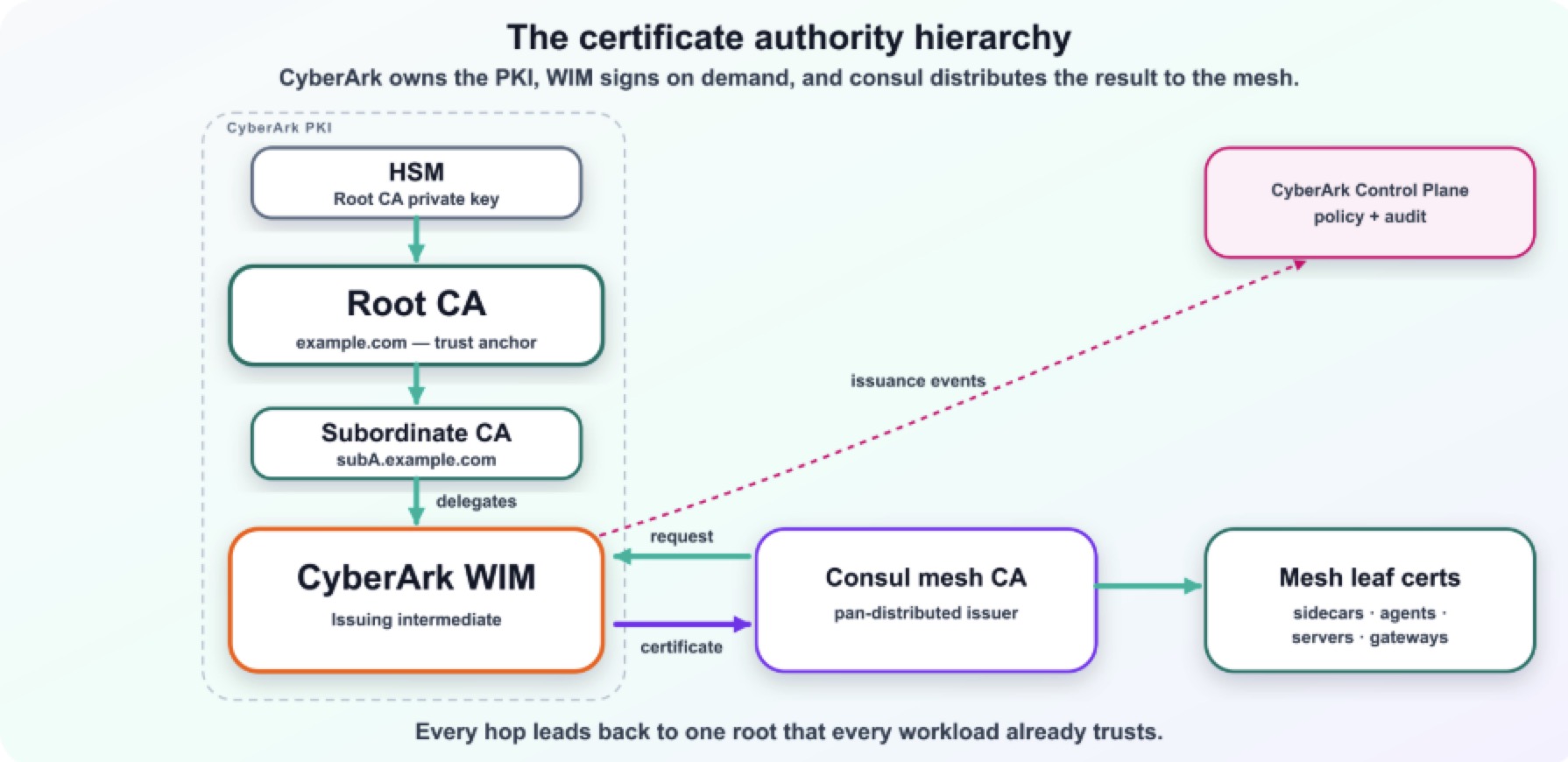
CyberArk owns the PKI hierarchy: a root CA whose private key is protected in an HSM, and one or more subordinate CAs beneath it. The root is the stable anchor every workload ultimately trusts.
CyberArk WIM is the issuing intermediate. A subordinate CA delegates issuance authority to it, and it signs short-lived certificates on demand.
Consul submits certificate signing requests (CSRs) to WIM and distributes the resulting leaf certificates — together with the full issuing chain — to every proxy, agent, server, and gateway in the mesh, renewing them automatically before they expire.
The CyberArk Control Plane governs issuance policy and collects audit and issuance events from WIM, so your security team retains central policy and visibility over what the mesh issues.
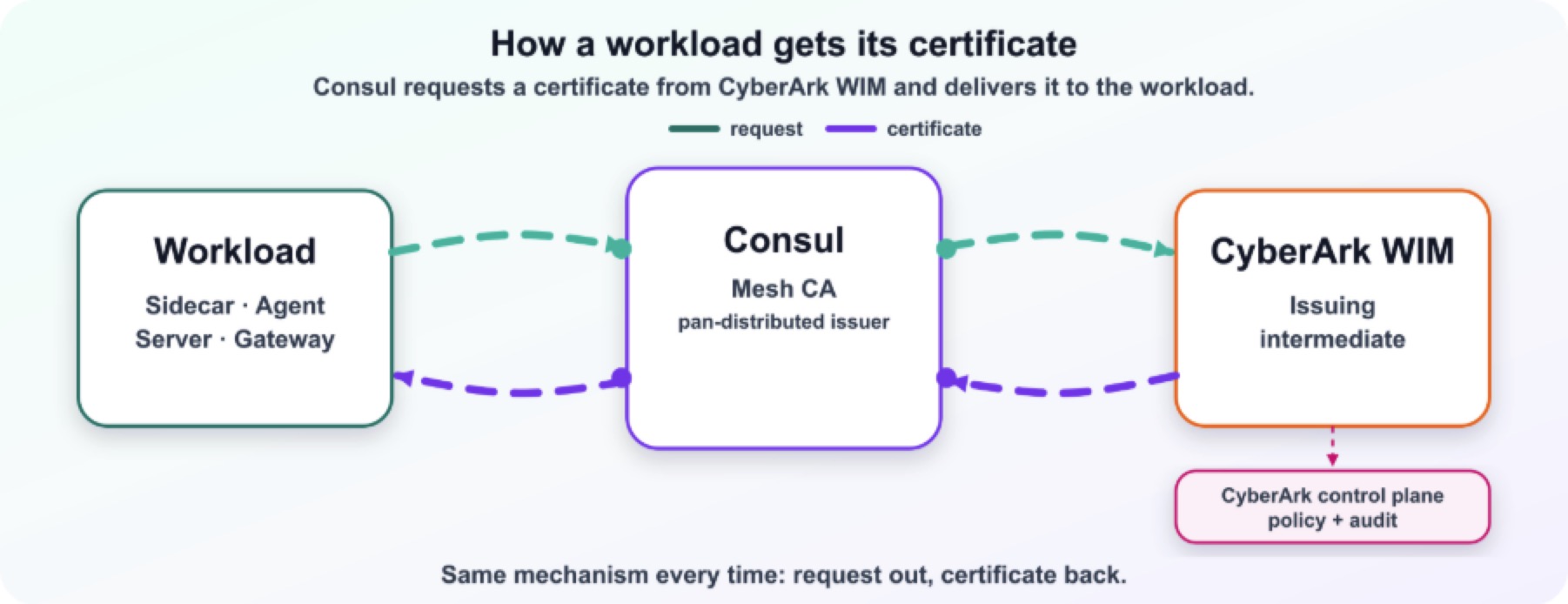
Here is that same flow end to end: A workload's sidecar gets its certificate through Consul, which requests it from CyberArk WIM and hands back the signed leaf with its full issuing chain.
When to use it
Reach for this integration when:
You already standardize on CyberArk or Venafi for PKI and want service mesh identities to live under the same root of trust.
Your security or compliance team needs the mesh CA to be a CA they govern and audit, not Consul-internal.
You want short-lived certificate issuance without running and protecting a separate signing key inside Consul.
If you have no external PKI requirement, Consul's built-in CA remains the simplest option. This integration exists specifically to put your mesh under an existing CyberArk trust hierarchy.
Prerequisites and supported topology
To configure the provider, you need:
| Requirement | Why |
| A reachable CyberArk WIM / Firefly request endpoint | Consul authenticates and submits signing requests here |
| A reachable CA chain endpoint | Consul reads the current CA chain to learn the trust anchor and issuing chain |
| An issuance policy | Defines what WIM will sign for the mesh |
| A short-lived auth token | Consul presents it when calling WIM |
Single datacenter
In a single datacenter, Consul servers point at one CyberArk WIM endpoint. The WIM- issuing intermediate sits beneath a subordinate CA, which in turn chains to the HSM-protected root. Consul reads the CA chain to identify your CyberArk root as the trust anchor, submits CSRs to WIM, and distributes the issued leaf certificates to every sidecar. WIM streams issuance events to the CyberArk Control Plane for policy enforcement and audit.
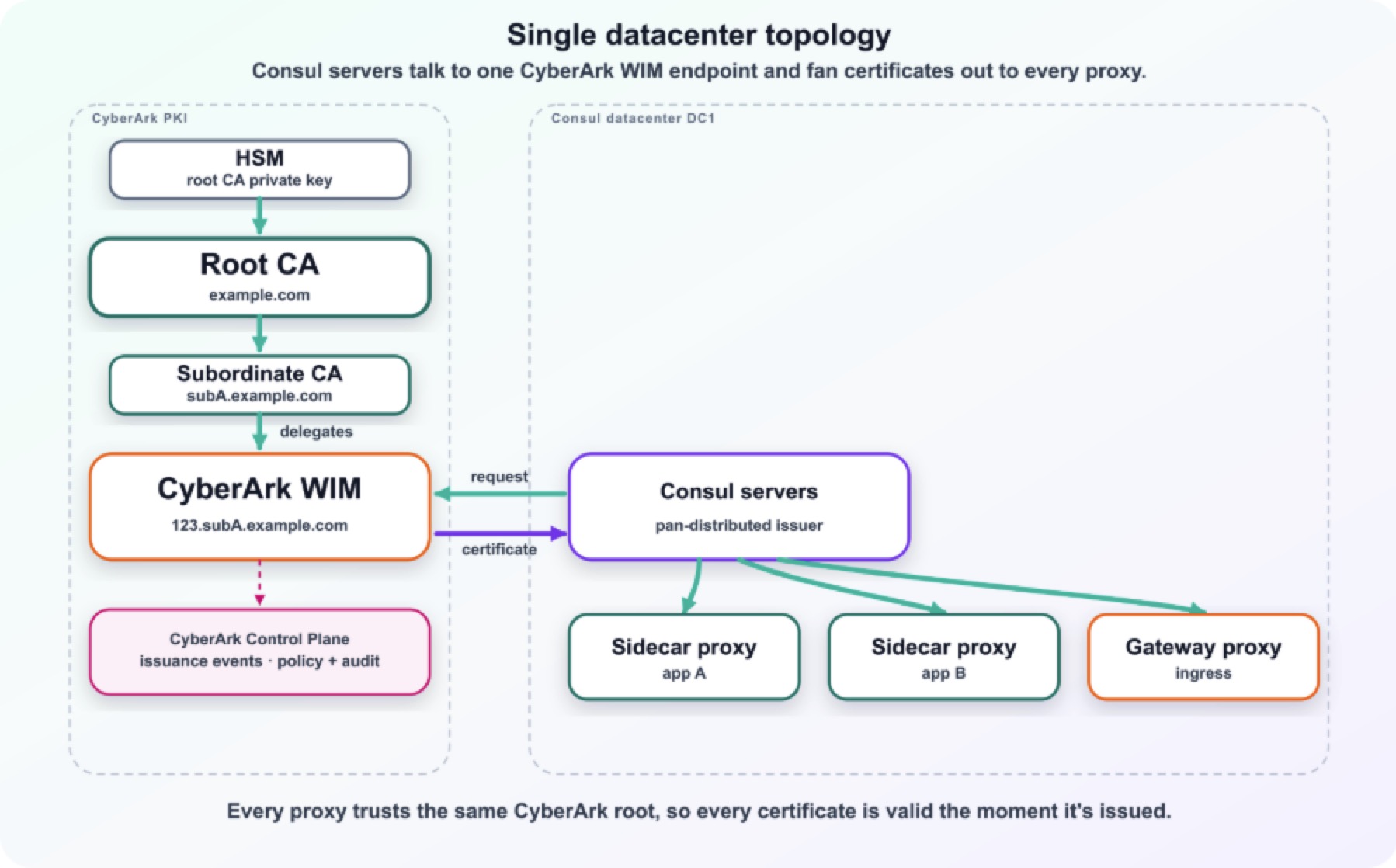
The proxies trust your CyberArk root. Every leaf Consul hands them is served together with the full issuing chain, so a verifying peer that trusts only the root can still build a complete path to it.
Multiple datacenters
For multiple datacenters, the supported model is cluster peering, where each datacenter runs its own WIM-backed Consul CA, all subordinate to the same CyberArk root. That topology is covered in its own section below.
What the provider does
Authenticates to CyberArk WIM at startup and when configuration changes.
Learns your CyberArk root from the CA chain and uses it as the mesh trust anchor.
Submits certificate signing requests to WIM and distributes the issued leaf certificates, along with the issuing chain, to mesh workloads.
Tracks the issuing intermediate and reacts automatically when it changes.
Configuration
Configure the provider in the agent's connect stanza:
connect { enabled = true ca_provider = "pan-distributed-issuer" ca_config { address = "https://wim.example.com:8002" chain_address = "https://wim.example.com:8008" token = "<short-lived-auth-token>" policy = "mesh-issuance-policy" tls_skip_verify = false } } The same configuration can be applied at runtime through the Connect CA configuration API:
curl --request PUT \ --header "X-Consul-Token: <acl-token>" \ --data @- https://127.0.0.1:8500/v1/connect/ca/configuration <<'JSON' { "Provider": "pan-distributed-issuer", "Config": { "Address": "https://wim.example.com:8002", "ChainAddress": "https://wim.example.com:8008", "Token": "<short-lived-auth-token>", "Policy": "mesh-issuance-policy", "TLSSkipVerify": false } } JSON Configuration keys
| Key | Type | Required | Description |
| address | string | yes | CyberArk WIM / Firefly endpoint used for authentication and signing requests |
| chain_address | string | yes | Endpoint Consul reads the CA chain and returns the issuing chain |
| token | string | yes | Short-lived bearer token CyberArk WIM accepts for client authentication |
| policy | string | yes | The CyberArk WIM issuance policy Consul should use |
| tls_skip_verify | bool | no | Skip TLS verification of the WIM endpoint. For non-production or self-signed endpoints only; leave false in production |
The auth token is intentionally short-lived. Plan to supply Consul with a freshly issued token whenever you re-apply the CA configuration and treat token rotation as a routine operational task rather than a one-time setup step.
Authentication methods WIM supports
The token in ca config isn't just an opaque secret — it's a JWT, and CyberArk WIM checks it against one of a small set of client authentication policies that a WIM administrator configures:
| Method | How it verifies the token | When to use it |
| JWT_OIDC | Resolves the issuer and signing keys live from an OIDC discovery endpoint | Platforms already running an OIDC provider, such as Kubernetes service account tokens |
| JWT_JWKS | Verifies against a static, pre-configured JSON Web Key Set | No live discovery call needed; keys are provisioned ahead of time |
| JWT_STANDARD_CLAIMS | Checks standard claims (issuer, subject, audience) against an explicit allow-list | Fine-grained control: map specific subjects to specific issuance policies |
| None | No authentication | Not for production |
Whichever policy your WIM administrator configures, Consul's job doesn't change: Present the token and let WIM decide whether to trust it.
This is a separate hop from how WIM itself authenticates upstream to CyberArk Certificate Manager — that connection uses either OIDC/JWT (recommended, dynamic, Kubernetes-native) or a static username and password (for non-Kubernetes deployments). Don't confuse the two: One governs who WIM lets request certificates, the other governs how WIM itself proves its identity to the CA behind it.
How certificates flow: roots, intermediates, leaves, and SPIFFE
There are four layers of certificate in this model, and it helps to keep them distinct:


