
At a glance
- Formal methods for everyday software. PDD Kit helps you turn your intent into a formal spec, then proves the code your agent writes for every input and uses tests where a proof can’t reach. It takes formal methods beyond niche, specialist work to engineers without a formal methods background and to everyday applications, like the full-stack web app shown here.
- Exhaustive line-by-line human review can become difficult to scale as AI agents generate increasingly large amounts of code. The plan is supposed to be the contract between you and a coding agent, but nothing actually forces the agent to follow it. The tests it writes usually check what it built, rather than what you asked for.
- PDD Kit makes the agent keep the plan. It works with you to turn your intent into a formal specification in Verus (opens in new tab), proves the agent’s code meets that spec for every input, and falls back to tests where a proof can’t reach.
- We tried it on a full-stack web app. Inside GitHub Next’s Chopin (opens in new tab), we used PDD Kit to formally verify the login logic of Pet Store, a Rust (opens in new tab) storefront. Verus hardened the code and uncovered existing bugs, proving the absence of login bugs with respect to the specification. The developer reviewed the intent and never read the generated code line-by-line.
The plan is the contract the agent should follow, but nothing constrains the agent to follow it.
Coding agents now ship whole features in one sitting often spanning tens of thousands or hundreds of thousands of lines of code. As a result, reading every line of the pull request doesn’t scale to this new way of work. Now, most teams invest in the plan and relevant testing instead: describe to an agent what they want, go back and forth until the plan and proposed tests look right, and hand them off to the agent for implementation.
This plan or natural language spec is meant to be the contract that an agent holds. However, in practice, the agent can drift from it. It implements something slightly different, then writes tests that pass for its implementation rather than the code you intended it to write. Continuous integration (CI) grows due to a profusion of low quality and high quantity of tests, coverage looks healthy, and the gap between what you asked for and what shipped stays hidden until a bug report or a nasty edge case shows up.
So, how do you reliably scale review as agents generate increasingly large amounts of code? Agent code fails in two ways a careful reviewer would usually catch: it leaves out something obviously necessary, or it does something obviously wrong. Tests alone don’t close that gap, because they only exercise a tiny slice of what a program can do. Closing it needs a different kind of machinery, which is where proofs come in.
Review asks “does this look right?” A proof answers “is this right?” A mathematical proof shows that code meets its specification for every input, including the ones your test suite can miss. That provides stronger assurance for specified properties than testing alone, especially when line-by-line review isn’t practical.
Proofs used to be too expensive for everyday software. You needed specialists, unfamiliar languages, proofs many times larger than the code, and proofs took years to develop, but two things have changed since. First, recent advances in coding agents have made it increasingly practical for them to help generate formal proofs from well-defined specs. Secondly, agents can now better help you write formal specs. We call this new software development paradigm Proof-Driven Development (PDD). PDD Kit is our toolkit for it.
How PDD Kit works
PDD Kit is to formal methods roughly what Spec Kit (opens in new tab) is to Spec-Driven Development. It runs as a partner inside Chopin (opens in new tab), GitHub Next’s real-time, multiplayer planning environment, where a team and agents can plan in one shared document.
The workflow has two halves (Figure 1). First, team members review intent in plain language. PDD Kit asks the questions a careful reviewer would ask, explains the relevant code as it goes, and records the answers in an intent artifact, a document that bridges the user’s intent with the formal specification or tests. The parts of the user’s intent that can be formalized are converted into formal specifications and the rest, which must be taken on trust, are converted to informal specifications for tests. PDD Kit automatically generates proofs that the code satisfies the derived formal specs and high-quality tests for the informal specs. You don’t need a formal methods background for any of it.

Consequently, every result in PDD Kit says which kind of verification it rests on:
- Formal verification is a mathematical proof that code satisfies its specification for every possible input, checked by a tool called a verifier. For PDD Kit today, that verifier is Verus (opens in new tab), a proof language for Rust co-developed by Microsoft Research, Carnegie Mellon University, VMware Research, ETH Zurich, MPI-SWS, UNSW Sydney, the University of Texas at Austin, the University of Michigan, the University of British Columbia, the University of Wisconsin–Madison and the Weizmann Institute of Science.
- Empirical verification checks code by running it and observing what it does. It covers what a proof can’t reach, such as a third-party cryptography library or a user interface. It uses unit and end-to-end tests, terminal automation, browser agents, and computer-use agents for anything a browser can’t drive. A passing test only shows the code worked on the inputs it tried, so PDD Kit labels it as evidence rather than proof.
The line between the two is the Trusted Computing Base (TCB): the code that the proof assumes behaves as described. PDD Kit makes that line explicit and asks you to sign off on each piece.
The capstone: a full-stack web app
To show PDD Kit integrating with existing codebases, we built Pet Store, a full-stack web app written entirely in Rust (opens in new tab). The backend uses Axum (opens in new tab) and SQLite (opens in new tab) and handles inventory, promotions, orders and checkout. The storefront is a Leptos (opens in new tab) app compiled to WebAssembly (opens in new tab). Together they come to about 5,000 lines of Rust.
For brevity in this blog, we focus on formally verifying the login logic of the app, but the same process can be used to verify functional correctness of the entire app. PDD Kit recommends starting with the most sensitive parts of your application and incrementally verifying your application. A login bug can hand an attacker a customer’s account or an admin’s controls, so that’s where proof effort pays off first. The developer’s whole request in Chopin was two sentences:
Verify the login logic in backend/src/handlers/auth.rs. Here are my requirements:
You only get a token with the right password.Only admin accounts get admin tokens.
We kept the request rough on purpose. Capturing the intent of the user and turning the user request into something a proof can check is PDD Kit’s job.
Step 1: Questions before code
PDD Kit’s planning workflow, pdd-plan, reads the code and comes back, before writing anything, with questions in a Decisions tab. When a question depends on how the code works, the card explains that part first: the goal, how the pieces fit, and the exact function involved, so you can answer without opening the source.

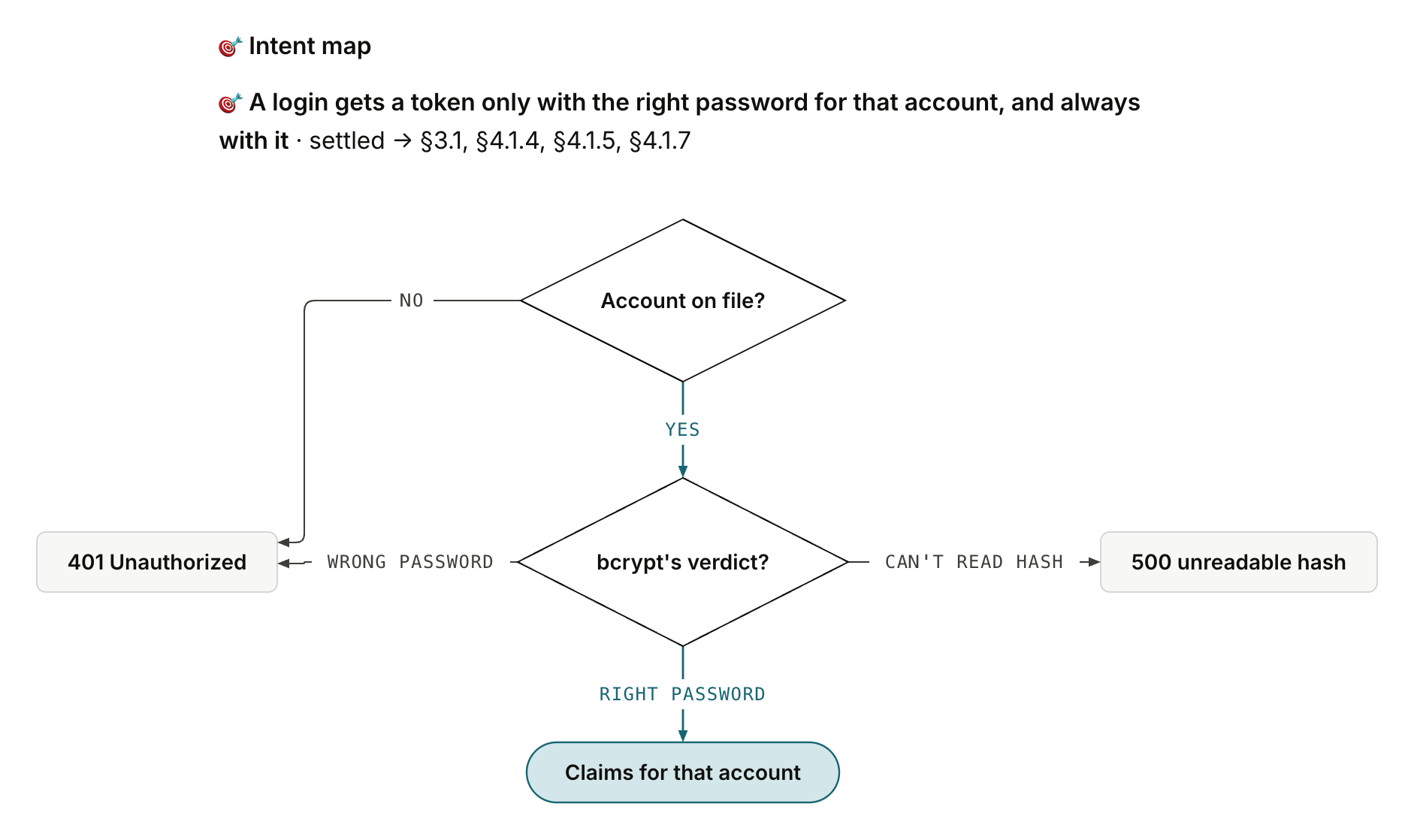
The question looks pedantic, but it matters. “You only get a token with the right password” rules out the bad case, a wrong password getting a token, and a login that refuses everyone keeps that promise perfectly. “The right password always works” is the half that rules it out. Formally, the first is an implication (token ⇒ right password) and the second is its converse. Together they make an “if and only if.” An agent left alone would pick one without telling you, but here the developer picked both ways.
Step 2: A human readable intent map
As the conversation goes on, PDD Kit keeps a rough work section at the top of the plan current, so a user can keep track of important concepts without having to scroll back through a long chat to find what was agreed. It includes a flowchart of the login being specified, a spec landscape of what will be proved and what will be trusted, and, when a picture helps, a mental model. For login, PDD Kit drew a ticket desk (Figure 3).

Below it, the intent map ties each requirement back to the developer’s own words and records how it was settled (Figure 4). Each entry links to the section of the formal spec that models it and to the tests that cover it, and the spec section shows snippets of the Verus contract, annotated so the developer can see how the formal spec models their intent.
The decision card in Figure 2 is the kind of ambiguity an agent would otherwise settle silently. Figure 5 shows how small the difference looks on paper: the two readings disagree in a single cell, a right password that gets no token.

Step 3: Proving the login function
Before anything gets built, PDD Kit asks the team to sign off on the plan as a whole. Its first draft proved the decision at the center of login, picking the table and gating on the password, and kept the handler around it trusted and tested. That’s a sensible default, and it’s what PDD Kit recommended, but the developer wanted more. The handler is where the lookups get awaited and the token gets signed, and that glue is exactly where a refactor can quietly swap two lines. So at intent review the developer chose to give the login handler its own async spec, so the proof covers that glue too instead of trusting it (Figure 6).

That choice moved almost everything into the proof and left the login handler with nothing to do but unpack the request. A new async function, login_flow, carries the contract from the request’s fields all the way to the token or the HTTP error. PDD Kit then brought the revised plan back for a fresh sign-off, because matching your intent isn’t proof, and it doesn’t approve new trust or a wider scope.
Step 4: Where proof stops
There are plenty of things you can’t prove about a program, and login runs into most of them:
- Code the verifier can’t see. bcrypt’s hashing, sqlx’s queries and jsonwebtoken’s signing live in other crates, outside the proof.
- Facts about the outside world. What SQLite holds right now and what time the clock says are inputs to the program, not something its code can establish.
- Whether, and how fast, something finishes. The spec says what you get if login answers. A hung query, or a slow one, breaks nothing in it.
- Anything a person has to judge, like whether an error message helps or a screen makes sense.
- Whatever nobody wrote down. A proof covers its spec and says nothing about requirements outside it.
That’s where empirical verification comes in. PDD Kit spells out the trusted boundary, the part of the TCB this proof leans on. It wraps each trusted piece in a small function with an assumed contract, using Verus’s #[verifier::external_body] or external_fn_specification, asks the developer to accept each one on its own, and writes a test for every assumed clause into the plan. For login, the developer signed off on six pieces:
- The two lookups,
Customer::find_by_emailandAdmin::find_by_username. Each awaited, successful lookup returns exactly the row its own table holds for that email or username, or none. check_password, a thin wrapper aroundbcrypt::verify. It errors only on a stored hash bcrypt can’t read, andOk(true)means exactly the right password.generate_token, which signs exactly the claims it is given under the configured secret and reports a signing failure as a 500.expiry_from_now, which reads the clock and writes an expiry exactly 24 hours later.database_error, which turns a failed lookup into today’s 500 with sqlx’s message.- The login handler shell, which unpacks the request and passes its fields to
login_flowunchanged.
In the spec, a lookup keeps its code where it is and gets a contract from the outside with external_fn_specification:
/// Looks up a customer by exact email.
/// Trusted, not proved: the SQL query runs in sqlx, which Verus cannot check.
/// Every customer promise of `login_flow` rests on it.
#[verifier::external_fn_specification]
pub async fn ex_customer_find_by_email(pool: &sqlx::SqlitePool, email: &str)
-> (r: Result
ensures
// When the query succeeds, it returns the customers row on
// file for exactly this email, or None when there is none.
r matches Ok(found) ==> found == customer_on_file(email@),
{
Customer::find_by_email(pool, email).await
}
The clock is a small wrapper marked #[verifier::external_body]. Verus uses its ensures clause and never reads the body:
/// Reads the clock and computes a token's expiry 24 hours ahead.
/// Trusted, not proved: chrono's clock is outside the proof.
/// It panics if the time is out of range, as today's login does;
/// that panic is not promised against.
#[verifier::external_body]
pub fn expiry_from_now() -> (r: Expiry)
    ensures
        // The expiry is exactly 24 hours (86,400 seconds) after the clock reading.
        r.exp as int == r.now as int + 86_400,
{
    ...
}
Figure 7 puts the three layers together: what Verus proves, what people accept and tests check, and what nobody is promising.

Figure 8 maps what gets proved and what gets trusted. Each trust decision is its own card. It shows the clauses Verus will take on faith, what the developer is accepting, and which promise falls apart if the assumption is wrong (Figure 9). Every assumed clause then gets an empirical check in the plan’s Empirical verification section, written as Given/When/Then scenarios before any test exists (Figure 10). An entry says planned until it has run, and then it records the command’s result and the commit it ran against.


check_password. Verus takes these two clauses on faith, so a person accepts them and two tests check them. 
check_password, written before the test exists. The plan labels a passing test as evidence rather than proof. The plan is just as explicit about what nobody is promising: that the login future ever completes, that an out-of-range clock won’t panic, anything about the timing or rate of attempts, and how other endpoints read the role.
Step 5: Reading the spec
The intent artifact is what the team reviews. It’s the plain-language version of the formal spec PDD Kit writes as Verus contracts. You might be wondering whether someone now has to read the proof instead of the code. Nobody does, because the coding agent writes the proof and Verus checks every step of it. If Verus accepts the proof, it holds whether or not anyone reads it. The spec is what the proof is held to, so that’s what people review, and this one is short enough to learn to read in a few minutes. Each function gets an ensures block: statements about its result, r, that must hold for every possible input. Verus checks them when you build, and if any clause could fail for even one input, the build fails and Verus points at that clause. Each clause reads as an if-then, and Figure 11 takes apart the clause for the developer’s first requirement.

Notice that the same a appears on every line, which ties the password check to the token. For example, imagine a bug where login checks the password against one account but signs the token for another. Bob logs in with his own, correct password and gets back a token for Alice’s account. Each step looks fine on its own, but this clause catches it, because the password check and the token have to name the same account. That’s the kind of wiring bug a test suite rarely thinks to look for. The spec also has to talk about SQLite, bcrypt and JWTs without running any of them. It does that with uninterpreted functions, names with no body: customer_on_file(email) and admin_on_file(username) for the rows the database holds, bcrypt_verdict(password, hash) for what bcrypt would say, and token_claims(token, secret) for what a token carries. Verus knows nothing about them except what the trusted contracts from Step 4 promise. The proof says “whatever the database holds, login does the right thing with it,” and a trusted contract says “the lookup returns what the database holds.”
/// The customers row the database holds for
/// exactly this email, if any, when login looks.
/// Left abstract: only `Customer::find_by_email`'s
/// trusted contract says what it is.
pub uninterp spec fn customer_on_file(email: Seq
...
/// What bcrypt says about `password` against a
/// stored `hash`: Some(true) when it is the password
/// the hash was made from, Some(false) when it is
/// not, None when bcrypt cannot read the hash.
/// Left abstract: its meaning is bcrypt's, taken on trust through `check_password`.
pub uninterp spec fn bcrypt_verdict(password: Seq
-> Option
/// The password is the right one for the stored hash, by bcrypt's verdict.
pub open spec fn password_matches(password: Seq
bcrypt_verdict(password, hash) == Some(true)
}
On top of those, named_account(email, username) says which account a login names: the customers row for the email when one is sent, otherwise the admins row for the username, otherwise none. It’s written like Rust, but it’s a mathematical definition that never runs and only appears in contracts. Code like this is called ghost code, since the verifier checks it but the compiler erases it from the program. With it, the developer’s two-sentence request ends up as eight ensures clauses on login_flow (Figure 12).
/// The account a login names: the customers row for
/// the email when one is sent (role "customer"),
/// otherwise the admins row for the username (role "admin"), otherwise none.
pub open spec fn named_account(email: Option
-> Option
match email {
Some(e) => match customer_on_file(e@) {
Some(c) => Some(NamedAccount {
id: c.id@, password_hash: c.password_hash@, role: customer_role() }),
None => None,
},
None => match username {
Some(u) => match admin_on_file(u@) {
Some(a) => Some(NamedAccount {
id: a.id@, password_hash: a.password_hash@, role: admin_role() }),
None => None,
},
None => None,
},
}
}

Here’s the whole contract, with its doc comment trimmed. Each clause has the plain-English comment above it that the intent artifact shows the team:
/// The whole login, awaited end to end: from the
/// request's fields to the token or the HTTP error.
/// ...
pub async fn login_flow(pool: &sqlx::SqlitePool, config: &Config,
email: Option
-> (r: Result
ensures
// Neither an email nor a username: 400 with today's message.
email is None && username is None
==> (r matches Err(AppError::BadRequest(m))
...


