🧠 How I Set Up OpenCode: A Real Agent OS (Config, Skills, MCPs, Memory)

You have inherited a repository.
At a glance: 1 config file · 40+ subagents · 123 skills · 20 commands · 8 MCP servers · 2 memory layers.
⚡ TL;DR
OpenCode becomes a real agent OS once you wire config, subagents, skills, MCP servers, commands, and a plain-file memory pipeline together. This post is my actual setup, so you can copy the shape rather than guess it. Everything is a plain file: no database, no proprietary format, no vendor lock-in.
The interesting part isn't the component count. It's the decisions behind them: what should be reusable, what should be persistent, where responsibilities should live, how much autonomy to allow, and how to keep the whole thing understandable as it grows.
🎉 Fun Things You Can Do
- ✨ Talk to 31 specialized agents - code reviewer, security reviewer, planner, architect, and more
- ✨ Watch your agent remember decisions across sessions (plain files, no database)
- ✨ Run 123 skills that fire automatically based on what you're doing
- ✨ Connect 8 MCP servers for web search, file access, memory, and more
- ✨ The whole thing is a folder of text files - open any one in a text editor
🤔 The Problem
Out of the box, an AI coding tool is a chat window. It forgets your conventions between sessions, has no idea which model is cheap enough for bulk work, and re-learns your repo every morning. I wanted an agent OS: config that loads my rules into every tool, a roster of cheap and quality subagents, installed skills with real workflows, MCP servers for docs/search/filesystem, and a memory pipeline that survives compaction.
Two constraints shaped everything:
- Plain files, not a database. Everything is Markdown, JSONL, and JSON. Human-readable, version-controllable, portable. No vendor lock-in.
- Cost-aware routing. 40+ agents split by cost and purpose. A 200-file summarisation runs on a cheap model; an auth change goes to a security reviewer.
🎁 What You Inherit
A fully configured OpenCode environment. It includes one config file (model, instructions, plugins, MCP servers, formatter, LSP, permissions), 40+ subagents, 123 skills under the agents skills directory, and 20 commands. There is also a two-layer plain-file memory pipeline (global + project) with compaction duty, plus a separate learning file that tracks patterns with evidence and confidence scores.
Stack: OpenCode, superpowers plugin, a learning-memory plugin, MCP (web research, data extraction, neural search, docs lookup, filesystem, fetch, memory, sequential thinking), and a CLI config for the terminal interface.
🏗️ Architecture

flowchart TB OC["OpenCode"] --> CFG["config file"] CFG --> INS["instructions:<br/>rules + agents protocol + personality + learning file"] CFG --> PLG["plugins: superpowers + learning-memory"] CFG --> MCP["mcp.servers (8)"] CFG --> EXP["experimental:<br/>todo + background_compaction"] CFG --> PERM["permissions:<br/>path- and command-scoped allow/ask"] CFG --> COMP["compaction:<br/>auto, keep 20k tokens, 20% buffer"] INS --> AG["agents (40+)<br/>config + agent files"] INS --> SK["skills (123)<br/>agents/skills"] INS --> CM["commands (20)"] INS --> MEM["memory pipeline"] MEM --> G["global: agents/memory<br/>state · topics · sessions · compactions.log"] MEM --> P["project: repo/.memory<br/>index · state · topics"] MEM --> L["learning file:<br/>patterns · AARs · evidence · confidence"]Notice what is not in the config: agent definitions, skills, and memory. Those are file-system conventions, which is why they work with any tool that can read a file.
📁 Project Layout
config/opencode/ ├── config file # the only config file ├── cli config # terminal interface settings ├── service config ├── agents/ # 12 subagent definitions (.md) │ ├── cheap-* (8) # bulk, code, fast, general, nano, quality, reason, vision │ └── code-reviewer, planner, security-reviewer, tdd-guide ├── commands/ # 20 slash commands └── package.json # plugin deps agents/ ├── AGENTS.md # universal operating protocol ├── rules/CORE.md # always-on rules ├── skills/ # 123 skills ├── agents/ commands/ workflows/ templates/ ├── memory/ │ ├── state.md │ ├── topics/ decisions/ learning/ sessions/YYYY/MM/DD.md │ └── compactions.log ├── .memory/ # project-scoped memory │ └── state.md └── kanban/BOARD.md 💡 Core Ideas
(https://dev-to-uploads.s3.us-east-2.amazonaws.com/uploads/articles/59ktn3czvkcgfbwck3vz.png)
The memory pipeline is the actual OS
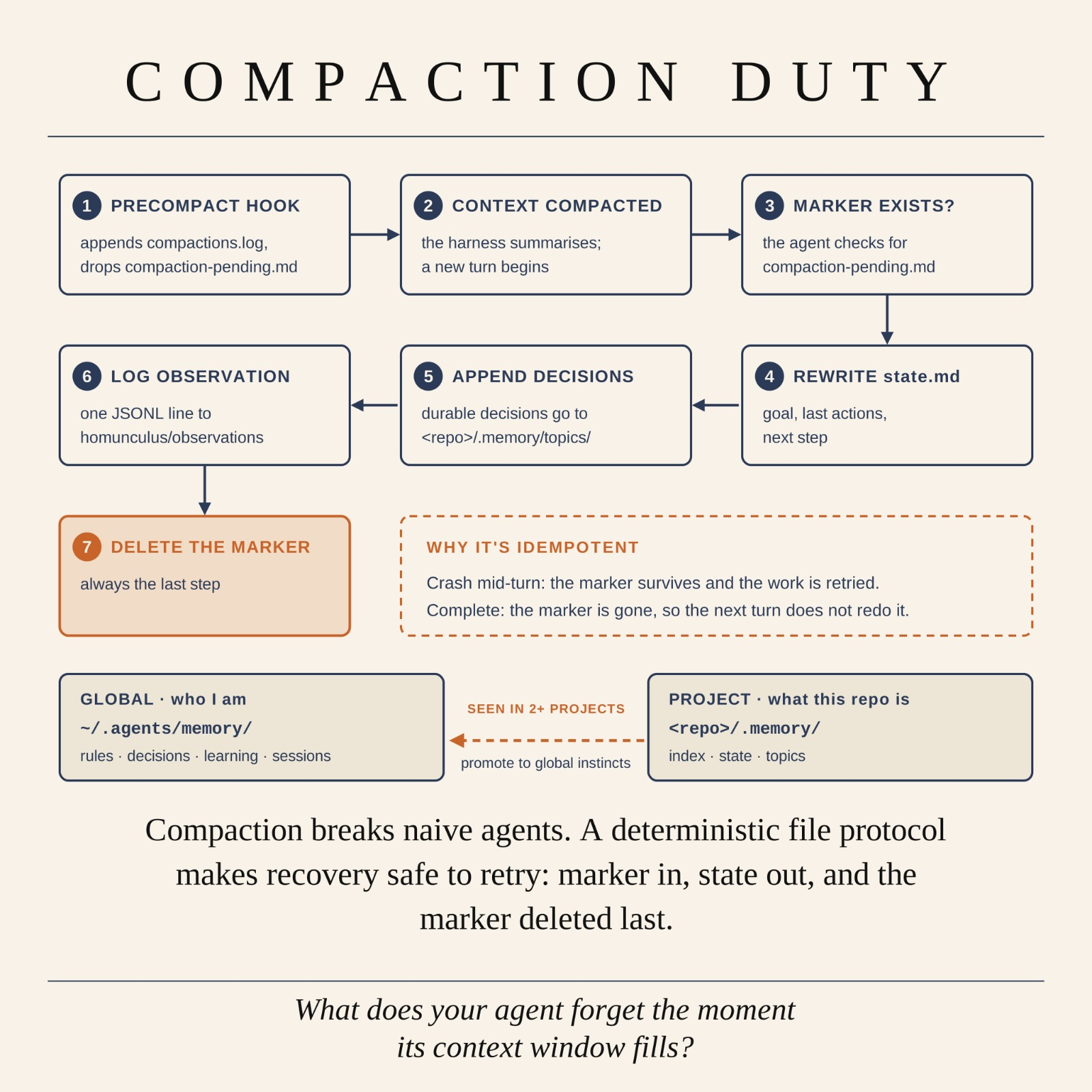
Compaction is the event that breaks naive agent setups: the context window fills, the harness summarises, and the agent forgets the decision it made an hour ago. The fix is a deterministic file protocol, not a bigger context window.
sequenceDiagram participant H as Harness participant M as compaction marker participant A as Agent participant S as .memory/state.md participant T as .memory/topics/ participant L as learning file H->>M: PreCompact hook appends compactions.log + drops compaction-pending.md H->>A: context compacted, new turn A->>M: marker exists? A->>S: rewrite goal / last actions / next step A->>T: append durable decisions A->>L: append observation or pattern A->>M: DELETE markerThe DELETE marker step is what makes it idempotent. If the turn crashes halfway, the marker survives and the work is retried; if it completes, the marker is gone and the next turn does not redo it.
Two layers, because they answer different questions:
- Global (agents/memory/) — who I am across projects: operating rules, decisions, learning, daily session logs.
- Project (repo/.memory/) — what this repo is: index, state, topics.
And one promotion rule: a pattern observed in 2+ projects gets promoted from observations to global. That is the difference between a journal and a learning system.
Why plain files instead of a database?
I chose Markdown, JSONL, and JSON over a database for four reasons:
- Human-readable. I can open any file in a text editor and understand the state. No query language, no ORM, no migration scripts.
- Version-controllable. Plain files diff cleanly in Git. I can see exactly what changed between sessions.
- Portable. Any agent that can read a file can use this memory. No vendor lock-in, no proprietary format.
- Easy to modify without specialised tooling. A text editor is enough.
Trade-offs I accept:
- Concurrency. Two agents writing to the same file simultaneously can corrupt it. I mitigate this with atomic writes and by keeping writes at task boundaries, not mid-task.
- Transactional integrity. No rollback if a write fails halfway. The compaction marker protocol compensates by making the recovery path explicit.
- Retrieval. No indexing, no full-text search beyond grep. For the volume of data I generate, grep is fast enough. If it weren't, I'd add a lightweight search index.
- Scaling. This works for one person's workflow. It would not work for a team of 50 sharing state.
Alternatives I considered and rejected:
- SQLite. Good for structured queries, but adds a dependency, a schema migration path, and a binary format that doesn't diff in Git. For my volume, the cost outweighs the benefit.
- Redis / in-memory store. Fast, but ephemeral. The whole point of this memory is that it survives session restarts and compaction events.
- Vector database (embeddings). Tempting for semantic retrieval, but overkill for state files that are read in full, not queried. I'd reconsider if the knowledge base grew past a few thousand entries.
- Cloud-synced notes (Notion, Obsidian). Adds a network dependency and a vendor. Plain files in a Git repo give me sync, history, and offline access for free.
At what point does filesystem memory stop being sufficient? I don't know yet. If retrieval latency becomes a problem, the first thing I'd try is a local SQLite index over the Markdown files, not a migration away from plain text.
Two-tier subagents

Forty-plus agents, split by cost and purpose:
| Tier | Agents | Use |
|---|---|---|
| Cheap (8) | cheap-bulk, cheap-code, cheap-fast, cheap-general, cheap-nano, cheap-quality, cheap-reason, cheap-vision | bulk transforms, lookups, small edits, screenshot review |
| Review (12+) | code-reviewer, python-reviewer, typescript-reviewer, go-reviewer, rust-reviewer, cpp-reviewer, java-reviewer, kotlin-reviewer, flutter-reviewer, security-reviewer, database-reviewer | language-specific and security review |
| Build resolvers (7) | build-error-resolver, cpp-build-resolver, go-build-resolver, java-build-resolver, kotlin-build-resolver, rust-build-resolver, pytorch-build-resolver | diagnose and fix build errors |
| Quality (4+) | planner, architect, tdd-guide, refactor-cleaner, doc-updater, docs-lookup, e2e-runner, harness-optimizer, loop-operator, chief-of-staff | planning, architecture, testing, docs, orchestration |
| Autonomous (1) | autonomous | full-autonomy mode: reads, writes, runs commands without prompts. Destructive actions still gated by core rules. |
The routing rule is simple: route by cost, escalate by risk. A 200-file summarisation runs on cheap-bulk; an auth change goes to security-reviewer before merge.
How many agents are useful before orchestration becomes overhead? I don't have a clean answer. The 40+ count includes many language-specific reviewers that I added because a generic reviewer kept missing language-specific issues. If I were starting over, I'd begin with 4 and add only when a real gap appears.
Skills are files with front-matter
A skill is a directory under the skills folder with a SKILL.md containing name and description. The description is not documentation — it is the trigger. The agent matches the task against it, so a vague description means the skill never fires.
That wording is deliberate: it names the situation ("encountering a bug"), not the capability ("debugging help"). Situation-shaped descriptions fire reliably; capability-shaped ones get ignored.
What belongs in a skill versus an agent instruction? My current split: skills are reusable workflows that apply across projects (debugging, planning, TDD). Agent instructions are identity and scope ("you are a security reviewer; do not edit files"). If a skill grows to include identity, it probably should be an agent. If an agent accumulates workflow steps, those steps should be extracted into a skill.
The learning system
The memory pipeline evolved. The original design used a separate observations-to-instincts pipeline. That was retired in favour of a single learning file that is the source of truth for preferences, patterns, and durable decisions.
The learning file carries:
- Patterns with trigger, action, domain, scope, confidence (0.3–0.9), evidence arrays, applied/confirmed counts, and last-confirmed date. Confidence only rises after a pattern is applied and checked against real output.
- After-action reviews (AARs) that record what happened, what was learned, and what changed.
- Learned entries for durable preferences and decisions.
Patterns are treated as hypotheses, not rules. A pattern starts at low confidence and earns trust through application and verification. Promotion into a rule or skill requires 2+ confirmed applications plus explicit approval.
The capture is manual, at task boundaries — not automated. No hooks, no observers, no background writers. This was a deliberate decision: automated capture without verification produces noise, not learning.
🔄 Pipeline / Flow

- Read state (global + project).
- Check the kanban board.
- Invoke relevant skills before any action (1% rule: if a skill might apply, load it).
- Use docs lookup for library questions — not training data.
- Research → plan → execute → verify for anything touching 3+ files.
- Update memory at the task boundary, not only at compaction.
🧭 Key Decisions
Why OpenCode over the alternatives
I evaluated Cursor, Copilot, Codex CLI, and Gemini CLI before settling on OpenCode. The deciding factors:
- Config as files, not UI. OpenCode reads a JSONC config file. No settings panel, no proprietary database. I can diff, version, and copy my entire setup.
- Subagent definitions as files. Each agent is a Markdown file with front-matter. I can create, edit, and delete agents with a text editor — no plugin SDK, no marketplace.
- MCP support out of the box. Remote and local MCP servers work without a separate bridge or proxy.
- Open source. If something breaks, I can read the source. The reference repo is even linked in my config for source-level lookups.
Trade-off: OpenCode has a smaller community than Copilot or Cursor. Fewer tutorials, fewer pre-built integrations. I accept this because the file-based model gives me control that UI-based tools don't.
Why Python for the learning tooling
The learning system's CLI and test suite are written in Python. Alternatives I considered:
- Node.js/TypeScript. Consistent with the OpenCode ecosystem, but I'm more productive in Python for CLI tools and data processing. The learning logic is pure functions with no I/O — language choice matters less than testability.
- Shell scripts. Tempting for simplicity, but JSON parsing and atomic file writes in bash are fragile. Python's
jsonmodule andpathlibmake this reliable. - Go/Rust. Overkill for a single-user CLI tool. The compile step adds friction to iteration.
The learning tooling has no runtime dependency on OpenCode itself. It operates on plain files. This means I can test it independently, version it separately, and replace the runtime without losing the learning data.
Why JSONC for config
- Comments. JSONC allows
//comments, which I use to document why each block exists. Plain JSON doesn't. - Trailing commas. Small quality-of-life improvement when editing by hand.
- Schema validation. The
$schemafield gives me autocomplete and validation in my editor.
Alternative: TOML or YAML. Both are more readable for deeply nested config, but OpenCode's schema is JSON-based and the ecosystem expects JSON. Using JSONC is the path of least resistance.
- One protocol file works across every tool. Plain files, no vendor lock-in. The same
AGENTS.mdserves OpenCode, Copilot, Codex, Gemini CLI, Cline, Cursor, Windsurf. - Plain-file memory beats a DB for cross-agent portability. Global + project layers, readable by any agent. Trade-offs accepted: concurrency, transactions, retrieval, scaling.
- Compaction is mandatory past 75% context. Declarative compaction settings plus a marker-based duty protocol.
- Skills first. If there's a 1% chance a skill applies, invoke it before acting.
- Permissions are least-privilege. Path- and command-scoped allow/ask rules. Writes allowed only in specific directories. The
askfallback means anything not explicitly allowed prompts for confirmation. I considered a pure deny-list (allow everything except dangerous commands), but an allow-list is safer and forces me to think about what the agent actually needs. The trade-off: I occasionally hit a permission prompt for a legitimate command, which is annoying but correct. - Pin MCP versions. Reproducibility over freshness.
- Model routing by cost, escalate by risk. Free/fast default, quality models for review and architecture. I chose a free model as the default because most tasks (file reads, searches, small edits) don't need a premium model. The savings are significant: a typical session uses the free model for 80% of operations and escalates only for reviews, architecture, and complex debugging. I considered using a mid-tier model as the default, but the cost difference over thousands of operations per week adds up. The risk: the free model occasionally produces lower-quality output on complex reasoning tasks. I accept this because the escalation path is one command away.
- Learning is manual, not automated. Capture at task boundaries with evidence. No hooks, no observers.
🔨 Recreate It
- [ ] Create a config file with
$schema,model,instructions,plugins. - [ ] Put cross-tool rules in a protocol file and a core rules file; reference them from
instructions. - [ ] Add MCP servers: remote first (no install), local second — with pinned versions and explicit timeouts.
- [ ] Set
permissionsto least-privilege: path- and command-scoped allow/ask rules. - [ ] Write cheap-tier and quality-tier agent files. Add language-specific reviewers only when a generic reviewer keeps missing issues.
- [ ] Install skills under a skills directory; give every one a situation-shaped
description. - [ ] Add commands under the commands directory.
- [ ] Create global memory (state, topics, decisions, learning, sessions) and project memory (index, state, topics).
- [ ] Wire hooks: PreCompact (append compactions.log + drop marker), SessionStart (read state), Stop (prompt memory update if marker exists).
- [ ] Implement the compaction duty protocol and delete the marker last.
- [ ] Add a promotion rule: observation seen in 2+ projects → global.
- [ ] Keep a kanban board and update task status as you work.
- [ ] Add a learning file for patterns, AARs, and preferences. Capture manually at task boundaries with evidence.
🚀 Quick Start
- Install OpenCode.
- Create the config file (see above).
- Place the core rules and protocol files.
- Install skills and subagents.
- Wire MCP servers; verify with a resource listing command.
- Add hooks: PreCompact, SessionStart, Stop.
✅ Verification
- Subagents: 40+ (8 cheap tier + language reviewers + build resolvers + quality agents + autonomous mode).
- Skills: 123 installed.
- Commands: 20.
- MCP servers: 8.
- Hook check: trigger a compaction, confirm compactions.log grows and the marker file appears.
- Duty check: on the next turn, confirm state is updated and the marker is gone.
- Secrets check: grep the config for literal keys — every credential should be
{env:…}.
📌 Takeaways
- One protocol file works across every tool.
- Plain-file memory beats a DB for cross-agent portability — with accepted trade-offs.
- Compaction is mandatory past 75% context.
- Route by cost, escalate by risk.
- Skill descriptions are triggers, not documentation.
- Learning is manual and evidence-based, not automated.
- Your system should look different from mine.
🔗 Links
- Config: the OpenCode config directory
Rules: the core rules file, the universal protocol file
Related posts: Wiring a Local LLM into PowerShell: Ollama, Model Tiers, and Guardrails, One Pane of Glass for Windows: Local AI, Zero Telemetry