When we post an engineering job, we get 300 to 400 résumés in a week. Reading each one carefully takes about two minutes. That adds up to eleven hours of work for just one opening, before any interviews even start.
But nobody really reads every résumé. Instead, HR does a quick triage. They skim for job titles, years of experience, and framework names, then sort résumés into "look closer" or "probably not" piles in about fifteen seconds each. By the time they reach résumé forty, they have less attention to give than they did for résumé four.
We set out to replace that triage step, not the reading itself. People are good at reading résumés when it's worth their time. But humans struggle with triage at scale, and that's where strong candidates can get missed if their experience is described in ways the quick skim overlooks.
If you're already familiar with LLMs and just want the build, you can skip ahead to How to Build the Résumé Screener App.
Table of Contents
Prerequisites
To follow along here, you should already know:
The Next.js App Router: what a server component is and roughly when a server action runs. The build leans on both.
Enough SQL to read a migration. You won't write any by hand, as every migration is in the repo.
Nothing about Jev or about machine learning. The next two sections cover everything the build needs.
And here's what you need before you start:
Node v24.21.0 and npm.
Docker, running. The Supabase CLI uses it to run Postgres, auth, and storage on your machine.
The Supabase CLI. Everything runs locally, so you don't need a cloud project until the final deploy step.
Claude Code. The build is nine prompts, each run in a fresh Claude Code session. They'll work in other coding agents with small adjustments, but the TypeSafe skill install in the build section is Claude Code-specific.
A TypeSafe API key from console.typesafe.ai. Jev is billed per input token, and building and testing this costs cents.
A Vercel AI Gateway key. Optional. It's used once to pull the candidate's name and email out of the résumé text, and you can skip it and type those in by hand.
A Vercel account, only if you deploy at the end.
Why Not Just Use the Tools That Already Exist?
Screening tools come in three kinds, and we'd used or tried all three before building anything.
Keyword and boolean filters are what most applicant tracking systems still offer as the default. You pick the words and they count. Candidates know this, which is why every résumé for a React role has React in it six times.
The filter measures fluency in writing for a filter. It says almost nothing about whether the person can build the thing, and it quietly drops the strong candidate who described the same work in different words.
Match scores are the upgrade most ATS vendors now sell: a model compares the résumé to the job description and returns a percentage. The number is real and it sorts. But you didn't write the criteria, you can't see them, and you can't change them.
When a hiring manager asks why one candidate is 81 and another is 64, the answer is "the model," and for an engineering role where the definition of a good hire changes with every opening, that's not an answer anyone can act on. Most of these products are also sold to recruiting teams of dozens, not to a company with two people in HR.
LLM assessments are the newest option, and the one we tried first. Send the résumé and the job description to a model, get a paragraph back. The next few sections are about why that didn't work, so I'll keep it to one line here: the paragraphs were good, and you can't sort a column of paragraphs.
What we wanted was narrower than any of these. Criteria written by the hiring manager, in plain language, per role. A number that HR could take apart into those criteria and argue with. And scoring cheap enough that when the manager changed their mind about what mattered, every candidate could be re-scored in seconds instead of re-read.
I'll also be honest about the last reason. Building it was a few days of Claude Code sessions, and a model had just launched that was shaped for exactly this problem. We wanted to see if it held up. The rest of the handbook is about whether it did.
What We're Building
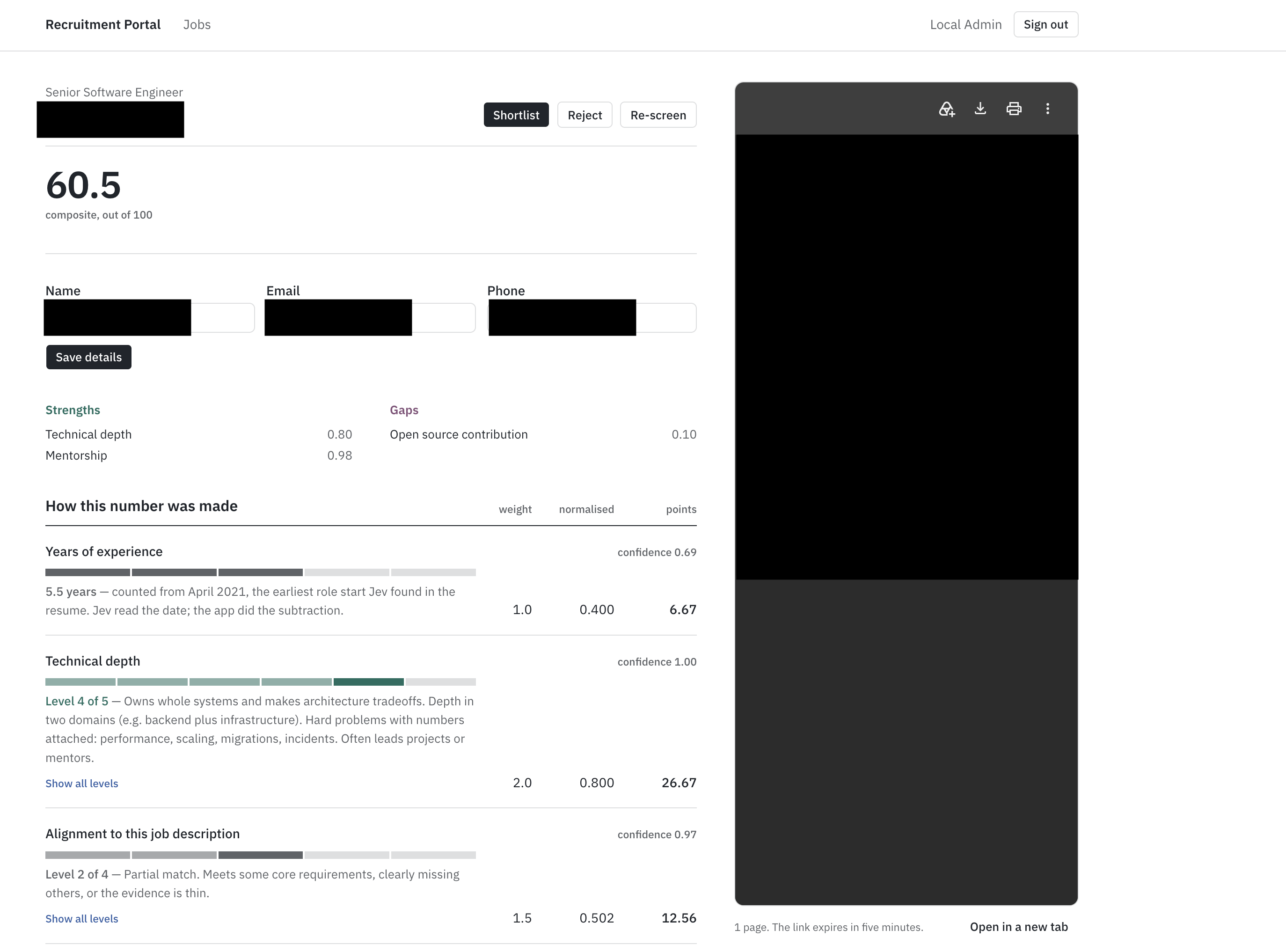
We’re building an internal recruitment portal. HR creates a job and sets the important criteria, like what counts as deep technical experience, whether mentoring is important, and the level of seniority needed. They upload résumés one at a time, and each is scored based on those criteria. The results show up as rows in a sortable, filterable table.
Each row displays the overall score, a breakdown by each criterion, the model’s confidence in its answers, and a flag if the confidence is low enough that a person should review it. The tool never rejects résumés automatically. It just sorts the pile, and people make all the final decisions.
Scoring is handled by a model called Jev, released by TypeSafe AI in September 2026. Unlike GPT or Claude, Jev doesn’t generate any text. You send it a résumé and a set of typed questions, and it returns numbers with calibrated probabilities. There’s no need to write prompts, parse JSON, or read paragraphs. You just get direct answers your code can use.
We'll use these pieces:
Next.js (App Router)
Supabase for auth, Postgres, and file storage
Tailwind CSS and shadcn/ui
TanStack Table for the applications list
unpdf to pull text out of PDFs
Vercel AI SDK with AI Gateway, for one small extraction job
TypeSafe Jev for the scoring
Zod everywhere there's an input
Where I'm coming from: I run MTechZilla, a software agency, and this is the version our own HR team started on. The numbers near the end are measured from running it, not projected. TypeSafe has no idea I'm writing this.
Résumé Screening is a Decision Problem
Think about what a recruiter does with a screened résumé. They sort and filter the results, compare them to the rest, and then read the top few résumés carefully.
Each of those steps needs a number or a label, not a paragraph.
I learned this the hard way. The first version of the tool sent each résumé and job description to an LLM and asked for a short written assessment. The responses were thoughtful and specific, often better than what I would have written. But they weren’t useful, because you can’t sort a column of paragraphs. HR read the first few, nodded, and then went back to opening PDFs.
To understand why the fix isn't "just ask for a number instead," you need to know how an LLM actually produces its answer.
How a Language Model Generates an Answer
A large language model is an autoregressive model. That's a technical term for a simple idea: it produces its output one piece at a time, and each new piece is chosen by looking at everything that came before it.
The pieces are called tokens. A token is roughly a word or a chunk of a word: "screening" might be one token, "unpdf" might be three. When you ask an LLM a question, it doesn't compute the whole answer and then print it. It computes a probability distribution over what the next token should be, picks one, appends it to the text, and runs the whole thing again to pick the token after that. A 200-token answer is 200 sequential passes through a very large neural network.
This is why LLMs feel slow when you use them. The delay isn’t just overhead, it’s built into how they work. Each token requires a full pass through the model, and these passes can’t happen at the same time because each depends on the previous one. That’s also why output tokens cost more than input tokens: input is processed all at once, but output is generated step by step.
Constrained Decoding Solves the Wrong Problem
Modern LLMs offer structured output modes. You hand the model a JSON schema, and it's guaranteed to return an object that validates against it. Under the hood, this is constrained decoding: at each generation step, the tokens that would produce invalid output are masked out before the model chooses. If the schema says the next thing must be a digit, the model can only pick a digit.
This approach works, and I want to be clear about that. We no longer have to use regex to parse model outputs or retry when the JSON is broken.
But consider what constrained decoding actually changes. The model still generates a string, token by token, with the same delays and costs. When you see something like "score": 7, the model hasn’t really calculated a score. It just predicted that 7 was the most likely token to appear there, based on the résumé, the prompt, and everything it has learned about assessments. The number is just text that looks like a number.
Why a Generated Number Isn't a Probability
Here is the distinction that matters. Say a model tells you a candidate is a 7 out of 10, or that there's a 70% chance they're a strong fit.
A calibrated model means something specific by that. If you took every candidate it rated 70%, roughly 70% of them would turn out to be strong fits. The number is a measurement, and you can act on it as one. You can set a threshold at 60% and know approximately what you're accepting and rejecting.
A language model’s 70% doesn’t mean the same thing. Nothing in its training links the string "70%" to an actual 70% chance of anything. The model outputs "70%" because, in its training data, similar assessments often used numbers like that. It’s just copying the style of a confident judgment.
Two things make this worse in practice.
Sampling is an issue. Most LLMs use a temperature setting above zero, so the model doesn’t always pick the most likely token. It samples. If you run the same résumé twice, you might get a 7 one time and an 8 the next, even though nothing changed. Setting the temperature to zero helps, but it doesn’t solve the problem, because the number was never a real measurement.
There’s also no shared scale. When you score candidate A and then candidate B, the model doesn’t remember A when it looks at B. Each 7 is generated independently, based on whatever the model is comparing to at that moment. Two 7s in your table might look the same, but they aren’t. In fact, having a column of numbers that seem comparable but aren’t is worse than having no numbers at all, because people tend to trust what they see in columns.
This is what really broke the first version, not parsing or latency. The scores didn’t mean the same thing from one row to the next, so sorting by them just sorted by random noise.
Generation vs Discrimination
There's an older distinction in machine learning that describes exactly what's going on. A generative model learns to produce data that looks like its training set. A discriminative model learns to assign inputs to a fixed set of categories, and outputs a probability for each category.
An LLM is a generative model. Its output space is every possible string. That's what makes it flexible, and it's also why it can hallucinate: nothing constrains it to true strings, or to strings that correspond to a real option. It can invent a citation, a function, or a candidate qualification, because every string is a legal output.
A discriminative model over a fixed set of options can't do this by construction. If the only allowed answers are junior, mid, senior, and staff_plus, the model can't answer principal. It can't answer with a sentence. It returns a probability for each of the four, and that's the whole output. Hallucination of form is impossible, not because the model is more careful, but because there's nowhere for it to go.
This doesn't mean it's always right. It can put 80% on senior for someone who's clearly mid-level. But being wrong within a fixed set is a different problem from being wrong in an open one. You can measure it, calibrate it, threshold it, and route on it.
System 1 and System 2 Thinking
Daniel Kahneman split human thinking into two modes. System 1 is fast, intuitive, pattern-matching: you see a face and know it's angry. System 2 is slow and deliberate: you work through a tax form.
Résumé triage is a System 1 task. An experienced recruiter looks at a résumé for ten seconds and knows, with reasonable accuracy, whether it's worth two minutes. They're not reasoning. They're recognizing a pattern they've seen a thousand times.
A reasoning LLM applied to that task is System 2 machinery bolted onto a System 1 problem. It writes out its thinking, weighs considerations, and produces a nuanced paragraph. All of that is slow and expensive, and none of it is what the task needed. The task needed the recruiter's ten-second glance, made consistent, and applied 350 times without getting tired.
TypeSafe named its model category after this. System One models are built to do the fast, calibrated recognition step and nothing else.
The 95% Problem
One more thing, because it decides whether any of this can actually be automated.
Suppose your screening model is right 95% of the time. That sounds good. But if it can't tell you which 5% it got wrong, you have to check every row, and you've saved nothing. The value isn't in the accuracy. It's in knowing where the accuracy runs out.
A calibrated model gives you that. When it says 55% on a question where it usually says 90% or 10%, that's a signal: this one's ambiguous, so send it to a person.
That's the mechanism that makes human-in-the-loop review work as a design rather than as a euphemism for "we check everything anyway." Confidence routes. Low confidence means a human looks. High confidence means the tool's answer stands until someone decides to overrule it.
The Shape That Fits
Unstructured text in, typed, calibrated decisions out. Nothing in between.
Not a model that writes an answer you then parse into a decision, but one whose only possible output is the decision. The set of allowed answers is fixed before the call. The number that comes back is trained to mean what it says, and to mean the same thing next time.
That's a different class of model, and one shipped in September.
What TypeSafe Jev Is, and What it Isn't
Jev is a model that takes text and a set of typed questions, then returns a numeric answer for each one. That’s the entire interface. To understand its behavior, it helps to know how it was trained, since that’s what sets it apart.
Where it Comes From
All modern language models begin the same way: a large neural network is trained to predict the next token using most of the written internet. This creates a pretrained model. While it knows a lot, it’s not very useful at first because it just continues text. If you ask it a question, it might answer, or it might generate more questions or even a random forum post from years ago.
To make the model useful, there’s a second stage called post-training. Today, there are three main approaches to this.
RLHF, or reinforcement learning from human feedback, is the method behind ChatGPT. Human raters compare pairs of model outputs and choose the one they prefer. A reward model learns to predict these preferences, and the language model is trained to produce outputs that score well with the reward model. In short, the model learns to say what people want to hear.
This approach led to the rise of chatbots, but it comes with trade-offs. Optimizing for what people like isn’t the same as optimizing for what’s true. RLHF can encourage flattery or confident-sounding mistakes.
There’s also a subtler effect, called mode dropping by TypeSafe’s primer: the model focuses on the styles raters liked and becomes less likely to produce other types of responses. As a result, it gets more agreeable and less open about its own uncertainty.
RLVR, or reinforcement learning with verifiable rewards, is used to train reasoning models. Here, the reward comes from checking answers against something that can be verified, like correct math. This works very well for math and code, but it’s slower and more expensive because the model has to show its reasoning before giving an answer.
RLCD, or reinforcement learning for calibrated decisions, is the approach TypeSafe uses for Jev. The model doesn’t generate text. Instead, it returns a decision from a fixed set along with a probability. The goal is for the probability to match how often the decision is actually correct. For example, if the model says 0.8, about 80% of those answers should be right. If it says 0.2, about 20% should be right.
This property is called calibration, and it’s the main goal. The focus is on calibration, not just accuracy. A calibrated model that’s wrong 30% of the time but tells you which 30% is more helpful than an uncalibrated model that’s wrong only 10% of the time but can’t tell you when.
Diogo Almeida, who co-invented RLHF, also co-founded TypeSafe. After helping create chatbots that focus on pleasing people, he now believes software decisions need models that are honest about uncertainty instead.
The Shape of a Request
A Jev call has two parts.
State is whatever the decision concerns. It can be a string, a JSON object, or an array of text. In our case, it’s the job description and the extracted résumé text. State is just data. Jev reads it, but doesn’t follow any instructions inside it.
Questions are a set of named, typed questions about the state. Each question is evaluated in parallel and independently, so one question doesn’t affect another’s answer. Adding more questions barely affects latency. For example, you can send one résumé with eight questions in a single request.
Here's the request our portal sends for one candidate, using the criteria our HR team wrote:
{ "state": { "job_title": "Senior Product Engineer", "job_description": "Own customer-facing features end to end. TypeScript across the stack, Postgres, on-call, and mentoring two or three engi…", "resume_text": "ANJALI MEHTA\nSenior Backend Engineer\nanjali.mehta@example.com | +91 98200 41122 | Pune, India\nSUMMARY\nBackend engineer with nine years building payment and ledger systems in Go and\nTypeScript. Owned the migration of a double-entry ledger handling 4M transactions\n…" }, "model": "jev-1.13.0", "questions": { "technical_depth": { "type": "score", "instructions": "Rate hands-on engineering depth using the experience and project bullets: what the candidate personally built, how complex it was, how much they owned. Ignore skills keyword lists, titles, and company names. Score the depth shown, not the years worked. When torn between two levels, pick the lower.", "criteria": [ "No roles or projects where they wrote code. Technical exposure is adjacent only: manual QA, IT support, PM, sales engineering.", "Coding appears only as coursework, bootcamp, or tutorial projects (to-do apps, clones). Nothing shipped to real users.", "Small scoped work inside someone else's design: bug fixes, minor features, CRUD screens. One language, one layer. Bullets list tasks, not problems solved. Also score here if you can't tell what they actually built.", "Owns features end to end in a live system: designs, builds, tests, and ships with little supervision. Works across two layers (e.g. API plus frontend). Mentions code review, testing, deploys, or on-call.", "Owns whole systems and makes architecture tradeoffs. Depth in two domains (e.g. backend plus infrastructure). Hard problems with numbers attached: performance, scaling, migrations, incidents. Often leads projects or mentors.", "Deep specialist with real breadth: maintainer of a widely used open-source project, systems internals (compilers, kernels, distributed systems, database engines), or org-wide architecture ownership at significant scale." ] }, "jd_alignment": { "type": "score", "instructions": "How well does this candidate's demonstrated experience match the requirements in `job_description`? Judge against what the job description actually asks for, not against a general notion of a strong engineer. Ignore keyword overlap in skills lists; weight demonstrated work.", "criteria": [ "No overlap with the requirements. A different discipline entirely.", "Adjacent field. Some transferable skills, but none of the core requirements are demonstrated.", "Partial match. Meets some core requirements, clearly missing others, or the evidence is thin.", "Strong match. Meets essentially all core requirements with demonstrated work.", "Exceeds the requirements, including the stated nice-to-haves, with directly comparable prior work." ] }, "mentorship_demonstrated": { "type": "noul", "instructions": "Does the resume demonstrate mentoring experience?" }, "llm_experience": { "type": "noul", "instructions": "Does the candidate have experience developing LLM products?", "criteria": { "true": "The candidate has built products or features powered by AI or Large Language Models", "false": "The candidate does not show experience building AI products." } }, "open_source_contribution": { "type": "noul", "instructions": "Does the candidate have open source experience?" }, "career_progression": { "type": "choice", "instructions": "What type of career progression is shown?", "criteria": { "steady_growth": "Clear progression with increasing seniority", "lateral_moves": "Similar roles at different companies", "job_hopping": "Frequent changes with short tenure", "unclear": "Progression pattern is unclear" } }, "primary_talent_profile": { "type": "choice", "instructions": "Pick the best match for the candidate's talent profile. Judge from their experience holistically, not from job titles or a skills list alone. Weight the most recent roles heaviest.", "criteria": { "frontend_engineer": "Builds user-facing interfaces: React, Vue, or Angular work, design systems, browser performance, accessibility. Consumes APIs but does not own them.", "backend_engineer": "Builds server-side services, APIs, and data models. Owns business logic, databases, queues, and service performance. Little or no UI work.", "full_stack_engineer": "Ships both UI and services on the same projects with neither side dominant. Not a backend engineer who occasionally edited a template.", "mobile_engineer": "Builds iOS, Android, or cross-platform apps (Swift, Kotlin, React Native, Flutter): app store releases, device performance, native SDKs.", "devops_infrastructure": "Owns how code runs and ships: CI/CD, Kubernetes, Terraform, cloud infrastructure, monitoring, reliability and on-call. Covers DevOps, SRE, and platform engineering.", "data_engineer": "Builds pipelines and data platforms: ETL, warehouses, Spark, Airflow, dbt, streaming. Serves analysts and models rather than end users.", "ml_ai_engineer": "Trains, fine-tunes, evaluates, or serves models. Includes applied ML, LLM, and research engineering.", "security_engineer": "Application, cloud, or product security: threat modeling, penetration testing, detection engineering, identity, vulnerability remediation.", "embedded_systems": "Low-level work: firmware, drivers, kernels, compilers, robotics, or hardware-constrained C, C++, and Rust.", "other": "Real engineering that fits none of the above, such as QA automation, game development, or forward-deployed and solutions engineering." } }, "is_resume": { "type": "noul", "instructions": "This document is a resume or CV for a job candidate." }, "earliest_role_start_year": { "type": "choice", "instructions": "In the candidate's work experience, which of these years is when their first full-time professional role began? Pick from the listed years only. Ignore education dates and certification dates. Pick 'none' if the resume does not state when their first role began.", "criteria": { "2016": null, "2017": null, "2021": null, "none": "The resume does not state when the first professional role began." } }, "earliest_role_start_month": { "type": "choice", "instructions": "In the candidate's work experience, which month did their first full-time professional role begin? Pick 'none' if only the year is stated or the start is not stated.", "criteria": { "january": null, "february": null, "march": null, "april": null, "may": null, "june": null, "july": null, "august": null, "september": null, "october": null, "november": null, "december": null, "none": "Only the year is stated, or the start date is not stated." } } } } And the response (the numbers below are illustrative, from a synthetic résumé, so you can see the shape):
{ "model": "jev-1.13.0", "answers": { "technical_depth": { "type": "score", "score": 3.32, "confidence": 0.71, "legend": { "0": "No roles or projects where they wrote code. Technical exposure is adjacent only: manual QA, IT support, PM, sales engineering.", "1": "Coding appears only as coursework, bootcamp, or tutorial projects (to-do apps, clones). Nothing shipped to real users.", "2": "Small scoped work inside someone else's design: bug fixes, minor features, CRUD screens. One language, one layer. Bullets list tasks, not problems solved. Also score here if you can't tell what they actually built.", "3": "Owns features end to end in a live system: designs, builds, tests, and ships with little supervision. Works across two layers (e.g. API plus frontend). Mentions code review, testing, deploys, or on-call.", "4": "Owns whole systems and makes architecture tradeoffs. Depth in two domains (e.g. backend plus infrastructure). Hard problems with numbers attached: performance, scaling, migrations, incidents. Often leads projects or mentors.", "5": "Deep specialist with real breadth: maintainer of a widely used open-source project, systems internals (compilers, kernels, distributed systems, database engines), or org-wide architecture ownership at significant scale." }, "probabilities": { "0": 0.00, "1": 0.01, "2": 0.12, "3": 0.46, "4": 0.36, "5": 0.05 } }, "jd_alignment": { "type": "score", "score": 2.87, "confidence": 0.68, "legend": { "0": "No overlap with the requirements. A different discipline entirely.", "1": "Adjacent field. Some transferable skills, but none of the core requirements are demonstrated.", "2": "Partial match. Meets some core requirements, clearly missing others, or the evidence is thin.", "3": "Strong match. Meets essentially all core requirements with demonstrated work.", "4": "Exceeds the requirements, including the stated nice-to-haves, with directly comparable prior work." }, "probabilities": { "0": 0.01, "1": 0.04, "2": 0.21, "3": 0.55, "4": 0.19 } }, "mentorship_demonstrated": { "type": "noul", "noul": 0.93 }, "llm_experience": { "type": "noul", "noul": 0.08 }, "open_source_contribution": { "type": "noul", "noul": 0.11 }, "career_progression": { "type": "choice", "choice": "steady_growth", "confidence": 0.82, "probabilities": { "steady_growth": 0.88, "lateral_moves": 0.08, "job_hopping": 0.02, "unclear": 0.02 } }, "primary_talent_profile": { "type": "choice", "choice": "backend_engineer", "confidence": 0.79, "probabilities": { "frontend_engineer": 0.01, "backend_engineer": 0.86, "full_stack_engineer": 0.09, "mobile_engineer": 0.00, "devops_infrastructure": 0.03, "data_engineer": 0.01, "ml_ai_engineer": 0.00, "security_engineer": 0.00, "embedded_systems": 0.00, "other": 0.00 } }, "is_resume": { "type": "noul", "noul": 0.99 }, "earliest_role_start_year": { "type": "choice", "choice": "2016", "confidence": 0.94, "probabilities": { "2016": 0.96, "2017": 0.03, "2021": 0.01, "none": 0.00 } }, "earliest_role_start_month": { "type": "choice", "choice": "august", "confidence": 0.88, "probabilities": { "january": 0.00, "february": 0.00, "march": 0.00, "april": 0.00, "may": 0.00, "june": 0.02, "july": 0.03, "august": 0.92, "september": 0.02, "october": 0.00, "november": 0.00, "december": 0.00, "none": 0.01 } } }, "usage": { "input_tokens": 4611, "output_tokens": 512 } } Notice what's missing: there's no text, explanation, or "reasoning" field. Every value is either a number or a label from a set you defined, so your code can use it directly without any extra parsing.
Also there's no years_of_experience question. It's the derived criterion, computed in code from the two earliest_role_start answers you can see at the bottom. That absence is the point of the design.
The Three Question Types
Score evaluates the state against ordered levels you define. These levels act as the contract: Jev reads each one and returns a probability distribution across them, along with a score, which is the expected value of that distribution.
It’s important that levels describe behaviors, not numbers. For example, "Owns features end to end in a live system" is something Jev can recognize in a résumé, but "6 years" is a number it can’t calculate. We’ll revisit this point later.
Noul is a yes/no question, and the answer is the probability that the answer is yes. That’s the whole response: a single number. There’s no separate confidence field, since the uncertainty is already shown in the value. For example, 0.95 means high confidence, while 0.52 means the model is unsure. You can also describe what true and false mean in the criteria, which helps with edge cases.
Choice selects one option from a set. It returns the chosen key, a probability for each option, and a confidence score. The key point is that Choice is relative: it picks the best-fitting option, not whether any option fits well.
Noul, on the other hand, is absolute and can be low for every option. This difference matters when choosing which type to use. For example, "what kind of engineer is this" is a Choice, while "does this person mentor" is a Noul.
Confidence
Score and Choice answers include a confidence value from 0 to 1. This isn’t a separate judgment, but a statistic based on the probability distribution. If all the probability is on one option, confidence is 1.0. If it’s spread evenly, confidence is 0. For Score, a flat distribution means the levels are unclear or the résumé lacks enough information. For Choice, it means no option stands out as the winner.
Probability tells you which answer to choose. Confidence tells you whether to act on it. TypeSafe’s documentation suggests three levels: high confidence means you can act automatically, medium means you should check, and low means you shouldn’t act and should send it to a person.
Where you set these boundaries depends on the risk. For example, a wrong seniority label can be fixed, but a wrong rejection can’t, so you should be more cautious with low scores.
In our portal, we use a threshold of 0.5 and flag anything below that for human review. The screening engine task shows where this number lives in the code.
Speed and Cost
Jev responds in 70 to 500 milliseconds for requests like ours. That’s fast enough to run directly in a server action while someone is watching, so the portal doesn’t need a background job queue.
Pricing is $0.042 per million input tokens, and output tokens are free. A two-page résumé plus a job description is about 1,500 tokens. The questions are billed too, and they aren't small: the eight default criteria plus the three system questions add roughly 3,000 tokens of their own, sent on every screening. So a single run is around 4,500 input tokens, or about two hundredths of a cent. Processing 350 résumés per week costs about seven cents.
The context limit is 64,000 tokens per request, with 32,000 for the state plus the longest single question. A typical résumé won’t reach this limit. But a fifteen-page CV with an appendix might, and the screening engine task adds a guard for it.
What Jev Isn't
Most write-ups skip this part, but it’s important because it explains the design decisions in the next section.
Jev doesn’t generate text. There’s no summary, no rationale, and no "the candidate scored highly because." The only explanation a recruiter sees is the per-criterion breakdown, so the criteria must be written so that the breakdown itself explains the result. This is a design constraint and shapes how the criteria editor works.
Jev isn’t a calculator. Counting items, adding numbers, or comparing dates is unreliable. For example, Jev reads "Jan 2022 - Present" as text, not as a time span. Any arithmetic should be handled in your own code.
Jev only reads text. If a résumé is a scanned image, there’s no text for Jev to score. The portal rejects these files instead of pretending to process them.
Jev is literal. It answers the exact question you write, not what you might have meant. Words like "not," implied conditions, and scope are all taken at face value.
"Never hallucinates" is more limited than it sounds. Jev can’t return a value outside the set you define. It can’t invent a new seniority level or answer a Noul with a sentence. This is a real guarantee, which is why there’s no need for a parsing layer.
But this doesn’t mean Jev is always correct. For example, it might give a 0.85 score for "senior" to someone who is clearly mid-level. The type system is reliable, but the judgment can still be wrong. Calibration tells you how often this happens.
Each of these limits shows up as a design decision in the next section, and several show up in the numbers from the first run near the end.
How the Application is Structured
Before you start building, it's helpful to see the overall structure and the reasons for each part. Most choices here are based on Jev’s capabilities and limits. If you know why each part exists, you’ll know what to adjust for your needs.
┌─────────────────────┐ │ HR on a laptop │ │ (browser) │ └──────┬──────┬───────┘ │ │ ① the PDF goes straight to Storage on a signed URL — │ │ it never passes through a server action body │ └──────────────────────────────────────────────┐ │ pages, server actions │ ▼ ▼ ┌────────────────────────────────────────────┐ ┌────────────────────────────┐ │ Next.js on Vercel │ │ Supabase │ │ │ │ │ │ proxy.ts refresh session, redirect │◀─▶│ Auth getUser() on │ │ server actions Zod on every entry │ │ every render │ │ scoring.ts pure — the only place a │◀─▶│ Postgres 6 tables, RLS │ │ number is produced ⑤ │ │ on all of them, │ │ │ │ append-only │ │ │◀─▶│ screenings │ └───────┬───────────────┬───────────────┬────┘ │ Storage private bucket, │ │ ② │ ③ │ ④ │ signed URLs │ ▼ ▼ ▼ └────────────────────────────┘ ┌──────────────┐ ┌───────────────┐ ┌──────────────────┐ │ unpdf │ │ AI Gateway │ │ TypeSafe Jev │ │ text, then │ │ → small LLM │ │ one systemOne │ │ reading │ │ name, email, │ │ call, every │ │ order from │ │ phone — and │ │ question at once │ │ geometry │ │ nothing else │ │ │ │ (in-process) │ │ │ │ jev-1.13.0 │ └──────────────┘ └───────────────┘ └──────────────────┘ ① upload ② extract ③ contact fields ④ score ⑤ compute + persist One Résumé's Journey
This is what happens from the moment HR uploads a résumé to when a score shows up in the table.
The browser uploads the PDF straight to Supabase Storage using a signed URL from the server. The upload never passes through our server.
A server action downloads the PDF from Storage and uses unpdf to extract plain text. If the text is much shorter than expected for the number of pages, the résumé is marked as failed with a message that it looks scanned. The process stops if there is no usable input.
The text is sent to a small LLM through Vercel AI Gateway to extract the candidate’s name, email, and phone number. This is the only generative step in the system, and it is optional.
The job description, job criteria, and résumé text are combined into one Jev request. All questions are handled in a single call.
The code calculates the composite score from Jev’s answers, marks each criterion as a strength or gap, checks confidence, and saves everything to Postgres.
The table updates. Most of the time is spent on parsing the PDF and extracting information, not on Jev’s processing.
The Data Model
Six tables handle all the data for the application.
jobs ─────────┬── job_criteria (the Jev questions for this job) │ └── applications ────── screenings ────── screening_answers (one per resume) (one per run) (one per question) profiles (one per HR user, mirrors auth.users) jobs table stores the job title and the pasted job description. The description is included in Jev’s state for every call, so it's saved as text instead of a link to another document.
job_criteria is the interesting one. Each row is a Jev question: its type, its instructions, its levels or options, a weight, and a flag for whether it counts toward the composite score. When HR creates a job, the system clones the default criteria set into this table, and they edit the copy. The questions HR authors are the screening logic. There's no prompt anywhere.
applications is one row per uploaded résumé. It caches the extracted text, so re-screening after HR changes the criteria doesn't re-parse the PDF.
screenings is one row per screening run, not per application. Every time a résumé is scored, a new row is added. The old ones stay.
screening_answers flattens each Jev answer into its own row: the raw value, the normalized value, the confidence, and the band. This is what the table sorts and filters on.
profiles mirrors Supabase's auth.users table and adds a display name, populated by a database trigger when an admin creates a user.
Decisions Worth Explaining
1. Criteria are stored in the database for each job, not in the code.
The other option would be a fixed rubric in a config file, which we tried at first. That approach failed when a hiring manager said, "for this role I don't care about mentoring, but open-source work matters a lot."
With criteria as database rows, you can change a weight in a form. If criteria are in code, you need to deploy. Since each job copies the default set, a new job starts with a sensible setup and only changes where the manager wants.
2. The composite score is always calculated in our code, not by Jev.
There are three reasons for this.
First, Jev's documentation says not to use its score outputs for exact values. The levels are meant for thresholds, not for precise numbers.
Second, a weighted sum in code is easy to audit, unlike a model’s judgment. If someone asks why a candidate got a score of 71, you can show the formula and the inputs.
Third, if a manager wants to change the weights, you just update a coefficient and re-run the scores for all candidates in milliseconds. This wouldn't be possible if the composite score was inside the model.
3. Choice questions are used as facets, not as inputs for scoring.
A Choice gives a label from a set with no order. For example, backend_engineer isn't more valuable than mobile_engineer. If you included Choices in the composite score, you would have to assign random numbers to categories, which would make the score misleading. So, the schema makes sure include_in_composite is off for every Choice, and the UI shows them as filter columns. You can filter for full_stack_engineer and then sort by score, keeping the two actions separate.
4. Screening is synchronous.
No queue, no worker, and no polling. Jev responds in well under a second, and the slower steps (like PDF parsing and the extraction LLM call) still finish inside a normal server action timeout.
Adding a job queue would have been the conventional architecture for "call an AI model," and it would have added a moving part for no benefit. If you later need bulk upload of hundreds at once, the screening function is already isolated and can be moved behind a queue without touching anything else.
5. There are two model calls for two different tasks.
Name and email extraction uses an LLM because it generates free text from the résumé, which Jev doesn't do. Scoring is handled by Jev because it judges against a fixed set, and as explained earlier, LLMs aren't suited for that. Using one model for both tasks would mean making a compromise.
6. Screening history is append-only.
The application never deletes a screening row. When criteria change and a candidate is re-scored, the old score remains next to the new one. This uses very little storage and provides two benefits: an audit trail for questions like "why was this candidate rejected in September," and a way to see how changes in criteria affect the whole group.
7. Uploads go directly to storage.
Vercel serverless functions limit the request body to 4.5MB. Most résumé PDFs are under 1MB, but some, like designer portfolios, can be much larger. Uploading directly to Supabase Storage with a signed URL avoids this limit and is faster for users, since the file only needs to go to one place.
Security Model
Every HR user has the same permissions, so this is a single-role application, and the security model is simple. Row-level security is enabled on every table. Authenticated users get full access, while the anonymous role gets nothing. There's no public application form, so no unauthenticated request should ever touch data.
Storage is private. Résumés are sent to the browser using signed URLs that expire after a few minutes. The Supabase service-role key is only used in server-side code and never sent to the client.
Admins create users in the Supabase dashboard. There's no signup page, invite flow, or password-reset form. This is intentional. For an internal tool with only a few users, adding those features would increase security risks without real benefits.
What We're Deliberately Not Building
There are no tests, background jobs, public candidate portal, email notifications, or ATS integration. These features are reasonable but out of scope, since this handbook focuses on the screening logic. Adding them would distract from the main topic.
How to Build the Résumé Screener App
So far, we've focused on the model. Now, we'll talk about the app. This part is set up differently than a typical tutorial, so let me explain why.
Repo: https://github.com/MTechZilla/recruitment-portal
Why Use Prompts Instead of Code?
Back in 2020, I would have shared every file as I built the app: I wrote the code, and you copied it. But that's not how this app was made. Every line in the repo was generated by Claude Code, following a written brief, one task at a time. Copying the output and pretending I wrote it myself wouldn't be honest, and it's the process that matters most.
Each section below shares the prompt I used and explains what it asks for and why. The code each prompt produced is in the repo.
There are three things you should understand before you start running anything.
CLAUDE.md is the constitution. It sits in the repo root and holds every constraint that must survive across sessions: the stack, the Jev contract, the security rules, and the compos...


