Tutorial hell is an unfortunate reality for many newcomers to Python, and learning how to get out of it starts with understanding why it’s so easy to fall into. When you’re a beginner, finishing tutorials is addictive! They make learning Python approachable by giving you a clear problem, showing you the steps to solve it, and letting you know when you’re finished. This structure is incredibly useful and fun when you’re just starting out.
After a while, that rush begins to fade as you notice something frustrating: you can follow tutorials successfully but still feel lost when you open a blank editor and no one tells you what comes next.
Instead of sitting with this discomfort, you start yet another tutorial, and the cycle known as tutorial hell begins. You keep learning new concepts, but you never practice making the decisions programmers have to make on their own.
The problem isn’t the tutorials. Even a great tutorial can tell you exactly what to build and why, but it can’t give you the experience of working that out yourself: building something, hitting a wall, and figuring out what was missing.
In this guide, you’ll learn which skills tutorials leave out and explore practical ways to develop them on your own.
By the end of this guide, you’ll understand that:
- Tutorials deliberately narrow a problem so you can focus on one topic, which is why they’re useful and also why they can’t be your only practice.
- Following a tutorial rarely lets you practice specifying the real problem, making tradeoffs, identifying knowledge gaps, or knowing when you’re done.
- Analyzing a tutorial you’ve completed and writing your own tutorials let you practice those skills in a low-stakes setting.
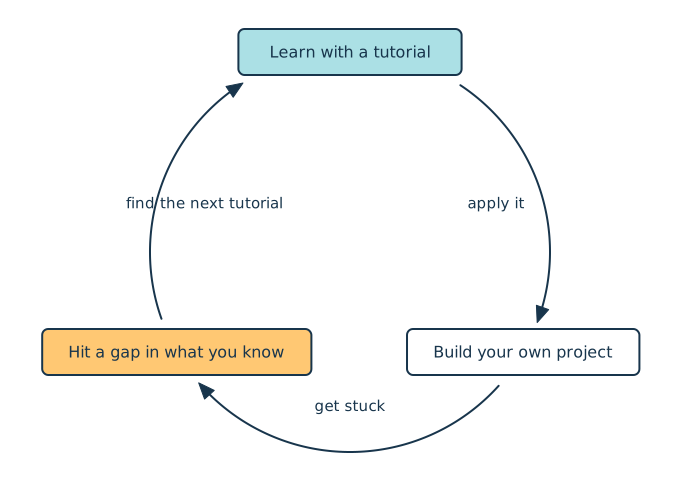
- Your own projects expose gaps that send you back to tutorials, and that learning cycle continues throughout your career.
Experienced programmers move around this cycle constantly. The goal isn’t to leave tutorials behind but to keep moving instead of getting stuck at the first step:
To work through the exercises in this guide, download the Tutorial-to-Project Worksheet, which includes a completed example, by clicking the link below:
Get Your Worksheet: Click here to download a free Tutorial-to-Project Worksheet, with a completed example, that helps you turn the tutorials you’ve finished into projects of your own.
Take the Quiz: Test your knowledge with our interactive “How to Get Out of Tutorial Hell” quiz. You’ll receive a score upon completion to help you track your learning progress:
Interactive Quiz
How to Get Out of Tutorial HellTest how well you can turn Python tutorials into practical projects by specifying problems, weighing tradeoffs, and knowing when you're done.
Prerequisites
This guide is for you if you’ve completed a few Python tutorials and feel comfortable with the basics, such as variables, functions, and loops, but still feel stuck when you open a blank editor. There’s no code to run and nothing to install.
One section uses a NumPy tutorial as a worked example, but you don’t need to know NumPy to follow along. Having a recent tutorial of your own in mind will help you get the most out of the exercises.
Python for Beginners Live Course: Want help crossing from tutorials to projects of your own? In Real Python’s Python for Beginners live course, you build programs from your own ideas with an instructor and a small cohort, with feedback whenever you get stuck. Join the waitlist to hear about the next dates.
Skills You Need Beyond Tutorials
The problem with getting stuck in tutorial hell is that tutorials aren’t meant to develop your general programming skills. Tutorials are most useful for teaching one specific topic, and they necessarily limit the scope of the problems you solve so you can focus on the skill you’re learning.
However, to get better at tackling complex and ambiguous problems, you need to develop several general skills:
- Specifying the real problem to be solved
- Making tradeoffs
- Identifying gaps in your knowledge
- Knowing when you’re done
To illustrate these skills, consider a hypothetical situation. Suppose you’re working on a to-do web application that lets users list their tasks for the day and check them off as they complete them. Several users ask to upload a text file containing a list of to-do items and have the application automatically parse it into items in the web app.
Since the users requesting this new feature likely don’t know much about programming, you have to make all the decisions about how to implement it. Consider how the general skills listed above apply to this hypothetical situation.
Specifying the Real Problem
In a tutorial, the problem you’re trying to solve is static and clearly defined. In commercial software development, requirements are rarely so clear, so you need to develop your ability to figure out the real problem you’re trying to solve.
In the hypothetical example, users are asking for a way to upload text files into your web application and have each line appear as a to-do item instead of typing out the items. Before you build that, it’s worth asking why they want it. Where do their task lists come from in the first place? A few users might say they keep a running list in a notes app, while others export tasks from a spreadsheet their team shares.
Read the full article at https://realpython.com/how-to-get-out-of-tutorial-hell/ »
[ Improve Your Python With 🐍 Python Tricks 💌 – Get a short & sweet Python Trick delivered to your inbox every couple of days. >> Click here to learn more and see examples ]


