Keeping the data you already have, modernizing only the app — what changes across SMB, NFS, and S3 Access Points
Business apps written for .NET Framework are still running in many Windows environments. .NET Framework runs only on Windows, and its feature set is effectively frozen. Current .NET (modern .NET) is cross-platform: it runs on Linux, in containers, and on serverless such as AWS Lambda. Moving an app to modern .NET frees it from the OS dependency and the support-window constraint, and lets it run without an always-on server, paying only for what it uses. Microsoft itself frames the move from .NET Framework to modern .NET as a good opportunity to containerize and go cloud-native (Microsoft Learn: Upgrade .NET apps overview).
But work usually stalls on the same question: the app can move, but what about the data the app has been reading and writing? Do I rebuild that data or relocate it, and what happens to its permissions and protocols?
No new announcement from AWS or any other vendor prompted this work. I have been working through modernization on AWS as a series of themes — migration, multiprotocol access, performance, S3 Access Points, a serverless file portal, a data lake, observability — and the step I had not yet taken was migrating the application code itself. Then AWS's AI-Driven Modernization published its AI Modernization Flow (a workflow that has an AI agent carry out a disciplined migration), and I used it to take exactly that step.
This post is a measurement record of what changed and what did not when I moved only the app, from .NET Framework 4.8 to current .NET and AWS Lambda in four stages, with the data left on a single volume. Across the stages I added paths for opening that same data: SMB from a Windows Amazon EC2 instance, NFS and cifs (a way to use SMB from Linux) from a Linux Amazon EC2 instance, and S3 Access Points (a way to open the volume through the S3 API) from AWS Lambda. The data lives on a single volume of Amazon FSx for NetApp ONTAP (FSx for ONTAP from here on; NetApp's ONTAP offered as a managed AWS storage service), and I did not change that volume from start to finish.
First, the caveats. I measured one app in one environment (ONTAP 9.19.1P3, Single-AZ, ap-northeast-1), and each measured value in this post comes from one to a few runs. A value I saw only once is labeled "one observation". No value is a guarantee that production will behave the same way. Costs are the values AWS Cost Explorer returned before billing is final (Estimated), not invoice amounts. When a later chapter says "as stated up front", it refers to this paragraph: one app, one environment, one to a few runs, and Estimated costs.
The one app I measured is DocIntake, a sample app I wrote for this verification. It is not a customer app and not a production app.
- Role: the Worker (the app proper, one of the two console apps) reads the documents in an inbox folder on the volume (
seed/inbox/), processes them, and writes a report of the results (reports) and an index,index.json. It is a batch-style app - Structure: two console apps (the Worker, and the Probe that measures the five behaviors). It has no screen (UI), no Web layer, no database, and no authentication
- How it reaches storage: all file reads and writes go through
IFileStore, which has 5 methods. In the .NET Framework source, a singleStorekey in appSettings selects the storage implementation (SMB in stage 0, the first of the four stages). As the stages advanced, I added NFS and S3 Access Points implementations - Why it was built this way, and its size: so that the difference between paths can be observed behavior by behavior, I placed one habit that does not show up on Windows + SMB but can show up on another path in the source code for each of the five behaviors (the five behaviors are listed in the Probe row under "Terms used in this post"). It is .NET Framework 4.8, C#, 0 NuGet dependencies, 10 .cs files, and 935 lines
Because this is the result of a single self-written console app, it does not necessarily apply to real business apps, or to apps that have a screen.
You are probably wondering about these three points:
- Can I move only the app to Lambda without moving the data?
- When I change the path that opens the data from SMB to NFS to S3 Access Points, what changes in how the same files behave?
- Which should I use to convert the code: atx (AWS's code analysis and conversion tool) or AIMF (the AI Modernization Flow mentioned above)?
Here are the three findings, answering the three questions above in order:
- Question 1 (can I move only the app to Lambda without moving the data?): yes. I converted the code of DocIntake and ran it on Lambda, while the data stayed in one FSx for ONTAP volume, appdata. In this post, "move" means converting the code and changing where the code runs and which path it uses to open the volume. It does not include copying or moving the data.
- What did not change (where the data lives): the data stayed in the volume appdata from stage 0 through stage 3. I did not copy, move, or recreate that volume. The UUID of appdata, its security style (the method it uses to decide permissions; ntfs to the end, which decides permissions with NTFS ACLs), and the sha256 of the seed (the 6 files I placed at the start of the verification) did not change; I recorded and compared them at each stage boundary (these records are from the second of the two builds of the verification environment). Those 3 items are what I confirmed did not change. The output that the app writes did accumulate on the volume, and in stage 1 I changed the export policy and name mapping settings for NFS
- What did change (the code, and how it runs): three things changed: the app's code, where the code runs, and the path used to open the volume. I converted the code from .NET Framework 4.8 to .NET 10 (with atx, a code analysis and conversion tool, and AIMF, a kiro-cli migration workflow; the third finding covers how they differ). I changed where the code runs from a Windows EC2 instance to a Linux EC2 instance to Lambda. For the path, I added NFS and cifs to SMB, and finally added S3 Access Points
- What I checked: in stage 3, the reports and
index.jsonthat the app itself (the Worker) wrote on Lambda through S3 Access Points were visible from the Linux client that opens the same volume over NFS (one observation) - The code that ran at each stage: the converted code ran in stage 2 and stage 3. Stage 0 is the starting point with the unconverted code, and stage 1 adds a path without changing the code, so neither has converted code. The table below shows each stage
| Stage | Code that ran | Where it ran | Path to the volume | Evidence that it ran |
|---|---|---|---|---|
| 0 | The unconverted Probe (.NET Framework 4.8). The counterpart on the Linux side is a Python version of the Probe (not DocIntake's code, but a separate script that measures the same 5 behaviors). The unconverted Worker ran once, later, as the stage 0 baseline | A Windows EC2 instance and a Linux EC2 instance | SMB from Windows; cifs from Linux | The Probe records show every side and every pair as Success. The Worker exited with 0 and wrote reports and index.json |
| 1 | The same Probe as in stage 0 (no record of a code change). A Python version of the Probe on the Linux side. No record that the Worker ran | A Windows EC2 instance and a Linux EC2 instance | SMB from Windows; cifs and NFS from Linux | The Probe records show every side and every pair as Success |
| 2 | The converted Worker and Probe (.NET 10). The counterpart on the Windows side is the unconverted Probe | A Linux EC2 instance | NFS for the Worker; NFS and cifs for the Probe | The Worker exited with 0 and wrote reports and index.json. Every Probe record is measured |
| 3 | The converted Worker and Probe (.NET 10; two modes of one Lambda function) | Lambda (inside the VPC) | S3 Access Points | The Worker exited with 0, and the output it wrote was visible from the NFS side (names and sizes only; I did not read the contents; one observation) |
- Question 2 (when I change the path that opens the data, what changes in how the same files behave?): some of how the same files behave changed with the path that opens them.
- Case sensitivity: for each path, I measured whether a reference that points at an existing file with different letter case resolves to that file on the same volume, appdata. Both SMB paths (Windows, and a Linux cifs mount, which uses SMB from Linux) were case-insensitive (the reference resolved), while NFS and S3 Access Points were case-sensitive (it did not)
- Write visibility (the time until a file written by one client becomes visible to the other client): I measured both directions between Windows and Linux. When Windows wrote and Linux read, it took under 100 ms (35 ms when Linux read over NFS and 66 ms over cifs; the reading client tries every 100 ms to read the content the writer wrote, so these two values cannot be told apart). In the opposite direction, when Linux wrote and Windows read, it took about 8 seconds (7,968 to 8,342 ms: 7,968 ms when cifs wrote and 8,342 ms when NFS wrote). The asymmetry, fast when Windows writes and slow when Linux writes, had the same shape in three measurements (record identifiers s0, s1 and s2m). The values 35, 66, 7,968 and 8,342 ms above come from one of them, the single s2m measurement
- Other behaviors: the handling of names that contain
\, whether an exclusive lock is possible (a way of opening a file so that no one else can open it), and the writability check (whether writability is judged by a pre-evaluation of the ACL or by actually writing) also differ by path (see "Behavior by access path")
- Question 3 (which should I use, atx or AIMF?): atx and AIMF covered different scopes. I do not rank them.
- What I compared: atx and AIMF are two different tools. I set side by side what each produced from processing the same app, DocIntake, once each
- atx (AWS Transform custom, AWS's code analysis and conversion tool): analyzed the code and converted it to .NET 10, and the net10.0 build of the converted code (on macOS) succeeded. But the five legacy-code habits that I had placed in the sample app, one for each of its five behaviors, and that assume Windows and SMB, remained in the converted code. The NFS and S3 Access Points implementations were not in atx's output
- AIMF (a workflow run with kiro-cli): took the atx analysis as input, produced ADRs (architecture decision records) and a migration ledger (a list of where each legacy-code habit was handled in the new code), and went on to implement NFS and S3 Access Points
- Limits of the comparison: one app, processed once with each tool, and the cost units differ (agent minutes for atx, Kiro credits for AIMF), so I did not compare which took less time or cost less
What you should take back to your own environment: each time you add a path that opens the data (SMB, NFS, S3 Access Points, and so on), measure the five behaviors again on the added path, together with how root is treated. The five behaviors are case sensitivity, handling of names that contain \, exclusive locking, the writability check, and write visibility (listed in the Probe row under "Terms used in this post"). For root, an example is that on NFS the root user could not enter /mnt/appdata (the cause is an inference from the export policy setting; see the stages 0 and 1 chapter and the stage 3 chapter).
On cost: the total I could identify for the AWS resources used in this verification is $35.91. The breakdown is $27.49 that I could narrow down in Cost Explorer by tag; $4.80 for AWS Directory Service (Active Directory) in the second of the two builds of the verification environment (the first on 2026-10-07, the second on 2026-10-11 to 2026-10-12), which I could not narrow down and estimated by subtracting the steady usage of days without the verification from the usage of the verification days; and $3.62 for AWS Transform (atx) usage. All three are Estimated, not invoice amounts. The AWS Transform usage carries a Credit of the same amount, −$3.62, and the $35.91 does not deduct that Credit.
When this post fits and when it does not
This post fits SAs, application developers, storage administrators, and Partner/SI engineers who are considering moving a .NET Framework app, built around a Windows shared folder (SMB), to Linux or Lambda without moving its data. It reports one such app, opened over SMB, NFS, and S3 Access Points against one FSx for ONTAP volume (ntfs, Single-AZ), so it is useful for judging cases with the same conditions (an SMB-based .NET Framework app, an ntfs volume, Single-AZ).
This post does not fit if you need any of the following, because I either did not measure it or measured it under different conditions:
- Performance (this verification put it out of scope, so I did not measure it; "What this post covers and what it does not" points to results that other projects measured)
- Behavior on a volume whose security style is
unixormixed(I measured only ntfs) - Migrating the screens or Web layer of an app that has a UI (the app I measured is a console app with no screen and no Web layer)
- Behavior on Multi-AZ (I built only Single-AZ)
- A guarantee for production (every value is from one to a few runs in one environment)
Reading by purpose
- You only want the conclusions: the three findings in this chapter are enough.
- You want to know whether changing the path causes trouble: "Behavior by access path" and "Summary and choosing an access path"
- You are choosing between atx and AIMF: "Choosing between atx and AIMF"
- You want to know how to hand out a development environment without copying the data: the FlexClone subsection of "Staged design and the single-volume constraint" (it reports only what I read in documentation; I did not create a FlexClone in this verification)
- You want to know the cost: "Cost estimates and observations"
- You want the conditions and limits of the measurement, or want to reproduce it: "Test environment and method" and "What has not been measured yet"
- You want to read in order: the staged design → stages 0 and 1 → stage 2 → stage 3 → behavior by access path
What this post covers and what it does not
This post reports five behaviors of one app, measured in one environment. It is not an exhaustive comparison.
What this post covers:
- It covers what changed and what stayed the same on the volume across four stages (SMB, adding NFS, new .NET, Lambda). The data did not move and only the path changed, so differences can be traced to the path
- It covers how I checked the measurements, and failures written up with numbers. Measuring without a positive control (a control that looks for something that must be found) invalidated the case-sensitivity values in 6 measurement runs. The same kind of error could occur in other measurements
- It covers how to choose between atx and AIMF. I have one pair of results where both processed the same app, so the difference in scope can be compared concretely
What this post does not cover:
- It does not cover volumes whose security style is
unixormixed. I decided to keep the security style at ntfs, and I did not create volumes with the other styles - It does not cover the container migration branch. The documents in this verification's repository hold only an explanation of the branch point and a link to another repository, and I did not go down the branch. The other repository that covers the branch (Container-Datastore Patterns, Japanese) is also, so far, at literature review and static validation (cfn-lint), and lists deployment to a real environment as the next stage
- It does not cover apps that have a UI (a Web layer such as ASP.NET, or a desktop app), or tests that operate a screen. DocIntake, the sample app in this verification, is a console app with no screen and no Web layer, and I ran no screen-operation tests
- It does not cover creating a FlexClone in a real environment, or the five behaviors on the clones. I did not create a single FlexClone in this verification, and the creation script went only as far as a dry run. The "Staged design and the single-volume constraint" chapter reports what I read in the documentation about FlexClone (documented)
- It does not cover other ONTAP versions or Multi-AZ. The only configuration I built was Single-AZ on ONTAP 9.19.1P3
- It does not cover reconciliation with an invoice. I have not checked an invoice, and the costs in this post are only the Cost Explorer values before billing is final (Estimated)
- It does not cover performance. This verification measured how behavior differs per path (the five behaviors). I did not run measurements with performance conditions decided in advance (large files, many files, long runs), and ADR-2, AIMF's record of design decisions, also put performance out of scope. Another project measured the performance of the S3 Access Points path in two cases. Both are carried-over (values measured in another verification of mine), and neither is a value measured in this post's environment. Neither document records the ONTAP version
- From an Amazon EC2 instance (c5n.9xlarge) using Python, the median latency of a PUT to S3 Access Points at concurrency 1 was 363.7 ms for 1 MiB and 331.5 ms for 8 MiB. A fixed cost per request (about 330 ms) dominated over object size (2026-09-01, ap-northeast-1, Single-AZ, 128 MBps, NetworkOrigin VPC, UNIX root identity; measurement of the S3 Access Points path performance, Japanese)
- From a Lambda function outside the VPC (1,769 MB), the median latency of a 1 MB GetObject against S3 Access Points at concurrency 10 was 73.2 ms (2026-05-25, ap-northeast-1, Single-AZ, 128 MBps, NetworkOrigin Internet; S3 Access Points benchmark results, Japanese). That benchmark results document also lists the path this post uses, from a Lambda function in the VPC to an S3 Access Point with VPC origin, as not yet measured
Terms used in this post
| Term | One-line meaning |
|---|---|
| ntfs / security style | The security style is the method a volume uses to decide permissions, and ntfs decides with NTFS ACLs. This post uses ntfs to the end |
| SMB | The protocol Windows uses for file sharing |
| NFS | The protocol Linux uses for file sharing. This post uses NFS 4.1 with sec=sys (a simple authentication where the client claims its uid) |
| cifs mount | A way to mount an SMB share from Linux. The path is SMB and the client is Linux |
| S3 Access Points | An endpoint that reads and writes an FSx for ONTAP volume through the S3 API. An S3 API client such as Lambda reaches the same volume without copying the data |
| NetworkOrigin | The setting for where an S3 Access Point can be reached from (a VPC in this post). You can specify it only when the access point is created, and changing it means recreating the access point |
| atx (AWS Transform custom) | AWS's code analysis and conversion tool. I use two of its transformations: analysis (comprehensive-codebase-analysis) and conversion (dotnet-modernization) |
| AIMF | Short for AI Modernization Flow. A workflow that runs through Phase 0a to 4 with kiro-cli and leaves ADRs and a ledger |
| ADR / migration ledger | An ADR is a record of a design decision and its reason. The ledger (AP-1 to 14) lists where each legacy-code habit was handled in the new code |
| Probe | A console app that measures five behaviors (case sensitivity, names containing \, exclusive locking, the writability check, write visibility) and records them as JSON. An exclusive lock is a way of opening a file so that no one else can open it |
| Positive control | A control that looks for something that must be found, through the same path, to confirm the measurement works |
| write-visibility | The label the Probe records use for write visibility: the time until a file written by one client becomes visible to the other |
| 8.3 short name | A short Windows-compatible alias given to a long file name (for example PROBES~1.TXT) |
| name mapping | An ONTAP setting that maps a Windows user to a UNIX user |
| FlexClone | An ONTAP feature that creates a writable point-in-time copy, as a separate volume, from a volume's Snapshot (its state at one moment). I did not create one in this post |
The modernization work so far, and the new step this time
This post continues an ongoing body of work on modernizing on AWS. So far I have worked through block storage migration with AWS Transform, multiprotocol access on FSx for ONTAP, hands-on throughput and block-performance verification, using S3 Access Points, a serverless file portal, data lake integration, and observability — each published as a GitHub repository and a blog post. This time the new, concrete step was migrating the application code itself.
What prompted this work is AWS's "AI-Driven Modernization (AIDM)" and its AI Modernization Flow (AIMF). I ran this migration with AIMF. AIMF is a workflow that has an AI agent carry out a disciplined migration of an app on an older technology stack; designing and building the cloud environment is out of its scope. That boundary is why the two fit together: AIMF handles the app side, and my earlier FSx for ONTAP work covers the data and storage side.
Differences from the previous article
The previous article is "AWS Transform Now Supports Block Storage Migration to FSx for ONTAP — Benefits and Pitfalls from a Hands-On EC2 Test". This post differs in two ways:
- Scope: the previous article covered getting data onto FSx for ONTAP (AWS Transform migrating block storage). This post leaves the data where it is and moves only the app's code
- What was measured: the previous article measured a migration job. This post measures how five behaviors differ when the same volume is opened over SMB, NFS, and S3 Access Points
Staged design and the single-volume constraint
I fixed the data on one volume so that failures in the app migration and failures in the data migration would not get mixed together. With the volume fixed, an observed difference can be read as a difference between paths. That choice to fix the volume is a design decision, not a measurement result. Fixing the volume does not mean there can be no working copies. FlexClone, a way to add a working volume while keeping appdata fixed, is described in the second half of this section.
| Stage | Runtime | Path | Where the code comes from | Volume |
|---|---|---|---|---|
| 0 | Windows Amazon EC2 instance, .NET Framework 4.8 (a Linux Amazon EC2 instance opens SMB over cifs as the Probe's second measuring client) | SMB | The original app | appdata (ntfs) |
| 1 | The stage 0 setup; the Linux Amazon EC2 instance also opens NFS 4.1 | NFS 4.1 added | The original app, plus a Python version of the Probe on the Linux side | appdata (still ntfs) |
| 2 | Linux Amazon EC2 instance, .NET 10 | NFS 4.1 and cifs | AIMF (main line), atx (comparison) | appdata (still ntfs) |
| 3 | AWS Lambda (in the VPC), .NET 10 | S3 Access Points | From AIMF; from atx (first run; run id s3) | appdata (still ntfs) |
Source of this table: the stage table in docs/en/reproduce.md (commit-pinned; I reorganized the columns)

Figure 1: The flow from stage 0 to stage 3. The volume in the bottom row stays the same. The container migration is a branch and was not measured. (dark theme version)
The point of the figure: the volume in the bottom row stays one volume as the stages advance.
AIMF is the main line of stage 2. AIMF's first step (Phase 0a) imported the atx analysis results. I ran the atx dotnet-modernization transformation separately, for comparison.
Handing out working volumes with FlexClone (not done in this verification)
For app development and testing, you often need a separate place to read and write production-like data (in this post, the contents of appdata) without modifying the data itself. ONTAP FlexClone is one way to add that place without copying all of the data. FlexClone can be used alongside the design that fixes appdata as a single volume.
A FlexClone is a feature that creates a writable point-in-time copy by referencing the metadata of a Snapshot (the state of a volume at one moment). I call the copy a clone, and I call the volume it is made from the source volume (the NetApp documentation calls it the parent volume; in this post the source volume is appdata). The clone shares data blocks with the source volume, and until you write to the clone it uses capacity only for metadata (ONTAP: FlexClone volumes, files, and LUNs concepts). The free space a newly created clone uses is described as about 0.5% of the clone's nominal size. New data written to either the source volume or the clone is not shared between the two volumes, and the clone's usage grows by the amount written to the clone (ONTAP: space used by a FlexClone volume). The NetApp documentation contrasts this with traditional copies, which can take minutes to hours, and says that because FlexClone shares blocks, a copy of a large dataset can be made in a short time (this post gives no creation-time number).
How this project used it
- Designed and implemented: the verification script
integration-clone.shcreates and deletes, over the ONTAP REST API, a FlexClone namedappdata_it_<n>from a Snapshot of appdata. The script never creates, changes, or deletes appdata itself. Its purpose is to create and remove the clones that the AIMF Phase 3 integration test (the integration gate) uses - Dry run only:
dryrun_shell_tests.shchecks the requests that were assembled and the name validation, without calling ONTAP. No clone is created - A check at teardown only: in steps 4 and 5 of the environment teardown, I confirmed that no FlexClone and no
it_*Snapshot remained and that the recovery queue was empty (docs/en/environment.md). This confirms absence; it is not evidence that one was created
So I have confirmed the design and the command assembly, but I have not created a clone in a real environment or measured behavior on one.
Use cases the documentation describes
| Use case | What the documentation says (paraphrased) | Source | Tier |
|---|---|---|---|
| Copies for development and testing | Described as temporary, writable copies for trying an app against a production dataset | ONTAP concepts, ONTAP: clones for testing | documented |
| Several copies, per user or per server | Several copies of the same dataset (the documented example is virtual desktop deployment). An example that makes several clones from the same Snapshot for several development and test servers. A use that gives additional users access to the data without giving them access to production data. I found no document that says "one per developer" | The two in the first row, AWS: SAP HANA replicate and clone | documented (per-developer use not stated) |
| Rehearsal before a change | An example of trying a database operation on a clone before running it against production. Checks before an application or Kubernetes cluster upgrade. Validation of a system upgrade or migration | AWS: refreshing a development environment, AWS: applications on Amazon EKS, the SAP HANA post in the second row | documented |
| Checking recovery and incident response | A use for disaster recovery (DR) testing. Mounting a clone of a Snapshot taken before data corruption on another server to attempt a logical repair | The SAP HANA post in the second row | documented |
| Provisioning test data for CI | The documents I could fetch contain no statement that names use in CI. This use is only my extension of "several copies" above | None | hypothesis |
| Analytics and reporting on a point-in-time copy | The documents I could fetch contain no statement that names analytics or reporting | None | hypothesis |
The examples in the sources are Oracle Database (Amazon EC2, NFS), MySQL (Amazon EKS, iSCSI), and SAP HANA. The documents I fetched have no example of a Windows app opening an SMB NTFS share.
Relationship to the single fixed volume
Through stages 0 to 3, appdata stays one volume with the same UUID. A FlexClone is a separate volume from appdata, and you can specify a separate junction path for it (the path that attaches a volume to the SVM namespace) (ONTAP CLI: volume clone create). So a clone does not contradict the fixed design. It adds a working volume, per developer or per stage, next to the fixed appdata. On the other hand, every clone adds a new junction path. The five behaviors this post measured (case sensitivity, names that contain \, exclusive locking, the writability check, and write visibility) and the treatment of root are properties of the access path. So you measure them again on each path that opens a clone, the same as the takeaway "measure again each time you add a path".
| Aspect | One fixed volume (this verification, verified) | FlexClone working volume (documented, not done) |
|---|---|---|
| What you get | You can attribute differences to the path. The UUID, the security style, and the seed sha256 did not change across stages 0 to 3 | A write target per user or per purpose that does not modify appdata |
| Behavior per path | The five behaviors are measured (one environment) | Needs to be measured again on each path that opens the clone. Opening a clone of an NTFS volume over SMB, NFS, and S3 Access Points is not measured. I found no statement in the fetched documents on how NTFS ACLs or SMB shares carry over to a clone |
| Capacity | No additional capacity, because no volume besides appdata is added | Metadata right after creation, then growth by the amount written. After a split (detaching the clone from its source volume to make an independent, normal volume), both the source volume and the clone need the full capacity set by the volume's guarantee (ONTAP: split) |
| Dependency on the source volume | None | You cannot delete the source volume while the clone exists (ONTAP: creating a FlexClone). A split cannot be undone, and no new Snapshot of that clone can be created during the split |
| What remains after deletion | Not applicable | In a separate verification of mine (2026-08-26, ONTAP 9.18.1P3D1, ap-northeast-1, a 1 GiB volume with the UNIX security style, one observation), a clone deleted in ONTAP stayed in the recovery queue, the deletion of the source volume it was made from failed, and a purge cleared it (measurement of ONTAP features over S3 Access Points, Japanese, carried-over) |
| Number of volumes | 1 | The volume limit per FSx for ONTAP file system is 500 (first-generation, and second-generation with one HA pair) or 1,000 (second-generation with two or more HA pairs), and 491 and 975 respectively when you use S3 Access Points (975 is for two HA pairs and decreases as HA pairs are added) (AWS: quotas). That page does not say whether a clone counts toward the number |
| How it appears on the AWS side | Not applicable | A change made on the ONTAP side can take up to several minutes to appear in the AWS console, CLI, and API (AWS: managing with ONTAP applications). In the separate verification described in the "What remains after deletion" row, a clone took 1,177 seconds (observed every 20 seconds, one run) to appear in the AWS-side list, and in another run it had not appeared at 1,258 seconds (carried-over) |
| Where you create it | Not applicable | The ONTAP CLI and REST API (ONTAP REST: creating a volume). The AWS API's ONTAP volume-creation settings list no field for specifying a clone (AWS API: CreateOntapVolumeConfiguration) |
| Relationship to backups | Not applicable | In an AWS Transform VMware migration example (a different feature from the atx in this post), locked Snapshots that FSx for ONTAP backups create can block a split (AWS: VMware migration). A clone that is in a data protection relationship cannot be split |
You can also clone a FlexClone (ONTAP: efficient copies). In the table above, I did not confirm the behavior of a clone of an NTFS volume or the relationship to backups.
How to choose
- Where it fits: you need working copies, per user or per purpose, that you can write to while keeping the contents of appdata, and the time and capacity of making full copies is a burden
- Where to consider other means: if you need only a few working copies for a short time, an ordinary copy is enough. If you keep a clone for a long time and writes grow, the clone's usage grows and the period during which the source volume cannot be deleted gets longer. Also consider other means when the volume count is near the limit, or when you cannot build the ONTAP CLI and REST API into your operations. Restoring from a backup (AWS: restoring backups) is also a way to create a separate volume. The documents I fetched do not say whether a restore shares blocks
What you can decide: whether to take the approach of adding working volumes with FlexClone while keeping appdata fixed as one volume, and, if you do, whether you can accept the operational costs in the table above (deleting the source volume, splitting, the volume count, and the delay before changes appear on the AWS side).
The value of S3 Access Points and its four prerequisites
The value of using S3 Access Points is that an S3 API client such as Lambda reaches the same volume without copying the data. In this environment, the 5 reports and index.json written by the Lambda Worker were visible from the NFS side (stage 3, one observation). There are four prerequisites:
| # | Prerequisite | Content | Evidence tier |
|---|---|---|---|
| 1 | Fixed NetworkOrigin | Specified only at creation. To change it, delete the access point and create it again | documented (AWS documentation; the source is in the stage 3 chapter) |
| 2 | The user (identity) that handles S3 Access Points requests on the volume | In this environment, the WINDOWS user appsvc | verified (stage 3) |
| 3 | Reachability to an AD domain controller (DC) | In this environment I used the access point with the DC reachable. Whether every data operation on an AD-joined SVM requires DC reachability, I have not confirmed. A successful HeadBucket does not show that file operations work | open (I could not find a record a reader can reproduce, or a public primary source; details are in "What has not been measured yet") |
| 4 | No exclusive locking and no event notifications | file-locking is skipped in the Probe run through S3 Access Points; the trigger that starts the Worker is polling from EventBridge Scheduler | The file-locking skip is verified. The unavailability of event notifications is documented (my reading of the AWS API support table, which lists GetBucketNotificationConfiguration as not supported; see the stage 3 chapter) |
What you can decide: whether to adopt the approach of changing only the paths (SMB, then NFS, then S3 Access Points) without moving the data, and whether you can confirm the four prerequisites above in your own environment before you use S3 Access Points.
Test environment and method
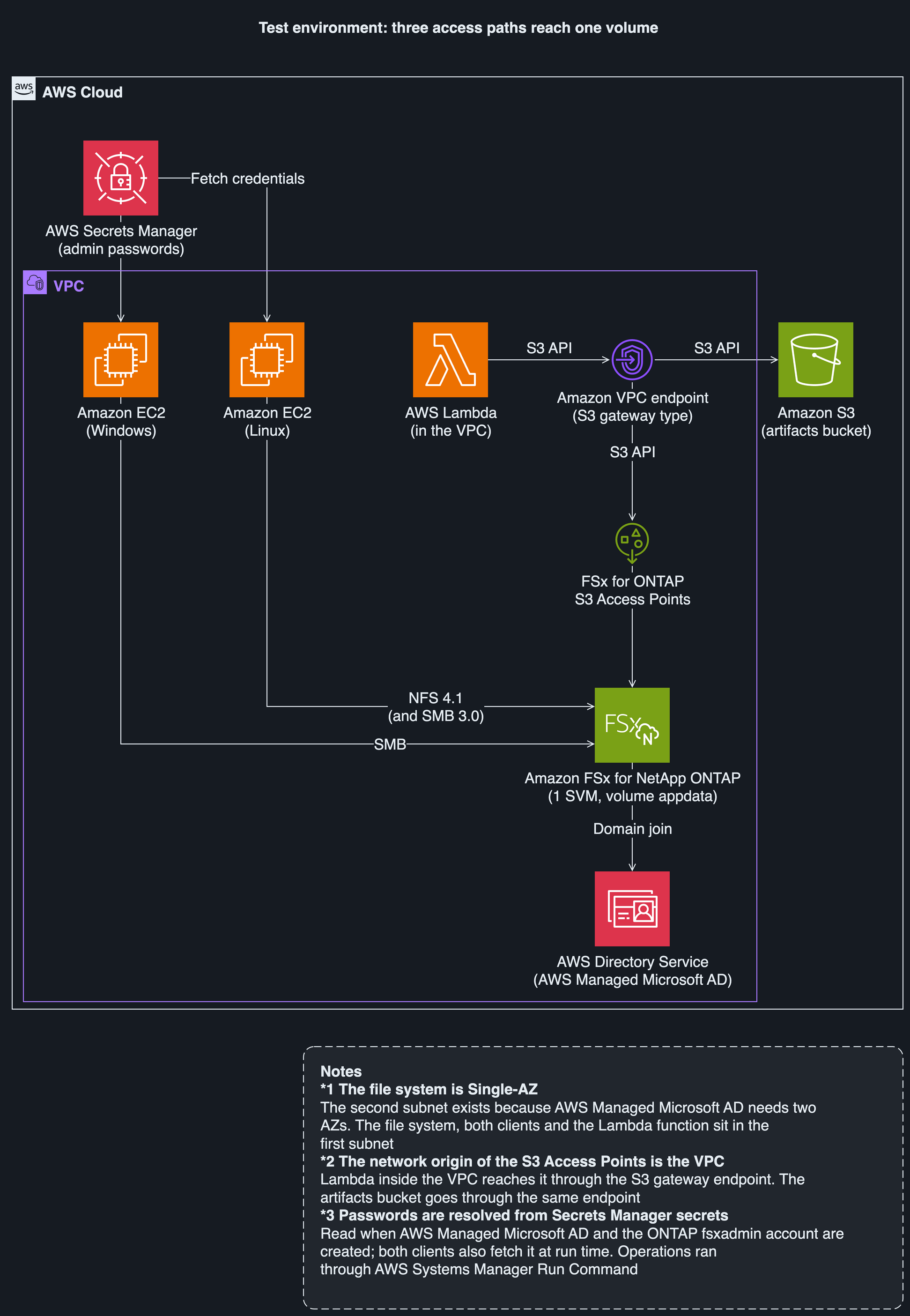
I measured three paths (Windows, Linux, Lambda) against the same volume, appdata, in the same SVM. The setup is below (as in the caveats stated at the start).
Configuration
Unless noted otherwise, the tier is verified (versions are values read from ONTAP REST and similar).
| Item | Value |
|---|---|
| Region and configuration | ap-northeast-1, SINGLE_AZ_1, 1 HA pair, 1,024 GiB SSD, 128 MBps |
| ONTAP | 9.19.1P3 (the first build was 9.19.1P2; I did not look into why it was updated) |
| SVM and volume | 1 SVM, 1 volume appdata, security style ntfs |
| Active Directory | AWS Managed Microsoft AD (Standard, 2 DCs). The directory needs 2 AZs, so I added a second subnet to the VPC |
| Windows client | Amazon EC2 t3.large. I did not record the Windows Server version |
| Linux client | Amazon EC2 t3.medium, Amazon Linux 2023 x86_64. NFS 4.1 sec=sys (uid 10001), cifs vers=3.0. I did not record the kernel or cifs-utils versions |
| Around the VPC | 6 interface endpoints, an S3 gateway endpoint, 4 Secrets Manager secrets, an Amazon S3 artifacts bucket |
| Tool versions | AIMF v0.11.0 (pinned tag), kiro-cli 2.29.1, atx 3.18.0, .NET SDK 10.0.400 (runtime 10.0.11; self-contained on Linux), AWSSDK.S3 4.0.104.2 (pinned) |
| The app, DocIntake | .NET Framework 4.8, C#, 0 NuGet dependencies, 10 .cs files, 935 lines (sum of wc -l; atx reported 15 files and 1,089 lines). Two console apps (a Worker that processes files and writes reports and index.json, and the Probe) and one class library. IFileStore has 5 methods |

Figure 2: The test environment. Arrow labels name the path or purpose (SMB, NFS 4.1, S3 API, fetch credentials, domain join). (dark theme version)
The point of the figure: all three paths reach the same volume in the same SVM.
Method
- Probe: a console app that measures five behaviors and records them as JSON
- Positive control for case-sensitivity: in addition to a lookup that refers to an existing file with different letter case, a lookup that refers to it exactly as it exists, to confirm the measurement works
- Standalone and pair: standalone runs the Probe on one machine; a pair links two machines by a shared sync ID (locking and visibility need two machines)
- Stage boundaries b0 to b3 and
check-invariant: records of the volume's state taken after each stage (b0 after stage 0, b1 to b3 after stages 1 to 3). Each record holds the volume UUID, security style, sha256 of the 6 seed files, export policy, snapshots, and snapshot locking.check-invariantcompares a later record with b0 and checks three items: the UUID, the seed sha256, and the top-level paths
Evidence labels and run ids
The labels in the tier column are as follows. verified: a value I measured in a named environment (with count and date). field-observation: a value I saw once and did not reproduce. documented: a value stated in a document whose source I read in full. carried-over: a value measured in another verification of mine that I did not measure this time. hypothesis: a guess. open: an item for which I could not find a record a reader can reproduce or a public primary source. not measured: an item I did not measure.
The main runs are below (a run id identifies one measurement).
| run id | Date | What it measured |
|---|---|---|
| s0-20261011T065443Z | 2026-10-11 | All 5 behaviors in stage 0 |
| s1-20261011T075058Z | 2026-10-11 | All 5 behaviors in stage 1 (after adding NFS) |
| s4c-20261012T034403Z | 2026-10-12 | case-sensitivity (SMB, cifs, NFS) |
| s3b-20261012T022900Z | 2026-10-12 | case-sensitivity (S3 Access Points) |
| s0w-20261012T102314Z | 2026-10-12 | Output of the old Windows Worker |
| s2m-20261012T090934Z | 2026-10-12 | 8 pairs (4 lock, 4 visibility) of the Probe converted to .NET 10 in stage 2 (Linux side; the Windows side was the earlier build) |
| s2n-20261012T104314Z | 2026-10-12 | A run that re-took the shape of the writability check (acl-evaluation) record |
| s3m-20261012T104800Z | 2026-10-12 | The Probe and Worker converted to .NET 10, on Lambda |
The source of this table is the run id naming in docs/en/reproduce.md, the same document as the stage table (I reorganized the columns).
The runs whose case-sensitivity values I invalidated are s0, s1, s2, s2f, s2g, and the first stage 3 run, s3. They had no case-sensitivity positive control, so I use none of those case-sensitivity values in any conclusion. The values of the other behaviors in those runs are valid. Source: record validity in docs/en/reproduce.md
The measurement window is 2026-10-11 to 2026-10-12. Times in the tables mix UTC and JST, and each row says which. For external unit prices and availabi...