We are excited to announce Trusted Publishing for Visual Studio Marketplace —a simpler and safer way to publish Visual Studio Code and Visual Studio extensions from GitHub Actions or Azure Pipelines without storing a long-lived Azure DevOps personal access token (PAT).
Trusted Publishing uses federated identity to verify your release workflow and grant access for the publish—no publishing secret to store or rotate.
Why Trusted Publishing?
Automated Marketplace publishing has traditionally required storing a PAT as a CI/CD secret. Trusted Publishing offers a safer alternative:
- No long-lived secrets—there is no publishing credential to store or rotate in your CI/CD system.
- Short-lived access—for GitHub Actions, Marketplace issues a temporary credential that expires after 15 minutes.
- Federated identity—Marketplace trusts a configured GitHub workflow or Azure Pipelines workload identity.
Existing PAT-based publishing continues to work, so you can adopt Trusted Publishing when you are ready.
How it works
- The CI/CD system presents its federated identity to Visual Studio Marketplace.
- Marketplace verifies the GitHub Trusted Publishing policy or the Azure Pipelines workload identity.
- The publishing tool uses the verified identity to publish the extension without a PAT.
The process is automatic when you publish with OIDC—there is no PAT to retrieve or manage.
Supported CI/CD providers
| Provider | Status | Authentication and setup |
|---|---|---|
| GitHub Actions | Supported | Create a policy on the publisher’s Trusted Publishing page and publish with GitHub OIDC. |
| Azure Pipelines | Supported | Configure a Microsoft Entra-backed WIF service connection and add its identity as a publisher contributor. No Marketplace policy is required. |
For Azure Pipelines, see configure a Microsoft Entra-backed WIF service connection and add its identity as a publisher contributor.
Get started with GitHub Actions
Create a Marketplace policy that identifies the GitHub repository and workflow allowed to publish.

1. Create a Trusted Publishing policy
- Sign in to Visual Studio Marketplace.
- Open the publisher that owns your extension.
- Select Trusted Publishing.
- Expand Create, then fill in the fields described below.
Field Value Policy name A descriptive name such as Release workflow.Repository owner The exact GitHub organization or user login that owns the repository, such as contoso.Repository The repository name without the owner, such as sample-extension.Workflow The workflow filename under .github/workflows, such aspublish.yml.Environment (optional) If the workflow uses a GitHub environment, enter its exact name, such as production. - Select Create.
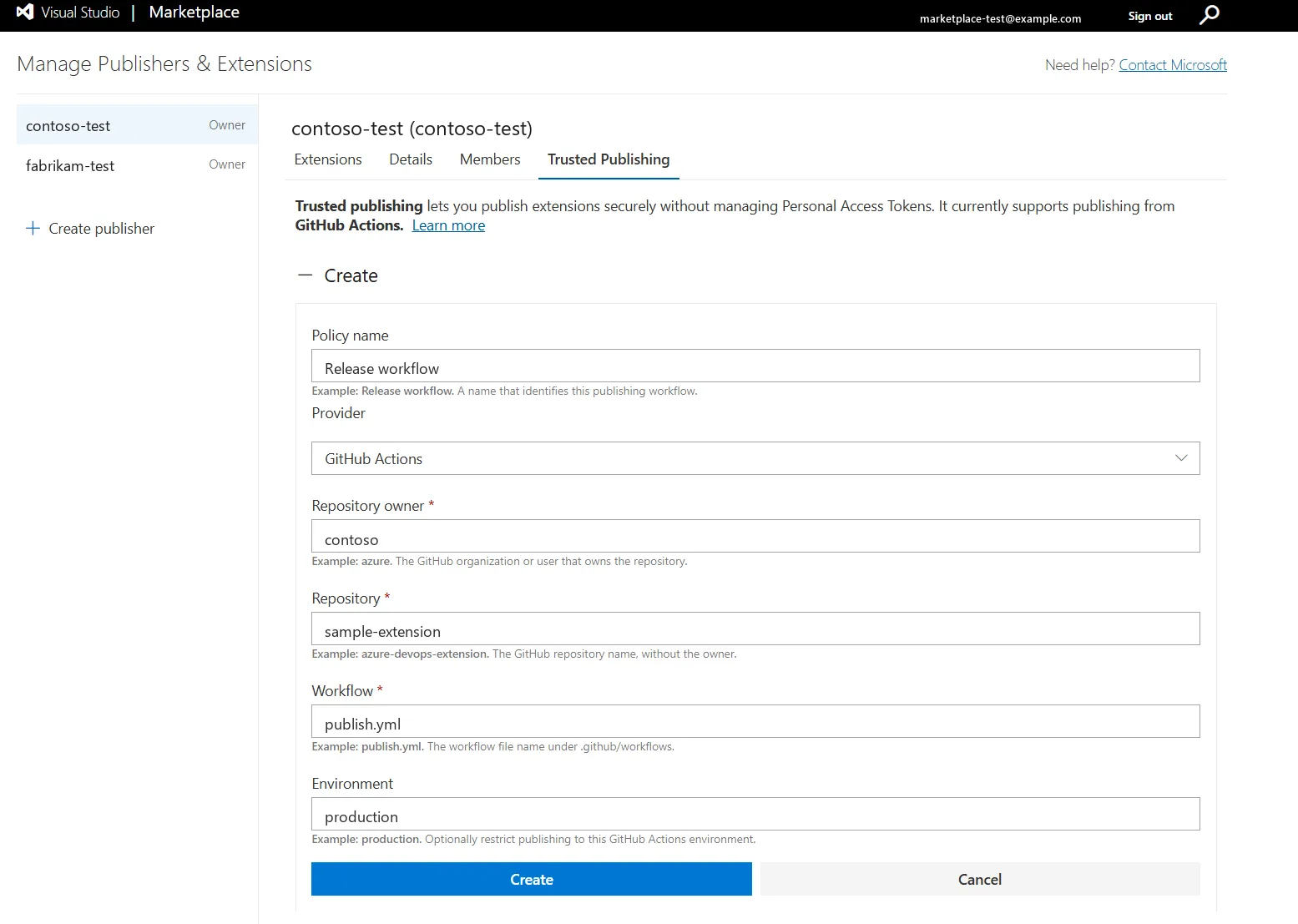
For a private repository, run the configured workflow within 48 hours of creating the policy. The first successful token exchange permanently activates the policy.
2. Publish a Visual Studio Code extension
To configure your GitHub Actions workflow and publish without a PAT, follow the Secure automated publishing to Visual Studio Marketplace guide in the Visual Studio Code documentation.
3. Publish a Visual Studio extension
To publish your Visual Studio extension from the command line, follow the Publish a Visual Studio extension via command line guide in the Visual Studio documentation.
Publishing from Azure Pipelines
Azure Pipelines uses an Azure DevOps service connection with Workload Identity Federation (WIF) instead of a GitHub Trusted Publishing policy.
Do not create a policy on the Marketplace Trusted Publishing page for Azure Pipelines.
Before publishing:
- Configure an Azure Pipelines service connection that uses Workload Identity Federation. Back the connection with either a Microsoft Entra app registration and service principal or a managed identity.
- Add that identity to your Visual Studio Marketplace publisher and grant it the Contributor role.
- Configure the publishing step to use the WIF service connection.
The pipeline can then publish Visual Studio Code or Visual Studio extensions without storing a Marketplace PAT.
GitHub policy lifecycle
GitHub policy activation differs based on repository visibility. For a private repository, a new policy is temporarily active for 48 hours. The first successful token exchange makes the policy permanently active. If the policy is not used during that period, it expires and can be reopened for another 48 hours.
You can view the status and last use of each policy from the Trusted Publishing page.
Migrating from a PAT
If your GitHub Actions workflow already publishes with vsce, migration is straightforward:
- Create a Trusted Publishing policy for the repository and workflow.
- Add
id-token: writeto the publishing job. - Update the publishing command to use OIDC.
- Run the workflow and verify that the OIDC publish succeeds.
- After the OIDC publish succeeds, remove the Marketplace PAT from the workflow and repository secrets.
We recommend keeping the PAT until you have verified the first Trusted Publishing run. After the migration succeeds, remove the unused secret so it cannot be used accidentally by another workflow step.
For Azure Pipelines, configure the WIF service connection and publisher identity first, update the publishing step to use that connection, and remove the PAT only after the federated publish succeeds. No Marketplace Trusted Publishing policy is needed.
Try Trusted Publishing Today
Trusted Publishing makes automated extension releases easier to maintain and safer by default—without requiring a long-lived publishing secret.
To get started:
- Open your publisher in Visual Studio Marketplace publisher management.
- Create a policy under Trusted Publishing.
- Update your GitHub Actions workflow to use OIDC.
- Publish your extension without a PAT.
Using Azure Pipelines instead? Follow the Azure Pipelines setup guide to publish with Workload Identity Federation (WIF), without a PAT.
For complete setup instructions and troubleshooting guidance, visit the Trusted Publishing documentation.
Thank you
Thank you to our extension publishers for investing in more secure releases. As you adopt Trusted Publishing, we would love to hear what works well and where we can improve—from configuring your first policy to publishing without a PAT.
Share your feedback in the Visual Studio Marketplace GitHub discussions.
The post Publish Visual Studio Marketplace extensions securely with Trusted Publishing appeared first on Microsoft for Developers.


