Plenty of Postgres services end up managed by application developers, whether they like it or not. Some dabble in databases on the side, and some inherited the job when the last DBA scampered off for greener pastures. Regardless, they’re put in charge of something they barely understand. Heck, that literally happened to me twice. Sometimes there never was a DBA. Sometimes, it's just you.I recently got a timely reminder of this when chatting with a colleague. Usually when it comes to Postgres, disk emergencies get traced back to the directory. For an amateur or novice DBA, the first reaction might be to purge its contents in any way possible. What is all this WAL junk, anyway? It's just for crash recovery or something, right? The logs say the archive command is failing, so I can just set to and it'll flush all that out. Easy peasy.Oh how we all wish it were that simple. WAL is the single linchpin that keeps Postgres operational at all. It's the Durability in the ACID acronym commonly associated with relational databases. In Postgres, literally every write must pass through the WAL. But why would an app dev know that? Why would anyone aside from a seasoned DBA need to know it at all?Fortunately the reality of the situation is actually incredibly easy to convey. I always like to start with something pretty much everyone has: a bank account.
Balancing the Books
A bank ledger starts with an opening balance. After that comes every deposit and every withdrawal, one line at a time, in the same order they happened. The balance printed at the bottom of a statement is a convenient aggregate summary. It's derived from the ledger, and any auditor can validate it by running the sum themselves.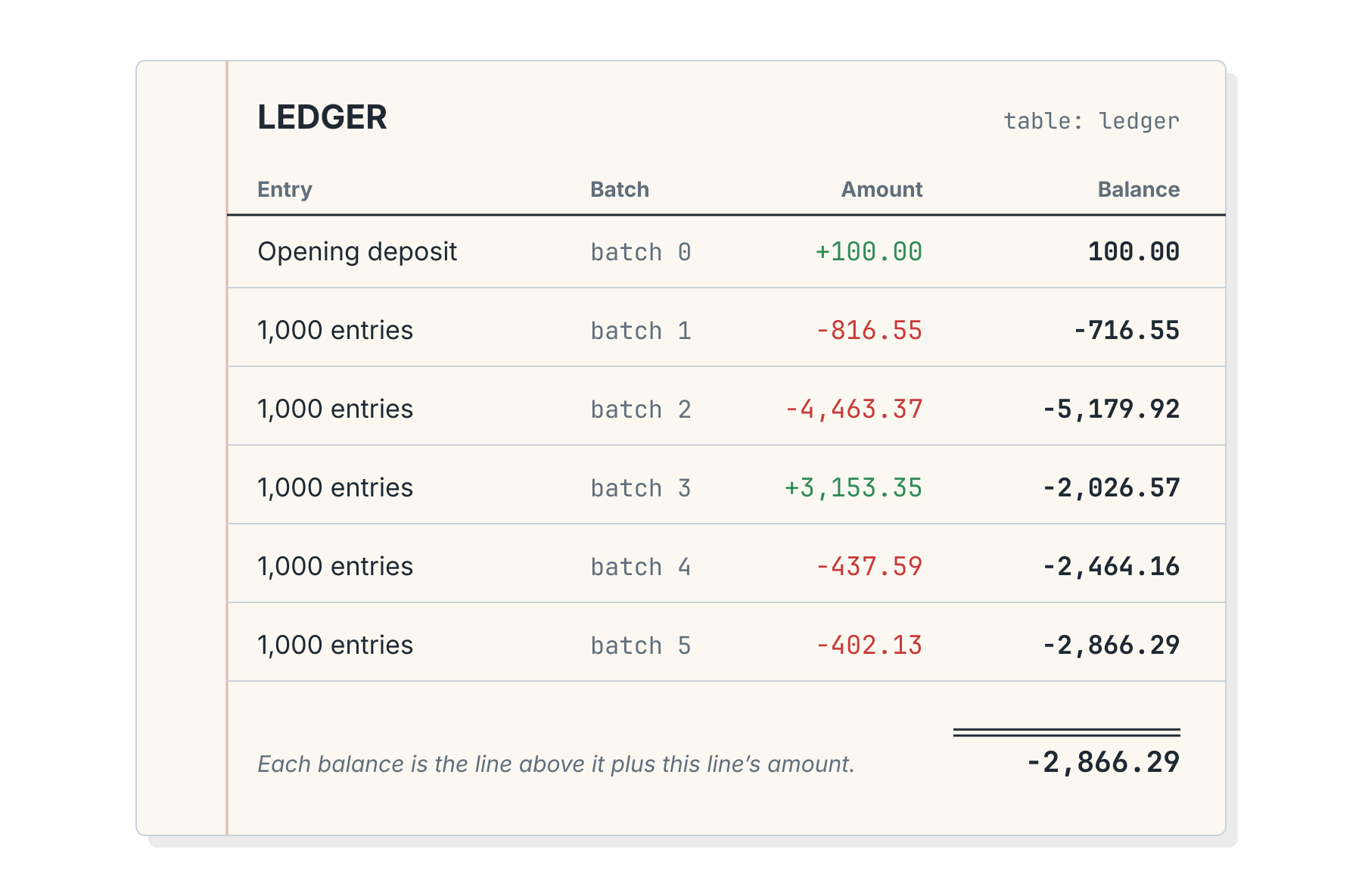 Now tear one page out of the middle of the ledger. Would you trust anything that came after? Even assuming the final total somehow survived because it was calculated earlier, who can say whether or not it's true now?Postgres works the same way. The data files holding tables and indexes are the balance, and the WAL is the ledger. See? Easy.
What Is This WAL Thing?
WAL stands for Write-Ahead Log. As for what it is, the Postgres documentation puts it like this:So every change hits the log first, and the table files catch up later. If the server crashes before that happens, Postgres can just replay the log until it does.Each entry has an address called a Log Sequence Number, or LSN. It's a byte position in one ever-growing log, so think of it as the ledger's line number. Each record points back at its predecessor, and the pg_walinspect extension will happily list them.Physically, the log is cut into 16MB files called segments, with ever-increasing names like . Those are the ledger's pages.People have been tearing those pages out for a long time. Postgres 10 renamed the directory from to , and the release notes explain why:I... may have been guilty of this myself in the past. In my defense, putting "log" in a directory name is essentially begging uninformed users to do horrible things to it. Besides that, there's obviously some mechanism preventing the WAL directory from growing forever since it's not possible to keep a running ledger of every transaction for eternity.What's cleaning up the WAL folder, and perhaps just as importantly, why?Selective Amnesia
Postgres reconciles the books by processing checkpoints. After a checkpoint completes, table files contain everything written to the WAL by that point, so crash recovery only needs WAL from the last checkpoint forward. I covered how and when checkpoints happen in Checkpoints, Write Storms, and You.It may be easier to see this in a live environment. Here's some output from a brand new instance:And we can see these files in the directory itself:Then after running a command:Where did the other files go? The log of the checkpoint has a few hints:And as we saw, segments 1-5 were all "recycled". This essentially means Postgres renamed the file for reuse as a new segment. The entire cycle looks something like this: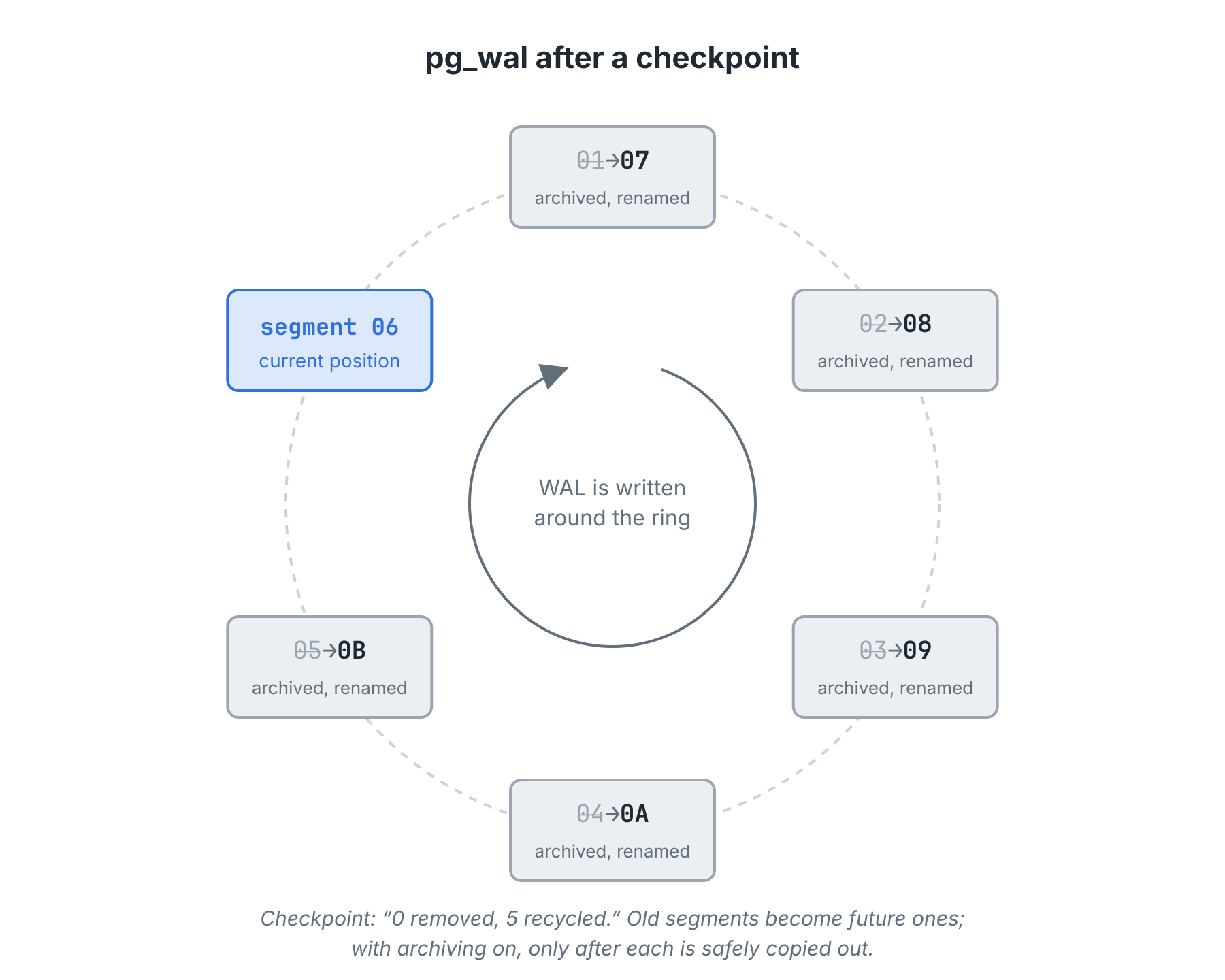 There is one notable exception here. With archiving enabled by activating , Postgres won't recycle WAL segments immediately. Instead, it executes a provided that should move the segment to a safe location. Once archived, Postgres is free to recycle or delete the WAL segment. It's a careful dance meant to guarantee each WAL file is saved for later.But why save old WAL segments if they're no longer necessary for crash recovery?
Look at this Photograph
Database backups still need old WAL files. Tools like pg_basebackup copy the data directory file by file while the server keeps running. Since writes continue during the copy, the files copied early and the files copied late reflect different moments. Any backup that requires more than a few minutes will reflect thousands of different file timestamps smeared across one "snapshot."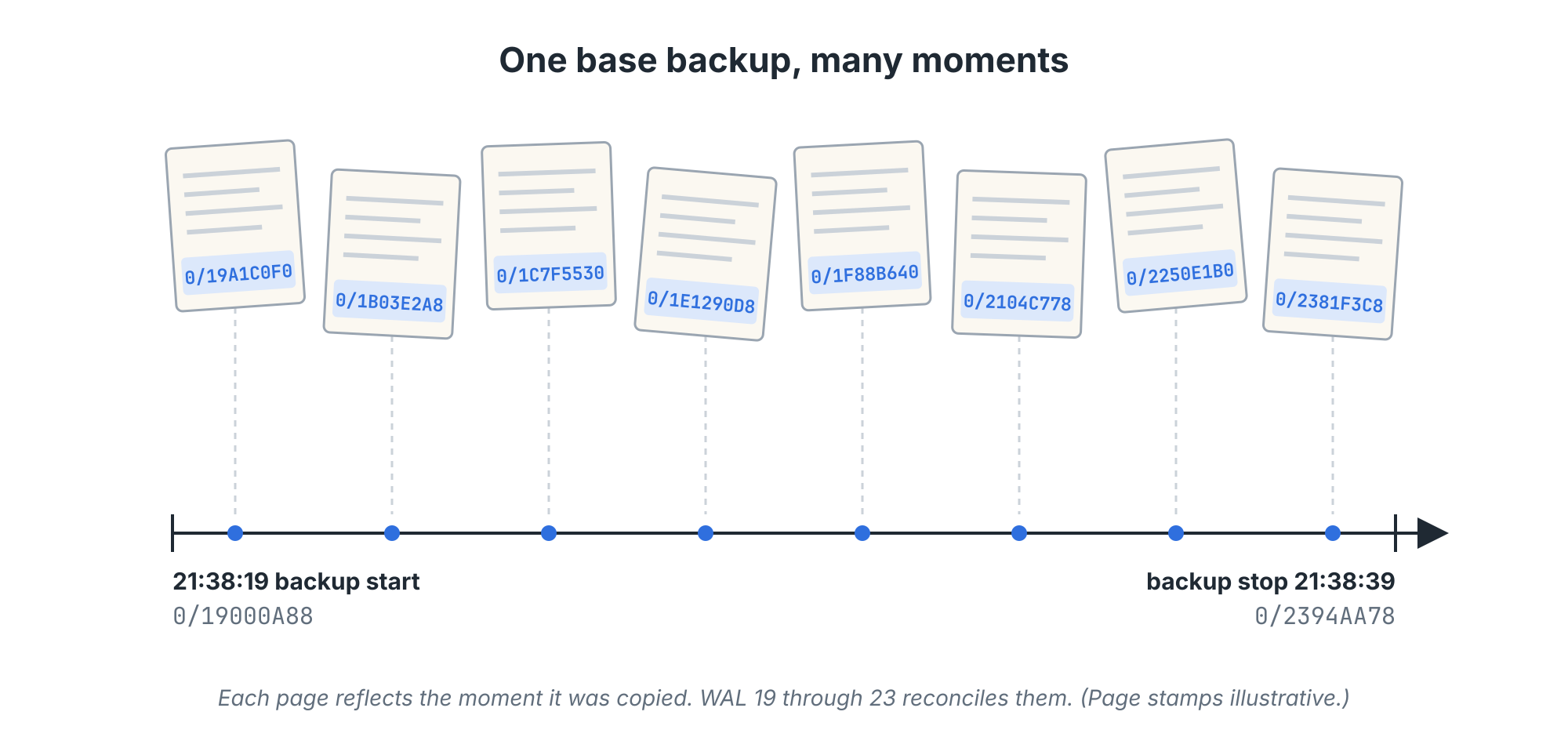 The documentation on continuous archival doesn't express much concern about this:That replay needs WAL, though. Every WAL file generated over the entire duration of the backup, in fact. Attempting to start a Postgres service pointed to a backup without these WAL files will result in an error like this:Postgres needs the pages in these WAL segments to update table and index files. Without them, the database is a long exposure photograph pointed at a busy intersection. There's no beginning or end, but a blurry mess of activity nobody can decipher.That's not a database. Even a backup's validity depends on the ledger.
Rewind and Replay
Once the minimum WAL files are applied such that the backup itself is valid, we may continue replaying segments from the archive if we want. Replaying WAL over a backup rolls it forward through time, like tracking through a video. Stopping that replay early is point-in-time recovery, or PITR. The documentation has a memorable example:That stopping point is a recovery target: a timestamp (), an LSN (), or a named restore point created with ().To have something to rewind, I built a lab table named (what else?) with an opening deposit as batch 0. Then I added five batches of 1000 random entries. Each batch got a restore point and a forced segment switch, since Postgres only archives completed segments. Like so:Then we just need three settings in and an empty file in the data directory to restore:That particular restore came back with all 5001 entries and a balance of -2866.29, matching the primary to the penny. Then I swapped for a to specify a moment between batches 3 and 4 and tried again. That produced a restore that logged to contain only batches 0 through 3. (This kind of repeated backup restore is messy, so I'll spare you the details.)In the end, we can see that WAL segments are a crucial and indispensable resource for backup restores. Without WAL segments, there's no such thing as a backup at all.One Missing Page
To better illustrate this, perhaps it would make sense to see what happens when a segment gets lost. Replay is strictly sequential. Thus segment 0F can only be applied after 0E. The PITR docs put it this way: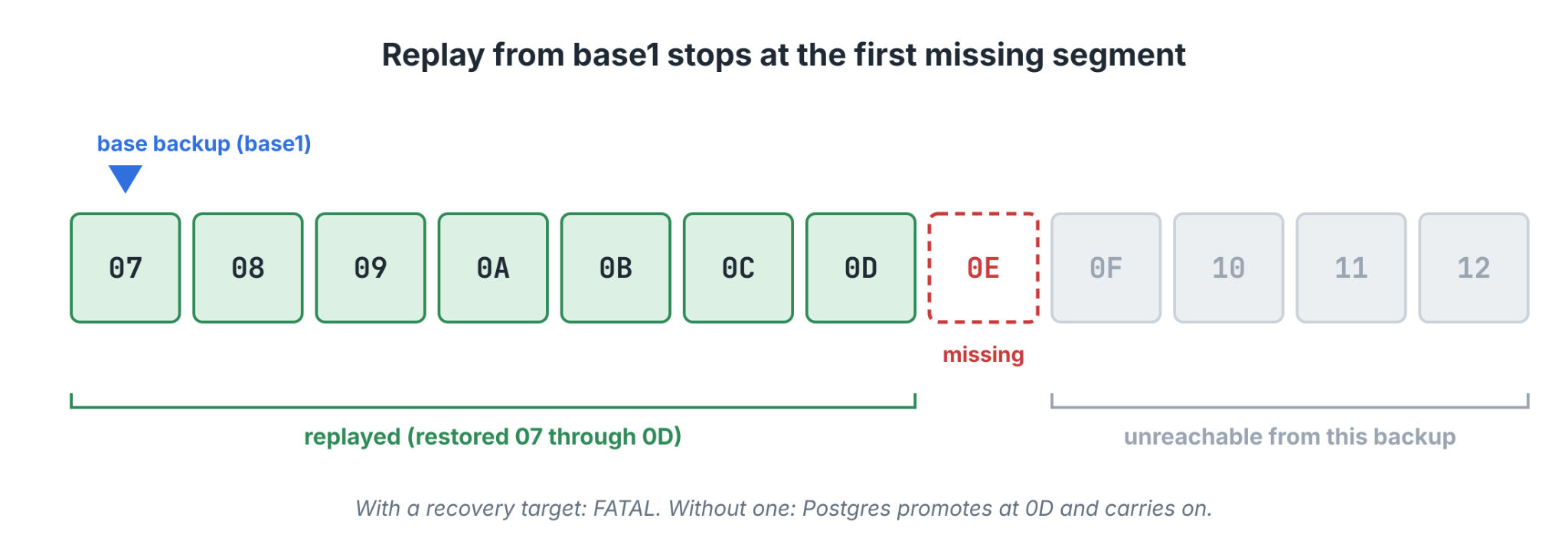 To demonstrate this, I went back to the lab and moved archived segment , the page holding batch 3, out of the archive. Then I attempted to restore the first backup with a target of . The command cheerfully reported "server started" with exit status 0.That's... not quite what the logs implied:Replay restored WAL segments 07 through 0D, asked for 0E, and got nothing. Postgres started and ran, but didn't recover to the exact point I specified due to missing WAL data. That's something we can see in the logs as a error. But what if I hadn't specified a target? Then the logs say this:Without a recovery target, Postgres simply replays until first fails to find a file. That means a missing segment looks exactly like the end of the archive. With the same hole and no target, the server selected a new timeline (a fresh branch of the ledger), promoted itself, and started accepting writes.Everything looked normal until I compared the two balances:Three thousand entries simply vanished and Postgres was none the wiser. From its perspective, it replayed all available WAL segments. Unfortunately, the gap in the sequence made it impossible to see the problem.
The Panic Button
I made the hole in the previous example by hand. Now imagine what would happen if an enterprising young DBA or unsung volunteer needed to solve an immediate crisis where Postgres is refusing to recycle WAL files. Perhaps the archive command was transmitting files to another system via scp and the target refused authentication. Maybe it was a command to stash archived segments in an S3 bucket that vanished or was unreachable.Any of these would cause the folder to grow forever, because:It's common to recommend setting to because that command always succeeds. The parameter requires a server restart to modify, so a shortcut is simply to enable archive mode, but set it to so we can use a different archive command later without restarting the server.Knowing this, or reading it in documentation or a blog somewhere, it might be tempting to change the archive command to to flush out all the backlogged WAL segments since they can't be properly archived. It's a neat trick, but:Those WAL segments that were supposed to go to the archive? Yeah, those are lost forever. We now have a gap that's tens, thousands, or even millions of transactions long. Any backup we recover will simply be unable to replay to anywhere in that zone of lost segments.Failed archive commands are a signal to fix the archive target, not discard the WAL segments. Even if that means changing the command to to move the files elsewhere until the real archive location can be addressed. Never, under any circumstances, delete or discard WAL segments if there's literally any way to avoid it. Instead:- Monitor
- pg_stat_archiver
- .
- This query covers the essentials:
- Alert on the age of
- last_archived_time
- as well as
- failed_count
- , and watch the server log.
- Leave headroom on the
- pg_wal
- volume.
- The
- max_wal_size
- setting is a target, not a limit. Keep a monitor on the
- pg_wal
- mount itself, and set an alert at a reasonable level like 80%.
- Fix the destination.
- The waiting segments then drain in seconds, with no gap.
- Move segments to a temporary location.
- An emergency mount. A hastily allocated S3 bucket. A spare server. Try to do anything to preserve these if you value the integrity of the ledger.


