Introduction
I tried MiniStack, a free local AWS emulator, and StackPort, a browser-based viewer for its resources.
 ministackorg / ministack
Ministack: Free, open-source local AWS emulator - 60+ services, Terraform compatible, real databases. Free forever. MIT licensed.

MiniStack
Free, open-source local AWS emulator. Free forever.
60+ AWS services on a single port · Multi-account & multi-region · Terraform compatible · Real databases · MIT licensed
Ministack.org · Docker Hub · LinkedIn
Why MiniStack?
LocalStack recently moved its core services behind a paid plan. If you relied on LocalStack Community for local development and CI/CD pipelines, MiniStack is your free alternative.
- 60+ AWS services emulated on a single port (4566)
- Drop-in compatible — works with
boto3, AWS CLI, Terraform, CDK, Pulumi, any SDK - Multi-account & multi-region — a 12-digit access key becomes the account, the SigV4 region scopes the state; isolated tenants and regions on one endpoint, like real AWS
- Amazon Bedrock locally — Converse / InvokeModel with AWS-exact wire shapes; point
MINISTACK_BEDROCK_PROXY_URLat Ollama, llama.cpp, or vLLM and get real completions through the Bedrock API - Real infrastructure — RDS spins up actual Postgres/MySQL containers, ElastiCache spins…
DaviReisVieira / stackport
Open-source universal AWS resource browser for MiniStack, Floci, LocalStack, Moto, and real AWS

StackPort
Universal AWS resource browser for local emulators and real AWS accounts.
Browse, inspect, and manage resources across 35 AWS services with dedicated UIs for S3, DynamoDB, Lambda, SQS, IAM, EC2, CloudWatch Logs, and Secrets Manager.

Screenshots
Dashboard — Service overview with resource counts and health status 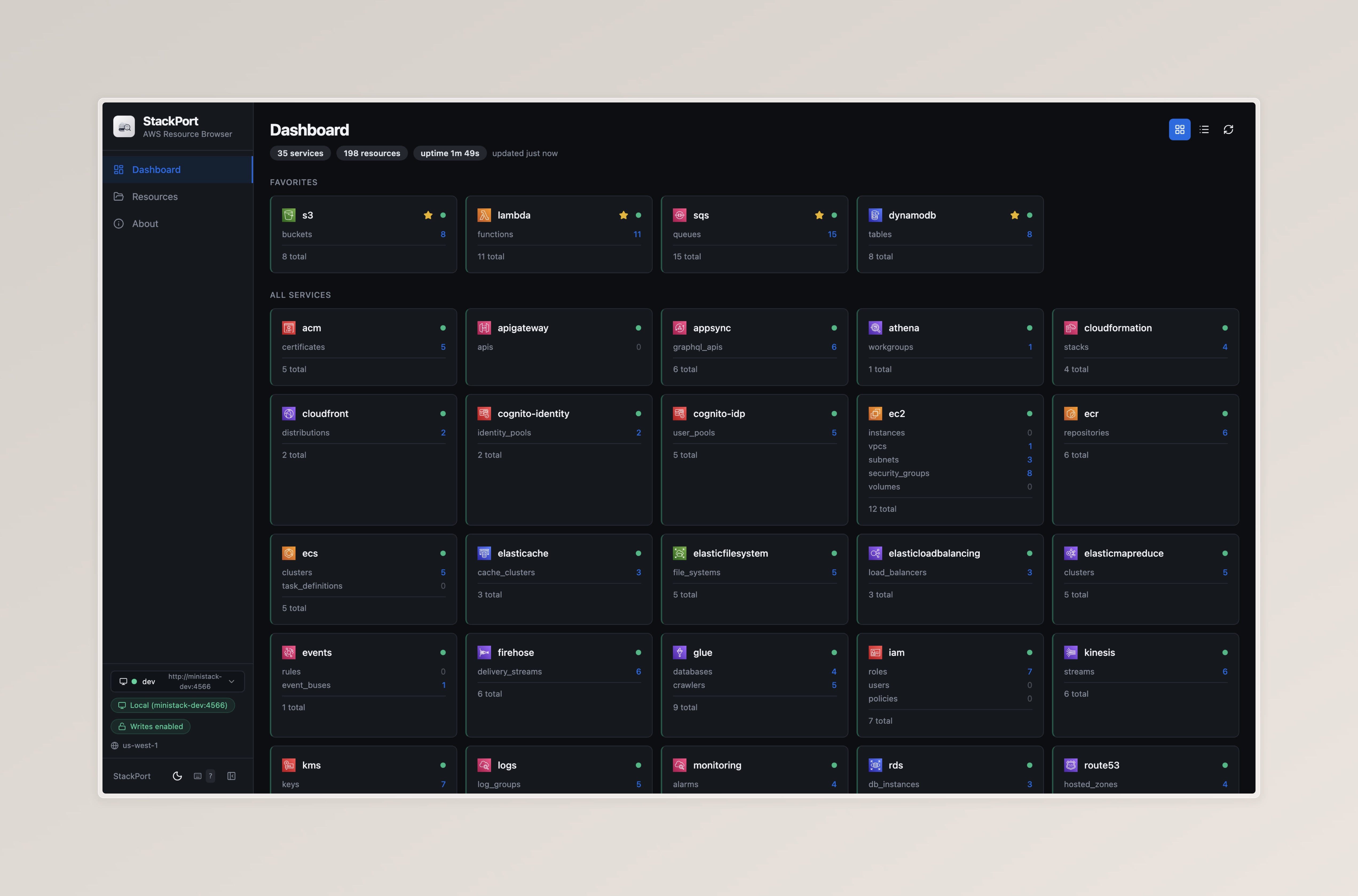
Lambda Browser — Function list with config, aliases, versions, event sources, and invocation panel 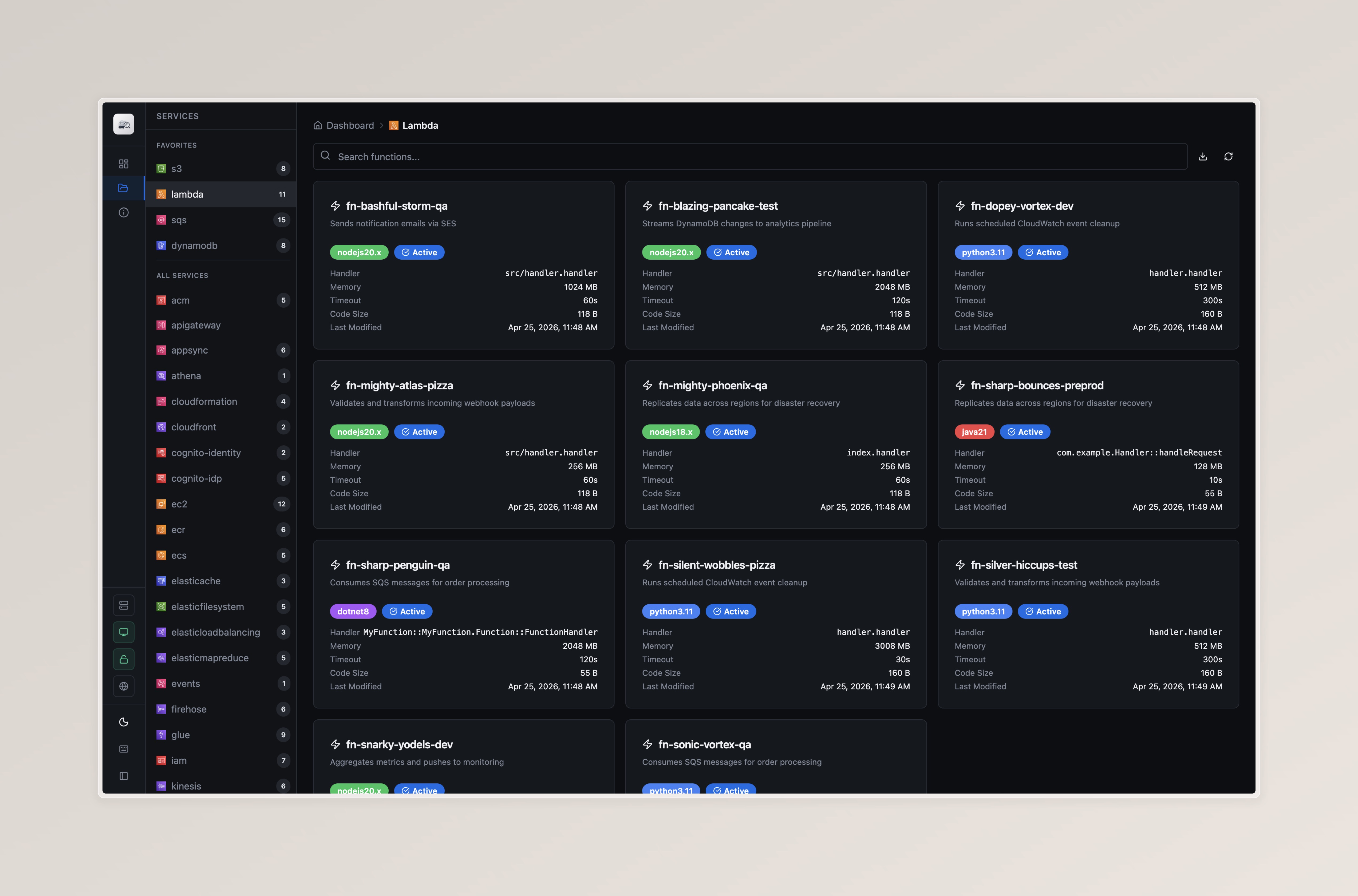
S3 Browser — File browser with upload, download, folder navigation, and tagging 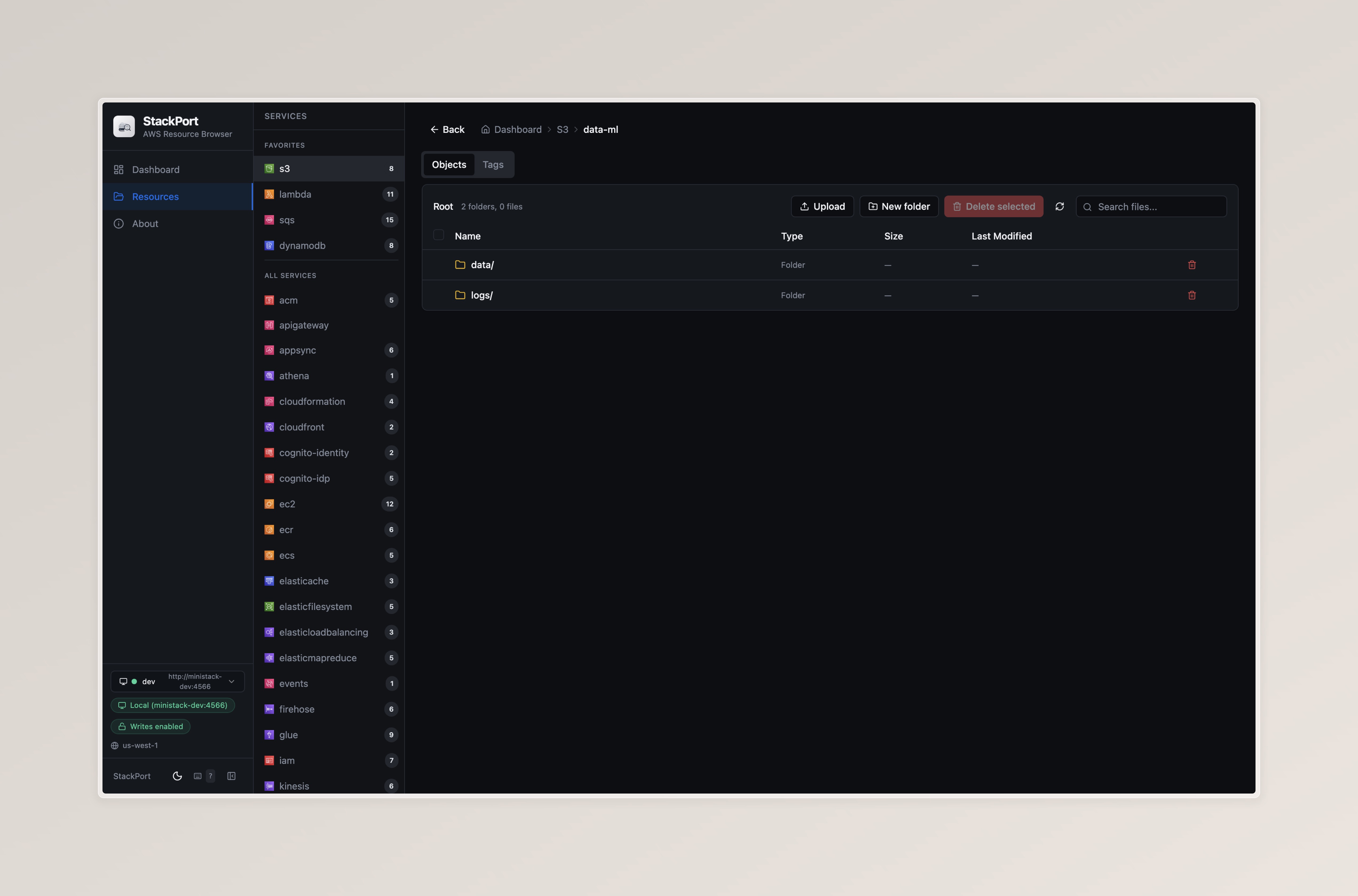
Features
- Browse and inspect resources across 35 AWS services
- 8 dedicated service UIs for S3, DynamoDB, Lambda, SQS, IAM, EC2, CloudWatch Logs, and Secrets Manager
- Write operations — upload/delete S3 objects, query DynamoDB, invoke Lambda, send/receive SQS messages
- Real AWS support — connect to real AWS accounts with read-only mode by default
- Per-endpoint authentication — default credentials, AWS profiles (SSO/AssumeRole), or static keys per endpoint
- Guided lessons — hands-on AWS tutorials that run inside the console and…
This article builds the following pipeline:
EventBridge Scheduler invokes a Lambda function on a schedule
The Lambda function calls an API and publishes the result to SNS
SNS triggers a second Lambda function, which posts to a Slack Incoming Webhook
The API key and the Webhook URL are stored as SecureString parameters in SSM Parameter Store
What Are MiniStack and StackPort?
MiniStack
MiniStack is a local AWS emulator under the MIT license. You can use more than 60 AWS services directly from the AWS CLI, boto3, Terraform, and CDK.

MiniStack — The Best AWS Emulator | Free Open-Source LocalStack Alternative
The best AWS emulator and the best alternative to LocalStack. 60+ AWS services free forever — real Postgres, Redis, Docker containers, full Terraform / CDK / Pulumi support. MIT licensed.
 ministack.org
StackPort
StackPort is a tool for browsing the resources of local emulators and real AWS accounts in a browser. It connects to emulators other than MiniStack (such as LocalStack) and to real AWS accounts.

StackPort: open-source web console for AWS emulators
StackPort is a free, open-source web console for MiniStack, Floci, LocalStack, Moto and real AWS. Browse 35 services, use 13 dedicated views, and learn AWS with guided lessons. One Docker image.
 stackport.cloud
StackPort lets you browse the resources of 35 services.
Eight of them have dedicated screens: S3, DynamoDB, Lambda, SQS, IAM, EC2, CloudWatch Logs, and Secrets Manager. For example, CloudWatch Logs lets you drill down from log groups to log streams to log events.
The other services (such as SSM in this article) are shown as a searchable resource table with a JSON detail view.
Note that StackPort does not support EventBridge Scheduler. The events service only shows EventBridge rules and event buses, so I check the schedule with the CLI.
Architecture
Locally, I run a mock server (mock-api) in place of the external API. For Slack, I use a real Incoming Webhook, with separate channels for the local and AWS environments.

Two things differ between the local environment and real AWS:
External API:
mock-apilocally, API Gateway (MOCK integration) on real AWS. Both returnGET /v1/statusSlack destination:
#notify-demo-locallocally,#notify-demo-awson real AWS
The directory structure is as follows. Terraform is split into a shared module (modules/notify) and one directory per environment (environments/local and environments/aws). Each environment has its own state.
code/ ├── lambda/ # Shared: the same code runs locally and on real AWS │ ├── fetch_status/ │ │ └── app.py │ └── notify_slack/ │ └── app.py ├── mock-api/ # Local only: mock server standing in for the external API │ ├── Dockerfile │ └── server.py ├── scripts/ │ ├── put-parameters-aws.sh # AWS only: registers parameters in the real SSM │ └── put-parameters.sh # Local only: registers parameters in MiniStack's SSM ├── terraform/ │ ├── environments/ │ │ ├── aws/ # For real AWS: points at real AWS │ │ │ ├── main.tf │ │ │ ├── outputs.tf │ │ │ ├── providers.tf │ │ │ ├── terraform.tfvars │ │ │ ├── terraform.tfvars.example │ │ │ └── variables.tf │ │ └── local/ # For local: points at MiniStack │ │ ├── main.tf │ │ ├── outputs.tf │ │ ├── providers.tf │ │ ├── terraform.tfvars │ │ ├── terraform.tfvars.example │ │ └── variables.tf │ └── modules/ │ └── notify/ # Shared: Lambda, SNS, Scheduler, IAM, and more │ ├── main.tf │ ├── outputs.tf │ ├── variables.tf │ └── versions.tf └── docker-compose.yml # Local only: starts MiniStack, StackPort, and mock-api Building the Local Environment
You need Docker (Docker Desktop, OrbStack, and so on), Terraform, and the AWS CLI.
Step 1: Start MiniStack, StackPort, and the Mock Server
Start three containers with docker-compose.yml.
services: ministack: image: ministackorg/ministack:latest ports: - "4566:4566" environment: - MINISTACK_REGION=ap-northeast-1 healthcheck: test: [ "CMD", "python", "-c", "import urllib.request; urllib.request.urlopen('http://localhost:4566/_ministack/health')", ] interval: 5s timeout: 3s retries: 5 stackport: image: davireis/stackport:latest ports: - "8080:8080" environment: - AWS_ENDPOINT_URL=http://ministack:4566 - AWS_REGION=ap-northeast-1 - AWS_ACCESS_KEY_ID=test - AWS_SECRET_ACCESS_KEY=test healthcheck: test: [ "CMD", "python", "-c", "import urllib.request; urllib.request.urlopen('http://localhost:8080/api/health')", ] interval: 10s timeout: 3s retries: 3 restart: unless-stopped depends_on: ministack: condition: service_healthy # Mock server standing in for the external API mock-api: build: ./mock-api ports: - "8000:8000" environment: - EXPECTED_API_KEY=local-dummy-api-key The three containers are:
-
ministack: the local AWS emulator. It accepts AWS API calls on port4566 -
stackport: a web UI for browsing MiniStack's resources. It opens on port8080 -
mock-api: a mock server standing in for the external API. It runs on port8000
mock-api is written with only the Python standard library. It has one endpoint that validates the x-api-key header and returns a status.
def do_GET(self): if self.path == "/v1/status": if self.headers.get("x-api-key") != EXPECTED_API_KEY: return self._send(403, {"message": "Forbidden"}) return self._send(200, {"status": "ok"}) return self._send(404, {"message": "not found"}) Start the containers.
cd code docker compose up -d --build Open http://localhost:8080 in a browser to see the StackPort dashboard.

Step 2: Register SecureString Parameters in SSM Parameter Store
I register the API key and the Webhook URL outside Terraform.
If you create them as aws_ssm_parameter resources in Terraform, the values remain in the state file in plain text. Write-only arguments (value_wo) in Terraform 1.11 and later keep them out of the state, but I don't use them here.
I prepared a script (scripts/put-parameters.sh) to register them.
#!/usr/bin/env bash set -euo pipefail : "${SLACK_WEBHOOK_URL:?Set SLACK_WEBHOOK_URL}" export AWS_ACCESS_KEY_ID=test export AWS_SECRET_ACCESS_KEY=test export AWS_DEFAULT_REGION=ap-northeast-1 ENDPOINT=http://localhost:4566 aws --endpoint-url="$ENDPOINT" ssm put-parameter \ --name /notify-demo/api-key \ --type SecureString \ --value local-dummy-api-key \ --overwrite aws --endpoint-url="$ENDPOINT" ssm put-parameter \ --name /notify-demo/slack-webhook-url \ --type SecureString \ --value "$SLACK_WEBHOOK_URL" \ --overwrite For the Webhook URL, I use an Incoming Webhook issued for a Slack channel dedicated to local testing (#notify-demo-local).
SLACK_WEBHOOK_URL=<Webhook URL of the local channel> ./scripts/put-parameters.sh Running the script adds the parameters.

The displayed value is ENCRYPTED: followed by a base64 string. It is not encrypted with KMS, and anyone can decode it back to the original value, so be careful when sharing screenshots.

Step 3: Write the Lambda Code
This is the Lambda function that calls the API (fetch_status). It gets the API key from SSM and publishes the API response to SNS.
import json import os import urllib.request import boto3 ssm = boto3.client("ssm") sns = boto3.client("sns") API_BASE_URL = os.environ["API_BASE_URL"] API_KEY_PARAM = os.environ["API_KEY_PARAM"] RESULT_TOPIC_ARN = os.environ["RESULT_TOPIC_ARN"] _api_key = None def get_api_key(): # Fetch from SSM only on a cold start; use the cache afterwards global _api_key if _api_key is None: res = ssm.get_parameter(Name=API_KEY_PARAM, WithDecryption=True) _api_key = res["Parameter"]["Value"] return _api_key def handler(event, context): req = urllib.request.Request( f"{API_BASE_URL}/v1/status", headers={"x-api-key": get_api_key()}, ) # 4xx/5xx raise HTTPError, which makes the Lambda invocation fail with urllib.request.urlopen(req, timeout=10) as res: result = json.loads(res.read()) print(f"API status: {result['status']}") sns.publish( TopicArn=RESULT_TOPIC_ARN, Subject="API status check", Message=json.dumps(result, ensure_ascii=False), ) return result This is the Lambda function for Slack notifications (notify_slack). It extracts the SNS message and posts it to the Webhook.
def handler(event, context): for record in event["Records"]: result = json.loads(record["Sns"]["Message"]) now = datetime.now().astimezone().strftime("%Y-%m-%d %H:%M:%S %Z") text = f":white_check_mark: API status: {result['status']} ({now})" req = urllib.request.Request( get_webhook_url(), data=json.dumps({"text": text}).encode(), headers={"Content-Type": "application/json"}, method="POST", ) with urllib.request.urlopen(req, timeout=10): pass print(text) Neither piece of code contains any MiniStack-specific endpoint configuration. MiniStack injects AWS_ENDPOINT_URL into the Lambda execution environment, so boto3 automatically points at MiniStack. The same code can be deployed to real AWS as is.
Step 4: Create the Resources with Terraform
The resources live in the shared module (terraform/modules/notify/main.tf). I don't show every resource. Instead, I excerpt the points I designed to work on both MiniStack and real AWS.
The external API URL is passed through the module variable api_base_url.
resource "aws_lambda_function" "fetch_status" { function_name = local.fetch_name role = aws_iam_role.fetch_status.arn runtime = "python3.14" handler = "app.handler" filename = data.archive_file.fetch_status.output_path source_code_hash = data.archive_file.fetch_status.output_base64sha256 timeout = 30 environment { variables = { API_BASE_URL = var.api_base_url API_KEY_PARAM = local.api_key_param RESULT_TOPIC_ARN = aws_sns_topic.result.arn } } depends_on = [aws_cloudwatch_log_group.fetch_status] } terraform/environments/ contains one directory per environment (local and aws). Each has a main.tf that calls the shared module and its own environment-specific settings.
The only differences are providers.tf, which decides the connection target, and terraform.tfvars, which decides the external API URL.
Because the directories are separate, the state is also separate for each environment.
In terraform/environments/local/providers.tf, the provider points only the services I use at MiniStack.
provider "aws" { access_key = "test" secret_key = "test" region = "ap-northeast-1" skip_credentials_validation = true skip_metadata_api_check = true skip_requesting_account_id = true endpoints { iam = "http://localhost:4566" lambda = "http://localhost:4566" logs = "http://localhost:4566" scheduler = "http://localhost:4566" sns = "http://localhost:4566" ssm = "http://localhost:4566" sts = "http://localhost:4566" } } These are the settings that make it work with MiniStack:
access_key,secret_key: dummy values (test)region: the region to deploy toskip_credentials_validation: skips validating credentials through the STS APIskip_metadata_api_check: skips the check against the AWS metadata APIskip_requesting_account_id: skips retrieving the account IDendpoints: points each service at MiniStack. Specify only the services you use
The local directory (terraform/environments/local/main.tf) calls the module. The external API URL is passed through the variable api_base_url.
module "notify" { source = "../../modules/notify" region = "ap-northeast-1" api_base_url = var.api_base_url } The variable's value goes in terraform/environments/local/terraform.tfvars. Because this file is not managed in Git, create it by copying the template (terraform.tfvars.example). The Lambda function runs inside the MiniStack container, so it reaches mock-api by its Compose service name.
api_base_url = "http://mock-api:8000" Apply it.
cd terraform/environments/local cp terraform.tfvars.example terraform.tfvars # Rewrite <API ID> in terraform.tfvars terraform init terraform apply Here is the result. The resources are created in MiniStack's default account ID (000000000000).
$ terraform apply module.notify.data.archive_file.notify_slack: Reading... module.notify.data.archive_file.fetch_status: Reading... module.notify.data.archive_file.notify_slack: Read complete after 0s [id=68fb7c506afbeeab169fb65494efc63dd8acba90] module.notify.data.archive_file.fetch_status: Read complete after 0s [id=013b111cb8285884b651e501fd6f84ad373f787a] module.notify.data.aws_iam_policy_document.lambda_assume: Reading... module.notify.data.aws_caller_identity.current: Reading... module.notify.data.aws_iam_policy_document.lambda_assume: Read complete after 0s [id=2690255455] module.notify.data.aws_caller_identity.current: Read complete after 0s [id=000000000000] module.notify.data.aws_iam_policy_document.scheduler_assume: Reading... module.notify.data.aws_iam_policy_document.notify_slack: Reading... module.notify.data.aws_iam_policy_document.scheduler_assume: Read complete after 0s [id=644537899] module.notify.data.aws_iam_policy_document.notify_slack: Read complete after 0s [id=2364181876] Terraform used the selected providers to generate the following execution plan. Resource actions are indicated with the following symbols: + create <= read (data resources) Terraform will perform the following actions: # module.notify.data.aws_iam_policy_document.fetch_status will be read during apply # (config refers to values not yet known) <= data "aws_iam_policy_document" "fetch_status" { + id = (known after apply) + json = (known after apply) + minified_json = (known after apply) + statement { + actions = [ + "ssm:GetParameter", ] + resources = [ + "arn:aws:ssm:ap-northeast-1:000000000000:parameter/notify-demo/api-key", ] } + statement { + actions = [ + "sns:Publish", Source:https://dev.to/aws-builders/trying-ministack-and-stackport-110iRelated posts

The Scariest Part of "Skynet Mode" Is Your Own Unauthenticated Endpoint

pgvector for Beginners: Add Semantic Search to PostgreSQL

Vibhor Kumar: Autonomous Postgres at PGConf.EU 2026: From Scripts to Self-Driving, and the Primitives in Between

From one command to a live app on a $5 VPS

Database Transaction là gì? Phân biệt Transaction và SQL thông thường
