The uncomfortable question
A few days ago, a customer asked me a question that sounded simple: “Argo CD said the sync succeeded, so why didn’t our migration run?” They had pushed a release while a deny sync window was active. When the window opened, five regional Applications rolled out the same commit. Three of them ran the database migration. Two did not, and the new code spent the next 36 to 44 minutes talking to a schema it did not understand.
My first instinct was to blame something specific to their setup. I was wrong. It took me two days, a throwaway lab, and a careful read of the Argo CD source to see that this is not bad luck. It is a race, and with the right timing, anyone can lose it.
Synced, healthy, and wrong
What bothered me most was how normal everything looked. The two broken Applications were Synced and Healthy on the new commit. Their last operation said “successfully synced (all tasks run)”. If you only looked at the UI, you would have signed off on the release.
The setup itself was ordinary. One service, five regions, one Application per region, automated sync with prune and self-heal turned on. Production sat behind a deny window outside business hours, and the migration ran as a Sync hook Job, which is exactly how many of us were taught to do it.
The only clue was buried in the controller log. The two bad operations listed thirteen specific resources and carried a self-heal attempt count of one. In other words, Argo CD had not deployed a release. It had healed drift, and healing drift never runs hooks.
A lab you can break on purpose
I don’t trust an explanation until I can make the failure happen on demand, so I built the smallest setup I could.
The app was as plain as I could make it. One Application with automated sync, prune, and self-heal. A ConfigMap and a Deployment that carry a release string, so every release makes the app OutOfSync. And a migration that runs as a Sync hook, labelled with its release so I could see at a glance which one last ran:
apiVersion: batch/v1 kind: Job metadata: name: db-migration labels: release: "v11" annotations: argocd.argoproj.io/hook: Sync argocd.argoproj.io/hook-delete-policy: BeforeHookCreation spec: backoffLimit: 0 template: spec: restartPolicy: Never containers: - name: migrate image: busybox:1.36 command: ["sh", "-c", "echo migrating schema to v11; sleep 3"]The last piece was a deny window on the project, four minutes long and starting at the current minute, so I knew to the second when it would close.
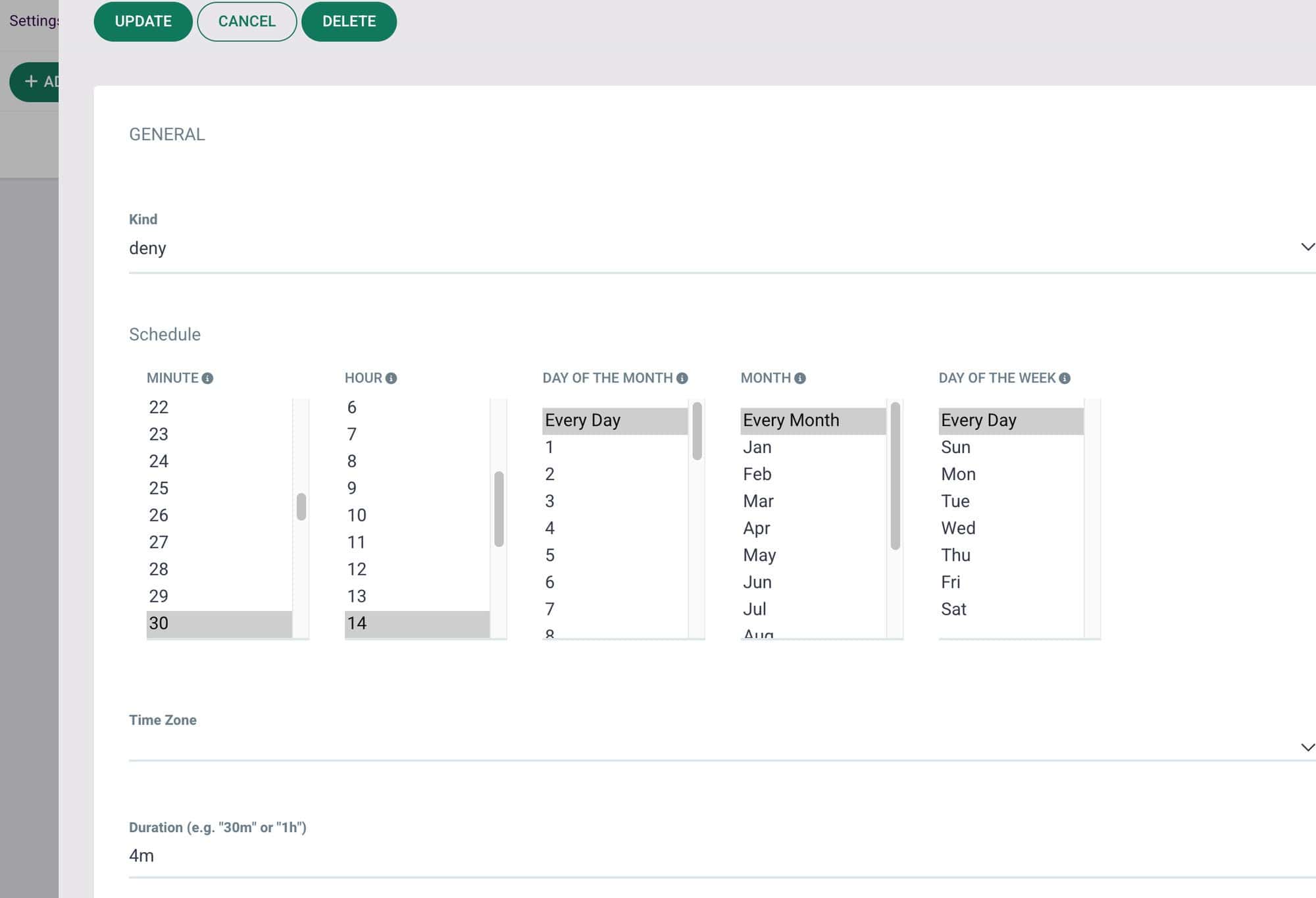
My first attempt did not reproduce anything, and that turned out to be the most useful run of the day. The app’s periodic refresh landed in the same second as my trigger, won the race, and did a perfectly correct full sync. So I changed the script. I pushed release v11 while the window was active, and refreshed the app fifteen seconds before the close to push its next periodic refresh a couple of minutes out.
The app synced v11 in one second, and the UI looked spotless.
Then I opened the migration Job. It still said release: v10.
I reproduced it five times out of six. The failure was not rare. It only needed the wrong event to arrive first.
The first refresh wins
With debug logging on, the story was right there. Argo CD refreshes an Application for two very different reasons. A level-2 refresh comes from the reconciliation timer, roughly every two to three minutes, and compares the app against Git. A level-1 refresh comes from a change to a managed object and reuses what the controller already knows. When a window closes, nothing announces it. The next refresh of either kind simply finds that syncing is allowed again, and whichever kind arrives first decides what happens next.
During the window, the timer-driven refreshes keep comparing the new commit and record it in status.sync.revision, while the last real sync stays on the old commit. A level-1 refresh then uses that same recorded revision as the one to compare, checks it against itself in evaluateRevisionChanges, and concludes there are no changes. With no changes, alreadyAttemptedSync only compares the Application’s source, which has not changed either, so the controller decides it already synced this revision. With self-heal on, that means healing drift: a sync of only the out-of-sync resources, which is a partial sync, which skips hooks and writes no history.
A timer-driven refresh compares against targetRevision instead, notices that the last synced revision is older, and runs a normal full sync with hooks. The bug fits in one sentence. On the level-1 path, the last compared revision is mistaken for the last synced one.
A hook is not a guarantee
It is tempting to reach for a quick fix inside the hook model. Make the migration a PreSync hook instead of a Sync hook. Turn on the newer RunHooksOnPartialSync option. Shorten the window. From what I read in the code, none of these change the outcome. A partial sync skips every hook type, the new option is ignored for automated syncs, and self-heal is automated by definition. The race happens at every window close, whatever its length. I didn’t test these three, but the code leaves little room for doubt.
The real lesson is broader than this bug. A hook runs when a particular kind of operation runs. If the release can reach the cluster through any other kind of operation, the hook is a hope, not a guarantee.
Make the migration part of the desired state
The fix I now recommend is to stop treating the migration as a side effect of syncing and make it part of what gets synced. Remove the hook annotations, give the Job a sync wave that runs before the app, and give it a name that changes every release.
apiVersion: batch/v1 kind: Job metadata: name: db-migration-v11 # change per release annotations: argocd.argoproj.io/sync-wave: "-1"Now the migration is an ordinary managed resource. A new release brings a Job that does not exist yet, so any sync, partial or full, sees it as missing and applies it, and Argo CD waits for that wave to be healthy before it touches the next one. In my lab, the wave version went through the exact broken self-heal path, and the migration still finished, one second before the new ConfigMap and Deployment were applied. The previous release’s Job was pruned on the way.
There are a few details worth getting right. Use a unique name per release, such as the image tag in a Helm template, because a Job’s pod template is immutable. Keep prune on so old Jobs are cleaned up. Don’t set ttlSecondsAfterFinished, or Kubernetes will delete the Job, self-heal will see a missing resource, and your migration will run again. Keep migrations idempotent anyway. And try a deliberately failing migration in staging before you rely on this, because that is the one case I did not test.
Or let the timer decide
If changing every chart is not an option this week, there is a blunter tool. Turn off self-heal on the apps that run migrations.
syncPolicy: automated: prune: true selfHeal: falseI ran two apps through the same window to compare. Both made the same faulty “no changes” decision. The one with self-heal on deployed v11 without its migration. The one with self-heal off logged “Skipping auto-sync: most recent sync already to […]” and simply waited. About two minutes later, its timer-driven refresh compared against the real last sync and ran a full sync with the hook, and the v11 migration finished.
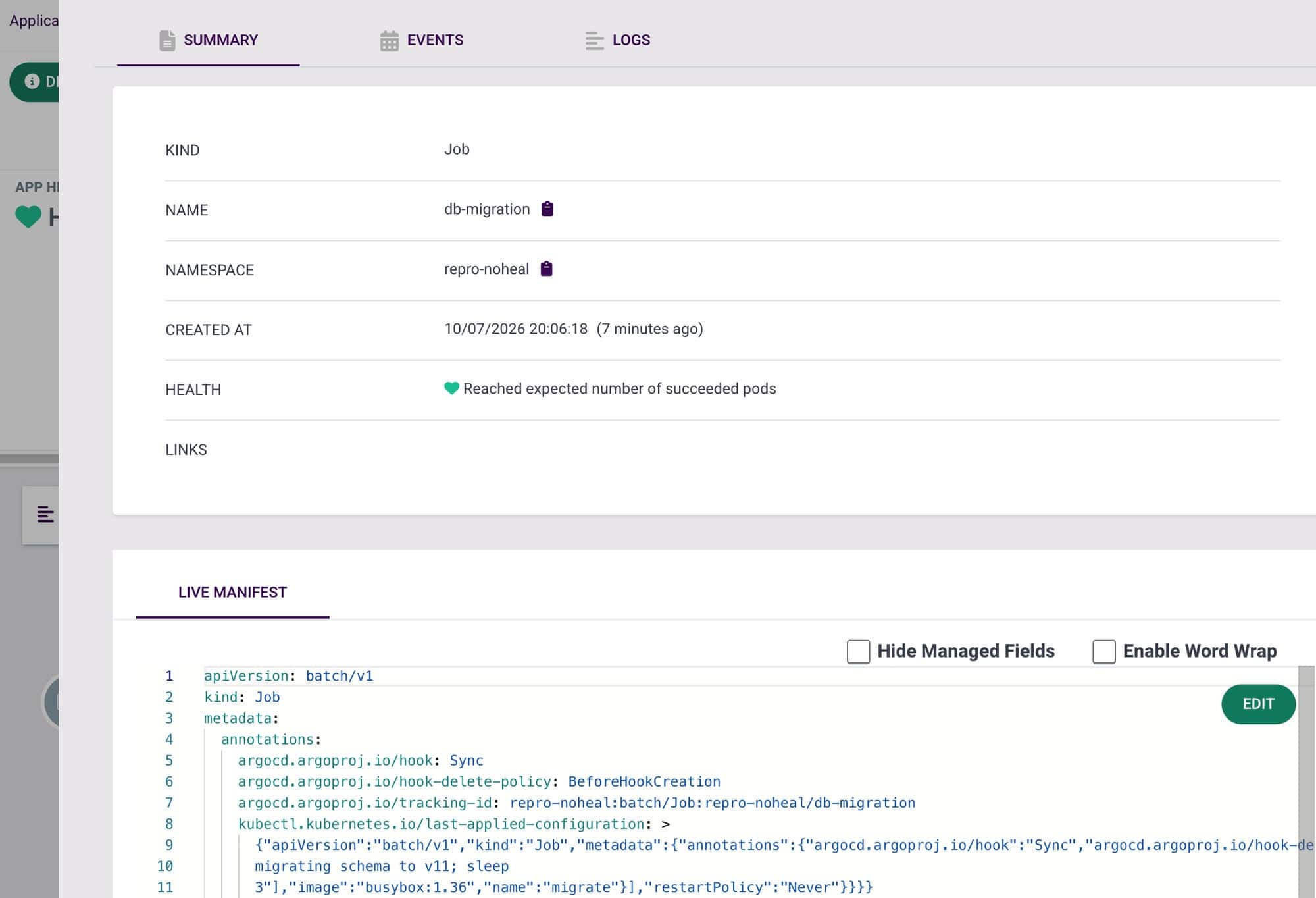
No manual sync, and no window of mismatched code and schema, because the app stayed entirely on the old release while it waited. The price is drift correction. Anyone who edits a resource by hand now leaves it OutOfSync until the next commit.
Trust the sync, not the timing
Sync windows, self-heal, and hooks are each reasonable on their own. Together they leave a gap that opens at every window close, and whether you fall into it depends on which event reaches the controller first. I don’t think you should have to win a race to get a correct release.
So I stopped letting a hook be the only thing that runs a migration. If the schema change is part of the desired state, every path that syncs the release also syncs the migration. We do not need to trust the timing. We need to trust what we put in Git.



