Amazon Aurora DSQL is a serverless, distributed relational database that stays PostgreSQL-compatible while providing active-active high availability and strong consistency across multiple Availability Zones and Regions. It is designed from the ground up as a distributed system, so it scales automatically with no servers to provision, no connection management, and no infrastructure to maintain. Paired with AWS Lambda and Amazon API Gateway, you can build a fully serverless application where every layer, from the API edge to compute to the database, scales on demand and bills only for what you use. There are no instances to size, no connection passwords to rotate, and no capacity planning before launch. For full details, see the Amazon Aurora DSQL User Guide.
In this post, I demonstrate those benefits in the context of a serverless recipe-sharing API written in Go. The application itself is intentionally straightforward, managing chefs, recipes, and ratings through a JSON API, so the focus stays on the patterns that matter: generating UUID primary keys that distribute writes evenly across Amazon Aurora DSQL storage, authenticating with short-lived IAM tokens instead of stored credentials, and letting the connector handle optimistic concurrency retries for you. By the end, you will have a working REST API on API Gateway and Lambda, backed by Amazon Aurora DSQL, that you can use as a starting point for your own projects. The complete source code is available on GitHub.
Prerequisites
To follow along, you need:
- An AWS account with permissions to create Lambda, API Gateway, AWS Identity and Access Management (IAM), Amazon CloudWatch, Amazon Simple Storage Service (Amazon S3), and AWS CloudFormation resources.
- Go 1.26 or later
- AWS Command Line Interface (AWS CLI) v2 configured with valid credentials.
- An Amazon Aurora DSQL cluster.
- Linux or macOS with zip file functionality.
Instructions for creating the Amazon Aurora DSQL cluster through the AWS CLI are provided later in this post.
For local development, you will need the AWS CLI credentials from the prerequisites and access to an Amazon Aurora DSQL cluster endpoint. The same application code runs locally as a standard HTTP server or deployed on Lambda.
Solution overview
The application runs in two modes. Locally, it runs as a standard HTTP server connected to Amazon Aurora DSQL. In production, the same application code runs on Lambda behind API Gateway, also connected to Amazon Aurora DSQL.
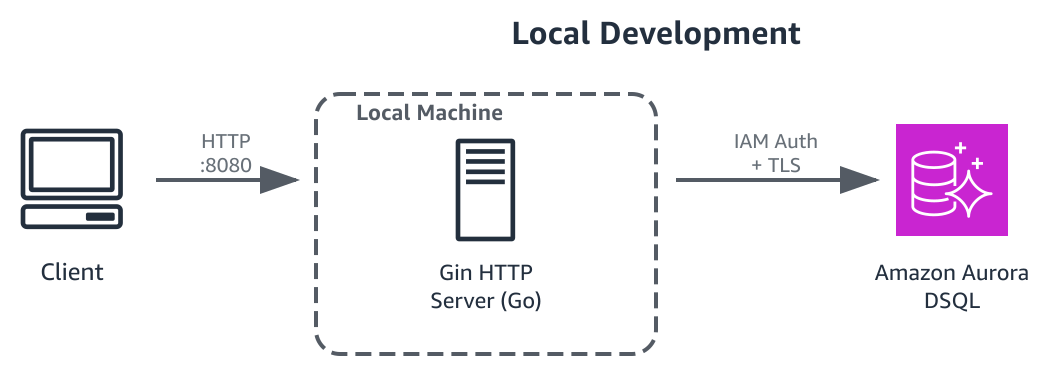
Figure 1: Local development request flow
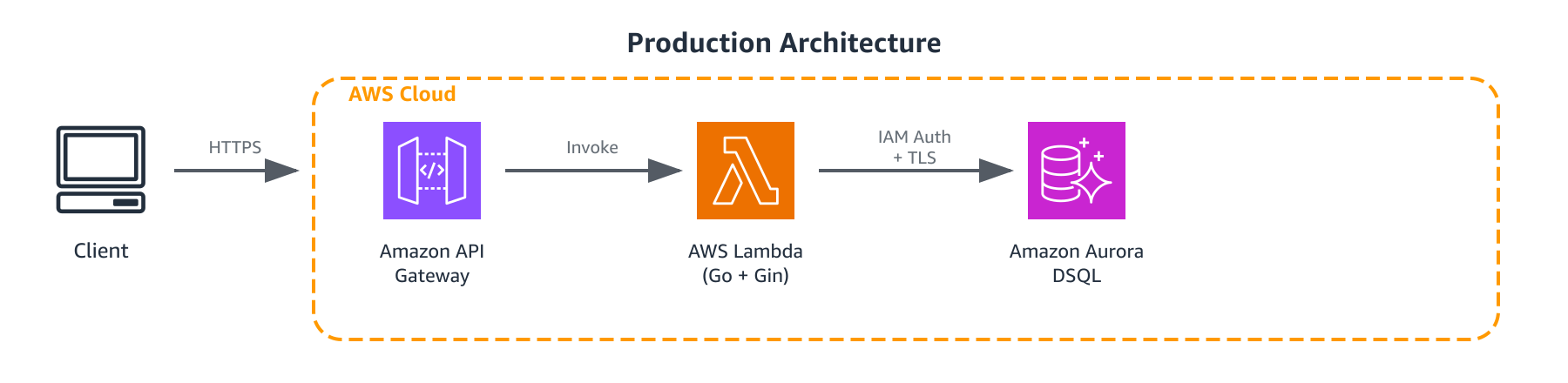
Figure 2: Production request flow
The API is built with Gin, a popular Go HTTP framework. Gin handles routing, request binding, and JSON serialization. For the Lambda deployment, the aws-lambda-go-api-proxy adapter translates API Gateway events into standard HTTP requests that Gin can process. The same router and handlers work in both environments without modification.
Here’s what happens when a request hits the production stack: The client sends an HTTPS request to API Gateway, which, optionally, evaluates its resource policy to verify the source IP is allowed. If the IP matches, API Gateway invokes the Lambda function. Because Amazon Aurora DSQL uses IAM authentication instead of a database password, the connection needs a short-lived authentication token in place of that password. The Amazon Aurora DSQL connector wraps the standard PostgreSQL driver and handles this for you: it uses the Lambda execution role to generate the token, then uses that token as the password to open an authenticated, TLS-encrypted connection to Amazon Aurora DSQL. The Gin router inside Lambda processes the request, the handler queries the database through the connection pool, and the response flows back through API Gateway to the client.
This dual-entrypoint pattern keeps the development loop fast. You write and test locally with a standard HTTP server, then deploy the same handlers and business logic to Lambda without changes. Only the server bootstrap differs between the two environments. Both connect to Amazon Aurora DSQL.
The data model has three tables named chefs, recipes, and ratings which all use UUID primary keys. In production, the tables live in a recipe_share schema within Amazon Aurora DSQL.
| Table | Key columns | Purpose |
chefs | id, name, email, specialty | People who create and share recipes |
recipes | id, chef_id, title, ingredients, instructions, difficulty, cuisine, status | Dishes with metadata and cooking details |
ratings | id, recipe_id, chef_id, score (1–5), comment | Reviews of recipes by other chefs |
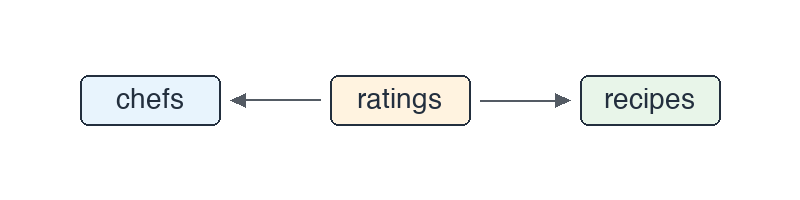
Figure 3: Entity relationships between chefs, ratings, and recipes
Each chef can create recipes. Any chef can rate any recipe. The relationships are enforced in application code.
Amazon Aurora DSQL design decisions
Amazon Aurora DSQL is PostgreSQL-compatible, but it has a few differences that affect how you write application code to work with it. These are trade-offs that come with a distributed, serverless architecture. Understanding them upfront saves you from surprises later.
Use UUIDs instead of sequential keys. Amazon Aurora DSQL range-partitions table data across multiple storage nodes. Sequential primary keys, such as auto-incrementing integers, send every new insert to the same partition, which limits write throughput to what that single partition can sustain. Primary keys that distribute evenly across the key space avoid this situation. Good primary key choices include UUIDs, random numbers, or compound keys derived from data you already store. In this application, I generate UUIDs in Go using the google/uuid package and pass them as TEXT primary keys. Amazon Aurora DSQL does support auto-incrementing identity columns, but choosing UUIDs gives Amazon Aurora DSQL an even write distribution across its storage nodes.
Referential integrity in the application layer. Amazon Aurora DSQL supports foreign key constraints, but for this application I chose to enforce referential integrity in the handler layer instead. Before creating a recipe, the code verifies the referenced chef exists. Likewise, before creating a rating, it checks that both the recipe and the chef exist. This keeps the integrity rules explicit and close to the business logic, at the cost of a few extra lines of Go. It is a reasonable pattern when you want application-side control over how violations are detected and reported. If you would rather have the database enforce these relationships, you can define foreign key constraints directly in your schema.
Separate DDL transactions. You can’t mix DDL (CREATE TABLE) and DML (INSERT, UPDATE) in the same transaction. The schema initialization code runs each CREATE TABLE IF NOT EXISTS statement as its own operation:
Amazon Aurora DSQL supports prepared statements through the standard PostgreSQL extended query protocol. By default, the connector runs pgx in its describe-and-execute mode, which resolves parameter types on the server for each execution rather than caching a query plan. That choice keeps your queries correct even after a live schema change, and you can override it if your workload needs a different mode.
The Store interface
The application uses a Go interface to abstract database operations. The Amazon Aurora DSQL implementation satisfies this contract:
In this application, the router is the Gin engine that maps each HTTP route to a handler, the handlers are the Go functions that service those routes, and the models are plain Go structs that represent domain entities such as chefs, recipes, and ratings. None of them know or care about connection details. They interact only with the Store interface. Both entrypoints create a DSQLStore, the concrete implementation of the Store interface that connects to Amazon Aurora DSQL through a pgx connection pool, and pass it to the shared router. Locally, cmd/api/main.go runs a standard Gin HTTP server. In production, cmd/lambda/main.go wraps the same router with the Lambda adapter. This is standard Go interface design. The interface abstraction makes the code testable, and you can swap implementations in the future if needed.
Connecting to Amazon Aurora DSQL
Amazon Aurora DSQL uses IAM authentication, which eliminates the need to store, secure, and rotate static database passwords. Instead, you generate a short-lived IAM token in your code and use it as the connection password. The Amazon Aurora DSQL Connector for Go handles this transparently, generating and managing those tokens for you. It also establishes the TLS connection, verifying the server certificate against the system trust store and requiring at least TLS 1.2.
The sample’s go.mod already includes the connector. To add it to your own Go module, run:
Here’s how the application creates a connection pool:
There are a few points to be aware of:
dsql.NewPoolaccepts adsql.Configwith the cluster endpoint and an optional*pgxpool.Configfor pool tuning. The connector resolves AWS credentials from the environment automatically on AWS Lambda. This means the execution role for the Lambda function must have the appropriate permission settings assigned to it.MaxConnLifetimeis set to 50 minutes because Amazon Aurora DSQL closes connections after 60 minutes. Setting the pool lifetime below that threshold makes sure the pool recycles connections before the server drops them.MaxConnsis kept low (5) because each Lambda invocation is a single concurrent request. You don’t need a large pool.
Once you have the pool, you use it exactly like any pgxpool.Pool, where Query, QueryRow, and Exec all work as expected. Here’s what a typical query looks like in the store layer:
If you’ve written Go database code with the pgx driver, this looks familiar. The one thing to notice is the schema-qualified table name (recipe_share.chefs): this application keeps its tables in a dedicated recipe_share schema, which fits how Amazon Aurora DSQL manages access through schema-level grants. Qualifying a table with its schema is standard PostgreSQL. Everything else is standard Go database code.
Amazon Aurora DSQL uses optimistic concurrency control (OCC). If two concurrent transactions modify the same row, the first to commit succeeds and the second receives an OCC conflict error. The connector’s companion package, occretry, detects these conflicts and retries the transaction for you with exponential backoff. Because a retry runs your transaction again, the transaction logic should be idempotent, meaning it produces the same result whether it runs once or several times. This is significant because, without it, I would need to write my own conflict-detection, backoff, and retry loop, and not every database connector handles this for you. For details, see OCC retry in the connector documentation.
Create your Amazon Aurora DSQL cluster
Before you run the application locally or deploy it to AWS, create a cluster if you don’t have one:
Save the identifier from the response. You will use it both for local development and for deployment.
Running locally
Clone the repository and start the API:
The server starts on port 8080, connected to your Amazon Aurora DSQL cluster. Try it out:
The repo includes a test-api.sh script that exercises every endpoint, including CRUD operations, filtering, validation errors, and cleanup:
Deploying to AWS
With your cluster created and the application running locally, you are ready to deploy to AWS.
The included deploy.sh script handles the full deployment. It cross-compiles the Go binary for Linux/ARM64 (Lambda runs on Graviton), packages it, uploads it to Amazon S3, and deploys the infrastructure through CloudFormation.
Replace 111122223333 with your own 12-digit AWS account ID. You can look it up with aws sts get-caller-identity --query Account --output text.
The --allowed-ip flag restricts access to your API. It accepts a single IP address or a CIDR block (for example, 10.0.0.0/8). A bare IP address gets /32 appended automatically. In this example the IP allowlist is the only access control, which keeps things simple, but it is not authentication. A production API should use IAM authorization, a Lambda authorizer, or Amazon Cognito.
The CloudFormation template creates the following resources:
-
An API Gateway REST API that applies an IP-based resource policy based on
--allowed-ip -
A Lambda function running the Go binary.
-
An IAM execution role scoped to the specific Amazon Aurora DSQL cluster and CloudWatch log group.
-
The CloudWatch log groups.
No wildcard IAM resource designations are used. The dsql:DbConnectAdmin permission targets the specific cluster ARN, and the CloudWatch Logs permissions target the specific log group.
It’s worth understanding what happens on Lambda at cold start. The main() function runs once per cold start. It creates the Amazon Aurora DSQL connection pool, initializes the schema, and builds the Gin router. All of that happens before the first request is processed. Subsequent invocations on the same Lambda instance reuse the pool and router, so only the first request pays the initialization cost. This is a standard Go-on-Lambda pattern: Do expensive setup in main() and keep the handler lightweight.
When the script finishes, it prints the API Gateway endpoint URL. Test it the same way you tested locally:
Cost considerations
This solution uses Amazon Aurora DSQL, AWS Lambda, and Amazon API Gateway, which are all pay-per-use services with no minimum fees. For a demo workload with light traffic, costs are minimal. Amazon Aurora DSQL meters usage in Distributed Processing Units (DPUs) for the requests it handles and the query processing they require, and it charges separately for the data you store. Lambda charges per invocation and compute duration. API Gateway charges per API call. For full pricing details, see Amazon Aurora DSQL pricing, AWS Lambda pricing, and Amazon API Gateway pricing. To avoid ongoing charges, remove the resources you created in the following section.
Clean up
To avoid ongoing charges, remove the resources you created:
Conclusion
In this post, you learned how to use Go with Amazon Aurora DSQL and deployed a Go REST API backed by that service. The key integration patterns were: using the Amazon Aurora DSQL Go connector for automatic IAM authentication and connection management, generating UUIDs in application code instead of relying on database sequences, enforcing referential integrity in Go handlers, and running DDL statements in separate transactions.
The interface-based store design keeps your application logic cleanly separated from connection details. The included deploy script and CloudFormation template give you a quick way to stand up the example and try it. Underneath, this is a fully serverless architecture. Amazon API Gateway, AWS Lambda, and Amazon Aurora DSQL each scale on demand with no servers to provision or patch, so the application costs little to run at low traffic and scales up without re-architecting. Amazon Aurora DSQL adds active-active high availability and strong consistency across multiple Availability Zones and Regions. That combination of serverless operations, on-demand scaling, and built-in high availability is what makes the architecture worth adopting.
This is a starting point, not a finished product. From here you might add pagination to the list endpoints, introduce user authentication with Amazon Cognito, or explore Amazon Aurora DSQL multi-Region clusters for active-active deployments across AWS Regions. The patterns in this post, consisting of the connector setup, the store interface, and the Lambda deployment model, will carry over to whatever Go and Amazon Aurora DSQL projects you decide to build next. For the latest on Amazon Aurora DSQL, see the Amazon Aurora DSQL User Guide.


