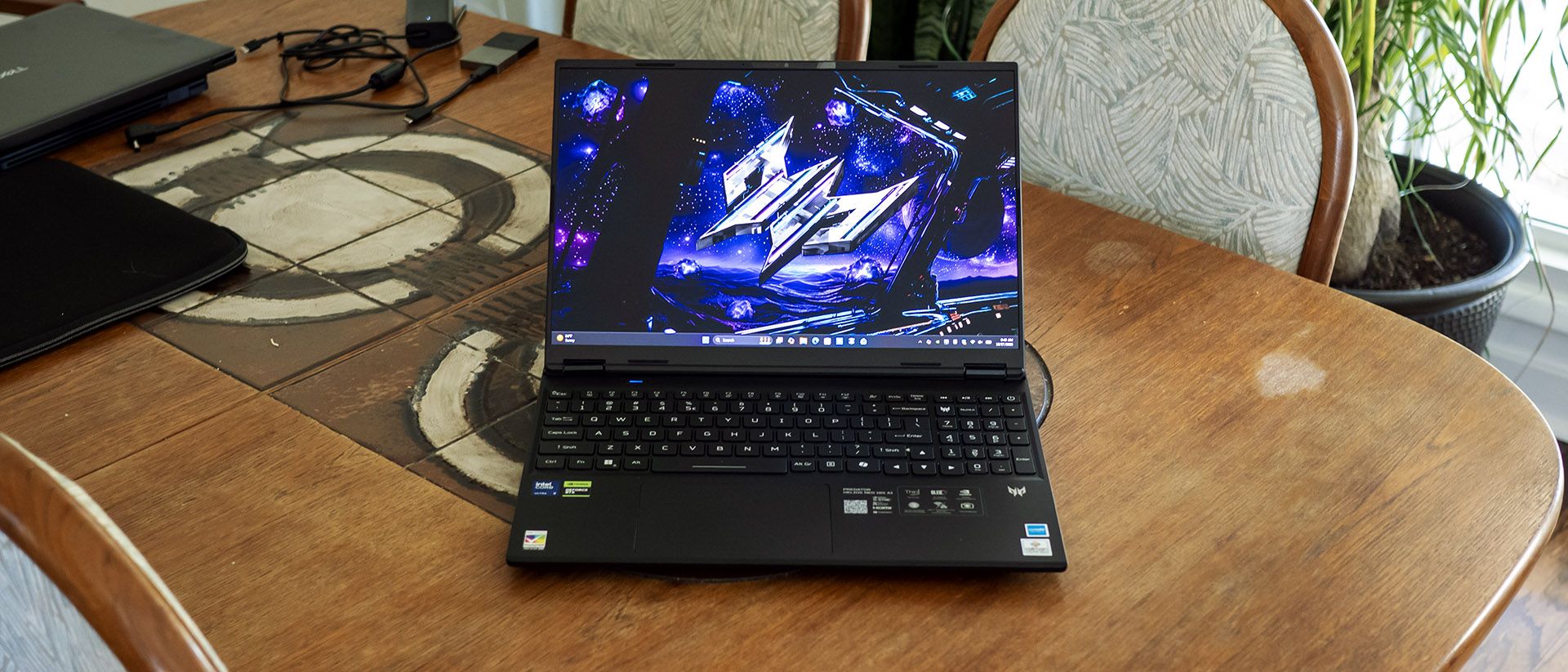
Not everyone wants a hulking gaming laptop. Some prefer something stealthier. Acer’s Predator Helios Neo 16S AI aims for portability but still packs a Core Ultra 9 290HX Plus processor and Nvidia RTX 5070 Ti graphics into a sub-five-pound package. It also includes plenty of ports and a beautiful 240 Hz OLED display. That hardware gives it plenty to work with, but the question remains whether the Helios Neo 16S AI can still deliver solid gaming performance while being portable.
Design of the Acer Predator Helios Neo 16S AI
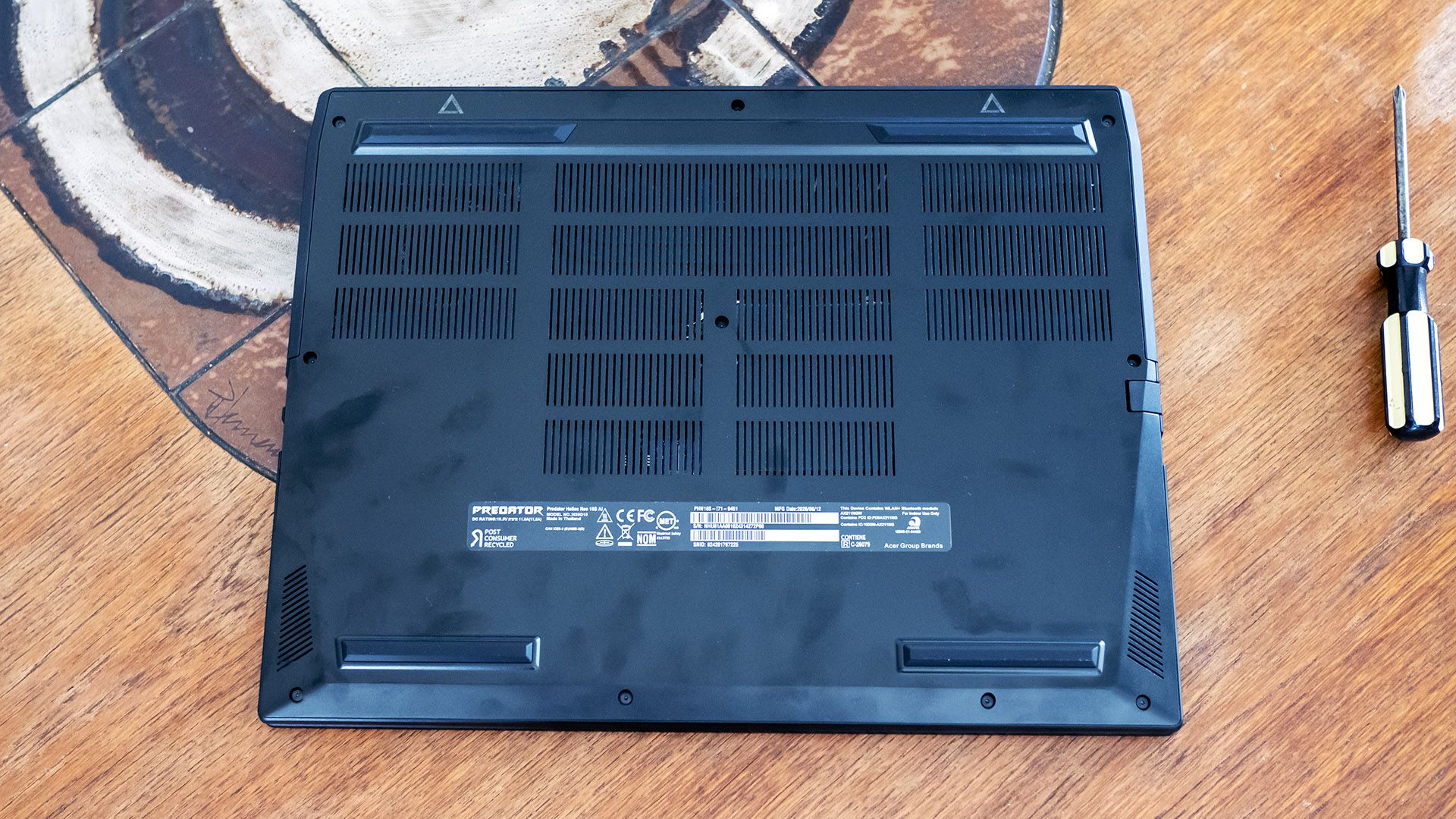
Acer’s obsidian black chassis maintains the look of the Predator series – angular, dark, and visible in the dark with its illuminated lid logo. At 14.05 x 10.85 x 0.74 inches and 4.85 pounds, it’s respectably trim for a gaming laptop, though the Gigabyte Aero X16 (14 x 9.9 x 0.78 inches, 4.2 pounds) and the HyperX Omen 15 (13.5 x 9.96 x 0.93 inches, 4.89 pounds) both have about an inch less depth since neither use a rear thermal shelf like Acer.
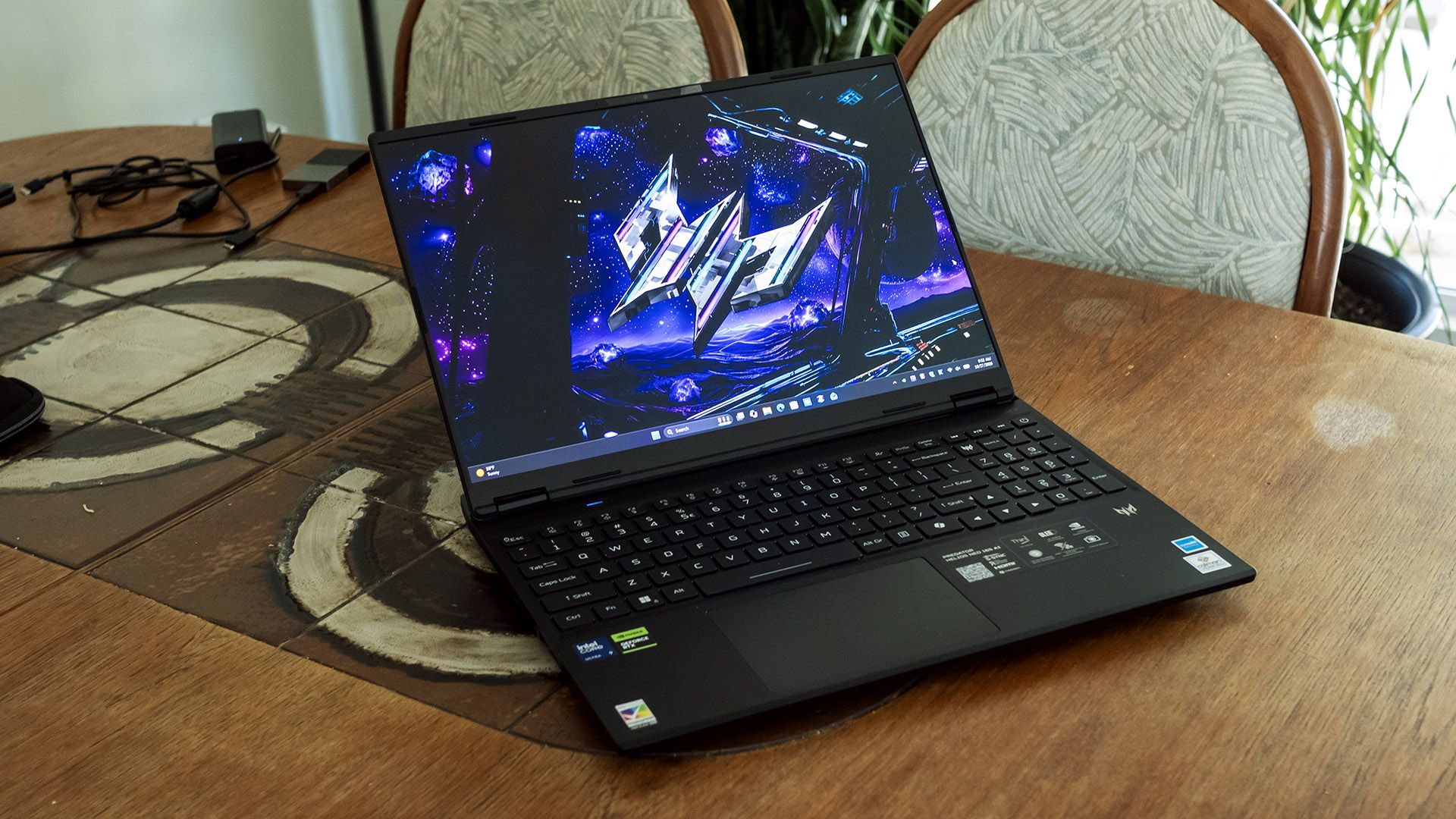
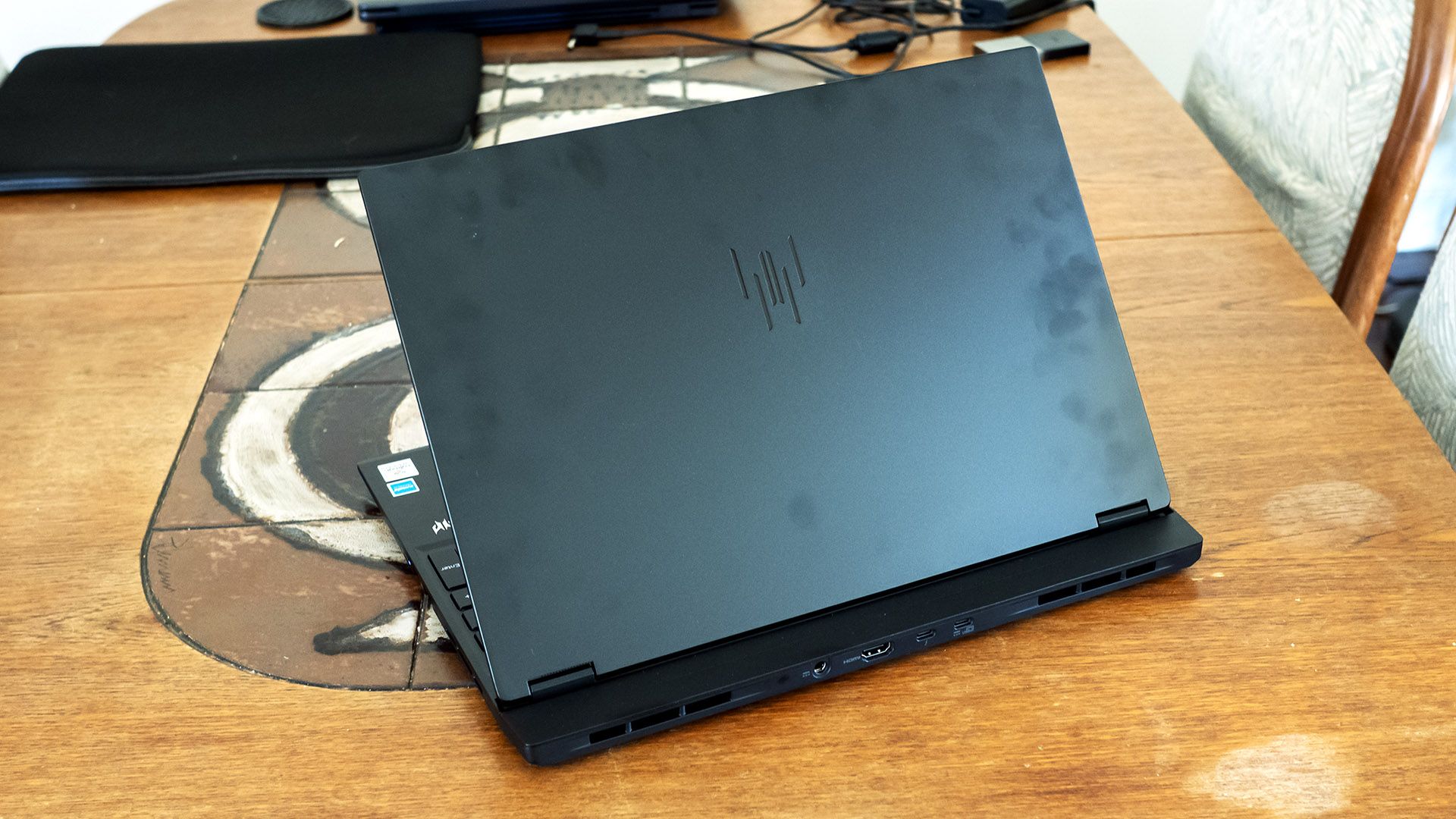
The build quality is decent – both the chassis and lid show little flex. The stamped aluminum panels on the lid bottom and chassis lid aren’t ultra-premium but still beat plastic. One downside is that the metal shows fingerprints easily, which are difficult to clean off.
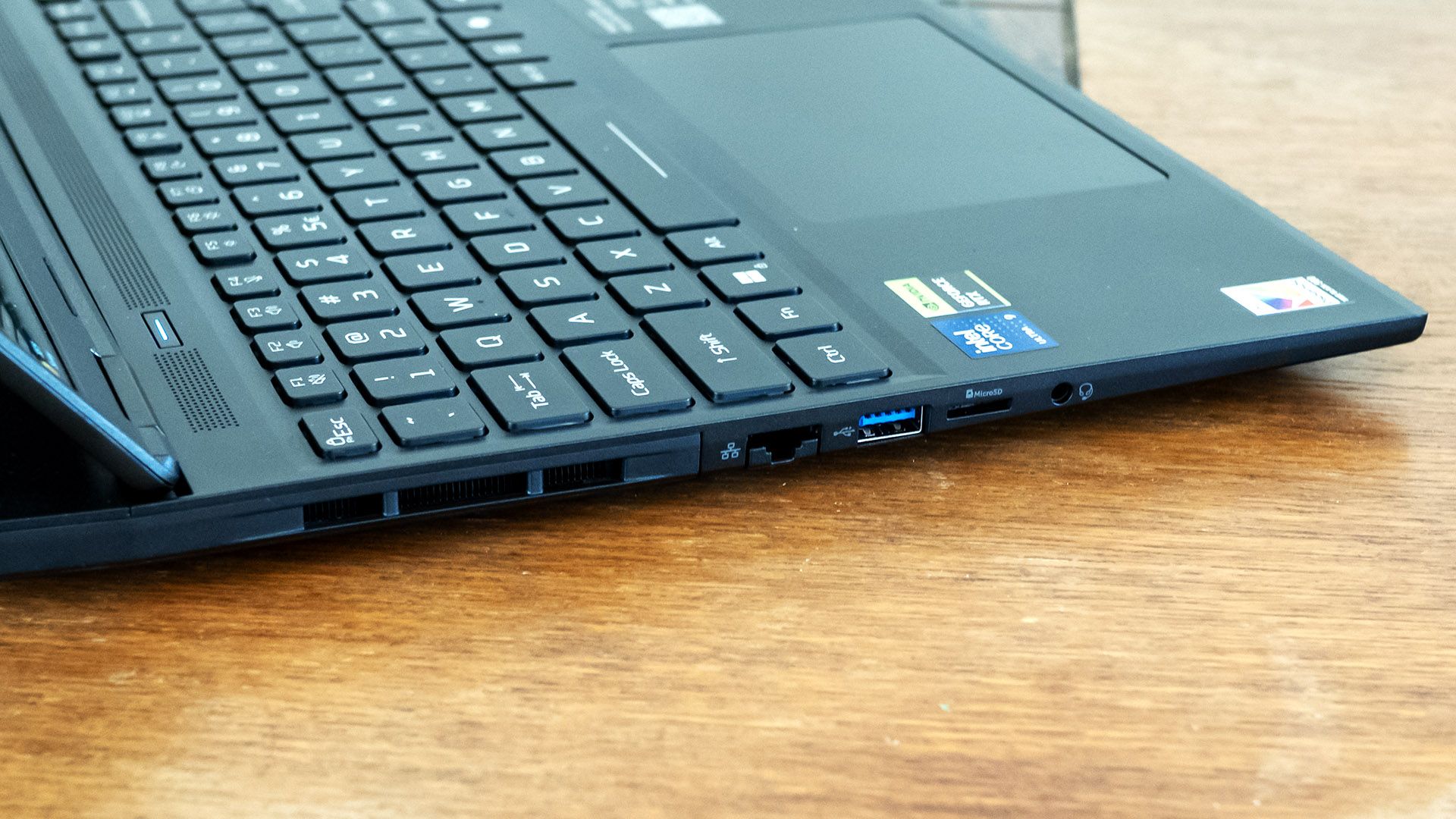
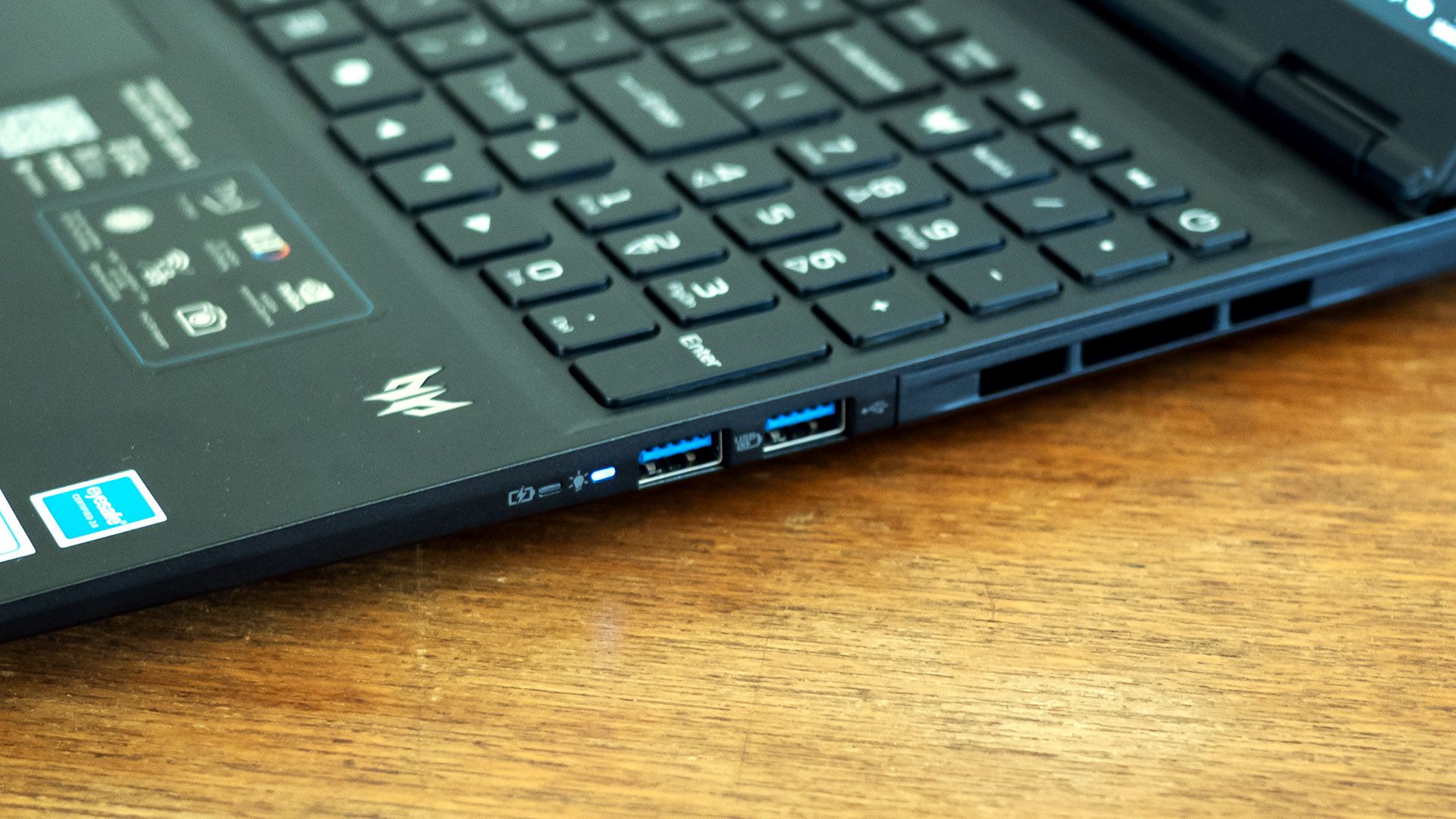
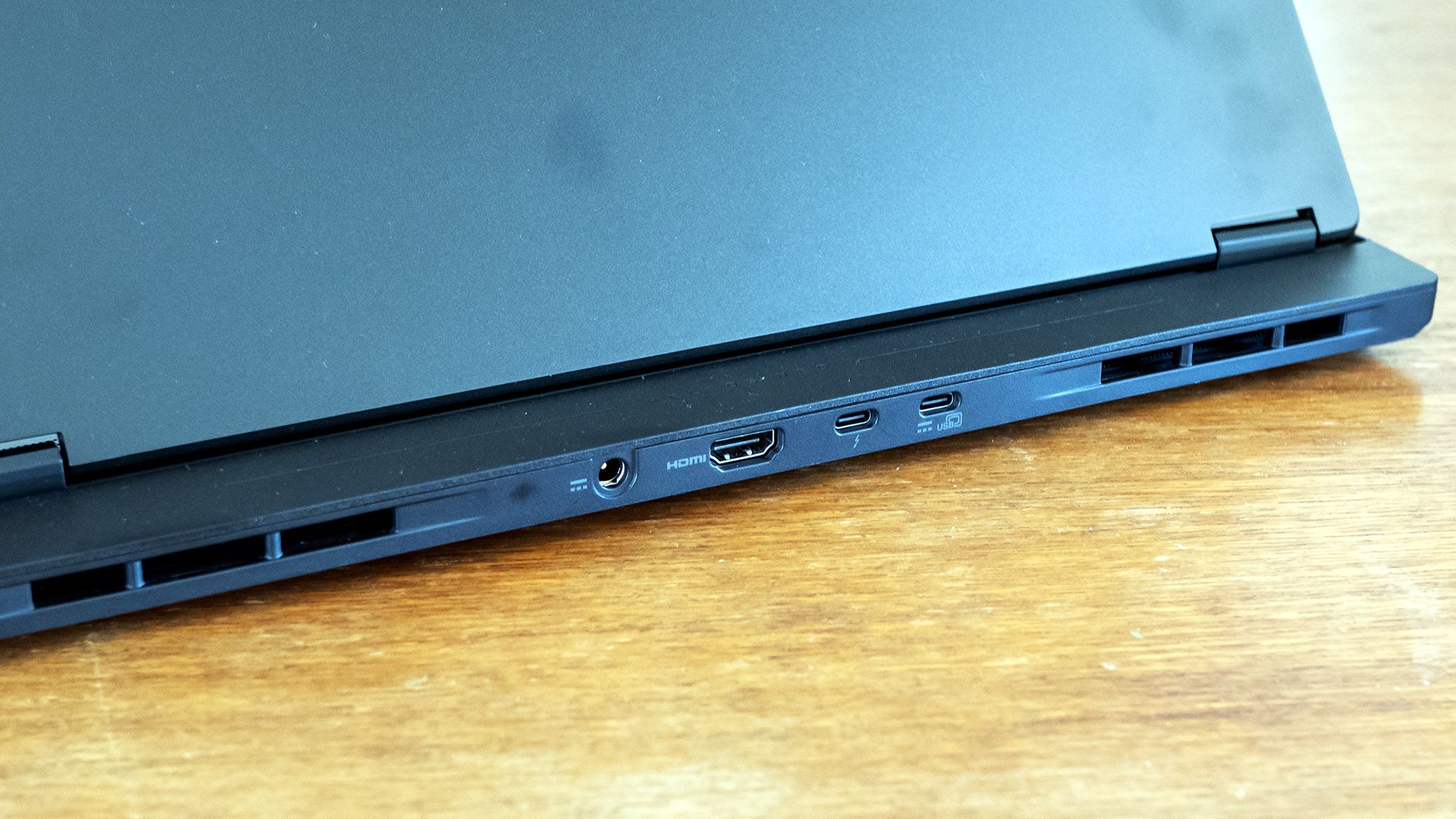
Acer provides an impressive port variety across three sides: Thunderbolt 4, three USB-A 3.2, USB-C 3.2, HDMI 2.1, 2.5 Gbps Ethernet, a MicroSD card reader, and an audio jack. The rear ports conveniently leave cables out of sight.
Inside, the laptop offers Wi-Fi 6E, which isn’t as modern as it could be, though the Killer AX1675i card and accompanying Killer Ethernet jack offer simultaneous network connections via Killer Doubleshot Pro for gamers that want to ensure network priority for the games over one connection and all other apps over the other. It’s also notable that Acer includes a zippered, padded travel sleeve.
Acer Predator Helios Neo 16S AI Specifications
CPU | Intel Core Ultra 9 290HX Plus |
Graphics | Nvidia GeForce RTX 5070 Ti (12GB GDDR7, 1,612 MHz boost clock, 115 W maximum graphics power) |
Memory | 16GB DDR5-6400 (2x 8GB) |
Storage | 1TB PCIe 4.0 SSD |
Display | 16-inch, OLED, 16:10, 2560 x 1600, 240 Hz, G-Sync |
Networking | Killer Wi-Fi 6E AX1675i |
Ports | Thunderbolt 4, 3x USB-A 3.2, USB-C 3.2, HDMI 2.1, Ethernet, MicroSD card reader, audio |
Camera | 1080p IR |
Battery | 92 WHr |
Power Adapter | 230 W (barrel connector) |
Operating System | Windows 11 Home |
Dimensions (WxDxH) | 14.05 x 10.85 x 0.74 inches (357 x 276 x 18.8 mm) |
Weight | 4.85 pounds (2.2 kg) |
Price (as configured) |
Gaming and Graphics on the Acer Predator Helios Neo 16S AI
We tested the Predator Helios Neo 16S AI with a Core Ultra 9 290HX Plus processor, Nvidia RTX 5070 Ti graphics card, and 16GB of RAM.
Playing 007 First Light, I saw about 65 to 75 frames per second (FPS) in most scenes, with spikes to over 100 FPS in wide open areas. The game remained all-around playable, though it did require using DLSS to achieve these framerates at native 2560 x 1600 with High settings.
Our comparison systems for this Acer are Gigabyte’s Aero X16 (Ryzen AI 7 350, RTX 5070 85W, $1,899.99 when tested, $1,499.99 as of this writing) and HyperX’s Omen 15 (Core Ultra 9 386H, RTX 5070 85W, $2,099.99 when tested, about $3,159.99 as of this writing).
Comparisons will focus on the 1920 x 1080 results, but we also included numbers at each laptop’s native resolution: 2560 x 1600 for the Acer and Gigabyte while the HP uses 2880 x 1800.
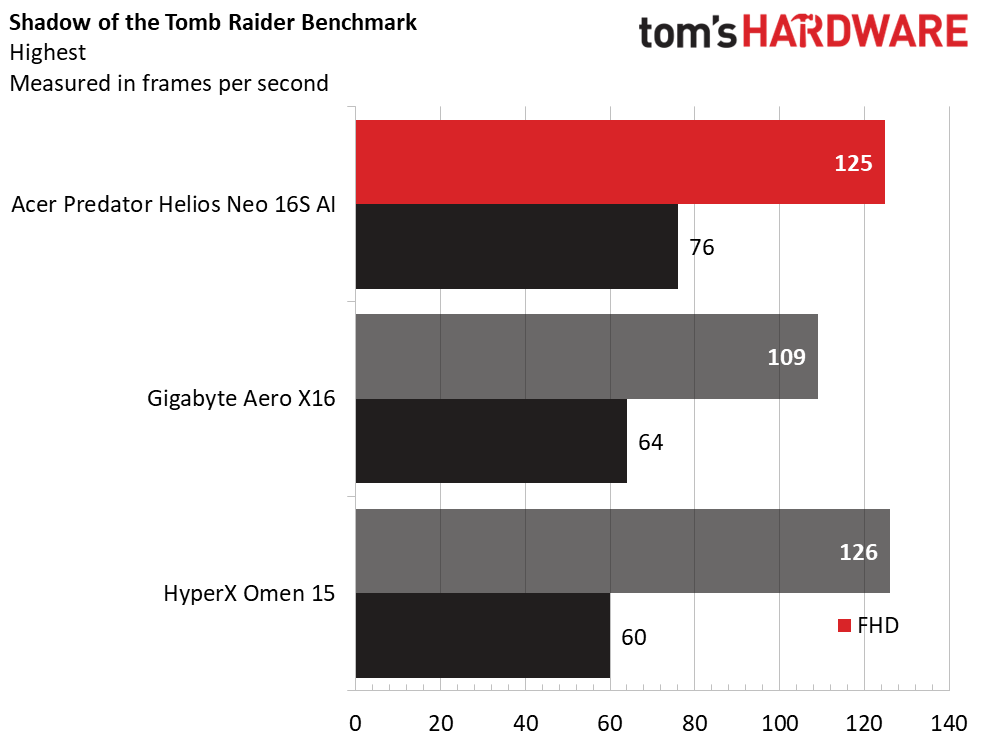
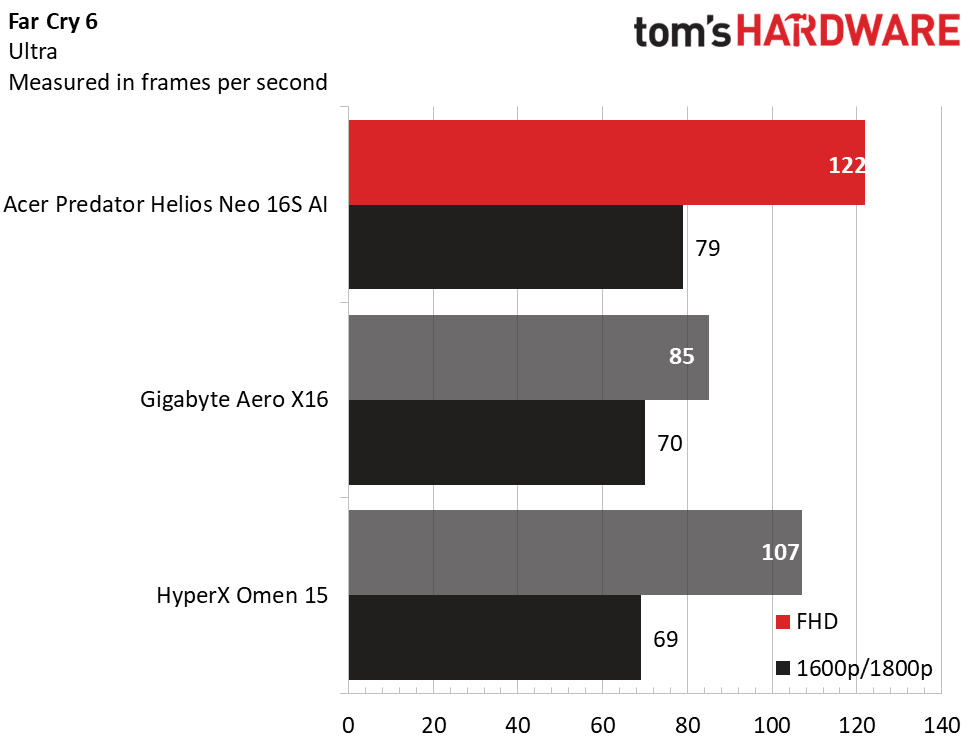
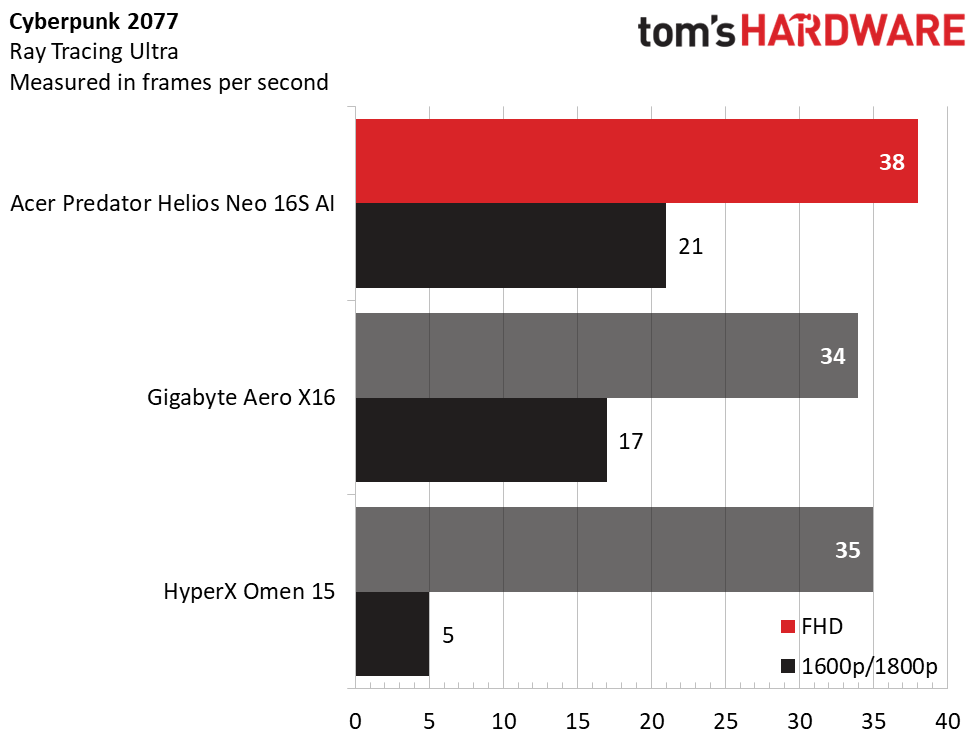
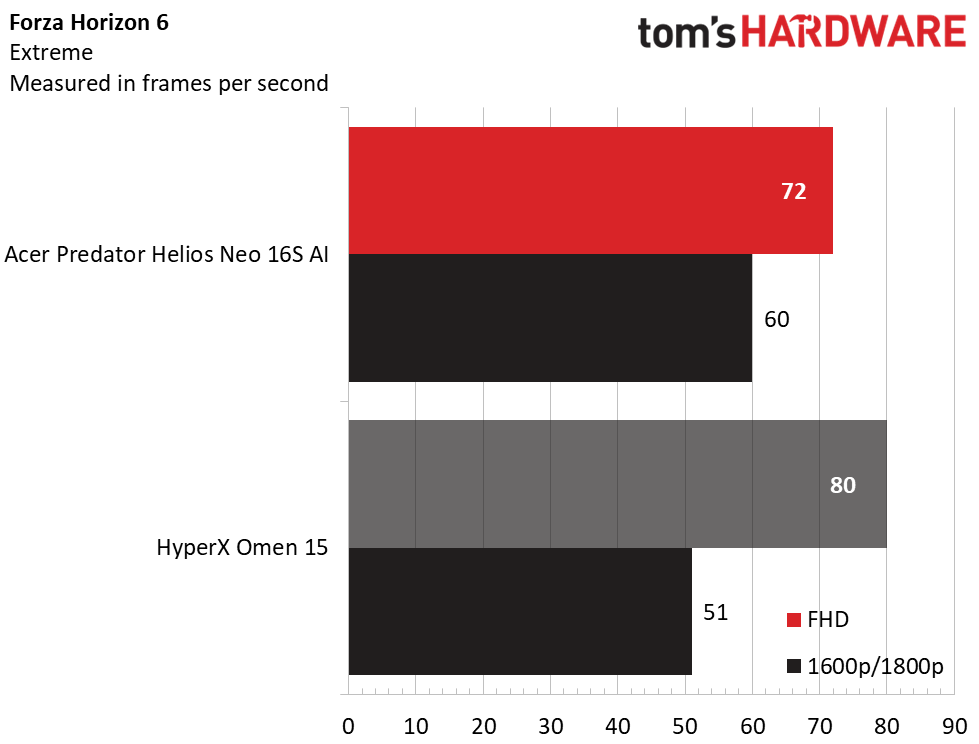
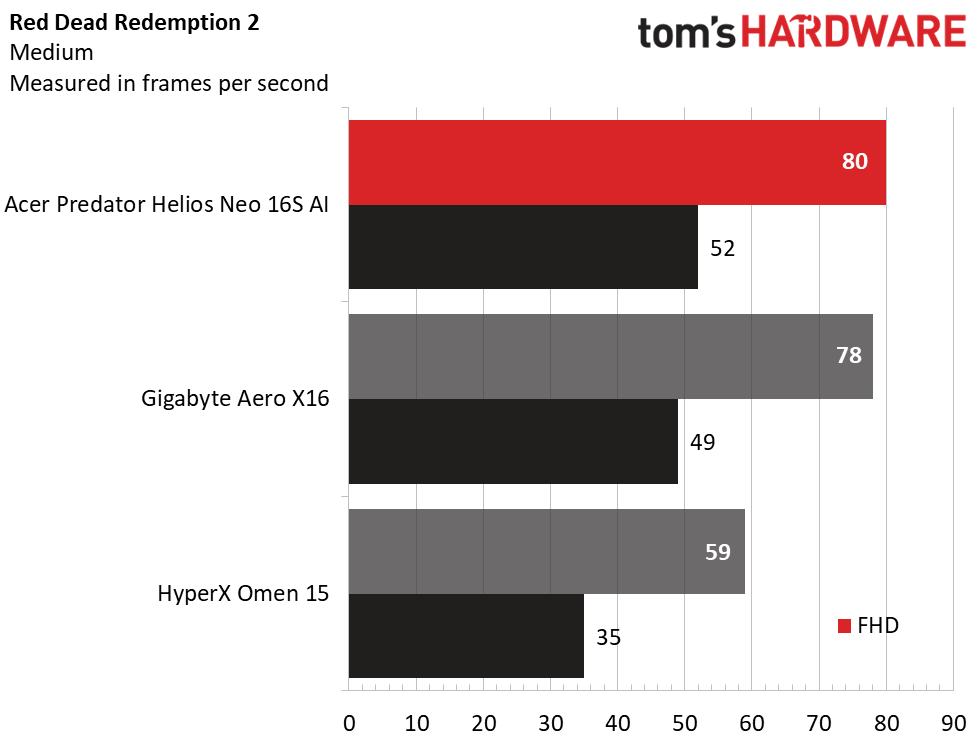
Overall, the Predator Helios Neo 16S AI performed significantly better than both the Gigabyte and HyperX laptops. Much of that has to do with its higher-wattage RTX 5070 Ti, though its Core Ultra 9 290HX Plus processor is also more modern.
In Shadow of the Tomb Raider (Highest detail preset), Acer’s 125 FPS at 1080p was on par with the HyperX (126 FPS), though it dominated at its 1600p native resolution, with 76 FPS against Gigabyte’s 60 FPS and HyperX’s 64 FPS.
Acer’s advantage continued in Far Cry 6 (Ultra), where it produced 122 FPS to Gigabyte’s 85 FPS and HyperX’s 107 FPS at native resolution. The lead narrowed in Red Dead Redemption 2 (Medium) where Acer and Gigabyte practically tied at 1080p and were within a few FPS at native (52 FPS for Acer and 49 FPS for Gigabyte). The HyperX remained behind.
The Acer also demonstrated markedly better performance in Cyberpunk 2077 (Ray Tracing Ultra) particularly at native resolution, where its 21 FPS outran Gigabyte (17 FPS) and HyperX (5 FPS).
In Forza Horizon 6 (Extreme), Acer’s 72 FPS at 1080p was strangely lower than HyperX’s 80 FPS, but the results flipped at native, where Acer’s 60 FPS was considerably ahead of HyperX’s 51 FPS.
While not a powerhouse, the Predator Helios Neo 16S AI demonstrates competent gaming performance at its 2560 x 1600 native resolution. Crucially, the extra depth from Acer’s thermal shelf design lets its GPU draw 115 W, considerably more than its Gigabyte and HyperX competitors
We test the sustained performance of gaming laptops running 15 loops of the Metro: Exodus stress test, simulating half an hour of gaming. During the test, the Predator Helios Neo 16S AI averaged 86.82 FPS across all runs. The variance was less than one FPS between runs, indicating stable thermal performance. The Core Ultra 9 290HX Plus ran at an average of 2.94 GHz on its P-cores, 2.16 GHz on its E-cores, and had an average temperature of 73 degrees Celsius. Meanwhile, the RTX 5070 Ti averaged 1.622 GHz and 74 C.
Productivity Performance on the Acer Predator Helios Neo 16S AI
Our Predator Helios Neo 16S AI features a Core Ultra 9 290HX processor, 16GB of dual-channel DDR5-6400 memory, and a 1TB PCIe 4.0 SSD.
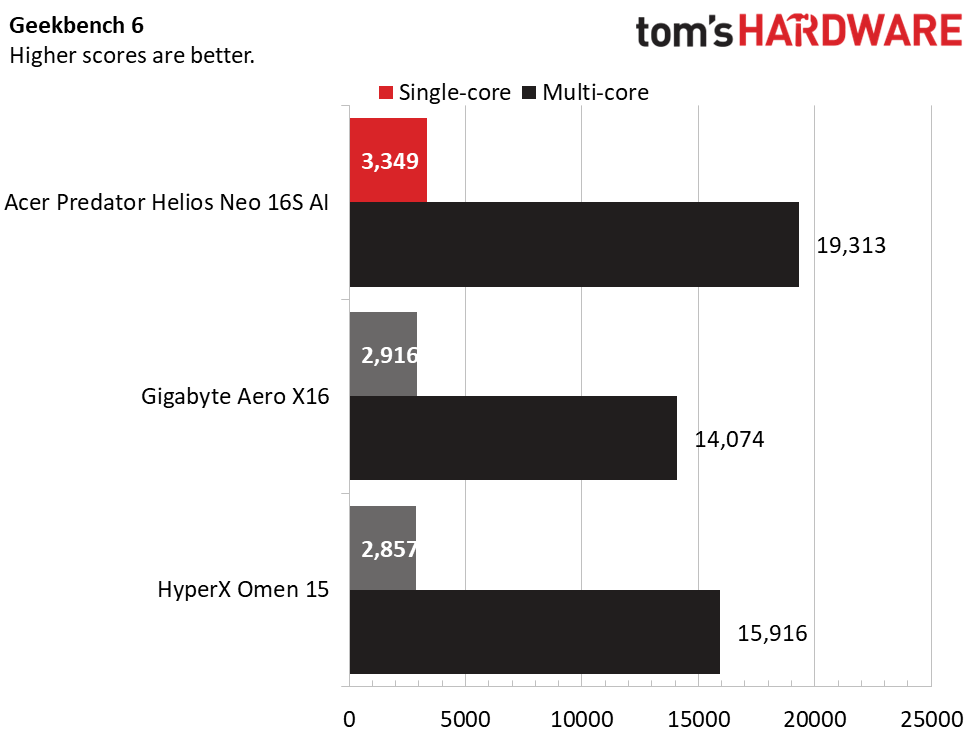
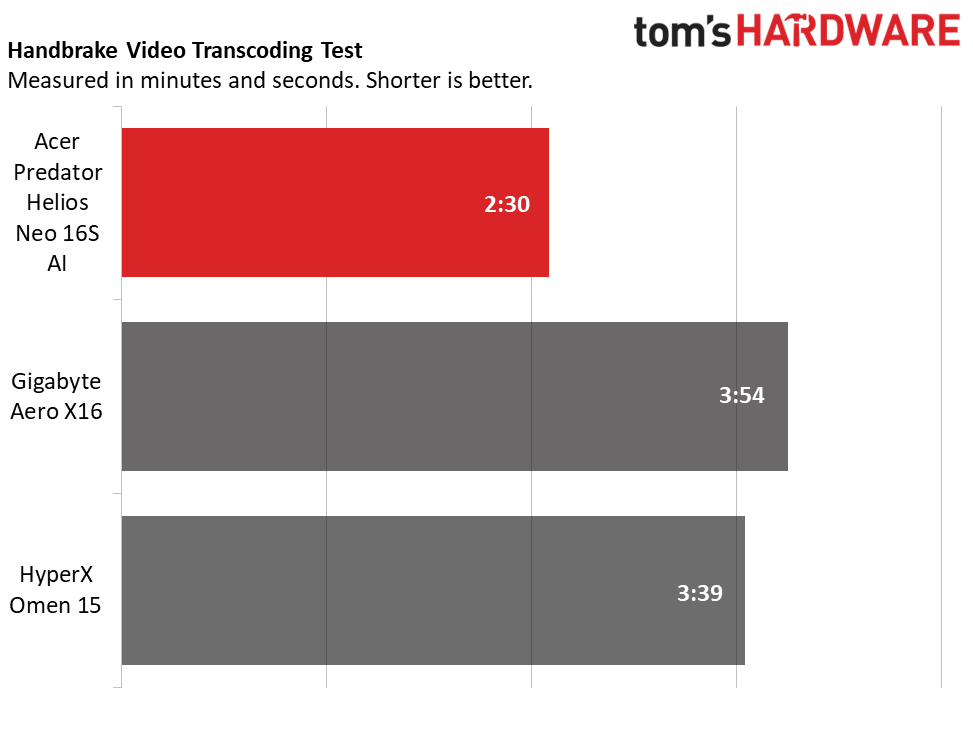
The Acer’s Core Ultra 9 290HX produced strong numbers in Geekbench. Its single-core score of 3,349 and multi-core score of 19,313 were well ahead of the Ryzen AI 7 350-powered Gigabyte (2,916 and 14,074) and Core Ultra 9 386H-powered HyperX (2,857 and 15,916). This continued into our 4K-to-1080p Handbrake transcoding testing, which Acer dominated with 2 minutes and 30 seconds. The Gigabyte (3:54) and HyperX (3:39) weren’t even close.
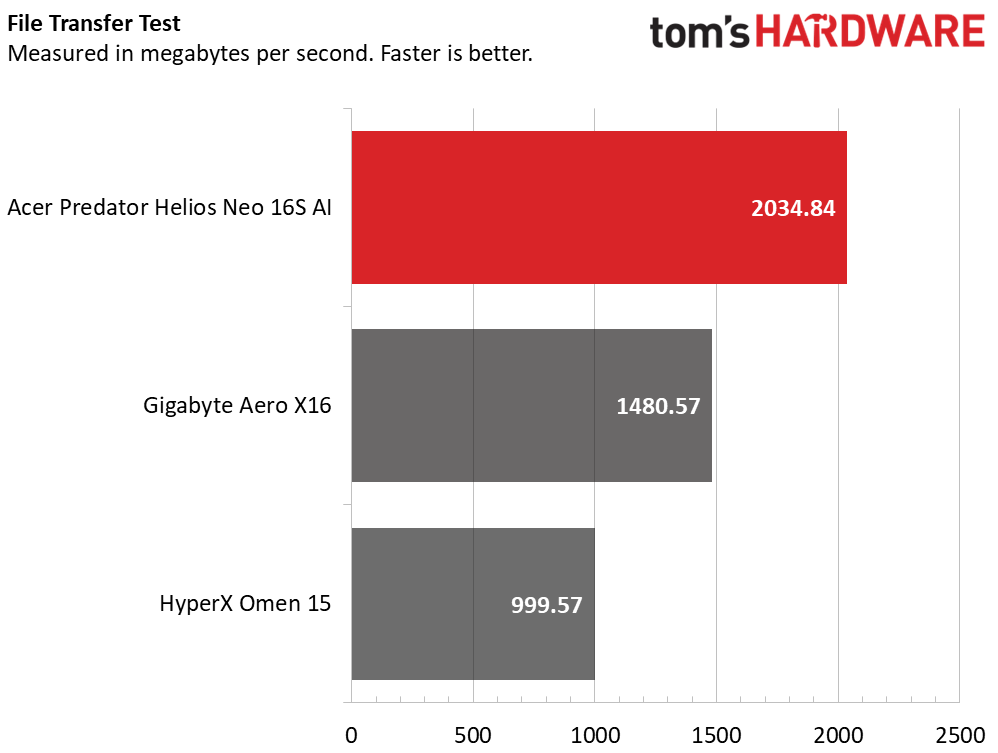
Acer also produced solid numbers in our 25GB file transfer test, averaging 2,034.84 MBps next to Gigabyte’s1,480.57 MBps and HyperX’s far slower 999.57 MBps.
Overall, this Acer is very capable for almost any kind of use. Multitasking will be limited by 16GB of RAM, but Acer sells versions of this laptop with 32GB and it can be upgraded after purchase.
Display on the Acer Predator Helios Neo 16S AI
Once glance at this Acer’s display leaves no doubt it’s a key selling point. Its OLED panel technology creates exceptionally vivid colors matched by excellent brightness, and its glossy surface gives it an almost liquid appearance. The 2560 x 1600 resolution is a good balance between detail and what the system’s RTX 5070 Ti graphics card can drive in today’s games. Gamers will also appreciate the smooth 240 Hz refresh rate and Nvidia G-Sync support. (As we’ll see in the battery life section, the screen only supports 240 Hz, resulting in higher-than-expected power consumption.)
Watching nature documentaries on National Geographic, I noted the vibrant colors of tropical scenes and the pitch blacks of the depths of the sea. Gaming was equally immersive – 007 First Light felt supremely fluid and looked sharp. I could even make out the writing on character’s uniform badges without zooming.
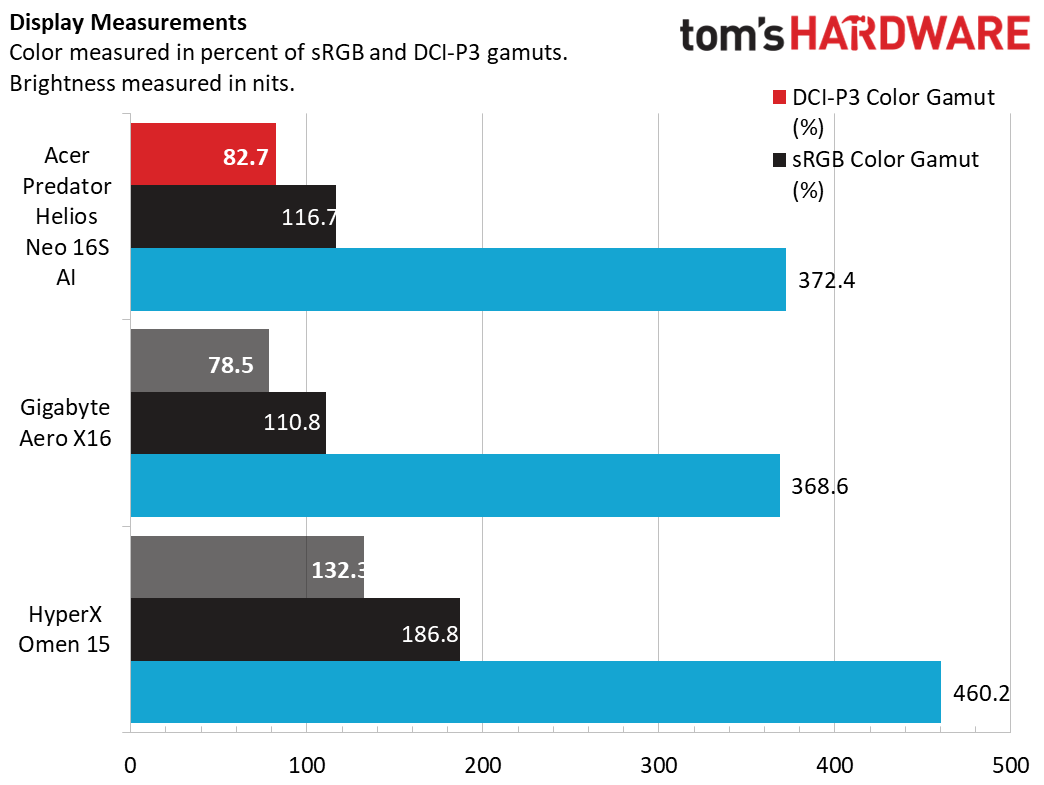
The Acer’s display covered a healthy 82.7% of the DCI-P3 color gamut, matching the Gigabyte, although it wasn’t quite in the same league as the HyperX, which also used an OLED panel. It also didn’t match the HyperX in brightness, but with a peak of 372.4 nits in SDR, the Acer boasts solid brightness for OLED. Our 40% HDR testing revealed up to an impressive 608 nits of brightness.
Keyboard and Touchpad on the Acer Predator Helios Neo 16S AI
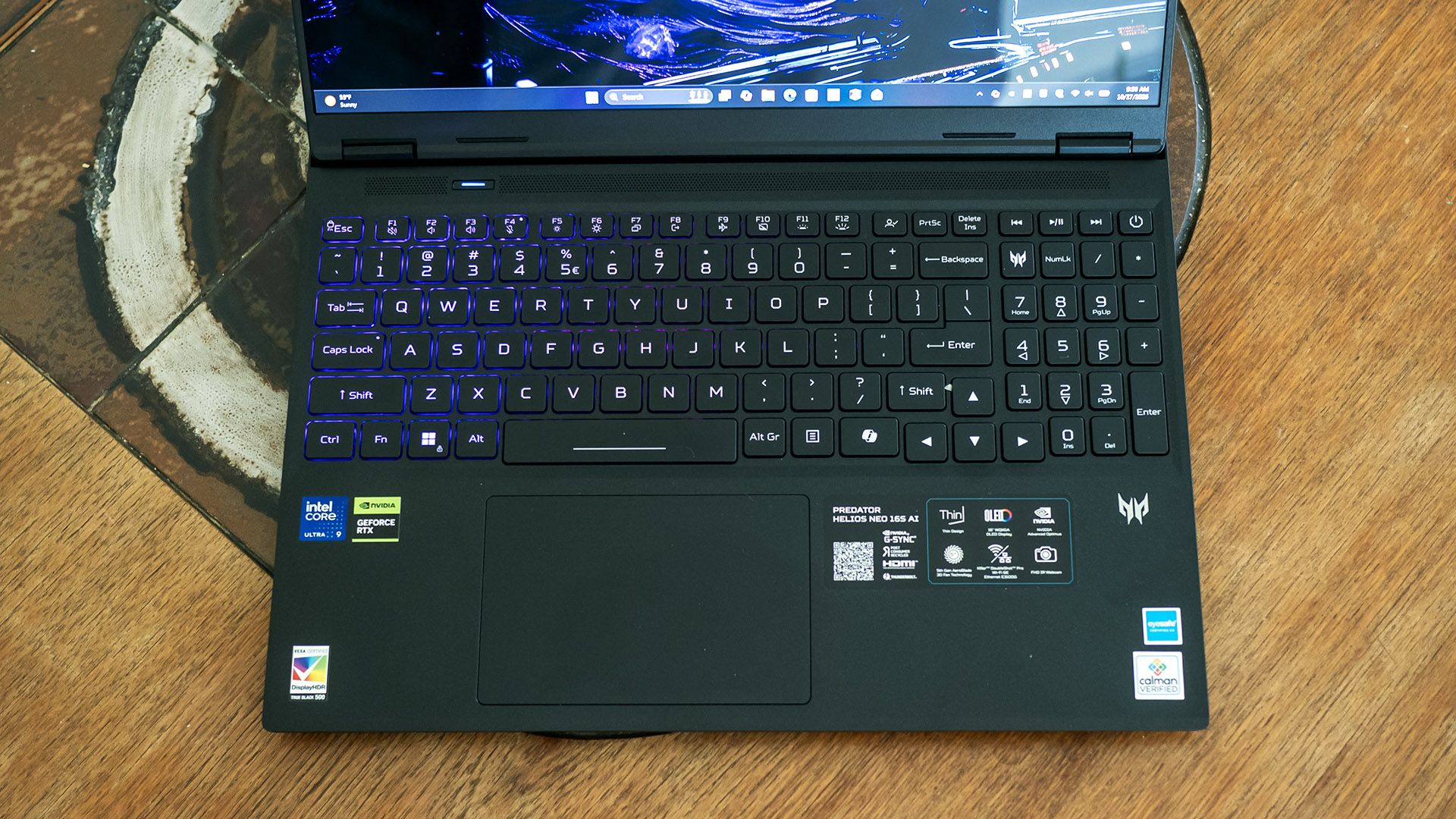
Acer’s keyboard offers a satisfying feel, with ample throw and cushioning without feeling rubbery. In MonkeyType, I reached 116 words per minute with 99% accuracy on my first try, a great result for me on any laptop. The Acer Key app lets you customize the user-customizable key above the plus key, which is handy for creating one-press access to a favorite app or site.
Though the keyboard doesn't feature per-key backlighting, its four RGB zones can be set to many patterns and colors in the PredatorSense app. When changing lighting settings, the app initially says they’re controlled by Windows Dynamic Lighting, but that isn’t the case since Dynamic Lighting says no compatible devices are detected. But once dismissing the warning in PredatorSense, the app provides intuitive if limited control over the zones and lid logo. Each zone can be assigned a static lighting effect or the entire keyboard set in a dynamic pattern: breathing, neon, wave, ripple, combo, snake, and disco, with customizable speed, direction, and brightness. Settings can be stored in profiles.
Acer also did well with the large touchpad, which offers predictable clicking and my fingers glided smoothly over the matte surface.
Audio on the Acer Predator Helios Neo 16S AI
Audio performance isn’t a strong point for the Neo 16S AI. Twin speakers embedded in the palm rest barely have enough volume for casual listening, with average clarity and thin bass. In Phil Collins’ “Don’t Lose My Number”, drum hits sounded flat and vocals were somewhat muted.
The speakers are better-suited gaming, offering a decent sense of direction because of their placement on either side of the palm rest, but lack of bass and volume means you'll want a headset. The DTS:X app offers equalizers – without them, the sound is quite tinny. I had the best results leaving the equalizer on Auto.
Upgradeability of the Acer Predator Helios Neo 16S AI
With ten Torx T6 screws securing the bottom cover, Acer doesn’t make it easy to get inside the Predator Helios Neo 16S AI. Removing the screws is the easy part – finding an entry point for my plastic pry tool provided harder. I eventually found one at the front corners of the chassis by using mild force. The fact that the side vents are part of the bottom cover compounds the difficulty – I needed to find an opening for my pry tool above those as well. The clips made cringeworthy snapping sounds as they were released, though surprisingly, none cracked off.
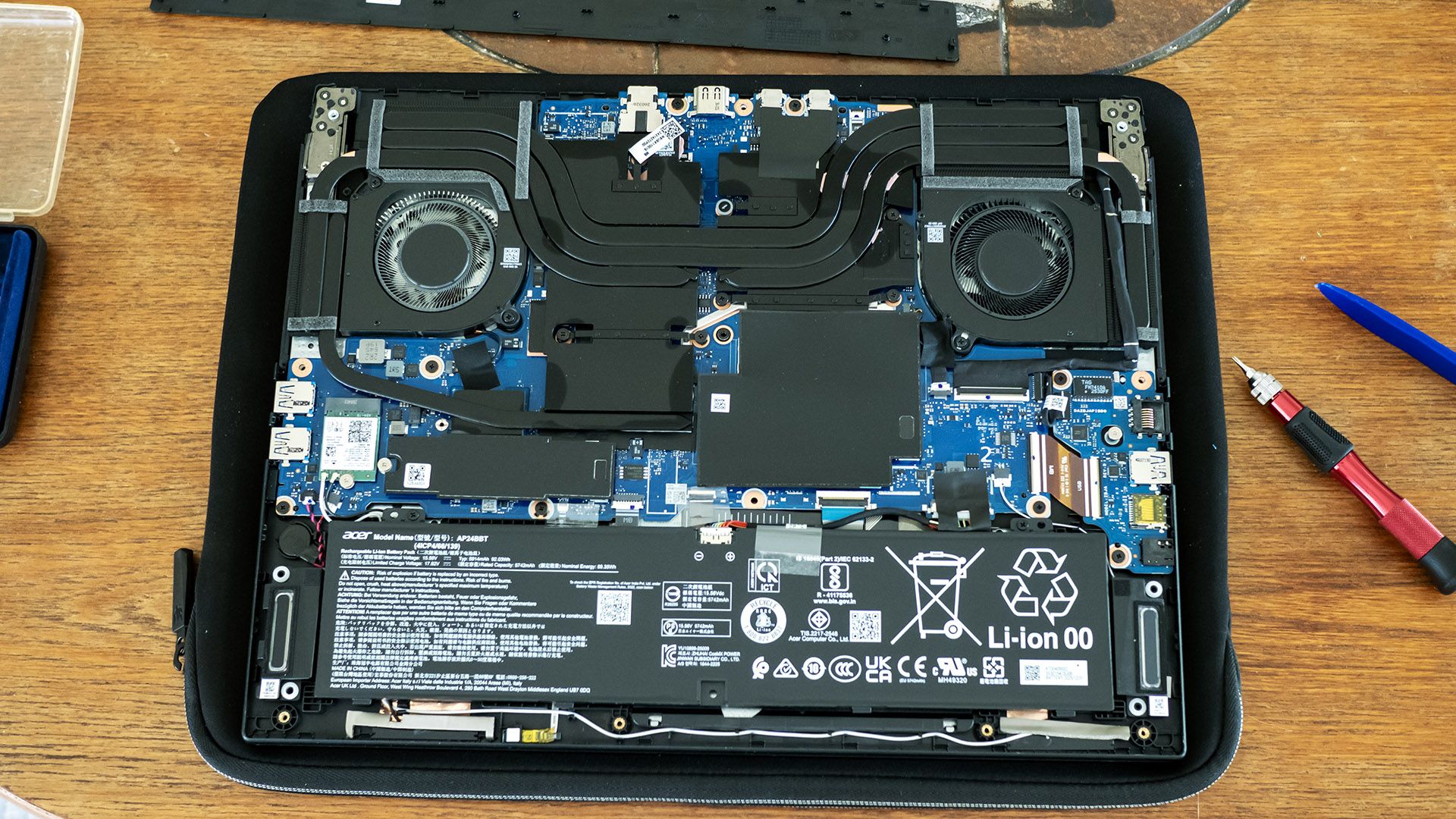
The effort is not for naught – Acer offers solid upgradeability, with two SODIMM slots under the black plastic cover in the middle, plus an M.2 2280 SSD slot and M.2 2230 wireless card slot. The battery is also replaceable.
Battery Life on the Acer Predator Helios Neo 16S AI
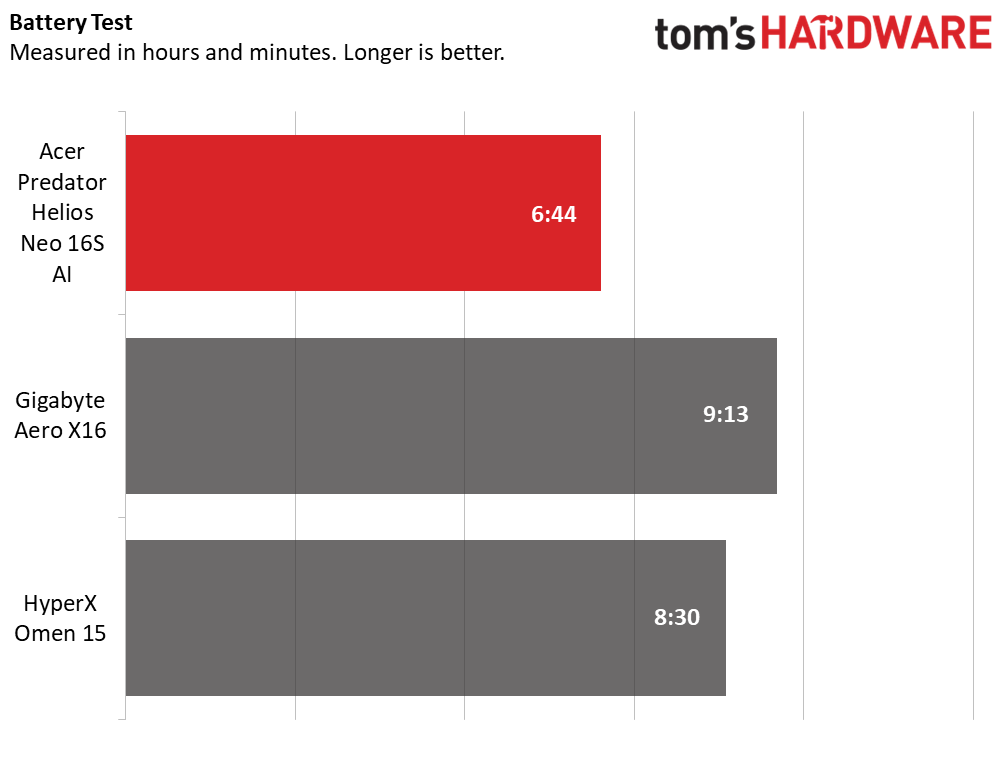
Our battery testing consists of web browsing, running OpenGL tests, and streaming videos with the screen at 150 nits while connected to Wi-Fi. The Predator underwhelmed here despite having a large 92 WHr battery – the HyperX laptop outlasted it by almost two hours and the Gigabyte nearly two and a half hours. Most of the blame goes to Acer’s decision to use a screen locked at 240 Hz; more advanced displays would support a variable refresh rate or at least allow it to be lowered to 60 Hz.
Heat on the Acer Predator Helios Neo 16S AI
We measure laptop surface temperatures during 15 loops of the Metro: Exodus stress test. During the test, the Acer’s temperatures peaked at 103 degrees F between the keyboard G and H keys, 81 F on the touchpad, and a toasty 129 F on bottom-center. Fan noise is audible particularly while gaming; hearing softer sounds in games will require using a headset. For daily use, the laptop hardly makes any noise.
Webcam on the Acer Predator Helios Neo 16S AI
Acer’s 1080p webcam offers a decently sharp picture – I could make out details in my facial hair and eyes from a few feet away. Highlights are also handled reasonably well. It lacks a physical privacy shutter or e-shutter, but it does have infrared (IR) for facial recognition.
Software and Warranty on the Acer Predator Helios Neo 16S AI
PredatorSense remains the prominent app on Acer’s Predator gaming laptops. On the Predator Helios Neo 16S AI, it offers power settings, system monitoring, updates, and system settings. Power profiles include quiet, balanced (the default), performance, and turbo. Performance mode indicates it overclocks the CPU and GPU, but doesn’t specify details, while turbo appears to be performance mode but with the fan speeds maxed.
The app’s settings let you disable Nvidia Optimus, set up optimized battery charging, a bluelight shield, and toggle a 30-second keyboard backlighting timeout. Fan control is possible, though the custom option only allows you to set the RPM, not a curve. Most of the settings above plus lighting effects and a sound equalizer can be saved in scenario profiles.
Acer loads many more apps than PredatorSense – too many: Acer Assist, Acer Chroma Tune, Acer Intelligence Space, Acer LiveArt, Acer documents, Acer Jumpstart, Acer Legal Information, Acer My Key, Acer Purified Voice Console, Acer PurifiedView, and Acer QuickPanel create a lengthy list under the Start Menu’s “A” section. Many of them are simply links to the Windows Store.
Some of the apps actually installed are useful, like Acer My Key mentioned earlier. Others could be: Acer Intelligence Space provides many AI-driven features like a meeting assistant, an image generator, a media search tool, and a game assistant that claims to automatically change the color of your crosshair for maximum visibility. I didn’t test all these out – they aren’t specific to the Predator Helios Neo 16S AI – but it seems that they could add value if you’re not already vested in other AI services.
There’s also a decent amount of bloatware, including a McAfee trial, a Dropbox promotion, and Forge of Empires. While easily uninstalled, they simply don’t belong on a laptop this expensive.
Acer Predator Helios Neo 16S AI Configurations
Our Predator Helios Neo 16S AI includes a Core Ultra 9 290HX Plus CPU, Nvidia RTX 5070 Ti graphics card, 16GB of dual-channel RAM, a 1TB PCIe 4.0 solid-state drive, and a 16-inch 2560 x 1600 OLED display with a 240 Hz refresh rate. It retails for $2,774.99 from Best Buy, though I did see it briefly drop to $1,999.99 during my review period.
Best Buy also offers a 32GB version for $3,199.99, but it was discounted to $2,459.99 during our review period, making it less expensive than our model. Pricing is always in flux with the ongoing memory shortages, but Acer’s list prices are in line with market expectations. At Best Buy, many RTX 5070 Ti models hover around the same price as our model and many are pricier.
Acer also lists a $2,099.99 model on its site with 16GB of RAM, a 1TB SSD, and an RTX 5060, though I didn’t find this model for sale.
Bottom Line
The Acer Predator Helios Neo 16S AI delivers on most of its thin-and-light gaming promise. Its RTX 5070 Ti provides solid gaming performance on its beautiful 240 Hz OLED display, and it follows up with a comfortable keyboard and touchpad, useful port selection, and solid upgradeability.
The trouble is that its portability is undermined by its below average battery life, an ironic shortcoming for a thin-and-light laptop. Audible gaming fans and lackluster speakers are further compromises, but the limited unplugged runtime is the one that those seeking a more portable package ought to be most concerned about.
But if you’re after a relatively slim gaming laptop to take between places where you can plug in, the Helios Neo 16S AI is an otherwise appealing package.


