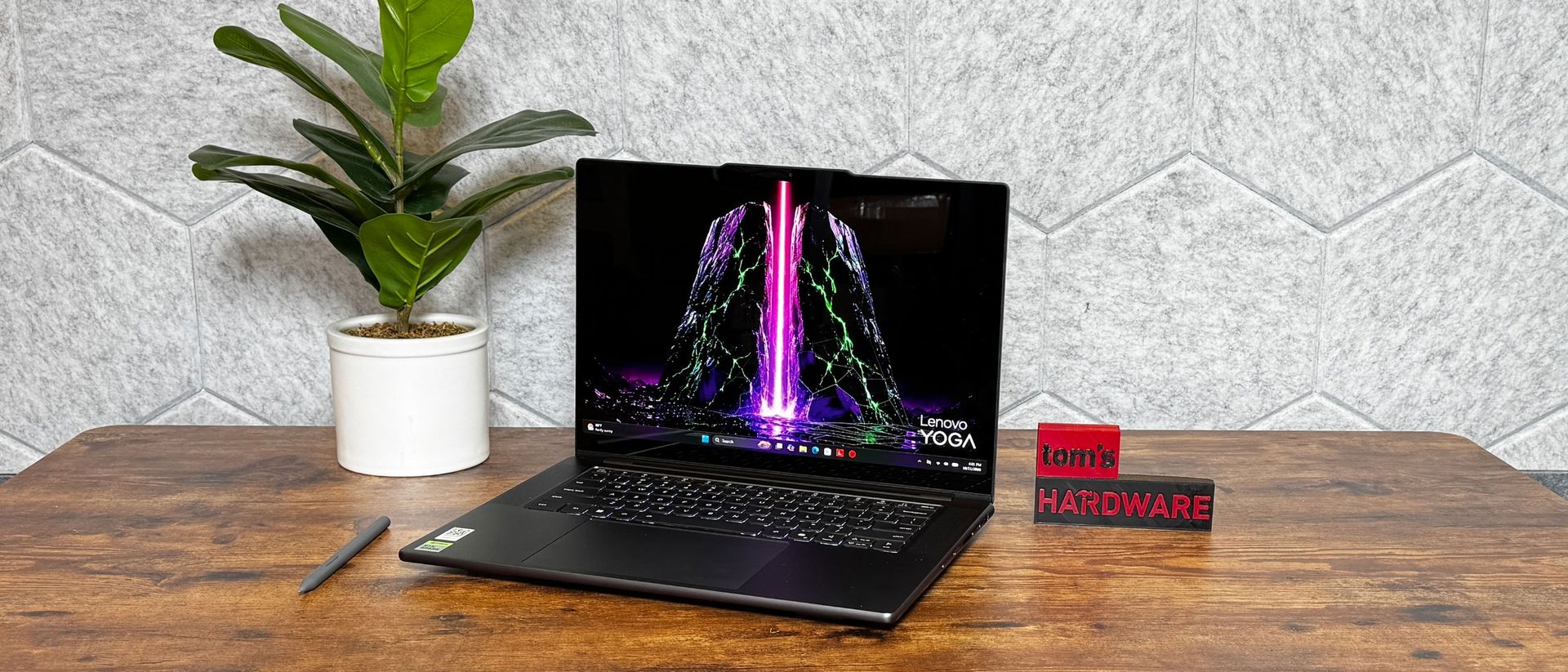
A lot of noise was made about the Microsoft Surface Laptop Ultra, but there's a handful of other premium machines running Nvidia's new RTX Spark chips. Lenovo's Pro 9n follows Microsoft's lead, making a fancy laptop with its own touches, like an OLED panel and a stylus that works on the touchpad.
This is also our first time looking at the 18-core version of the RTX Spark, which has fewer CUDA cores than the last one we tested, so we'll see just what kind of changes in performance you get if you don't opt for a higher-end configuration.
Design of the Lenovo Pro 9n
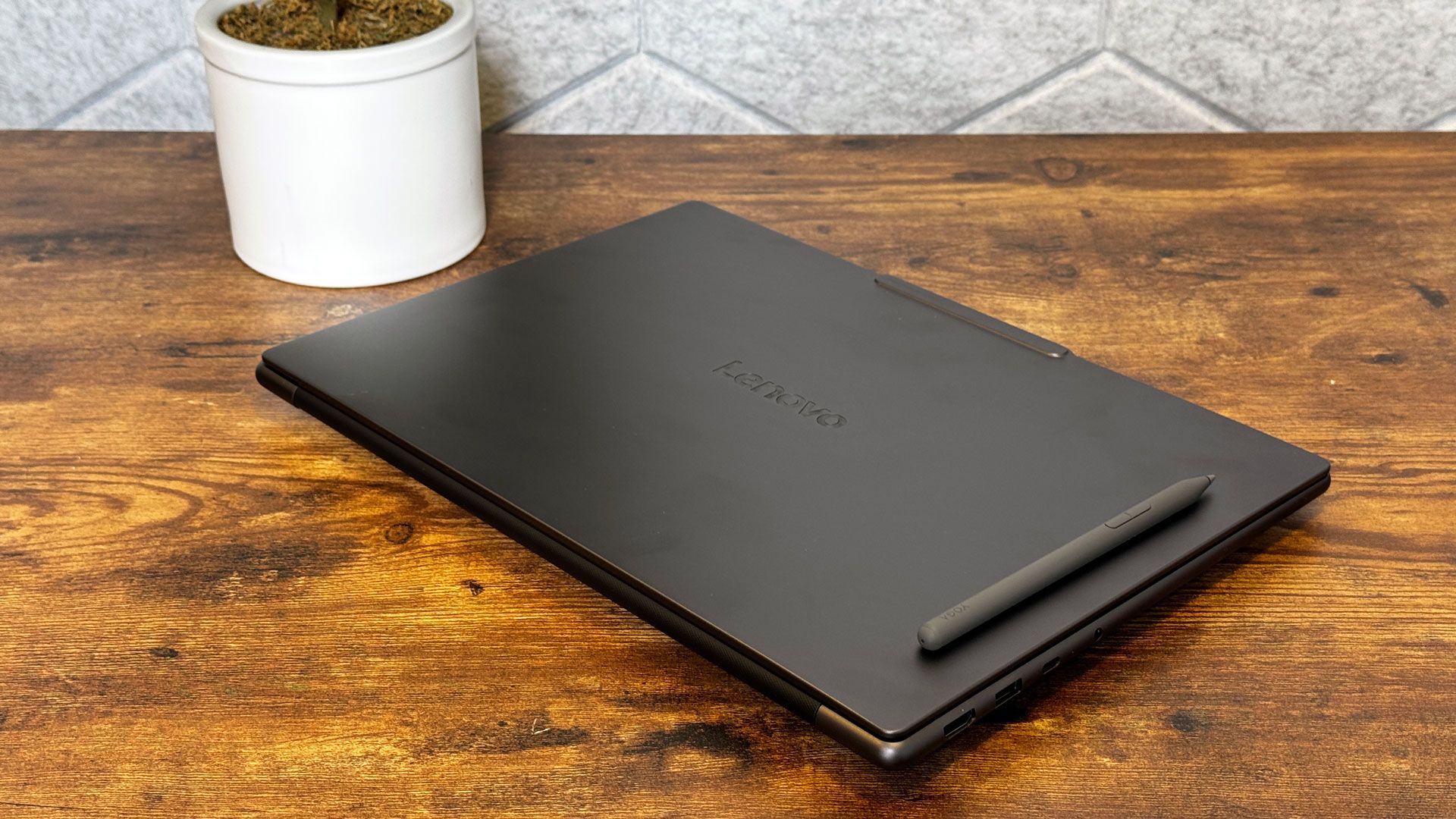
The Lenovo Pro 9n is clearly a tool. It's a dark gray box with a Lenovo logo and a slight extrusion to fit Lenovo's signature anti-notch for the camera. The lid is flat, with a rounded keyboard deck, like many of Lenovo's premium Yoga laptops. It's a playful look that's less noticeable when the system is matte black rather than colorful.
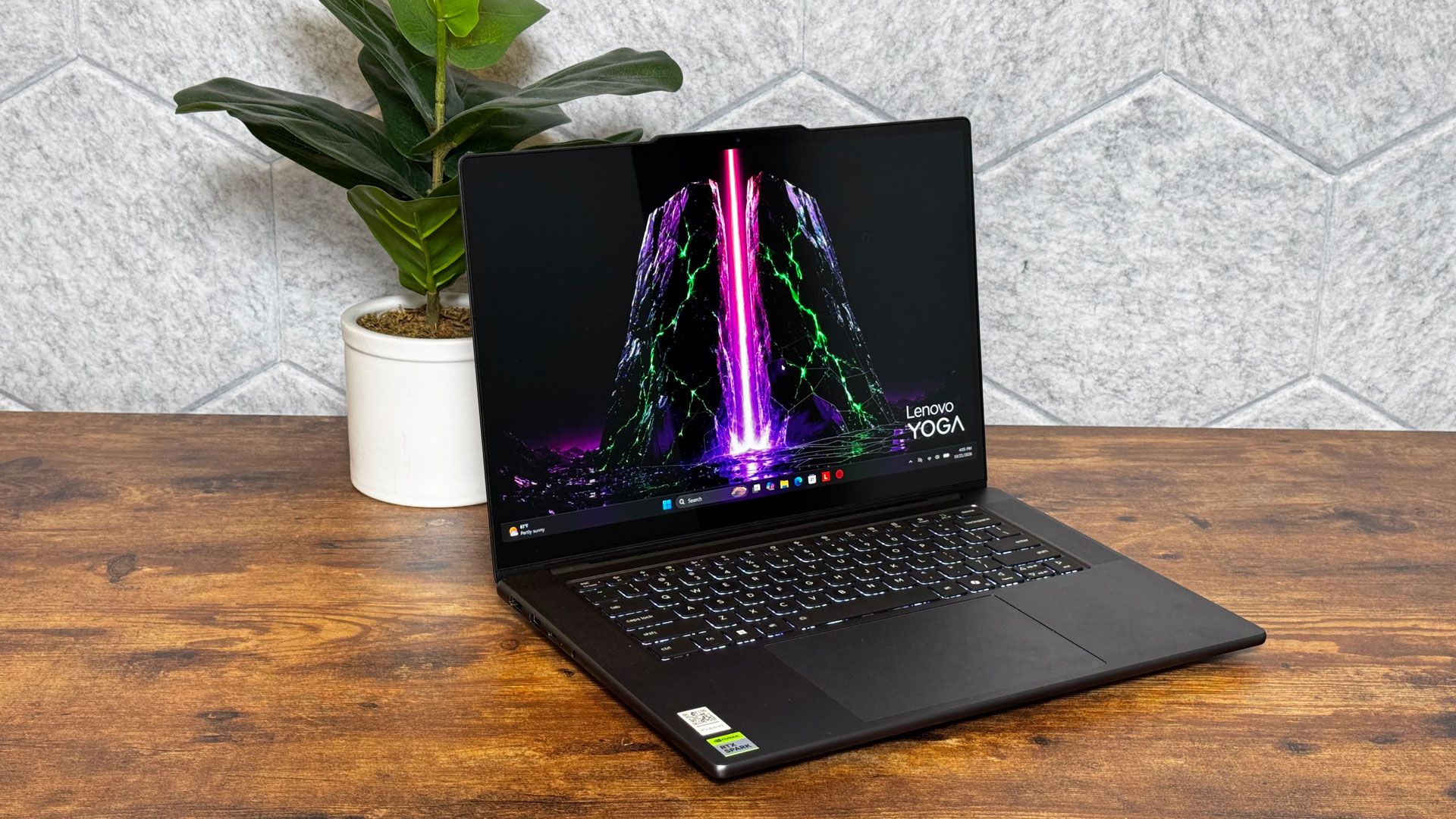
The keyboard deck, including a massive touchpad, is logo-free other than an Nvidia RTX Spark sticker, which keeps all of your attention on the backlit keyboard and 15.3-inch OLED screen.
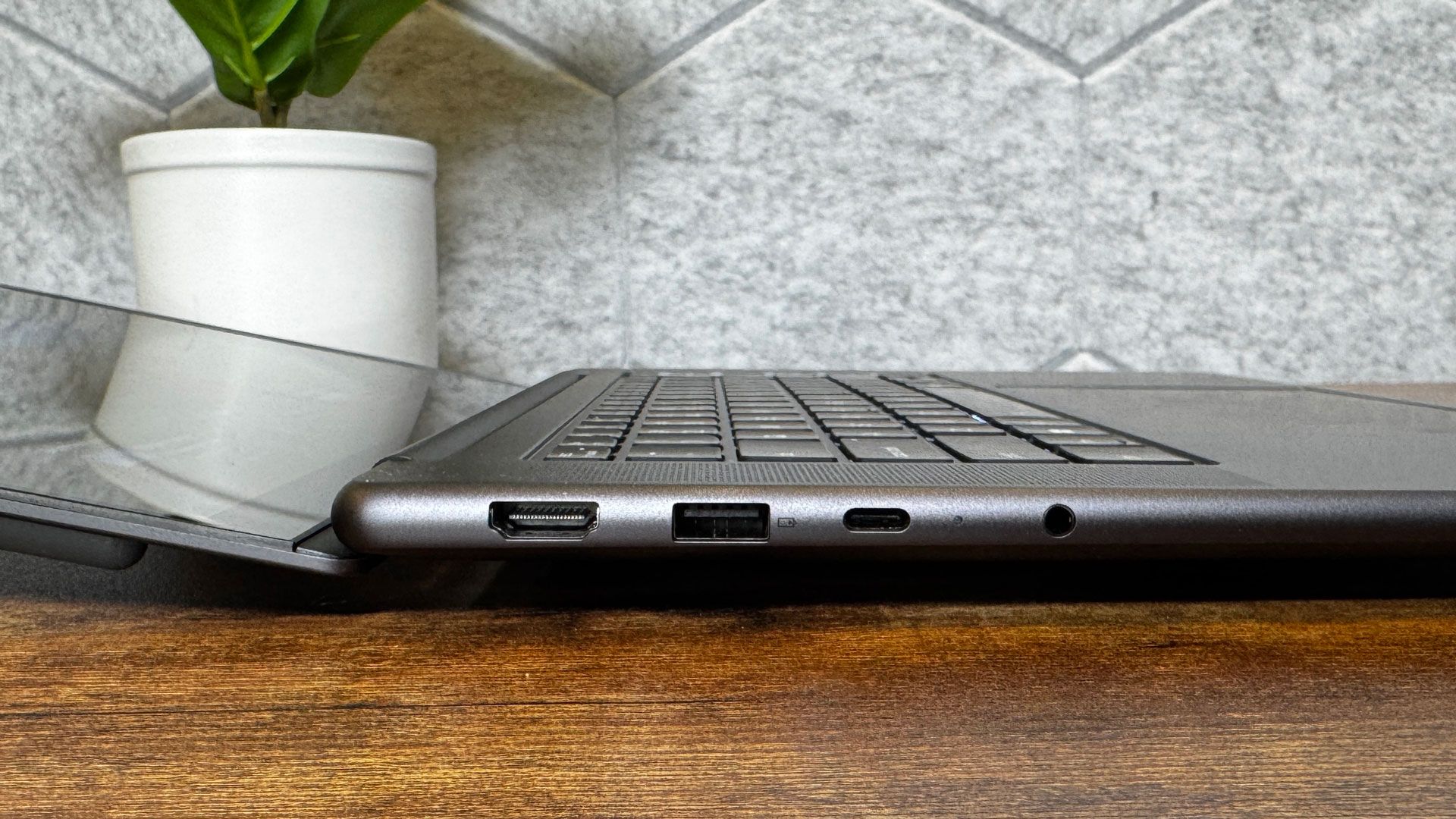
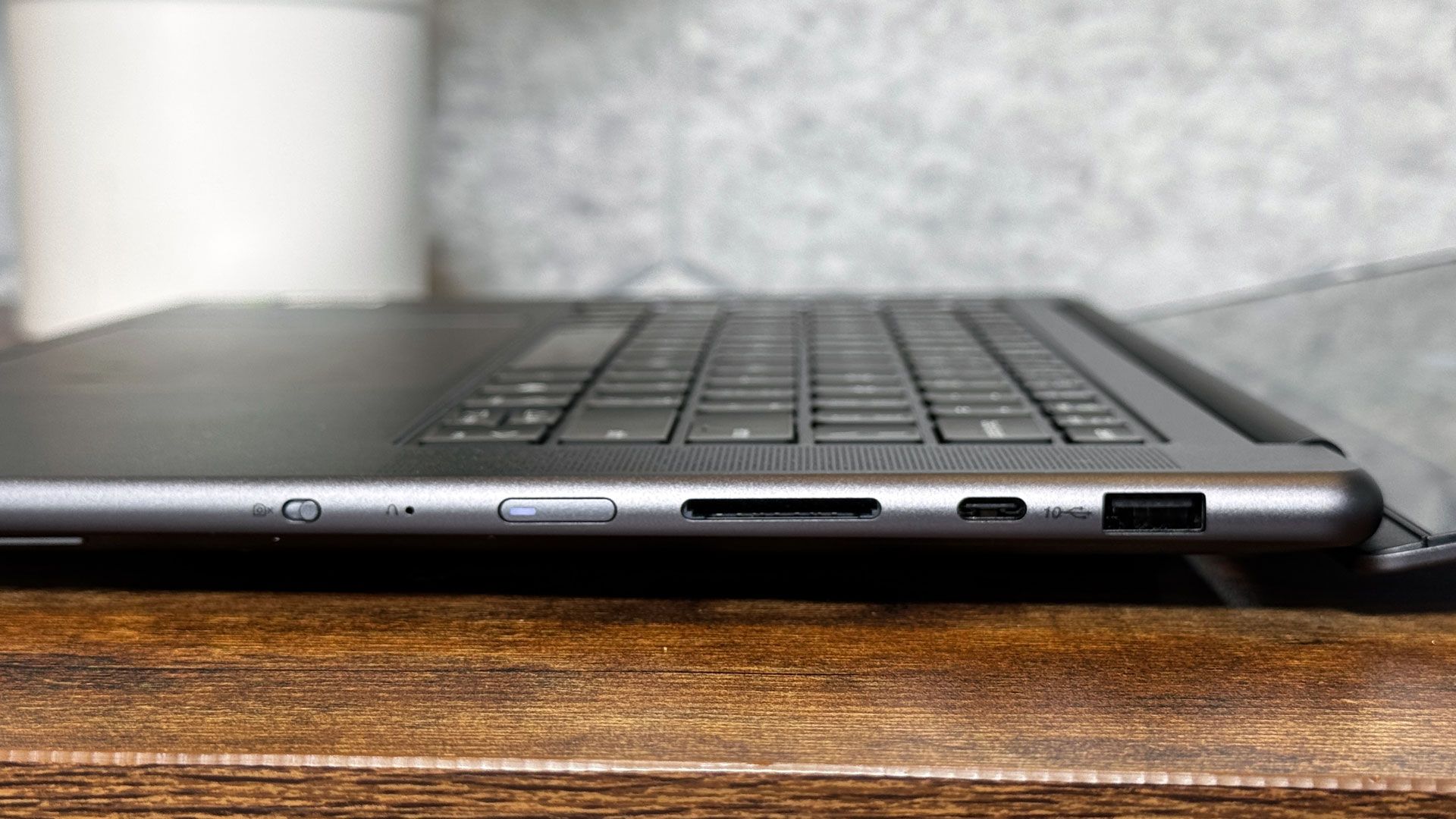
There are plenty of ports, and I appreciate that both sides of the laptop have both USB Type-C and Type-A. The left side also has HDMI and a 3.5 mm headphone jack, while the right side includes an SD card slot and an e-shutter for the webcam.
At 13.66 x 9.53 x 0.66 inches, this isn't a small system, but it's still one you can reasonably fit in your backpack. It's wider and deeper than the Microsoft Surface Laptop Ultra (12.95 x 9.40 x 0.75 inches) but it's also thinner. Apple's new 16-inch MacBook Pro with PROLED XDR is a tad sleeker at 0.63 inches thick.
The Pro 9n measured in at 3.64 pounds pounds, less than 4.41-pound Microsoft Surface Laptop Ultra. The 16-inch MacBook Pro is a bit heavier than the Pro 9n at 4.1 pounds.
Lenovo Pro 9n Specifications
CPU | Nvidia RTX Spark (18-core CPU) |
Graphics | 5,120 CUDA cores, Blackwell-based |
Memory | 32GB LPDDR5X-9400 |
Storage | 1TB PCIe |
Display | 15.3-inch, 2560 x 1600, OLED, touch, 165 Hz |
Networking | MediaTek Wi-Fi 7 MT7925, Bluetooth 5.4 |
Ports | HDMI 2.1, 2s USB Type-A (10Gbps), 2x USB4 Type-C (40 Gbps), 3.5 mm headphone jack, SD card reader (UHS-II) |
Camera | 9.2 MP, IR, e-Shutter |
Battery | 92.5 WHr |
Power Adapter | 140W USB Type-C |
Stylus | Lenovo Yoga Pen Gen 2 |
Operating System | Windows 11 on Arm, Pro |
Dimensions (WxDxH) | 13.66 x 9.53 x 0.66 inches / 347 mm x 242 mm x 16.7 mm |
Weight | 3.64 pounds (1.65 kg) |
Price (as configured) | $3,249.99 |
Productivity Performance on the Lenovo Pro 9n
The Lenovo Pro 9n features the lesser variant of the RTX Spark N1X, and this is our first look at a system with that config. This version has an 18-core CPU, down from the 20-core version we saw with the Surface Laptop Ultra. It also has 32GB of RAM and 1TB of storage.
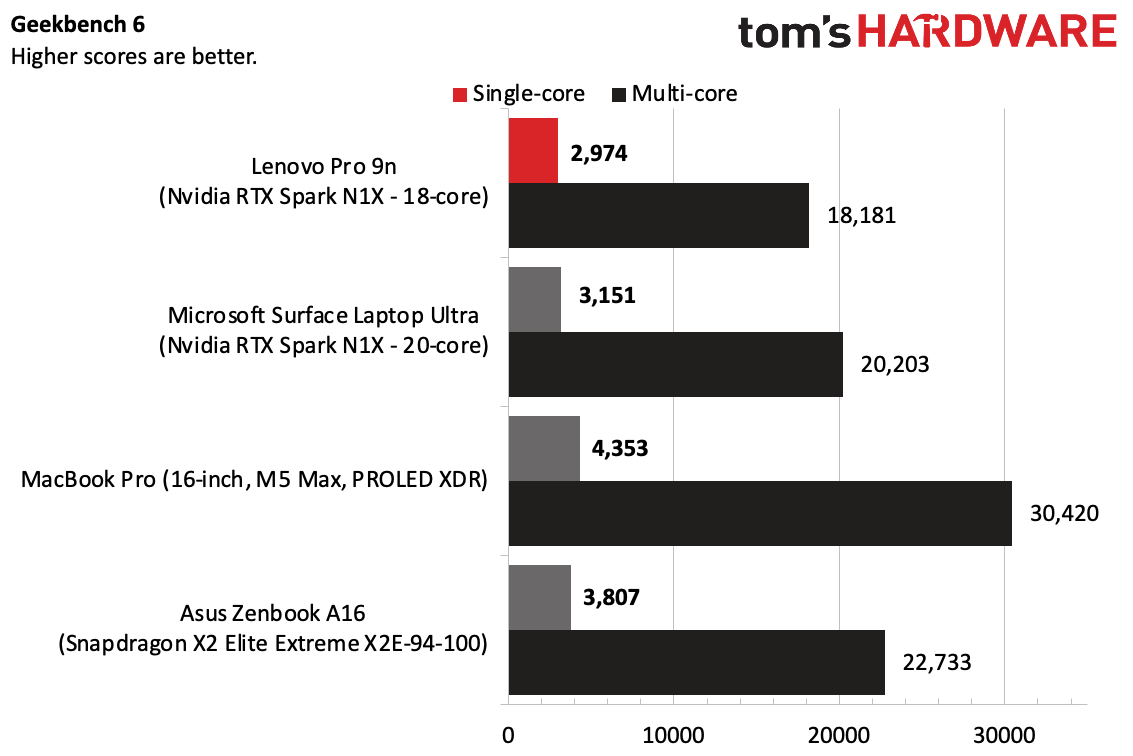
On Geekbench 6, the Pro 9n came in slightly behind the Surface Laptop in both single-core and multi-core performance (given how heavy the Surface Laptop is, some of this could come down to cooling). The MacBook Pro with M5 Max won out, while the Asus ZenBook A16 with Snapdragon X2 Elite Extreme beat both RTX Sparks.
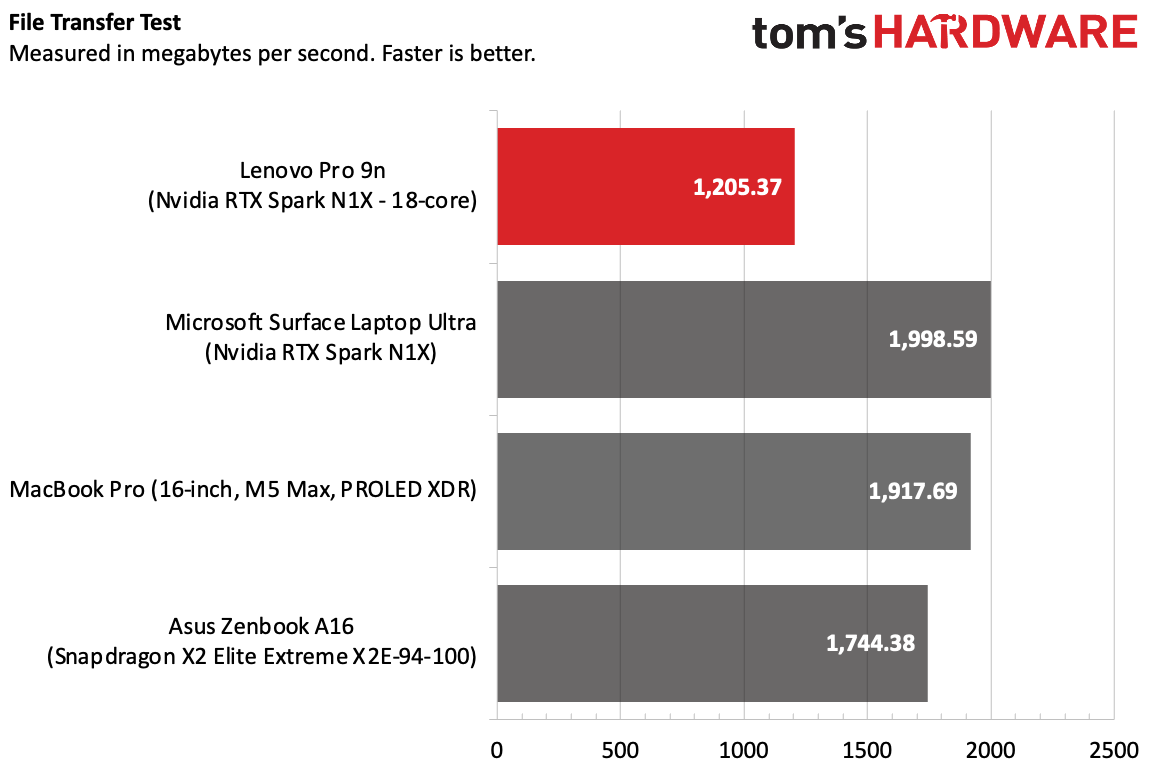
The Pro 9n copied 25GB of files at a rate of 1,205.37 MBps. That's not terrible, but in the ultra-premium price band, you can get faster speeds. Every other laptop beat the Pro 9n here.
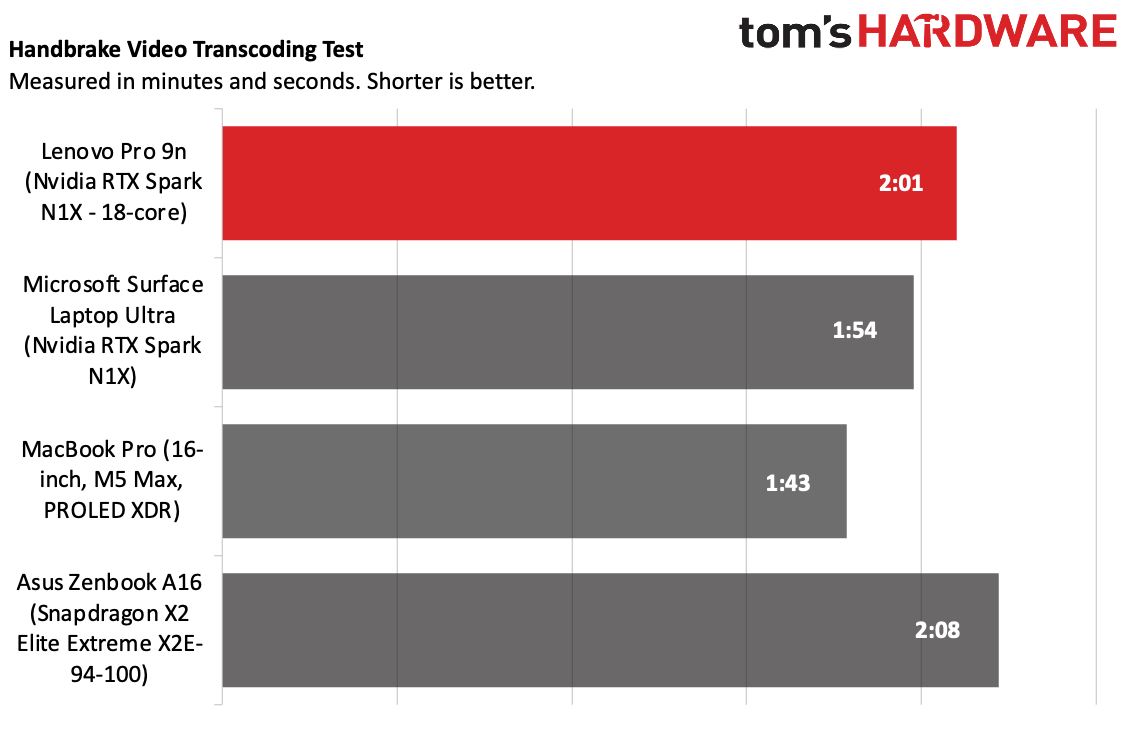
On Handbrake, the Pro 9n transcoded a 4K video to 1080p in 2 minutes and 1 second, or 7 seconds behind the Surface Pro with the 20-core CPU. The Pro 9n beat the Snapdragon-powered Zenbook here.
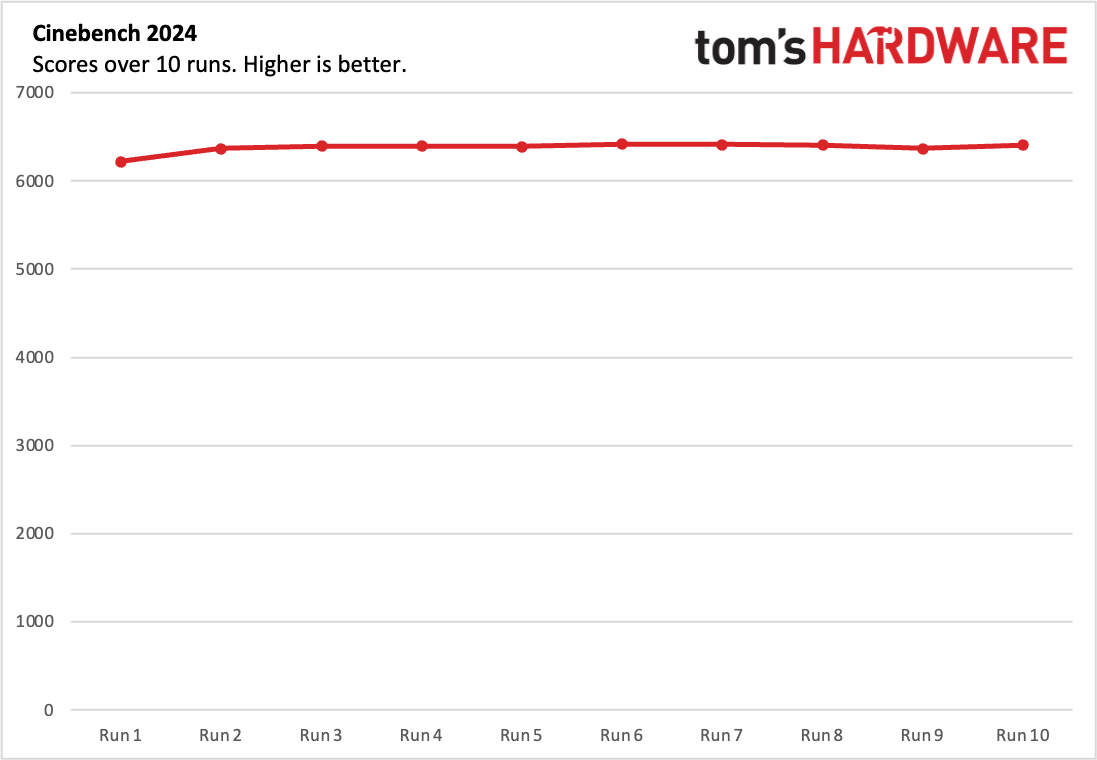
We use Cinebench 2026 to stress test laptops, running a multi-core benchmark ten times in a row. The Pro 9n stayed largely consistent — in fact, it even got better later on, as the cooling kicked into high gear. The system started with a score of 6,219.85, and topped out on run 6 at 6,417.45. Most of the runs were in the high 6,300s. The RTX Spark's Cortex-A725 cores ran at an average of 2.81 GHz, while the Cortex-X925 cores averaged 3.57 GHz.
It's worth noting that HWinfo, which we used for monitoring, was missing a single A725 core. This also happened on the Surface Laptop Ultra, though now we can tell which cores are which.
AI Performance: Comparing the two RTX Sparks
The Lenovo Pro 9n we reviewed came with the entry-level version of Nvidia's RTX Spark, which has an 18-core CPU and 5,120 CUDA cores. It can be upgraded to a 20-core / 6,144 CUDA core chip in some configurations, which is the same chip we saw in the Surface Laptop Ultra.
To test the difference in AI performance, we ran AgentPerf-Local using Qwen 3.8-27B-UD_IQ3_XXS in order to fit in the limited available GPU memory (both are 32GB systems, with the Surface allowing 24GB of allocated graphics memory and the Pro 9n accepting just 16GB). The benchmark simulates running conversations by playing back conversations, with a majority of the work involving processing prompts rather than generating tokens.
The difference between the two RTX Spark systems wasn't particularly significant here. The Surface Laptop Ultra completed the benchmark in 1,148.3 seconds, while the Pro 9n took 1,196.6 seconds. That's a 4.12% difference in favor of the higher-end Spark.
Gaming and Graphics on the Lenovo Pro 9n
Beyond the difference in CPU cores, the version of RTX Spark in the Pro 9n we tested has 5,120 CUDA cores, down from 6,144 in the more powerful version in the Surface Laptop Ultra. (The beefier chip is also available in other configurations of the Pro 9n).
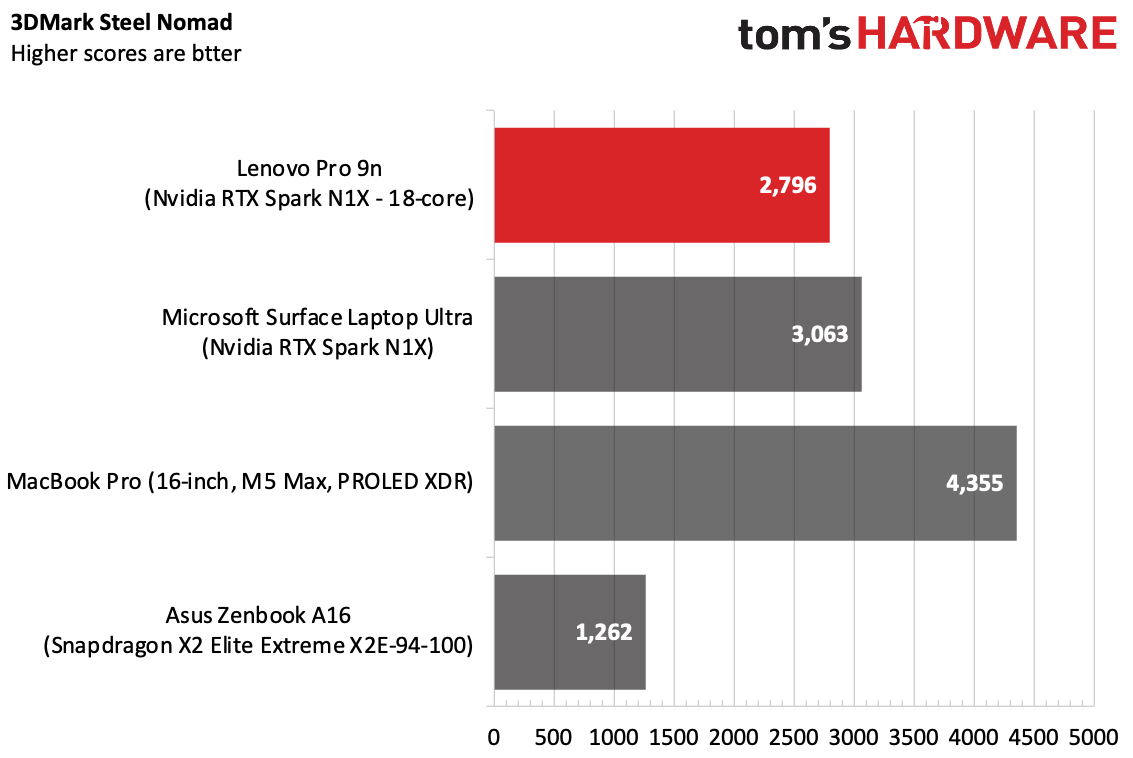
On 3DMark Steel Nomad, the Pro 9n earned a score of 2,796, falling behind the Laptop Ultra (4,355) and the MacBook Pro (3,865). It's still a more powerful system than the Zenbook with Snapdragon X2 Elite Extreme (1,262).
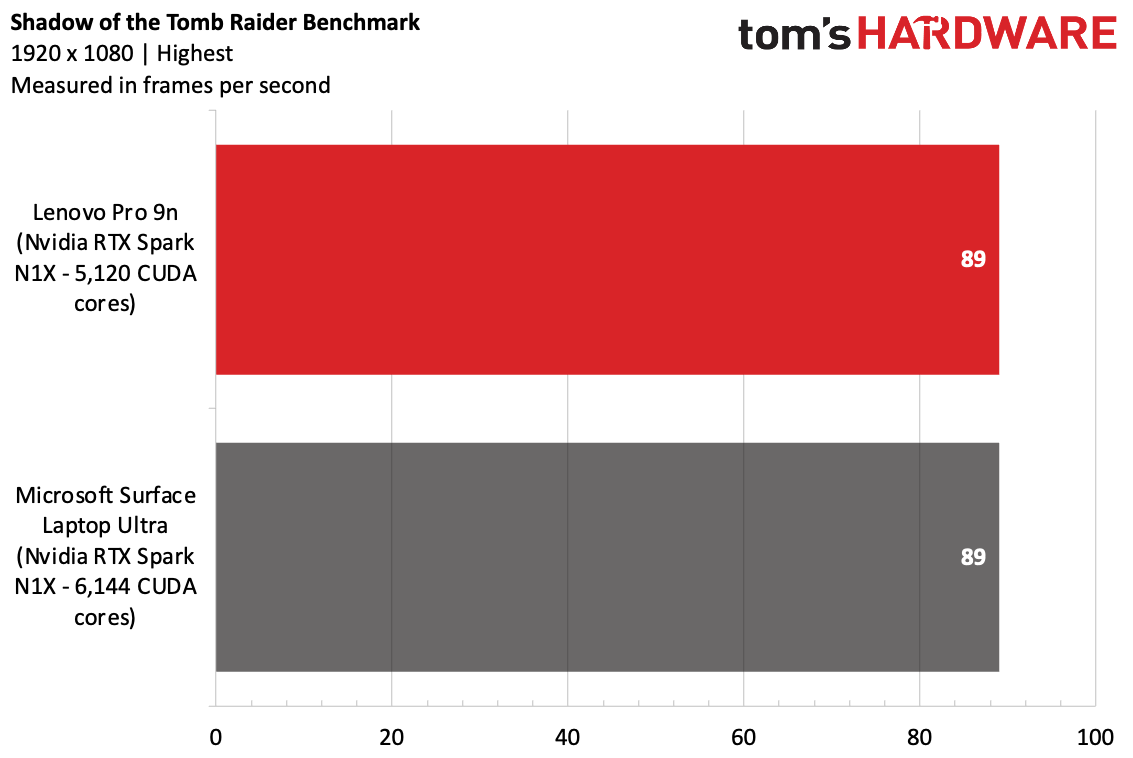
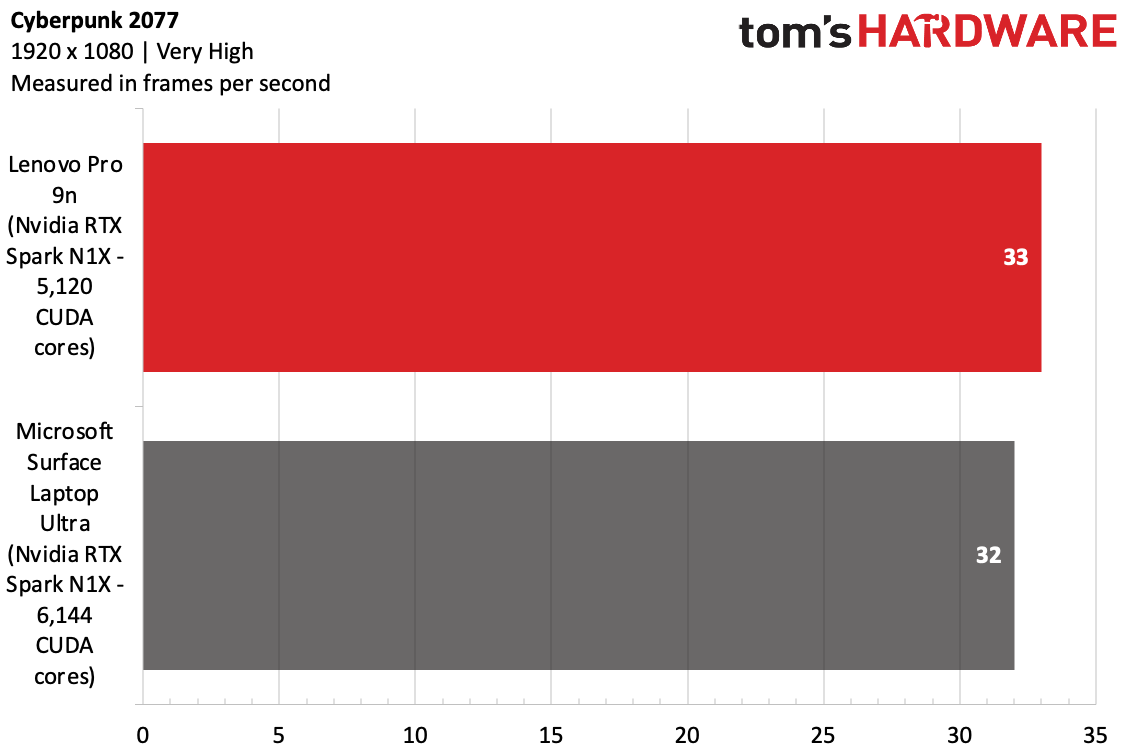
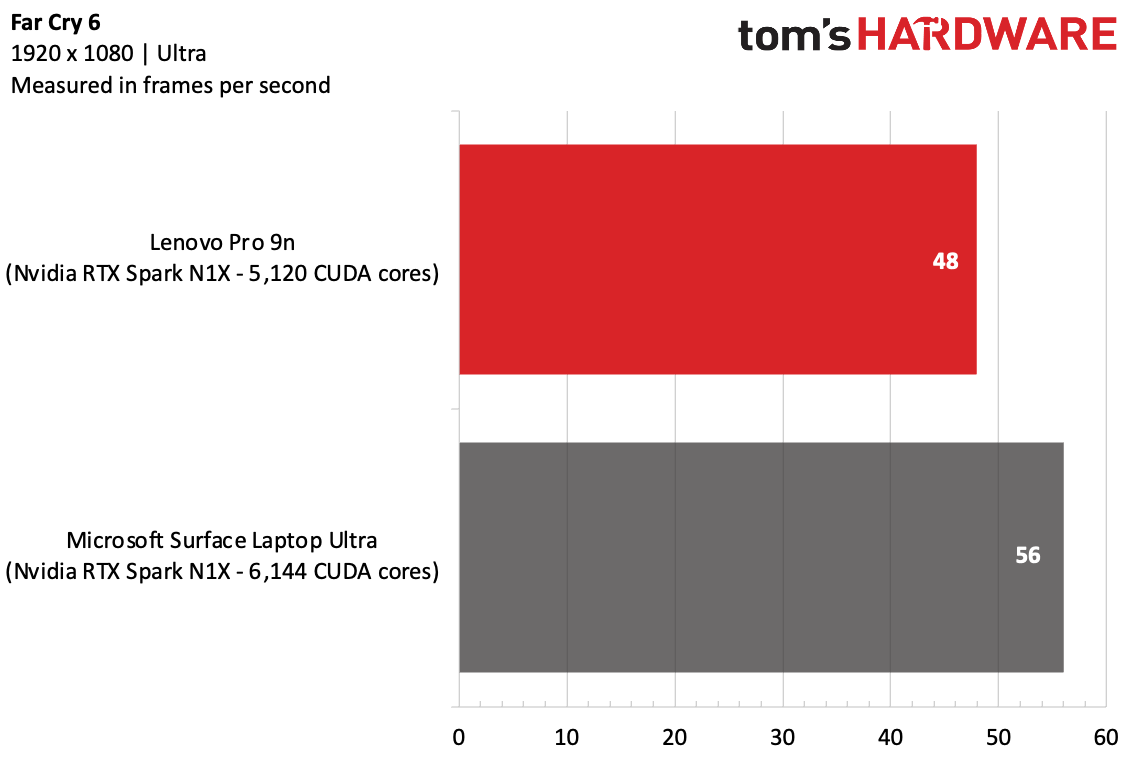
In gaming, the RTX Spark isn't really meant for much above 1080p (perhaps 1440p, depending on the game). So in the case of our benchmarks, the difference in CUDA cores didn't have a stark difference, with nearly identical scores on Shadow of the Tomb Raider and Cyberpunk 2077. Far Cry 6, which is more CPU-focused, ran better on the 20-core RTX Spark.
When I played 007: First Light, with the game at 1920 x 1200 and settings on medium, and DLSS set to ultra performance, the game ran just over 30 frames per second. With DLSS on "dynamic," the game ran smoother, between 40 and 72 frames per second as Bond moved through a swanky hotel, though there was some jankiness to it. The game also took a long time to load, possibly due to Windows' Prism emulation.
Display on the Lenovo Pro 9n
The 15.3-inch OLED touchscreen on the Pro 9n is quite nice. The 165 Hz panel is vivid and bright enough for most uses.
The trailer for Artificial showed off the colors and blacks, as the trailer descends from lush greens outside of Sam Altman's home to a dark tunnel, until he arrives in a bunker with blue lights that all but jumped off the screen.
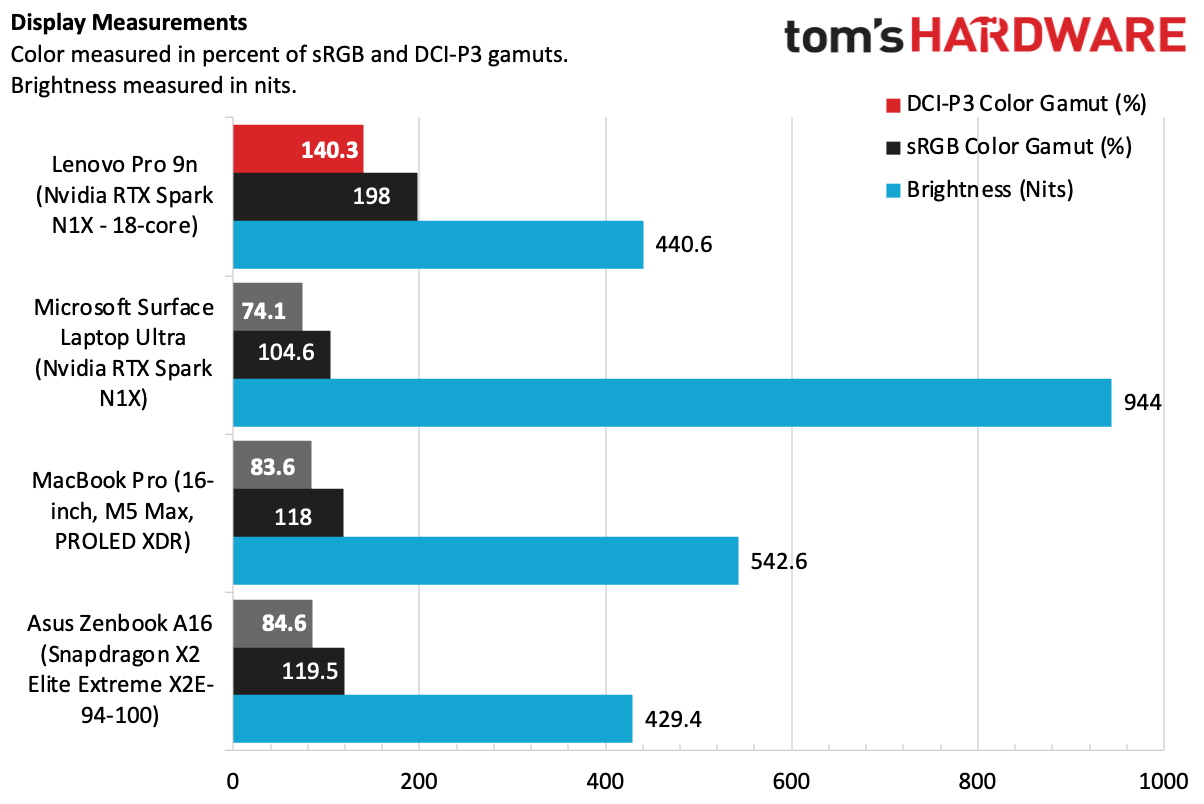
Lenovo's OLED panel was the most vivid of our test group on our colorimeter, covering 198% of the sRGB color space by volume, significantly higher than the rest of the field, though it often appeared oversaturated. In fact, it arrivees out of the box on its default wallpaper with severe pops of green and white. The MacBook Pro's PROLED XDR display has lower numbers on the colorimeter, but looks far more natural than what Lenovo is offering here.
At 440.6 nits of brightness, the Pro 9n's display is good, but the MacBook Pro has it beat at 529.5 nits, while the Surface Laptop Pro reached an astounding 944 nits in our testing.
Keyboard, Touchpad, and Stylus on the Lenovo Pro 9n
Lenovo's keyboard feels great. There's 1.5 mm of key travel, and you can feel it. It's deep, but punchy. The keycaps can be a bit slippery, though I typed at 106 words per minute on the monkeytype typing test, albeit with 2% less accuracy than usual.
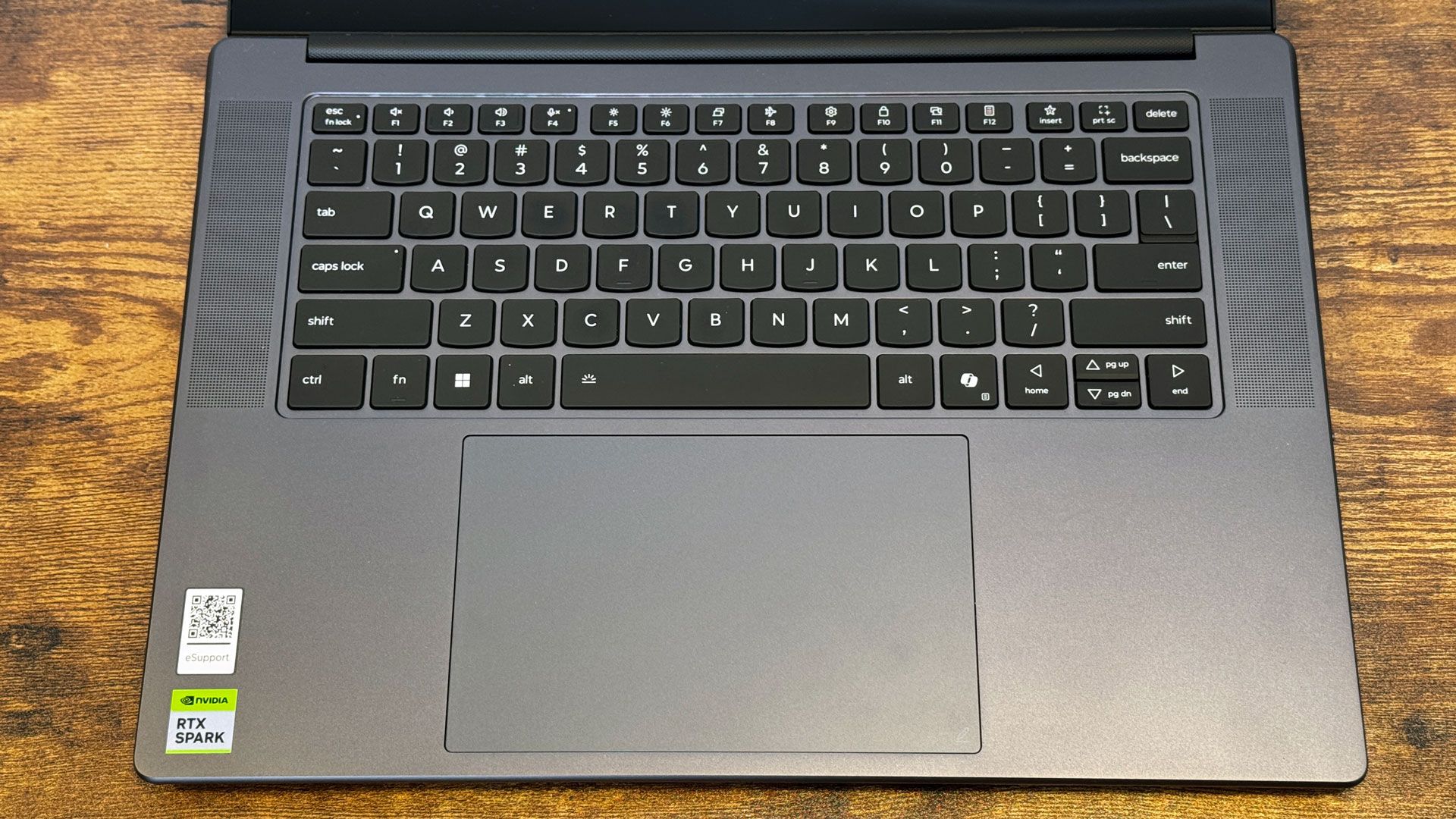
The haptic touchpad is huge, smooth, and responsive. Oddly enough, despite being haptic, there is a noticeable depression when you click down, especially at the bottom edge. It's an odd feeling when you notice it, especially when you can still configure how hard you have to press in Windows to register a click.
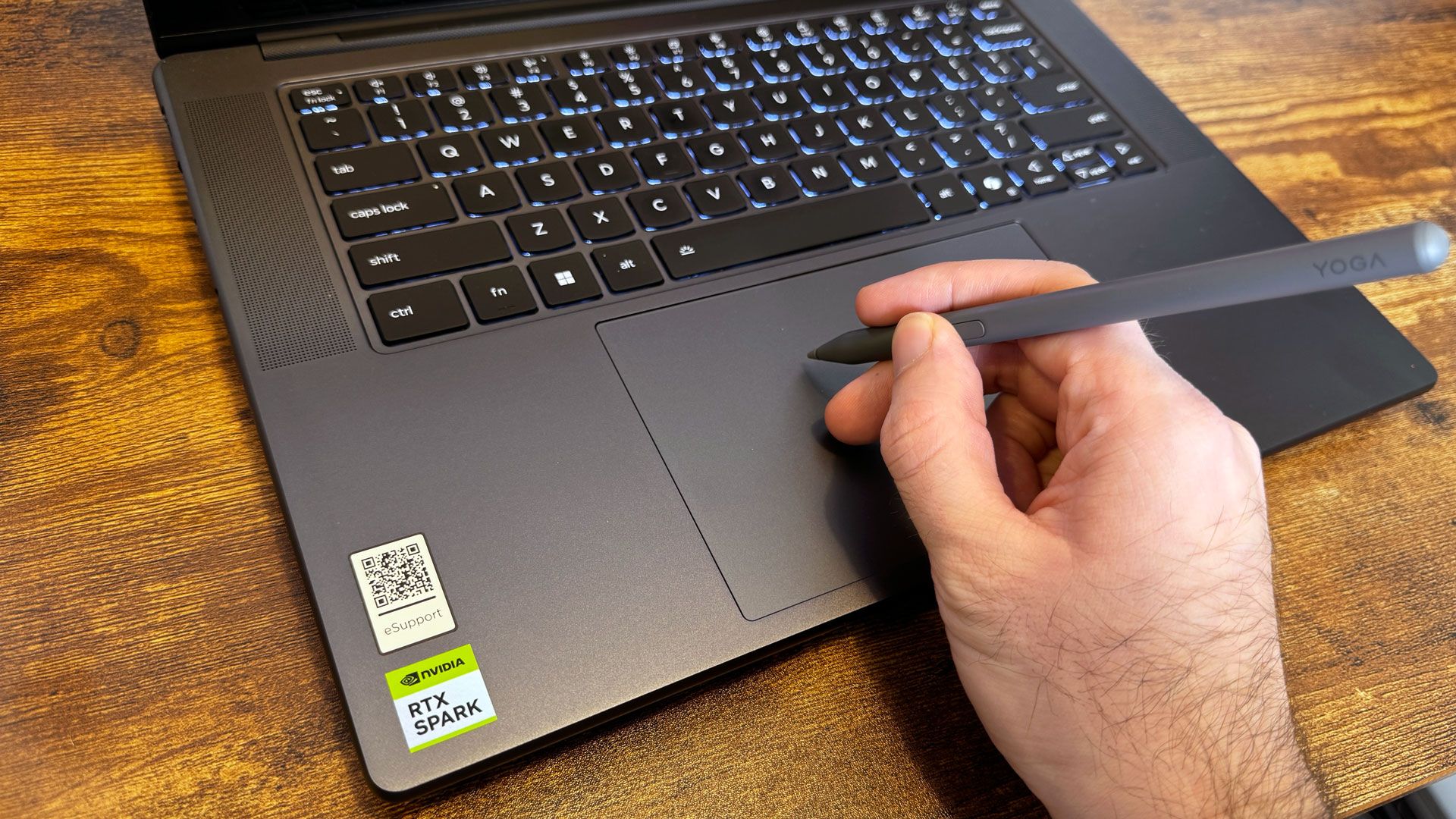
Lenovo includes a stylus in the box for use with the touch screen, which is good for signing documents. The pen, however, does not work on the touchscreen, which is an odd choice. The Yoga Pen Gen 2 (typically sold for $63 with a case that isn't included here) can attach magnetically to the Pro 9n's lid and charges over USB Type-C, so you can use the same charger as the laptop. It supports up to 8,192 points of pressure sensitivity with AES3.0, or up to 4,096 points on other protocols.
Audio on the Lenovo Pro 9n
Lenovo's combination of two tweeters and two woofers does a decent job. They get nice and loud, easily filling a mid-sized office room with Justice's "Flower In A Hurricane."
The song's guitars and synths sounded excellent, as did SZA and Kevin Parker's voices. The drum beat was a bit low, but going into the Dolby Settings app, switching to the "Warm" music setting with boosted lows helped there.
Upgradeability on the Lenovo Pro 9n
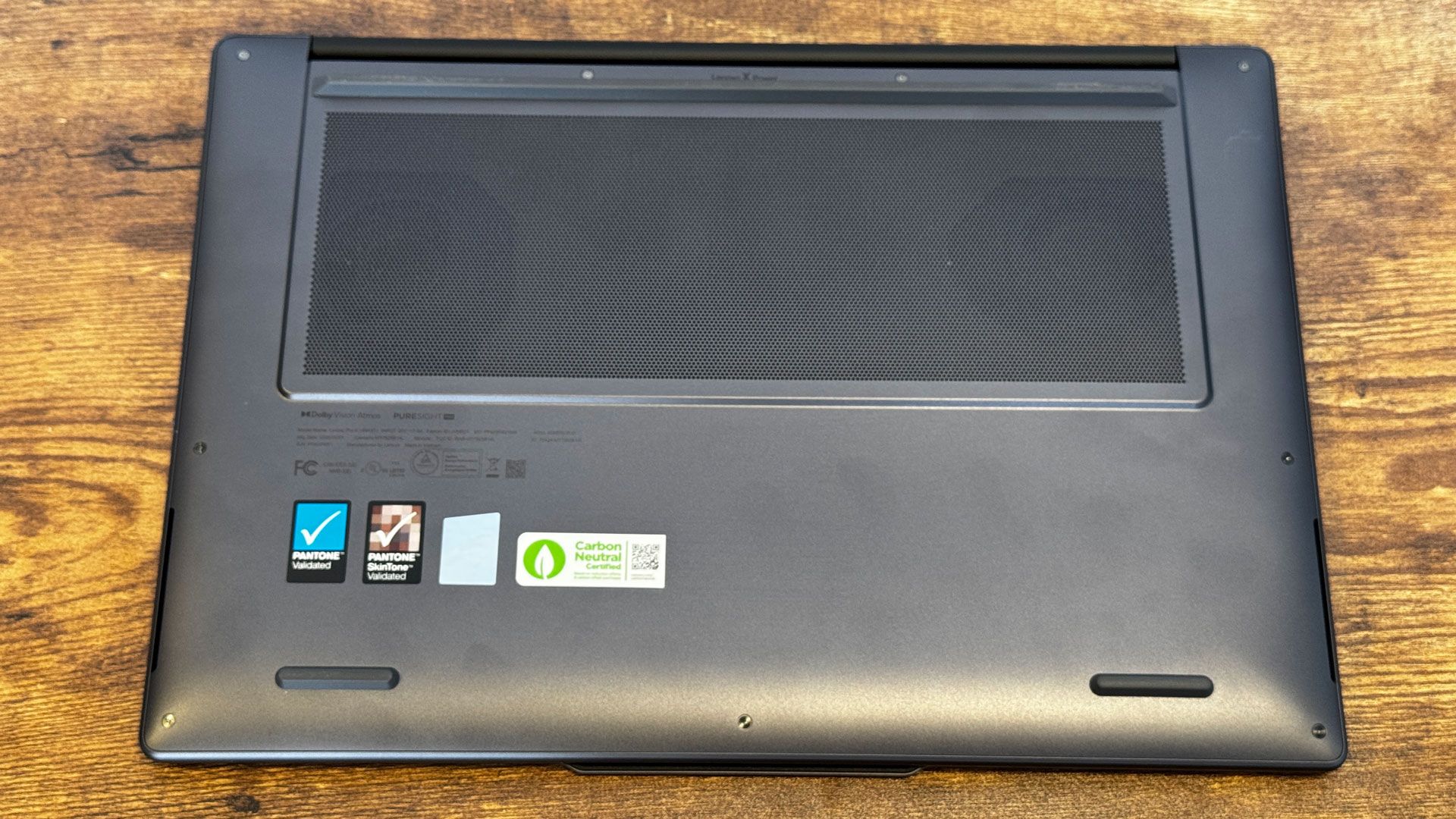
There are 9 screws holding the bottom of the Lenovo Pro 9n on. The four closest to the hinge are longer than the remaining five, so be sure to keep them organized. You'll need a pry tool to remove the latches and release the base.
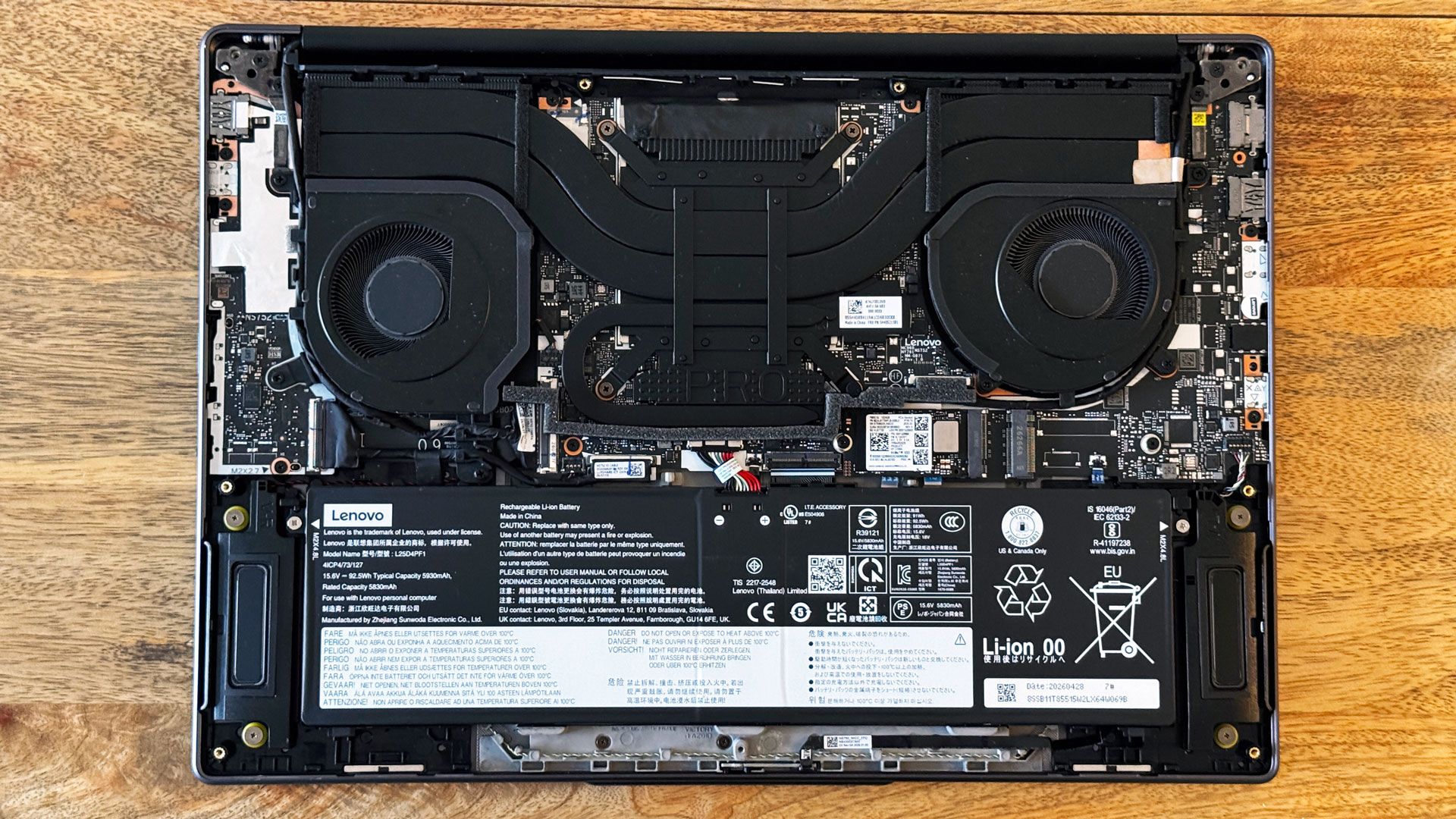
Inside, there's not a ton to repair or replace down the line for the average person. The 92.5 WHr battery is held in place with a few screws. You can also easily access the included M.2 2242 SSD, and there's a second bay for another drive of the same length. I would always prefer a more standard 2280 drive, but if this is what lets Lenovo fit two drives on the board (or at least give you the option to add a second drive), I'll take it.
The Wi-Fi card is soldered to the board and partially obscured by the heatsink's thick heat pipes.
Battery Life on the Lenovo Pro 9n
The Pro 9n ran for 10 hours and 30 minutes on average on our battery test, which browses the web, streams video from a server, and runs OpenGL tests with the screen set to 150 nits of brightness.
That's not too far off from other high-end Windows on Arm laptops, beating the Snapdragon X2 Elite Extreme-based Zenbook A16 by 4 minutes, and it was 13 minutes behind the Surface Laptop Ultra with a more powerful version of N1X.
The MacBook Pro smoked them all though, running for 15 hours and 57 minutes on our test.
Heat on the Lenovo Pro 9n
During our Cinebench stress test, we took skin temperature measurements to get an idea of how hot the Pro 9n gets during use.
The center of the keyboard measured 98.5 degrees Fahrenheit, while the touchpad was 10 degrees cooler. The hottest point on the bottom of the laptop reached 101.5 F.
HWinfo hasn't been updated to be clear on which sensors are measuring what internally. We could make educated guesses, but we'll have more specifics when the software is updated.
Webcam on the Lenovo Pro 9n
The 9.2-megapixel webcam on the Pro 9n should be more than enough for video calling in 4K, assuming your software supports it. While making calls, I found that the camera captured fine details, like graying hairs on the side of my temples (it's been a long month).
The colors were a bit cool, however. I could do with more vibrancy and warmth to make it more realistic.
Software and Warranty on the Lenovo Pro 9n
There’s just too much pre-loaded software on the Pro 9n. The most important app is Vantage, a catch-all app with your serial number, user guides, warranty status, a number of device settings, and access to support services. But it also houses a ton of ads.
The company also has direct links in the Start menu and taskbar to the Lenovo subscription portal to buy software. An additional user guide is also in the start menu. There's also Smart Connect, to pair and transfer files between your laptop, tablet, and phone, along with a dashboard to view them all. The company also has its stylus settings app and a link in the Start Menu to its Artificial Intelligence policy, which looks more like an internal document than something meant for consumers.
Lenovo also includes some bloatware, like trials of McAfee antivirus and a promotional trial of Dropbox.
Like other RTX Spark systems, the Pro 9n is running Windows on Arm. It's better than it's ever been, but there are still times when it feels laggy. More games and apps than before are compatible, but it's still not perfect.
Lenovo sells the Pro 9n with a 1-year warranty, which can be extended with additional coverage for more money.
Lenovo Pro 9n Configurations
We tested the Lenovo Pro 9n in a $3,249.99 configuration with an 18-core RTX Spark CPU and integrated GPU using 5,120 CUDA cores, 32GB of RAM, a 1TB PCIe Gen 4 SSD, and Windows 11 Pro.
The cheapest version, at $2,999.99, uses the same processor and RAM as our review unit, comes with Windows 11 Home, and has 512GB of RAM.
Bumping up to the higher-end 20-core, 6,144 CUDA-core GPU costs an extra $450 but also gets you 64GB of RAM and 1TB of storage as a base. Moving to 128GB of RAM is $1,400, while moving to a 2TB PCIe Gen 5 SSD is another $450.
Bottom Line
The Lenovo Pro 9n is a minimalist, RTX Spark-based laptop with strong port selection and a lovely OLED screen. The keyboard has deep travel, and I don't mind a design that simply gets out of the way of your work.
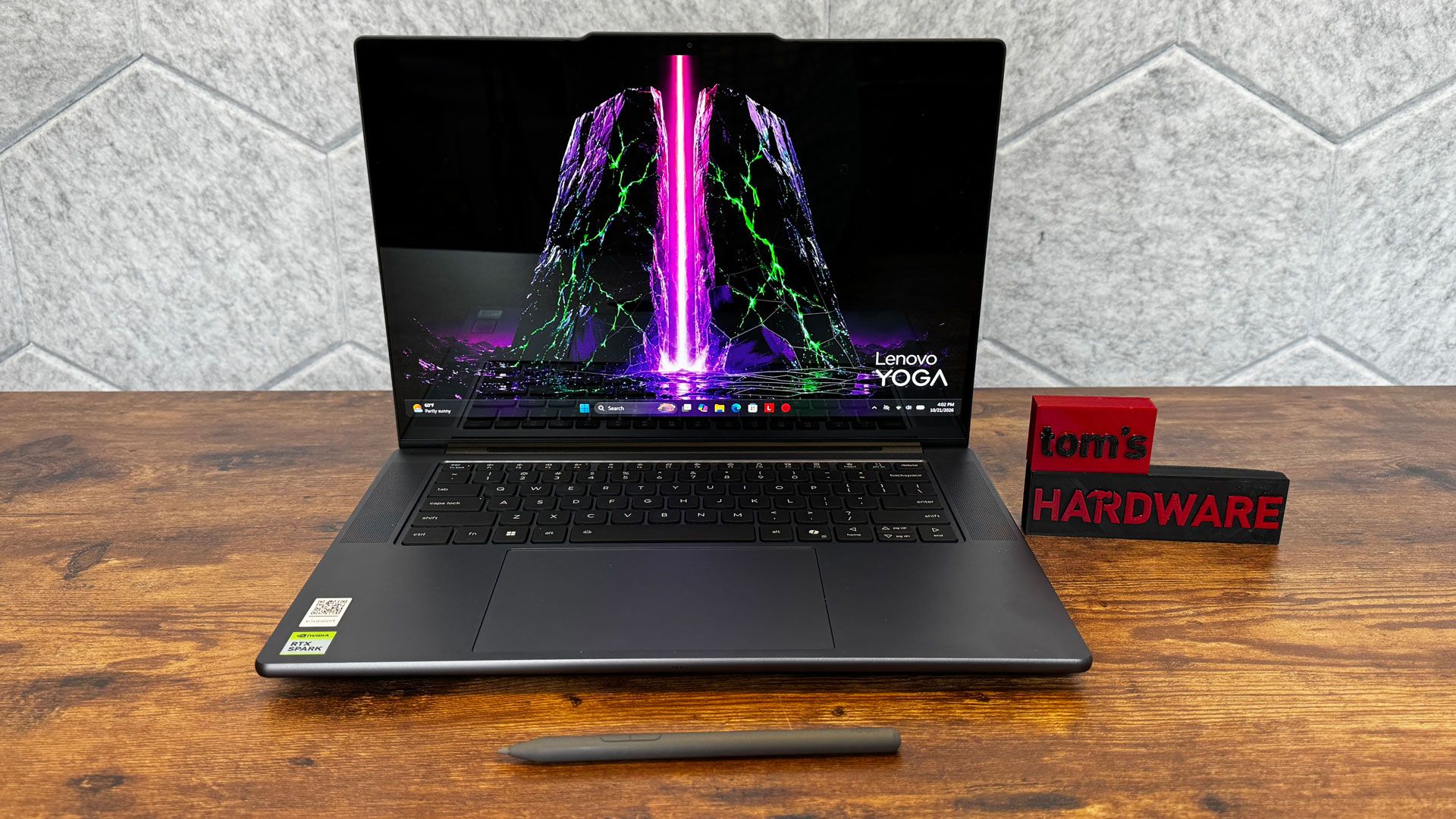
Still, it's expensive, even with the base version of RTX Spark. Battery life is just past 10 hours, which I would like to see improve across the RTX Spark platform, and there aren't any AI features in Windows that make this chip special for anyone who isn't running local models.
If you are married to getting an RTX Spark machine, the Lenovo Pro 9n beats the Surface Laptop Ultra in three areas: It's lighter, has an OLED screen, and extra SSD slots (even if it is M.2 2242) for an upgrade down the line. Still, the Surface is a nicer, more premium design and has the fun, magnetic Surface Connect port.
Those who aren't running local models should probably be looking for a cheaper laptop. Those prioritizing battery life should consider a Mac. And those who like Windows on Arm can still consider Snapdragon X2, as Nvidia's entrance into this choppy sea should lift all ships.