The FSI challenge: Faster delivery with stronger controls
Financial institutions face a difficult asymmetry. Frontier models can help defenders find and remediate weaknesses faster, but regulators are also warning that the same capabilities might accelerate vulnerability discovery and exploitation. The supervisory response is raising expectations for prioritized vulnerability management, continuous monitoring, operational resilience, supply-chain assurance, and the use of AI-based defensive tools under safeguards, human oversight, and robust risk management.
Traditional software delivery makes that harder. Build, security, risk, and operations often work in separate tools and review cycles, with context passed through tickets and manual handoffs. Security checks might occur late, evidence is assembled after the fact, and incident responders must reconstruct what changed across multiple systems. For regulated teams, this creates more than delay: it makes controls harder to apply consistently and decisions harder to evidence.
Under the Digital Operational Resilience Act (DORA), accountability for Information and Communication Technology (ICT) risk remains with the financial institution, including its use of cloud and other third-party providers. Fast development speed alone isn’t enough. Teams need a delivery model that shortens the cycle from discovery to remediation while retaining approval points, traceable evidence, and human accountability.
A governed AI-DLC with three Frontier Agents
The AI-Driven Development Lifecycle (AI-DLC) provides a practical pattern: an AI agent drafts or analyzes, a human evaluates, and the cycle repeats in short iterations. Applied across the lifecycle, agents can help author code, assess release readiness, identify security weaknesses, and investigate production failures. Humans continue to set policy, evaluate findings, authorize material changes, and own the production decision.
In this hands-on walkthrough, Kiro, AWS Security Agent, and AWS DevOps Agent work across a shared GitHub-based workflow. Kiro authors and revises code. AWS DevOps Agent reviews release readiness before and during the pull request. AWS Security Agent performs a deeper security review. A human approves the merge, and AWS DevOps Agent investigates production failures.
Under DORA, accountability for ICT risk stays with the financial institution regardless of which cloud or tooling it uses. Showing that every change was scanned, reviewed, and approved before it reached production, with evidence captured in the delivery toolchain itself, is what turns a good engineering practice into a defensible compliance posture. The institution moves faster without weakening the governance chain, because the agents handle the analysis while humans retain the authority over what gets deployed. This reference implementation doesn’t provide compliance by itself. Each institution must map it to its policies, segregation-of-duties requirements, model risk controls, risk appetite, and DORA obligations.
The three agents — role mapping across the SDLC
| SDLC Phase | Agent | What it does |
| Plan → Build → Test | Kiro (autonomous agent) | Virtual developer. Maintains persistent context across sessions, learns from PRs and feedback. Handles multi-repo tasks: bug triage, code coverage, feature implementation. Connects to Jira, GitHub, Slack. |
| Security | AWS Security Agent | Virtual security engineer. Reviews design docs, scans PRs against org-specific security requirements, runs autonomous penetration testing. Returns validated findings with remediation code. |
| Review → Operate → Improve | AWS DevOps Agent | Virtual site reliability engineer (SRE), and now code reviewer. Release readiness code reviews on every change (cross-repo dependency risks, standards compliance, access control, automated verification testing), plus always-on incident triage, root cause identification and proactive reliability recommendations. Works with Amazon CloudWatch, Datadog, Dynatrace, Splunk, New Relic, Grafana, ServiceNow, Jenkins, GitHub. |
Integration model: Workflow-level orchestration
The three agents operate as complementary autonomous systems that share the same software development lifecycle (SDLC) context through common tooling (repos, continuous integration and continuous delivery (CI/CD) pipelines, ticketing systems). The AWS DevOps Agent pulls double duty in this pipeline. Its release readiness code reviews capability makes it the first reviewer on every change: inside Kiro while the code is being written, and again on the PR, before it switches hats to incident response in production.
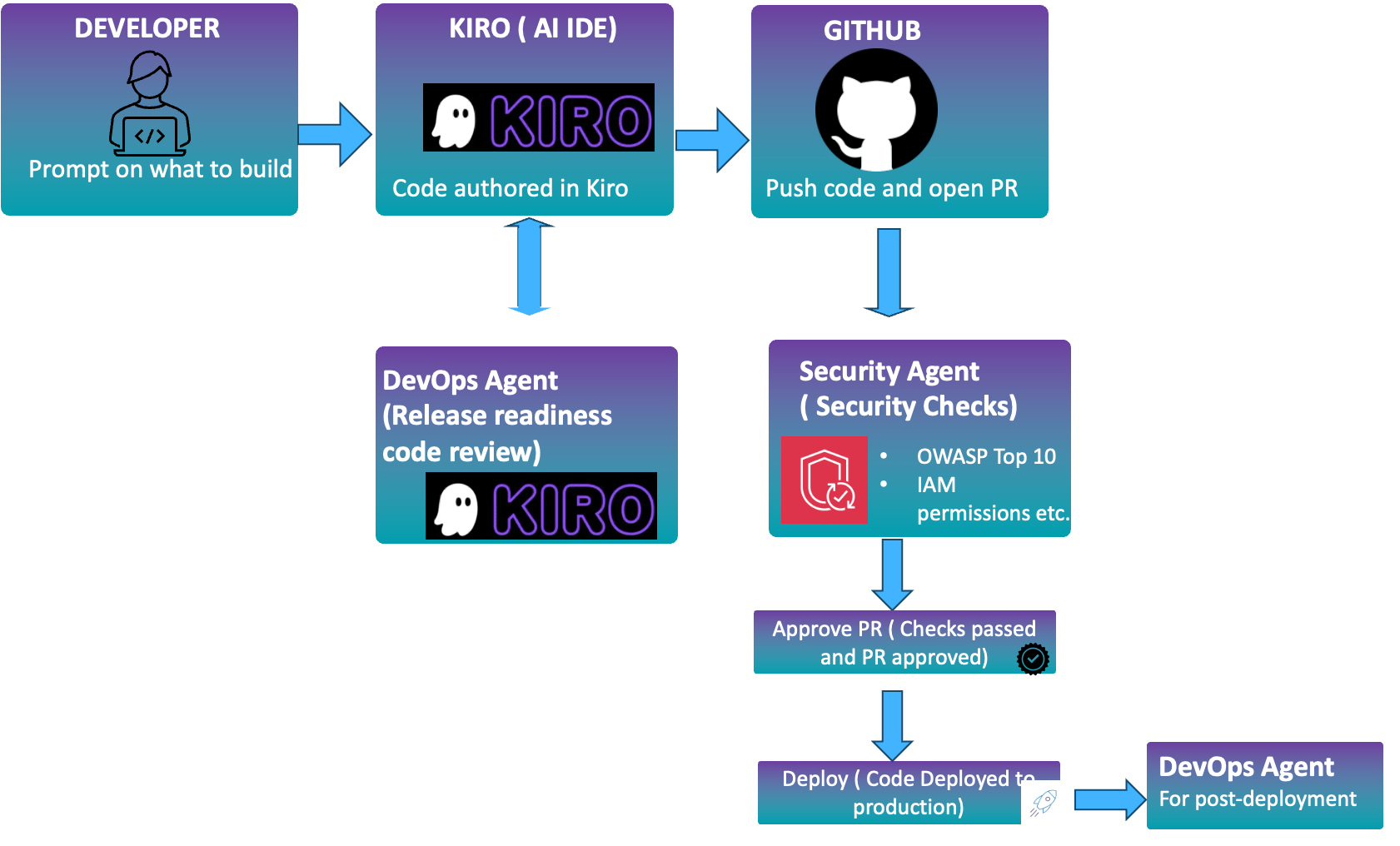
Figure 1: End-to-end workflow across Kiro, AWS DevOps Agent, and AWS Security Agent in a shared GitHub-based pipeline
- Developer prompts Kiro on what to build. Kiro authors the code.
- With the AWS DevOps Agent Kiro Power installed in Kiro, you can request a code release readiness review from AWS DevOps Agent right in the Kiro IDE. The release readiness review covers cross-repo dependency risks, standards compliance, access-control correctness, and automated verification testing.
- After we pass the AWS DevOps Agent code readiness review, we push the code to GitHub from Kiro. The GitHub workflow is designed in a way that a Pull Request (PR) is automatically created.
- AWS Security Agent runs the deeper OWASP / AWS Identity and Access Management (IAM) / secrets pass on the PR.
- The developer might incorporate the output from AWS Security Agent and further revise the code. If all looks good, the developer merges the PR.
- On merge, GitHub Actions deploys.
- AWS DevOps Agent watches production and, the moment something breaks, opens an investigation, finds the root cause and ties back to the same GitHub repo Kiro is working in.
The rest of this post is the hands-on version of that loop: the exact wiring you need to make it run against a real repo.
Step-by-step setup
This section walks through the setup end to end, from a quick primer on GitHub Actions through the prerequisites and the six steps that wire the agents together.
A quick primer on GitHub Actions
GitHub Actions is GitHub’s built-in automation system. You drop YAML files into .github/workflows/ in your repo, and GitHub runs them on events you care about, such as a push, a PR being opened, a label being added, or a merge to main. Each workflow spins up a fresh Linux VM (“runner”), checks out your code, and executes a series of steps. Steps can be shell commands or reusable packages called actions. We use GitHub Actions as our CI/CD pipeline manager for demonstration purposes.
Prerequisite 1 — What you’ll need
- A GitHub repo. In this demo example, we deploy a Python application to AWS Lambda using GitHub Actions.
- An AWS account with permission to create IAM roles, Lambda functions, and an OpenID Connect (OIDC) identity provider.
- Kiro installed locally.
- A Slack workspace (for AWS DevOps Agent notifications).
Prerequisite 2 — Install the GitHub Apps and connect the agents
GitHub Apps are the modern way to give automation identity and scoped permissions. For the general model, see About using GitHub Apps. For this demo, install the following on your repo:
- AWS Security Agent – Follow the AWS docs to connect the AWS Security Agent to your GitHub repo.
- The AWS DevOps Agent isn’t a GitHub App, but it needs three connections:
- Connecting AWS DevOps Agent to GitHub – With GitHub integration, AWS DevOps Agent can access code repositories and receive deployment events during incident investigations.
- Connect it to Kiro by installing the AWS DevOps Agent Kiro Power from the Kiro Power marketplace, so the agent can review code in the IDE while it’s being written.
- (Optional) Connecting AWS DevOps Agent to Slack – With this connection, AWS DevOps Agent can post the investigation result to the designated Slack channel.
Step 1 — Author code in Kiro and push to GitHub
Kiro is an agentic IDE: you describe what you want to build, it writes and edits files, and you commit the result. Open your repo in Kiro, iterate until the feature works, then push a feature branch.
For demonstration purposes, we intentionally started with a flawed .py file with a hard-coded credential and a SQL injection vulnerability so the AWS DevOps Agent and AWS Security Agent have something to catch downstream. This is only to exercise the review agents end-to-end.
Because we installed the AWS DevOps Agent Kiro Power in Prerequisite 2, the review actually starts here, before anything is pushed. The Power includes Skills that tell Kiro to invoke a release readiness review after significant code changes and before creating a PR. Findings surface directly in the IDE, and Kiro offers to fix them on the spot. For this demo, we let the flawed file through so you can see the PR-side review catch it too.
Step 2 — Let the AWS DevOps Agent review the code
This is where the AWS DevOps Agent takes the first review pass. In this post, we use Kiro’s AWS DevOps Agent Power and chat directly with Kiro to kick off the review. This is convenient because you can download the review report and incorporate it into your code. Note that the AWS DevOps Agent can be configured to automatically run a release readiness code review every time a PR is opened or updated.
Prompt: Starting a release readiness review on DevOps-agent-demo @ update-lambda-import. Run it as static analysis.
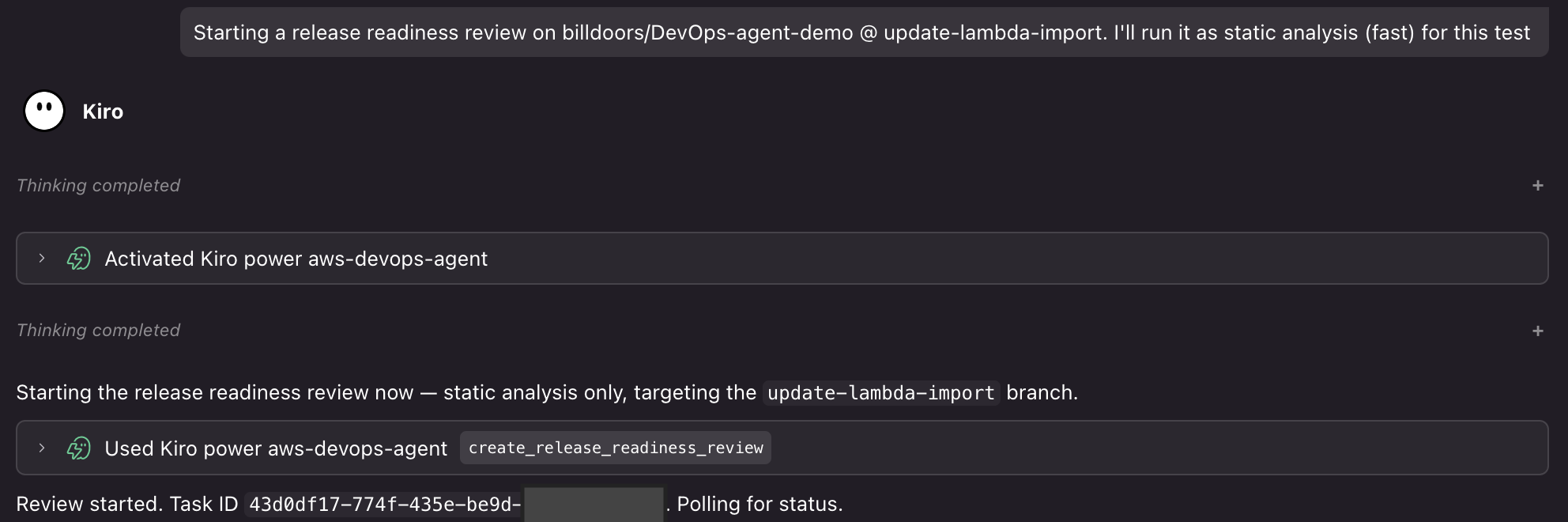
Figure 2: AWS DevOps Agent release readiness review results in the Kiro IDE
Each review evaluates the change for cross-repository dependency risks, internal standards compliance, and access-control correctness. With automated verification testing enabled, the agent goes further than static analysis. It clones the change into an AWS-managed verification environment, figures out the build tools from your project files, builds the code, generates a test plan, and runs it. This surfaces functional risks like edge cases that would fail at runtime.
Step 3 — Auto-create the PR
We don’t want to context-switch to the GitHub UI only to open a PR. A tiny workflow does it for us. On every push to a non-main branch, it opens a PR against main if one doesn’t already exist. Put this in .github/workflows/auto-create-pr.yml:
The workflow runs on push to any non-main branch and opens a PR against main if one doesn’t already exist.
Step 4 — Wire up the AWS Security Agent review
The AWS Security Agent was also connected to the repo in Prerequisite 2. This workflow is narrower and stricter than the AWS DevOps Agent’s release readiness pass: OWASP Top 10, hardcoded secrets, IAM misuse, and dependency risk. It gates on the needs-security-review label, so it only runs after the AWS DevOps Agent has cleared the PR.
Create .github/workflows/security-review.yml:
Two agents now gate every merge. If either requests changes, you fix the code in Kiro and push again, and the whole review cycle restarts automatically.
Here’s what the output looks like in practice:
AWS DevOps Agent release readiness finding posted as a PR comment
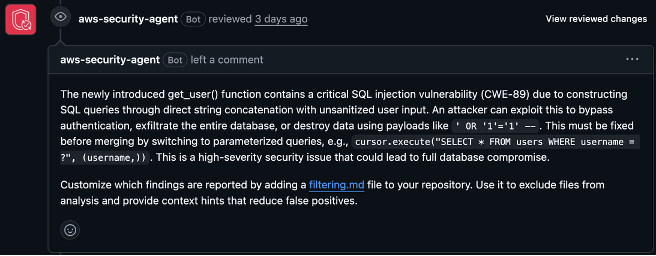
Figure 3: AWS Security Agent finding posted as a pull request comment
Step 5 — Deploy to Lambda on merge
This demo keeps a human approval before production. After both agents have completed their reviews, an authorized reviewer evaluates the findings and chooses Merge. Financial institutions can add the approvals, separation of duties, change records, and policy checks required by their control framework. The moment the merge lands on main, the deploy workflow takes over.
Create .github/workflows/deploy.yml:
At this point the PR has gone from Kiro push to auto-created PR, AWS DevOps Agent release readiness review, AWS Security Agent review, human approval, and Lambda update. The agents automate analysis and workflow steps, while the authorized reviewer remains accountable for the production decision.
Step 6 — Let the AWS DevOps Agent handle incidents
Deployments fail. Functions throw. Latency spikes. This is where the AWS DevOps Agent earns its keep. It’s an incident-response teammate that investigates on its own, finds root causes, and reports to Slack.
The AWS DevOps Agent is already wired up from Prerequisite 2. It’s connected to this repo (so it can read workflow runs, commits, and IAM policy references) and to Slack (so investigations post to your channel). The only thing left is to point an alert source at it. Follow the webhook configuration guide to grab a webhook URL, then aim your alerts at it, whether GitHub Actions failure notifications, Amazon CloudWatch alarms, or both. An event that hits the webhook kicks off a new investigation.
What an investigation looks like:
Here’s a real run from this demo. A Lambda deploy failed because the OIDC role was missing one IAM permission. The agent walks through it as a timeline:
4:22 PM — Investigation started: Lambda deployment failed. [Symptom] Deploy to Lambda workflow failed on
main. [Observation] Workflow assumed thegithub-action-lambdarole, then gotAccessDeniedcallingGetFunctionConfiguration. [Finding] IAM policyfrontier-agent-deploy-lambdais missinglambda:GetFunctionConfiguration. Investigation complete — root cause: that one missing IAM permission.
In the AWS DevOps Agent console you see the full timeline and the identified root cause, and you can ask the agent to generate a mitigation plan from there. It proposes the IAM policy change and the steps to apply it.
You’ll also get a Slack ping the moment the investigation kicks off, because we connected the Slack integration in Prerequisite 2:
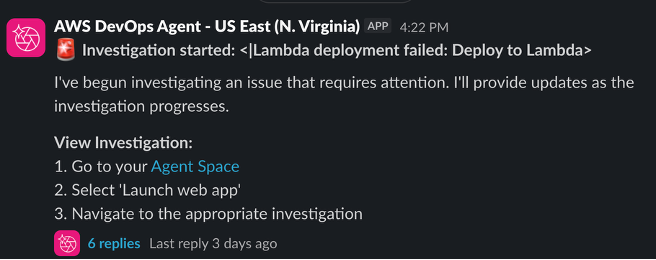
Figure 4: AWS DevOps Agent investigation notification in Slack
Conclusion
In this post we walked end-to-end through an AI-DLC pipeline. Kiro authors the code, with the AWS DevOps Agent Kiro Power reviewing changes in the IDE as they’re written, and opens the PR. The AWS DevOps Agent runs a release readiness review and the AWS Security Agent runs a security review, both posting their findings as PR comments. A human merges, GitHub Actions deploys to Lambda, and the AWS DevOps Agent watches production, investigating failures, surfacing root causes in its console, and pinging Slack the moment something goes wrong.
The value isn’t in any single agent. It’s in what happens when you put them together. Kiro gives you a virtual developer that carries context across sessions. The AWS Security Agent gives you a security engineer on every PR instead of once a quarter. The AWS DevOps Agent gives you a release readiness reviewer on every change, from the IDE to the PR, and an always-on SRE that triages before a human is even paged. Each phase of the SDLC (build, review, secure, operate) gets its own frontier agent, and the handoffs between them are automatic. They pass the baton through GitHub, AWS, and Slack, and the feature moves forward.
Financial services institutions adopt development tooling to deliver better software while meeting their security, resilience, and governance obligations. The workflow demonstrated here brings build, security, and operations into a shared delivery loop, helping teams identify issues earlier and reduce the time from development to production. It also retains review findings and human approvals within the delivery workflow, providing evidence that controls were applied before code reached customers. For financial services industry (FSI) teams, this combination can make software delivery faster, safer, and more straightforward to defend during governance and regulatory reviews.
Ready to explore this approach? You can start with a low-risk workload in a non-production environment. Connect Kiro, AWS DevOps Agent, and AWS Security Agent, then map each automated step to your organization’s approval, segregation-of-duties, and evidence requirements.