On October 21, 2026, the PHP project fixed two critical vulnerabilities in the PHP engine, CVE-2026-109618 and CVE-2026-109619, which are known together as PHP2Shell. Both vulnerabilities have a Common Vulnerability Scoring System (CVSS) v4.0 score of 9.2 because either one can let an unauthenticated caller run code on any server that handles PHP requests. The U.S. Cybersecurity and Infrastructure Security Agency (CISA) has since added both of them to its Known Exploited Vulnerabilities catalog.
These vulnerabilities don’t affect AWS services, but they can affect workloads running on AWS that serve PHP. The potential exposure is significant because PHP remains widely used across websites, with many sites still running PHP 8.1 or older versions.
If you run PHP 8.1 or older, you cannot patch PHP2Shell in place because no PHP release fixes those branches. Moving to a supported version isn’t always straightforward either, because legacy code often breaks on newer PHP releases. As a result, upgrading the code becomes the real blocker to patching the runtime.
With AWS Transform continuous modernization, you can remove that blocker by finding legacy PHP across your repositories and upgrading to PHP 8.4 or 8.5. AWS Transform analyzes your repositories on a schedule and flags end-of-life runtimes and other technical debt before they become urgent.
In this post, you learn how to use AWS Transform to find and upgrade legacy PHP, confirm that the upgrade was validated on a patched PHP runtime, and then patch and restart the runtime to remediate the vulnerabilities.
This post focuses on moving your code onto a patched runtime. For detection and mitigation guidance, refer to the AWS WAF post and the community checklist Find It, Patch It, Watch It. Compromise assessment is out of scope, so if a system was exposed while it was unpatched, investigate it separately and rotate any credentials the application could read.
Understand the PHP2Shell vulnerabilities
Before you start the upgrade, review which PHP releases are affected and which releases contain the fix, because this determines whether you only need to patch the runtime or whether you must also upgrade your code. The GHSA-w8hw-w9fx-j79w and GHSA-6wmf-4rv5-p3rp advisories describe the two vulnerabilities, and the following table summarizes the affected and fixed releases.
| PHP branch | Affected | First fixed |
| 8.5 | 8.5.0 to 8.5.11 | 8.5.12 |
| 8.4 | 8.4.0 to 8.4.26 | 8.4.27 |
| 8.3 | 8.3.0 to 8.3.35 | 8.3.36 |
| 8.2 | 8.2.0 to 8.2.34 | 8.2.35 |
| 5.4 to 8.1 | all | No release fixes these branches. Migrate to 8.4 or 8.5 |
Source: AWS Security Bulletin 2026-143-AWS. The bulletin recommends that you migrate to a supported branch, and this post recommends PHP 8.4 or 8.5 based on their support dates on the PHP supported versions page. Amazon Threat Intelligence identified an exploitation attempt on October 17, 2026, four days before the fixes were released. It has reported broad exploitation attempts since then. The disclosure date isn’t necessarily the earliest date of exploitation. The report advises you to start your investigation no later than October 17, 2026.
Your next action depends on the PHP branch that you run. The following table shows what to do for each branch.
| You run | What to do |
| PHP 8.2, 8.3, 8.4, or 8.5 | These versions are vulnerable until you patch to 8.2.35, 8.3.36, 8.4.27, or 8.5.12. Your code doesn’t need to change. Patch the runtime and restart all running workers. |
| PHP 8.1 or older | No release fixes these branches. PHP published minimal source backports for 7.4 to 8.1 as a stopgap for people who build from source. First, check whether your distribution or LTS vendor ships backported fixes. Otherwise, migrate to 8.4 or 8.5. PHP 8.2 reaches end of life on December 31, 2026, and PHP 8.3 reaches end of life on December 31, 2027. Until you migrate, apply the interim controls in the bulletin and the AWS WAF post. Your code might need changes first. The rest of this post covers those changes. |
| PHP you cannot find | Build the inventory first. Use Amazon Inspector, AWS Systems Manager Inventory, and your container registries. |
For PHP 8.1 or older, upgrading the code doesn’t fix the CVEs by itself. Instead, the upgrade removes the blocker that prevents you from updating the runtime, which is an application that breaks on a supported PHP version.
Solution overview
The solution works in three steps. Continuous modernization first analyzes your repositories and returns findings. A managed transformation then upgrades the code from those findings and validates the result on a patched PHP runtime. Finally, you patch and restart the runtime itself, which is the step that remediates the CVEs. The following diagram shows the flow.
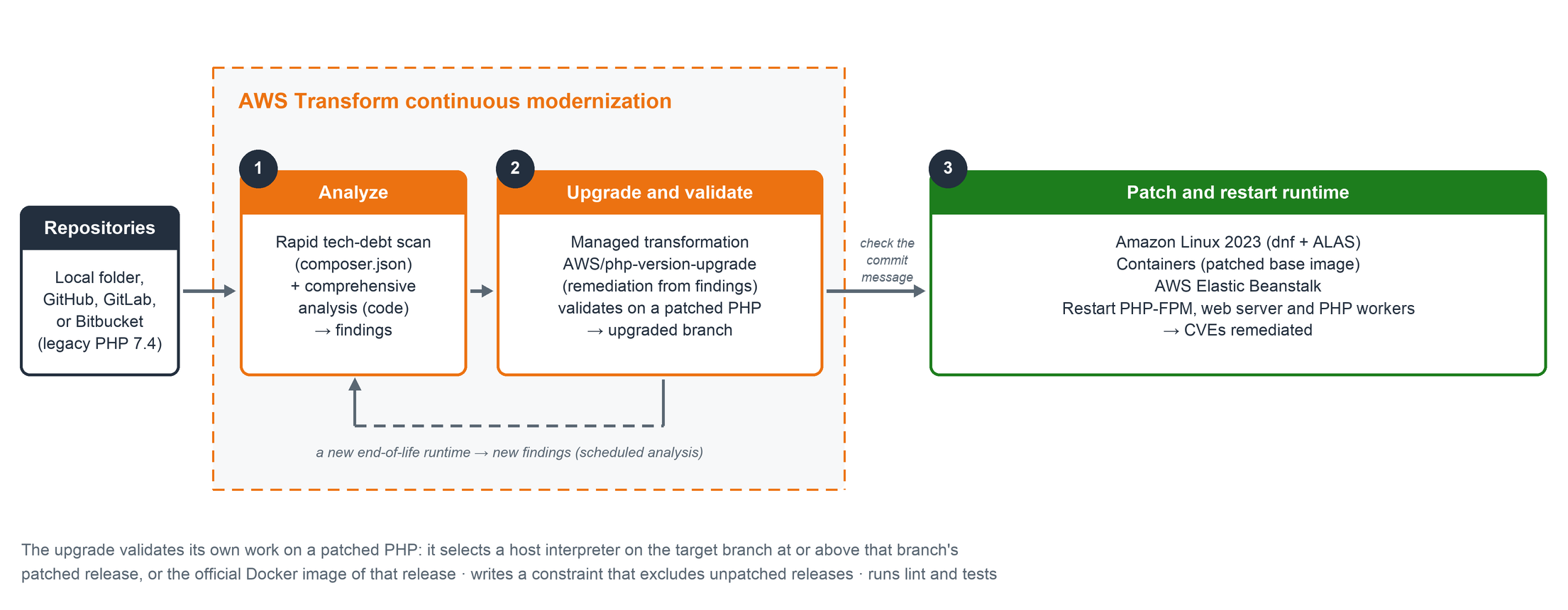
Figure 1: Analysis, upgrade, and patch flow with AWS Transform continuous modernization
The walkthrough covers the following steps:
- Analyze your repositories for end-of-life PHP.
- Upgrade the code from the findings.
- Patch and restart the runtime.
Explore the sample application
This walkthrough uses a sample application so that you can follow along. Later, you can apply the same three steps to your own code. The sample is a PHP 7.4 application that represents common pre-8.0 codebases, with five small classes and seven PHPUnit tests. It includes the three kinds of breakage that you find in real code. The following table shows these kinds of breakage.
| Kind | Example in the sample | What PHP 8 does |
| Removed or stricter, fails to parse or run | $text{0}, create_function(), each(), count(null) | Parse error, fatal error or TypeError |
| Silent behavior change | 0 == "abc" in Matcher::isZeroLike | No error, a different result. Only a test notices |
| Deprecated | Implicit nullable parameter, dynamic properties, "${var}" | Deprecation notices on 8.2 to 8.4 |
Silent behavior changes are the hardest to detect. The code runs without errors, but it returns a different result.
Prerequisites
To follow this walkthrough, you need the following:
- An AWS account and the AWS Transform CLI 3.20.0 or later (check with
atx --version) in a supported AWS Region. For setup and authentication, refer to Getting started with continuous modernization. - AWS credentials with the AWSTransformCustomFullAccess managed policy.
Node.js22 or later, Git, and jq. You also need Docker, or a patched PHP on your target branch, on the machine that runs step 2: the transformation validates its work on one of them.- The transformation installs nothing on the host. If the machine has no PHP and no Docker, or its only PHP is on a branch older than your target, the preflight stops the run before any migration work and names what is missing. If its only PHP is an unpatched release of your target branch and there is no Docker, it validates on that PHP instead, writes NOT a patched … interpreter and reports Success with warnings. Install Docker or a patched PHP to avoid both cases.
- Throwaway clones of your repositories. You also need a disposable machine for step 2 because the agent runs commands there unattended. AWS/php-version-upgrade is in public early access, so test it in a non-production environment first.
- A target branch of 8.4 or 8.5. Export it as
TARGETbecause every command in this post uses it.
The sample application lives in the guide folder, so clone it once:
A local continuous modernization source is a folder of Git repositories. Create that folder first. The following commands set it up with the sample application. To use your own code instead, point REPO at your own repository folder.
If you use a host PHP instead of Docker, install the patched release on Amazon Linux 2023:
Step 1: Analyze your repositories for end-of-life PHP
In this step, you connect your repositories to continuous modernization and run two analyses. You use the atx ct command group, which runs continuous modernization.
To run the analysis
Add the folder as a source and scan it. Then run the rapid and comprehensive analyses and list the open findings:
Run both analyses because they answer different questions. The rapid scan reads only composer.json and takes 1 to 2 minutes per repository, which makes it a good first sweep to find the repositories in your estate that run an end-of-life PHP version. The comprehensive analysis reads the code itself and takes 5 to 10 minutes or more, but it’s the analysis that finds the silent behavior changes.
On the sample, the rapid scan returned one high-severity finding named “PHP Version Upgrade” with AWS/php-version-upgrade as its fix. The comprehensive analysis returned between 6 and 11 findings, depending on the run, including removed constructs such as create_function() and each(), silent behavior changes, and the end-of-life php >=7.4 constraint in composer.json.
Most findings name a transformation in their fix field, although some recommend a manual change instead, and step 2 acts on the findings that name AWS/php-version-upgrade.
The analysis leaves each repository on its own branch and writes an ATXDocumentation/ folder into it. Step 2 doesn’t run on a repository with uncommitted changes. Switch back to your branch, remove that folder, and confirm that the working tree is clean before you continue:
Step 2: Upgrade the code from the findings
In this step, you start the upgrade from the step 1 findings by using AWS/php-version-upgrade, an AWS managed transformation that is in public early access. A continuous modernization remediation passes the findings to the transformation, so the run plans around the findings and not only around the target version.
To create a remediation from the findings
Confirm the account has version 2026-11-02 or later, then collect the IDs of open findings whose fix is AWS/php-version-upgrade and create a remediation:
The -g flag is accepted only together with --transformation-name. Without both, the remediation migrates to PHP 8.5 regardless of TARGET.
The command returns when the run ends, which took about 8 minutes on the sample. The atx ct remediation status --id <id> command then shows the repository as pr_open and the findings as change_ready. Do not interrupt the run, because an interrupted run stays in the running state until you cancel it. On a local source, the job runs on your machine and trusts every tool. Use the disposable machine from the prerequisites, with Docker or a patched PHP and no production credentials.
A remediation has no cost cap and no opt-out of knowledge-item extraction. If you need either, run the transformation directly:
The -d flag opts the run out of knowledge-item extraction, and the --limit flag caps the agent minutes (300 is a ceiling of $10.50, not the expected cost). On the 13-file sample the direct runs used 64 to 79 agent minutes, so budget at least 100 even for a small project and raise it for a real application. A run that reaches the cap stops with exit code 2. The CLI help says it can be resumed with a higher limit, but the resume command it prints (atx --conversation-id <id> -t --limit <n> ) has to be run attended, because it cannot be combined with -x (seen on CLI 3.21.0). Otherwise rerun on a fresh clone with a higher limit, and do not merge the branch a stopped run leaves. This direct run doesn’t read the findings.
Either way, the result is a new branch. Two of its edits follow. The first replaces a construct that PHP 8 removed:
The second changes the test instead of the production code, because PHP 8 returns a different result here:
Review the full diff before you merge it. The first edit is mechanical. The second is a behavior change that the upgrade made deliberately: PHP 8 changed loose comparisons on purpose, to close a class of bug that causes authentication bypasses, so ‘abc’ == 0 is now false. Version 2026-11-02 kept the PHP 8 result in all five test runs and listed the changed assertion under Behaviour changes in its run summary. Read that item, because a caller that relied on the old result changes behavior too. If the upgrade ever keeps a pre-PHP-8 result on purpose, it records the site under Security review required. Either way, check every ==, switch statement, and non-strict in_array call that handles user input.
Check the upgraded branch before you ship
Version 2026-11-02 of the managed transformation validates the upgrade for you. Confirm three things on the branch before you ship it.
The transformation validates its own work on a patched runtime. Version 2026-11-02 selects the interpreter it validates on: a host PHP on your target branch at or above that branch’s patched release, or else the official Docker image of the patched release. It installs nothing on the host. Across five test runs on November 6, 2026, every run validated on 8.4.27 or 8.5.12, and a host PHP of 8.5.3 was rejected. After the run has finished (a direct run exits with code 0, or a remediation shows the repository as pr_open), check out the upgraded branch and find the Validated on PHP line in the commit message. Set BASE to the branch you started the run from:
The output must name a patched release of your target version, for example Validated on PHP 8.4.27 (security floor 8.4.27). If it prints nothing, names an unpatched release, or prints NOT a patched …, do not ship yet: run the independent verify check in the sample folder (step 3 of its README). Empty output also happens when BASE doesn’t exist or when you are still on BASE, so treat it as not verified, never as fine. The line tells you which PHP the run tested on, not which PHP you deploy on.
The transformation also writes a constraint that excludes unpatched releases. Version 2026-11-02 wrote ^8.5.12 for target 8.5 and ~8.4.27 || ^8.5.12 for target 8.4 in all five runs, and added no config.platform.php pin. Earlier versions wrote branch-level constraints such as “>=8.5”, which still admit the vulnerable releases, so check the value if you ran an older version. Confirm that your branch uses one of these constraints. Details are in the GitHub README.
Set require.php to ^8.5.12 for target 8.5, or to ~8.4.27 || ^8.5.12 for target 8.4. If composer.json sets config.platform.php, set that value to 8.5.12 (or 8.4.27), and then run composer update --lock. Composer’s generated platform_check.php file checks only the lowest version in require.php. With ^8.5.12, the application refused to start on both 8.5.11 and 8.4.27. With ~8.4.27 || ^8.5.12 it refused to start on 8.4.26 but still started on 8.5.11. In both cases, the manifest prevents an install on older PHP, although it doesn’t replace the runtime patch.
Step 3 is required whatever the run summary says, and the run summary file might not exist at all. The constraint is enforced when Composer installs, but at run time Composer’s platform_check.php checks only the lowest bound. The 8.4 outputs of the test runs booted on PHP 8.5.11, which is vulnerable (the 8.5 outputs refused it). Only step 3 closes that gap.
Step 3: Patch and restart the runtime
The previous steps prepare your code, but this step is the one that remediates the CVEs. The following table shows the action to take for each place where PHP runs.
| Where PHP runs | Action |
| Amazon Linux 2023 | Upgrade every PHP package of your branch to the release in the advisory (command that follows) |
| Containers | Rebuild on a base image with a fixed release (for example php:8.4.27-fpm) and redeploy |
| AWS Elastic Beanstalk | Updated PHP platform versions exist for 8.2 to 8.5. Managed platform updates apply them in the next maintenance window. Otherwise update the platform version yourself |
| Amazon Lightsail | No in-place update: create new instances from the updated blueprint and migrate |
| Debian, Ubuntu, RHEL, LTS builds | Use your vendor’s package. The version string might not change: trust the vendor advisory |
| AWS Lambda | No managed PHP runtime. If the runtime is yours (a custom runtime or a container image), rebuild it with a patched release and redeploy |
On Amazon Linux 2023, upgrade every installed package for your branch with a quoted wildcard such as ’php8.5*’. The advisories are ALAS2023-2026-3301 for 8.2, -3302 for 8.3, -3303 for 8.4, and -3304 for 8.5. Use the quoted wildcard because dnf upgrades only installed packages, so a bare name such as php8.4 can match nothing and leave the host unpatched.
To upgrade PHP on Amazon Linux 2023
Set your branch and advisory from the table, and upgrade:
Set session.upload_progress.enabled=0, and keep it set after patching. A separate vulnerability, CVE-2026-115560, affects session upload progress in an uncommon configuration and was still unpatched as of October 26, 2026. Because the setting is on by default, PHP recommends that you keep it disabled until its next regular release. The following paths are for Amazon Linux, and you can find yours by running php --ini and checking “Scan for additional .ini files”. A pool setting overrides php.ini, so check the pools too:
--releasever value you used for the upgrade, and rely on the rpm and php-fpm -v checks. We ran these steps in Amazon Linux 2023 containers that started on php8.4-fpm 8.4.26 (B=8.4) and on php8.5-fpm 8.5.11 (B=8.5). Containers have no systemd, so we restarted php-fpm by starting it again directly. The workers came back on 8.4.27 and 8.5.12, with the matching advisory installed and upload progress set to Off.
Clean up
To avoid unneeded resources and charges, remove what this walkthrough created:
If you no longer need the my-php source in continuous modernization, remove it in this order. Deleting a finding on its own requires it to be dismissed or obsolete, so --cascade-findings is simpler, and the source cannot be removed while any repository still references it:
Then delete the throwaway clones. Terminate the disposable machine from step 2 because it ran an agent with -t, which trusts its tools. Keep the upgraded branch until it’s reviewed and merged.
Cost
AWS Transform bills per agent minute ($0.035 as of November 6, 2026). For current rates, refer to AWS Transform pricing.
On the 13-file sample, as measured in the project’s BENCHMARKS.md on GitHub, version 2026-11-02 used about 64–79 agent minutes ($2.24–2.76) per upgrade. That’s more than earlier versions used with a host PHP (21 to 38 agent minutes). The transformation’s own instructions say its Docker path takes about three times as long as a host PHP. A larger application costs more, so start from --limit 300 and raise it for larger code. A remediation started from findings has no cost cap. Measured results per run are in the GitHub README.
Limitations
- This solution doesn’t patch your servers or detect a compromise. Step 3 is yours. If a system was exposed while unpatched, investigate separately and rotate credentials the application could read.
- The upgrade doesn’t prove identical behavior. Its validation runs your tests and a lint pass on a patched PHP, so it catches what your tests cover. Review the diff, and the Behaviour changes item in the run summary or commit message. Treat a missing item as unknown, not as none, before you merge.
- The upgrade runs an AI agent with your tools trusted. Use throwaway clones and a disposable machine, review every diff, and use the inventory step to find PHP outside your connected repositories.
Conclusion
In this post, you learned how to use AWS Transform continuous modernization to find legacy PHP across your repositories, upgrade it with a managed transformation that validates the result on a patched PHP runtime, and then patch and restart the runtime. Because the analysis keeps running on a schedule, the same setup flags the next end-of-life runtime before it becomes urgent.
Of the three steps, the runtime patch and restart is the one that remediates the CVEs. The analysis and the managed upgrade are what make that patch possible for legacy code.
To get started, clone the sample from the GitHub repo and run it end to end. Then connect your own repositories to AWS Transform continuous modernization. If you have questions about applying this pattern in your organization, contact your AWS account team.
For more information, refer to the following resources:
- AWS Security Bulletin 2026-143-AWS: affected versions and AWS service status.
- AWS Transform continuous modernization: analysis and remediation across repositories.
- Getting started with continuous modernization: setup, authentication, and Regions.
- Working with continuous modernization: how to work with sources, analyses, findings, and remediations.
- php2shell-patch-and-verify in aws-samples/aws-transform-custom-samples: the prescriptive guide, the sample application used in this post, and an optional independent verify check.
- Find It, Patch It, Watch It: a community checklist for PHP2Shell on AWS.
Related posts:
- Analyze and remediate technical debt autonomously with AWS Transform – continuous modernization.
- Using AWS WAF to apply mitigations for PHP2Shell RCE vulnerabilities.


