After an Amazon Aurora Global Database switchover or failover, your application can reconnect to the promoted writer. Your analytics pipeline might not recover with it. The Amazon Aurora zero-ETL integration with Amazon Redshift continues to reference the former primary cluster and stops ingesting changes. Fraud scoring, inventory management, and operational reports keep running on data that is getting older while their queries still succeed.
A zero-ETL integration identifies its source by the Amazon Resource Name (ARN) of one DB cluster, and each cluster in a global database carries a unique ARN. A switchover or failover promotes a cluster with a different ARN to primary. The documented recovery requires you to delete the integration and create a new one against the new primary.
In this post, we show you how to automate integration recreation using an Amazon EventBridge rule and an AWS Lambda function, create the required destination database in the local Amazon Redshift target, update replication-health alarms for the new integration ID, and validate the complete recovery. We use Amazon Aurora PostgreSQL-Compatible Edition as the source and Amazon Redshift as the target.
Estimated time to deploy: Your deployment time will vary based on your environment and includes workload-specific initial synchronization time for each switchover direction.
Quick start
If you already run an Aurora PostgreSQL-Compatible Edition global database with a zero-ETL integration and want the automation in place now, follow these three steps:
- Clone aws-samples/sample-aurora-zero-etl-globaldb-recovery.
- Deploy
cloudformation/zero-etl-recovery.yamlin every Region that can host the primary cluster. - Rehearse with
aws rds switchover-global-cluster, create the destination database from the new integration ID, and validate synchronized tables before routing analytics clients to the promoted Region.
The rest of this post explains how the solution works and how to operate it. If you’re new to zero-ETL integrations, continue to the Solution overview before deploying the automation.
Solution overview
The solution is event driven and serverless, and you deploy the same stack in each Region that can host the primary cluster. Amazon Redshift requires the zero-ETL source and target to be in the same Region, so each possible primary Region also needs its own Amazon Redshift target. Figure 1 uses one logical Amazon Redshift icon to keep the transition flow readable. In deployment, the promoted Region uses its local target. Analytics clients use their own routing or failover mechanism to select the active regional target. This automation doesn’t route queries.
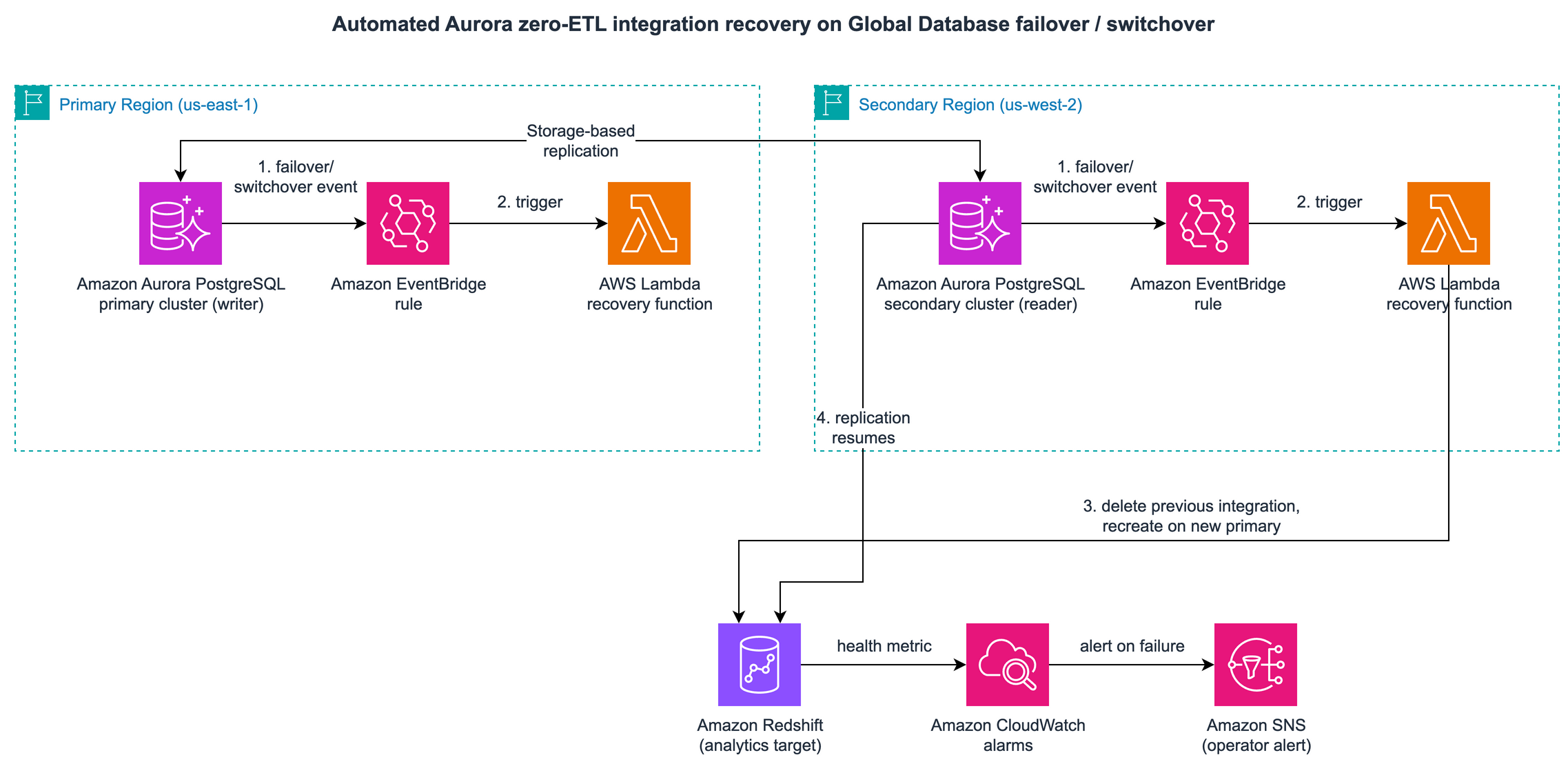
Figure 1: The Amazon EventBridge rule in the promoted Region invokes the Lambda function, which recreates the integration against the new primary and its same-Region Amazon Redshift target. The single Amazon Redshift icon represents the active regional target. Amazon SNS and Amazon CloudWatch report the outcome
The flow is:
- Aurora emits a switchover-finished or failover-completed event.
- The Amazon EventBridge rule matches the event and invokes the Lambda function.
- The function identifies the current writer cluster of the global database.
- The function validates that the writer has a DB instance, deletes the integration bound to the former primary, and creates an integration against the new primary and its same-Region Amazon Redshift target.
- Amazon Simple Notification Service (Amazon SNS) reports the outcome. Amazon CloudWatch alarms fire if the automation fails or an invocation reaches the dead-letter queue.
Four design decisions keep the automation correct:
- The global cluster is the source of truth. Rather than parse one event to infer the new primary, the function calls
DescribeGlobalClustersand reads which member reportsIsWriter. Duplicate, retried, and out-of-order events converge on the same result because each invocation re-reads the global cluster topology. - Region affinity and serialization select a single actor.
CreateIntegrationis Regional, and the source and target must be in the same Region. Each copy acts only when the writer is in its Region. Reserved concurrency of one serializes duplicate deliveries in that Region. A later invocation re-reads integration state and returns without creating another. - Each Region has a local analytics target. Supply an Amazon Redshift namespace in every Region that can host the primary. The promoted Region creates against its local target. Analytics routing between targets is outside this sample.
- Cleanup spans the member Regions. Integrations are Regional resources, and the previous integration lives in the former primary’s Region. The function checks each member Region of the global cluster to find and delete the integration it owns.
Prerequisites
Complete these in order.
- An Aurora PostgreSQL-Compatible Edition global database with a primary and at least one secondary cluster. At the time of writing, this walkthrough requires Aurora PostgreSQL 16.4 or later in a supported Region. Version 17 requires 17.4 or later, and version 18 requires 18.3 or later. Verify every Region and engine version in the current zero-ETL support matrix.
- A custom DB cluster parameter group (
aurora-postgresql16family or later) with enhanced logical replication turned on:Apply it to every cluster in the global database, not only the current primary. A promoted secondary needs these parameters already in place to serve as a zero-ETL source. See Getting started with Aurora zero-ETL integrations.
If you associate the parameter group with an existing cluster, reboot the DB instances in that cluster, including the instances in every secondary cluster. Modifying DB cluster parameters requires a reboot, and you can’t create a zero-ETL integration until the reboot is complete and the new values are applied. See Creating Aurora zero-ETL integrations. If a secondary still has the change pending when it’s promoted, the function’s
CreateIntegrationcall fails at the moment recovery is needed. Before you rely on the automation, confirm that every instance in every member cluster reports the cluster parameter group asin-sync:Note: Enhanced logical replication writes all column values to the write-ahead log (WAL) even when
REPLICA IDENTITY FULLis not set, which can increase IOPS on the source cluster. - An Amazon Redshift target in every Region that can host the primary: Amazon Redshift Serverless, or an encrypted provisioned cluster using an RA3 node type with at least two nodes. A zero-ETL source and target must be in the same Region. Analytics clients need their own mechanism to select the active regional target.
- Case sensitivity turned on for every target. Set
enable_case_sensitive_identifiertotrue. - Each member cluster authorized on its local Amazon Redshift target. Record all member cluster ARNs. The stack also uses this list to scope AWS Identity and Access Management (IAM) permissions and reject an unexpected writer.
- The selected database, schema, and tables present after promotion. Aurora Global Database replicates schema, so you don’t maintain independent schemas on members. After an unplanned transition, verify that the promoted state contains every object in the data filter. Every selected table needs a primary key, and all source databases need UTF-8 encoding. Use
SVV_INTEGRATION_TABLE_STATEafter recreation to identify objects that didn’t synchronize. - Optional integration AWS Key Management Service (AWS KMS) keys in every possible primary Region. Use independent regional keys or local replicas of a multi-Region key, and pass the local key ARN to each regional stack. The stack separately creates a local key for notifications, logs, the dead-letter queue, and Lambda environment variables.
- Permissions to create AWS CloudFormation, AWS KMS, Amazon SNS, Amazon Simple Queue Service (Amazon SQS), AWS Lambda, Amazon EventBridge, IAM, and Amazon CloudWatch resources.
All code in this post is in aws-samples/sample-aurora-zero-etl-globaldb-recovery.
Build the automation
The seven steps that follow move from event matching through to a multi-Region deployment.
Step 1: Match the global database events
Aurora publishes global database transitions as RDS DB Cluster Event records on the aws.rds event source. Match these three Aurora events:
| Event ID | Meaning | Automation behavior |
RDS-EVENT-0185 | Global switchover finished | Reconcile after readiness checks |
RDS-EVENT-0238 | Global failover completed | Reconcile after readiness checks |
RDS-EVENT-0519 | Failover completed, promoted cluster has no instances | Stop before cleanup, notify, and retry. An operator must create a writer instance |
Match them on event ID, because event IDs are unique and unambiguous:
The template configures Amazon EventBridge to retry failures to deliver an event to Lambda up to four times while the event is no older than one hour. After Lambda accepts the asynchronous invocation, the template allows up to two retries for handler errors while the request remains within its configured one-hour maximum age. These are template settings, not service defaults.
The function timeout is 300 seconds. Its RDS clients use a five-second connection timeout, a 20-second read timeout, and standard SDK retries.
Event RDS-EVENT-0519 doesn’t mean the source is ready. The function checks DescribeDBClusters before deleting anything. If the promoted cluster has no available writer instance, it raises an error for Lambda retry and sends an SNS notification. The retry budget is short by design. Lambda waits one minute before the first retry and two minutes before the second, so the function stops retrying about three minutes after the first failed attempt, plus the run time of each attempt. Plan for an operator to create the writer instance and then replay the dead-letter queue (DLQ) event. For RDS-EVENT-0519, that replay is the expected recovery path, not an exceptional one. The automation doesn’t poll indefinitely for an instance.
Step 2: Find the current writer
The function asks the global cluster which member is the writer instead of inferring it from the event:
If no member reports IsWriter, the transition is still in flight. The function raises an error so the Lambda asynchronous invocation queue retries it. If all retries expire, the dead-letter queue alarm requires operator action.
Step 3: Act only in the writer’s Region
Each member cluster’s Region receives events for that cluster, so every regional copy of the function can be invoked. During a service impairment, the former primary’s Region might emit no event. The promoted Region’s event is sufficient because the function reads the global-cluster topology before it acts. Each copy first checks whether it is the one that should act:
Only the Region that now holds the writer proceeds. Reserved concurrency of one serializes duplicate events delivered to that regional function. After the first invocation creates the integration, the next invocation re-reads state and returns noop. The handler also validates IntegrationAlreadyExistsFault as a defensive fallback for a concurrent request made outside this function.
Before cleanup, the function also confirms that the writer ARN is in the configured SourceClusterArns allowlist, the Amazon Redshift target and optional KMS key are local, and DescribeDBClusters reports an available writer DB instance.
Step 4: Delete the previous integration in each member Region
DescribeIntegrations and DeleteIntegration are Regional calls, and the previous integration lives in the former primary’s Region. The function derives the member Regions from the global cluster and uses a Regional client for each one. Deletion is best effort by design. During an event that impairs service in the former primary’s Region, API calls to that Region might not succeed, and the new integration still needs to be created.
The function reports Regions where API calls didn’t succeed, both in its return value and notification, so you can reconcile after API access is restored. _managed_integrations discovers integrations by both ownership tags rather than by target ARN. This is necessary because the old and new integrations use different regional Amazon Redshift targets. The function deletes only integrations that carry both ownership tags, so it doesn’t delete integrations you created by hand or that another process manages.
Step 5: Create the integration against the new primary
With the previous integration removed, the function creates the replacement against the promoted cluster:
A data filter is required for Aurora PostgreSQL, and the minimum is a single database. PostgreSQL patterns use database.schema.table, so include: salesdb.*.* is the smallest valid filter for a database named salesdb. The promoted state must contain each selected database, schema, and table. Check SVV_INTEGRATION_TABLE_STATE for objects that don’t synchronize. Aurora MySQL uses database.table patterns.
TARGET_ARN and KMS_KEY_ID, when present, are local to the function’s Region. The handler validates their ARN Region before deleting the old integration.
If deletion succeeds but creation fails, the handler raises the error for Lambda asynchronous retry. Each retry re-reads the writer and integration state. If retries expire, the dead-letter queue alarm fires. Correct the reported readiness, authorization, KMS, or quota issue, then replay the event or invoke the function again. Recreating against the former primary isn’t a rollback because that integration no longer follows the writer.
Step 6: Grant least-privilege permissions
The following excerpt shows how the role scopes CreateIntegration to the configured source-cluster ARNs and to requests that carry exactly the two ownership tags. It is not the complete execution-role policy. The full policy in iam/lambda-least-privilege-policy.json also covers the service-generated integration resource, the local Amazon Redshift target, tagging on create, notifications, logs, the DLQ, and replication-alarm updates.
The role also scopes DescribeGlobalClusters to the configured global-cluster ARN and DescribeDBClusters to the member-cluster ARNs. Integration IDs are service-generated and cleanup spans member Regions, so DescribeIntegrations and deletion use an account-level integration ARN pattern across Regions. Resource-tag conditions restrict deletion to integrations owned by this automation. The role scopes cloudwatch:PutMetricAlarm to the two replication alarms that the function manages. The AWS X-Ray write APIs require Resource: "*" because they don’t support resource-level permissions, but the policy grants only the two actions they need. The policy scopes the Amazon Redshift permissions to the local target ARN.
Step 7: Deploy in every Region
The template creates a separate regional notification key, SNS topic, SQS dead-letter queue, encrypted CloudWatch log group, IAM role, Lambda function, Amazon EventBridge rule, and alarms. Provide the local Amazon Redshift target and optional local integration KMS key to each deployment:
Expected output for each Region:
Confirm the Amazon SNS subscription from your inbox, because unconfirmed subscriptions receive no notifications. The template intentionally lets CloudFormation generate the IAM role name, so CAPABILITY_IAM is sufficient. Use CAPABILITY_NAMED_IAM only if you later add a custom RoleName. The automation is now live in both Regions and idle until a transition occurs.
Cost considerations
This design requires an Amazon Redshift target in every Region that can become primary. You pay for the regional Amazon Redshift capacity and the supporting CloudWatch, AWS KMS, Amazon SNS, Amazon SQS, and Lambda usage. Every recreated integration also performs an initial synchronization, which consumes source I/O and target compute. A switch over and switch back therefore produces two complete reseeds of the selected data.
Use non-production resources and controlled, representative data for the first rehearsal. Measure both synchronization time and cost before setting an operational schedule. For current rates, see Amazon Aurora pricing, Amazon Redshift pricing, and Amazon CloudWatch pricing.
Validate with a switchover
A planned switchover synchronizes the secondary before promotion, so its recovery point objective (RPO) is 0, with no data loss, as described in Using switchover or failover in Amazon Aurora Global Database. That makes it the right rehearsal. It still triggers a full reseed in each direction, so schedule the rehearsal according to your measured synchronization window. For more on planned transitions, see Managed planned failovers with Amazon Aurora Global Database. Use these seven steps.
- Record the integration ARN you have today:
- Switch over to the secondary:
- Confirm the new integration in the promoted Region. It first reports
creatingand thenactive: - Check cleanup in the former primary Region using the recorded ARN:
Immediately after recovery, the row can report
deleting. If deletion has finished, the command returns no rows. Re-run the command until the recorded integration is absent. Don’t count every integration in the Region because unrelated integrations can exist. - Create the destination database. The sample doesn’t run this step for you. It is a documented operator step, and the SNS notification from the function includes the new integration ID as a reminder. After the new integration reaches
active, connect Amazon Redshift query editor v2 or a SQL client to the local Amazon Redshift target. Superusers can also read the ID fromSVV_INTEGRATION, which is visible only to superusers:Aurora PostgreSQL needs the source database in the command. Create a destination database with a unique Region and recovery sequence in its name:
The principal running this command needs Amazon Redshift superuser privileges or both
CREATEDBandCREATEUSER. The integration alone doesn’t replicate data until this database exists. See Creating destination databases in Amazon Redshift. - Wait for the selected tables to synchronize, then validate state and new writes:
- Route analytics clients to
salesdb_analytics_west_01only after the integration isactiveand the selected tables are synchronized.
Switch back to validate the reverse direction. The reverse transition creates a new integration ID in the original Region, so repeat the destination-database step there with a new name, such as salesdb_analytics_east_02. Verify it before routing clients back. Retain old destination databases until your data retention and rollback requirements allow deletion. The automation doesn’t drop Amazon Redshift databases.
Monitor the pipeline
The automation recreates the integration and updates its replication alarms. After an operator creates the destination database, seeding must complete before the target is current. Four signals cover the states that matter:
- Automation failures. The
<IntegrationName>-zero-etl-recovery-failedalarm watches the LambdaErrorsmetric. This is the alarm that needs a human, because it means the integration was not recreated. - Invocations that gave up. The
<IntegrationName>-zero-etl-recovery-dlq-not-emptyalarm fires when an invocation exhausts its retries and lands in the dead-letter queue. - Replication health. Amazon Redshift publishes
IntegrationLag,IntegrationNumTablesReplicated,IntegrationNumTablesFailedReplication, andIntegrationDataTransferredin theAWS/Redshiftnamespace. See Metrics for zero-ETL integrations. Every replacement receives a newIntegrationIddimension. After each successful recreation, the function callsPutMetricAlarmwith stable alarm names and updates the lag and failed-table alarms to the newest ID. Set the lag threshold throughIntegrationLagThresholdSeconds. The template defaults it to 900 seconds as an example, and you should replace it with the threshold established by your rehearsal and workload requirements. Missing data is non-breaching, so the inactive Region’s old alarm doesn’t page operators. A later switch-back updates that Region’s stable alarm names to the new ID. - Integration errors. Amazon Redshift emits zero-ETL integration events to Amazon EventBridge with
INFO,WARNING, andERRORseverities.
To check integration and table state directly in the active regional target, run the SVV_INTEGRATION and SVV_INTEGRATION_TABLE_STATE queries from step 6 of the switchover validation.
Handle queries during reseeding
This automation doesn’t route analytics queries. Until the replacement integration is active and selected tables have completed synchronization:
- Pause freshness-sensitive reports and jobs, or route them through your own regional analytics failover mechanism.
- If your business permits querying previously replicated data, label results with the last successful replication timestamp and a stale-data warning.
- Plan for a new destination database name after every transition. Each recovery creates a new integration ID, so the walkthrough creates a new, versioned database such as
salesdb_analytics_west_01and retains the old one. Keep the database name in client configuration or in your routing layer so that you can switch clients to the new name without code changes. - Resume normal processing only after
SVV_INTEGRATIONandSVV_INTEGRATION_TABLE_STATEconfirm readiness.
Considerations and limitations
Review these constraints before you rely on this automation in production.
- Seeding follows the recreate. There is no universal duration. It varies with selected data volume, table count, source activity, and target capacity. Measure from integration creation until it is
activeand selected tables have synchronized during a production-representative rehearsal. Lambda duration isn’t reseed duration because the function returns after the create request is accepted. - Cleanup is best effort during a service impairment. If API calls to the former primary’s Region don’t succeed, the function creates the new integration anyway and reports the Regions it could not reach. Reconcile when access is restored.
- Ownership is tag-scoped in both directions. The function only deletes integrations carrying its own tags, and it does not manage integrations you created by hand.
- Quotas apply per source cluster, per target, and per account per Region. See Aurora zero-ETL quotas.
- Each Region uses local keys. Every stack creates a separate regional key for notifications, the DLQ, logs, and Lambda environment encryption. For optional integration encryption, pass either an independent regional key or the local replica of a multi-Region key. Don’t pass one ordinary key ARN to every stack.
- The function reconciles replication alarms at runtime. The Lambda function creates or updates two stable CloudWatch alarm names after each recreation because every integration has a new
IntegrationId. CloudFormation doesn’t own these two alarms, so delete them separately during cleanup. - Changing
aurora.enhanced_logical_replicationinvalidates all logical replication slots on the primary instance and stops replication. Keep the parameter stable outside planned maintenance. - Application connectivity is a separate concern. This automation restores the analytics pipeline. For endpoint management during a transition, see Automate Amazon Aurora Global Database endpoint management for planned and unplanned failover.
- Service capabilities can change. This sample implements the current documented delete-and-recreate behavior and makes no roadmap claim. Before deployment, check the Aurora zero-ETL documentation for native recovery capabilities that could replace this automation.
- Security. The template scopes the execution role to the integration and target resources it needs, and encrypts the notification topic and dead-letter queue with a customer managed key that the stack creates. Review the role against your own least-privilege standards before deploying to production.
Applicability to other engines
The pattern applies to both Aurora engines because the Global Database events and integration APIs are the same. For Aurora MySQL-Compatible Edition, apply a custom aurora-mysql8.0 cluster parameter group to every member that can be promoted, with the values from the current zero-ETL setup guidance:
Also make sure binlog_transaction_compression isn’t ON and binlog_row_value_options isn’t PARTIAL_JSON. Data filters are optional for Aurora MySQL and use database.table patterns rather than database.schema.table. The Amazon EventBridge rule, writer discovery, Region-affinity check, cross-Region cleanup, and alarm reconciliation don’t change.
Clean up
Delete the stacks in every Region where you deployed them:
The stacks do not own the zero-ETL integrations, Aurora clusters, Amazon Redshift targets, or destination databases. The command deletes the runtime-created CloudWatch alarms separately. Delete test integrations and retained destination databases only after your retention and rollback requirements permit it.
Conclusion
In this post, we showed you how to automate Aurora zero-ETL integration recreation after an Aurora Global Database switchover or failover. An Amazon EventBridge rule detects the transition, and a Lambda function reconciles the integration to the new primary and same-Region Amazon Redshift target, cleans up owned stale integrations, and updates replication alarms to the new integration ID. An operator then creates a versioned Amazon Redshift destination database from that ID, validates synchronization, and routes analytics clients after the data is current.
Deploy the automation from aws-samples/sample-aurora-zero-etl-globaldb-recovery in each Region that can host the primary, and rehearse it with a planned switchover before you need it in a real one. To learn more about the services in this solution, see Amazon Aurora and Amazon Redshift.


