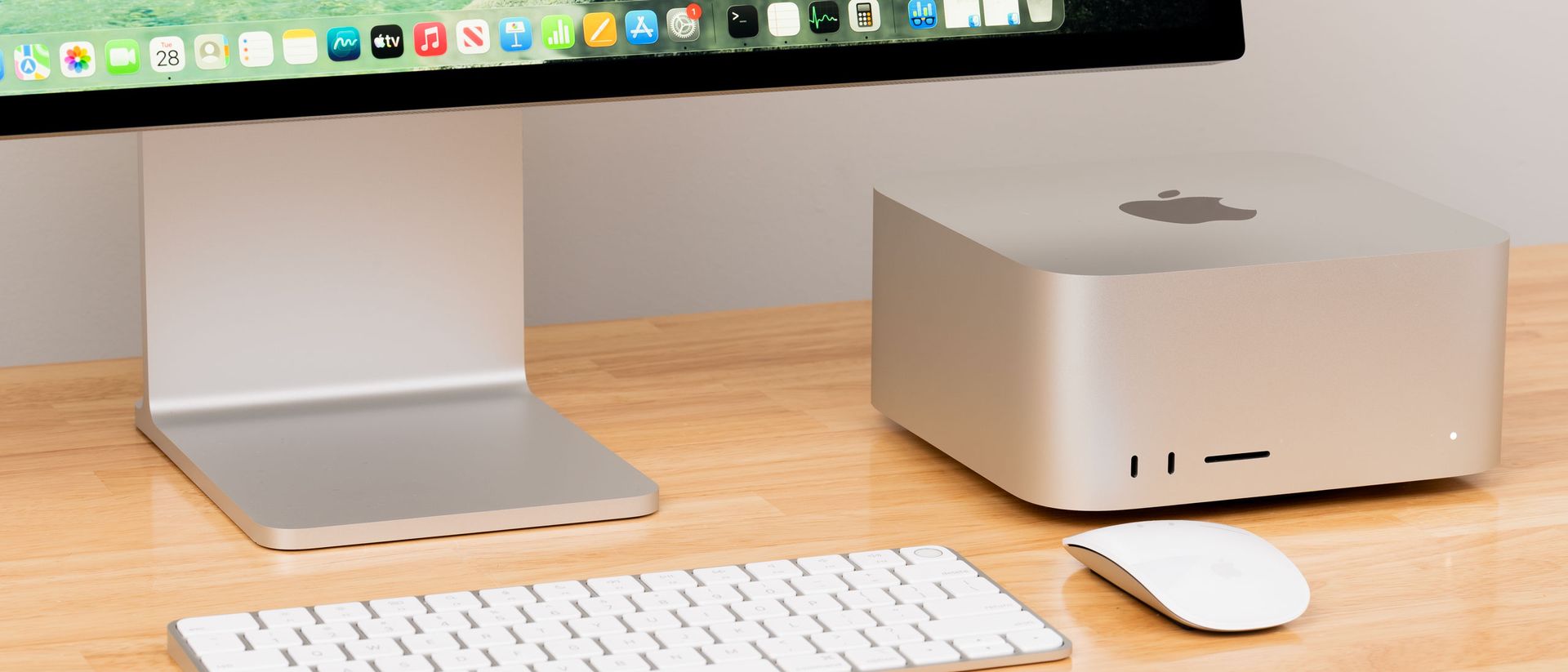
Apple’s updated Mac Studio with the M5 Ultra SoC has already proven itself as one of the most powerful systems around, thanks to its 36-core CPU and 80-core GPU with Neural Accelerators for the matrix math operations that drive AI compute. Beyond that raw power, options for up to 512GB of unified memory have many local AI enthusiasts lining up for the 13 to 15 weeks it’ll take for Apple to ship one right now.
But is our tested Mac Studio config worth a whopping $12,300 or more for those folks? We already tested the maxed-out M5 Ultra chip with the popular Qwen 3.8 27B in our initial review, but that compact dense model doesn’t come anywhere close to exercising 256GB of memory. We wanted to fill that pool to the brim with cutting-edge large models like DeepSeek V4.1 Flash 1017 and GLM 5.3 Flash.
We also have some new benchmarks at our disposal to see how the Mac Studio stacks up in agentic tasks on the GPU side in the wake of our review of the Microsoft Surface Laptop Ultra with Nvidia’s RTX Spark chip. So there's much to dig into.
Agentic AI performance and power efficiency
We started our more detailed local AI testing with Artificial Analysis' AgentPerf-Local benchmark. This test plays back recorded inference traces with certain models across a range of agentic AI workloads to gauge performance. Artificial Analysis provides a full breakdown of this workload, but the bulk of its work takes place in prompt processing rather than token generation. As a result, it should favor systems with lots of raw compute, which both GB10 and the M5 Ultra have at their disposal.
The M5 Ultra's 80-core GPU dwarfs GB10's 48 Blackwell SMs at a high level. Even without detailed info on clocks, it would be extremely difficult for GB10 to outgun the M5 Ultra in this test. And the Mac's 1.2 TB/s of memory bandwidth gives it just over four times as much decode bandwidth as GB10's 273 GB/s. But as our past tests have shown, raw specs aren't as important as delivered performance with AI. Delivered performance can vary greatly from paper specs.
We continued to use the dense Qwen 3.8 27B for this test. We used llama.cpp as our inference backend on both the Mac Studio and a single Dell Pro Precision GB10 box, which is nearly identical to the DGX Spark. We further enabled Qwen 3.8 27B’s native multi-token prediction (MTP) support for a decode speed boost on both platforms.
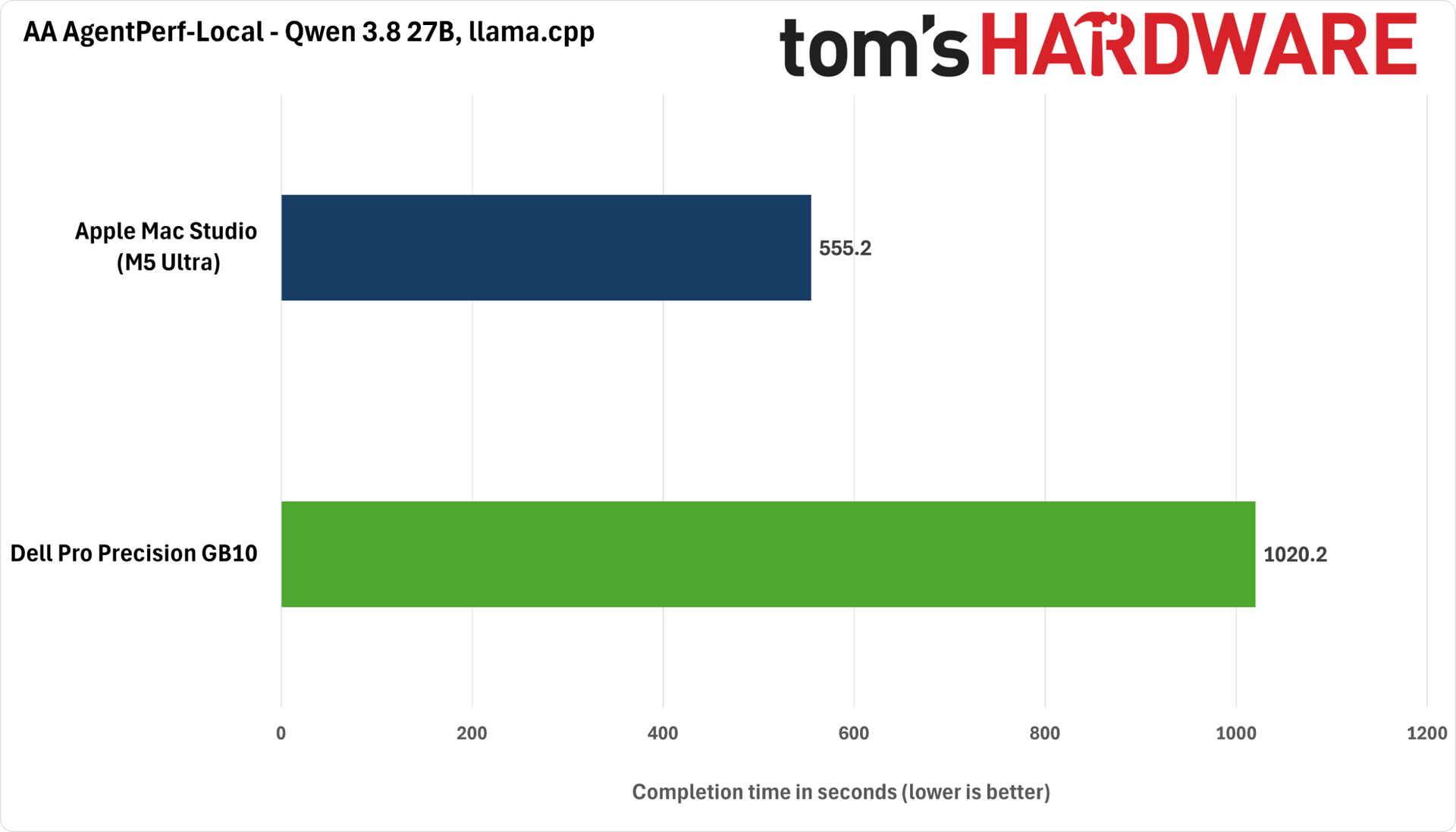
Versus a single DGX Spark-like system, the M5 Ultra Mac Studio finishes this agentic test in just under half the time, an extremely impressive result. One might think this is a silly comparison given the imbalance in compute resources and memory bandwidth between these two systems, but the cost of a single 4TB Dell Pro Precision GB10, like the one we tested, is now a whopping $10K, so comparing it to the $12K Mac Studio head-to-head isn’t actually that far-fetched.
Because AgentPerf-Local performs a fixed amount of work on every system, we can also directly compare power efficiency between platforms by recording the wall power consumed by a single Spark and the Mac Studio and converting it to task energy in kilojoules.
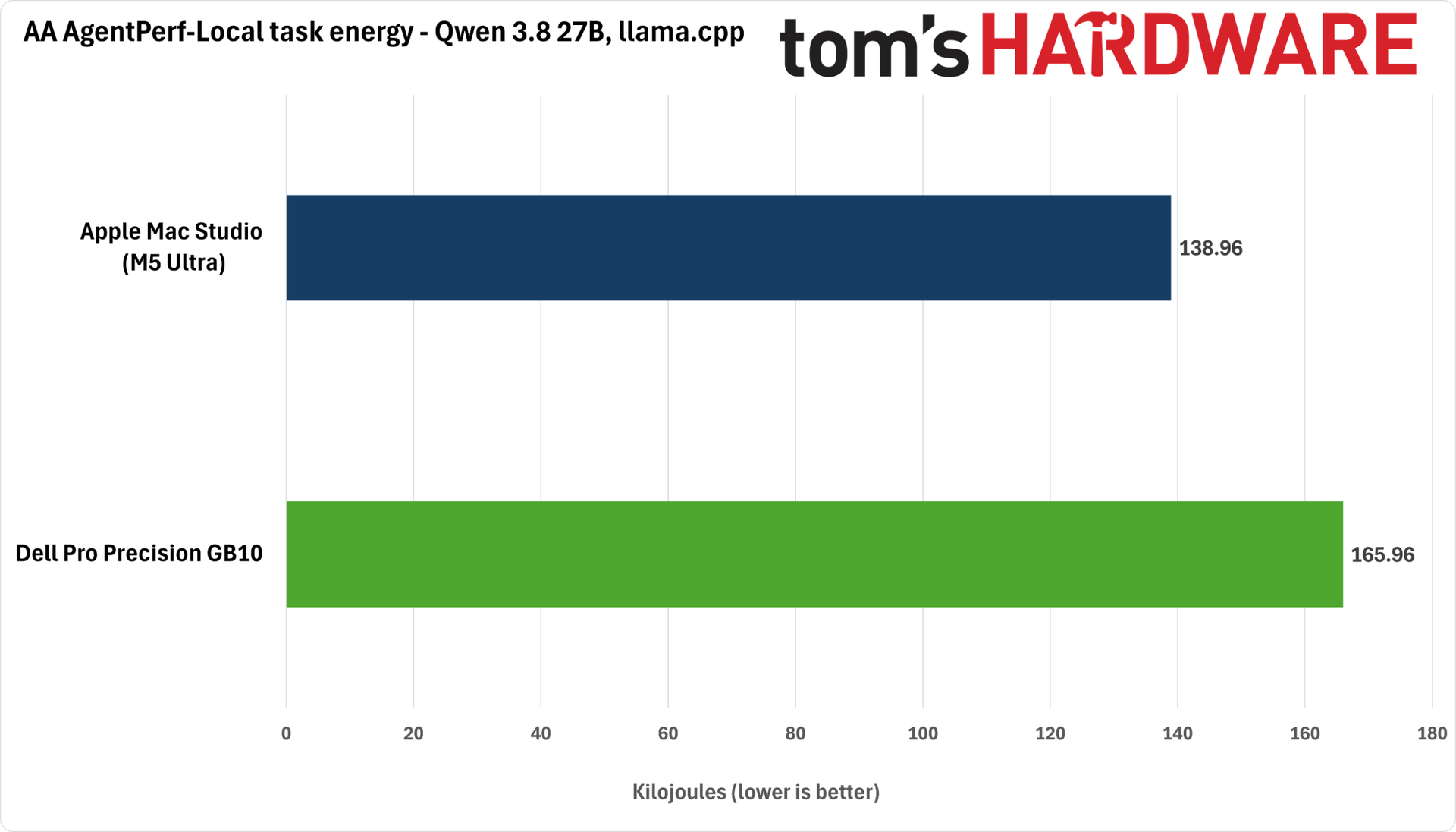
At least with llama.cpp, the Mac Studio not only finishes the AgentPerf-Local test much faster than the DGX Spark, but it also consumes less task energy overall — about 16% less. A different inference engine might produce a more favorable result for the Spark-like system, but apples-to-apples, this test looks fantastic for the Mac Studio.
We can multiply both task time and energy consumed (in kilojoules) together to arrive at the energy-delay product (EDP) for each system. A lower EDP wraps up a fast time to completion and a low task energy into a single comparable figure for efficiency.
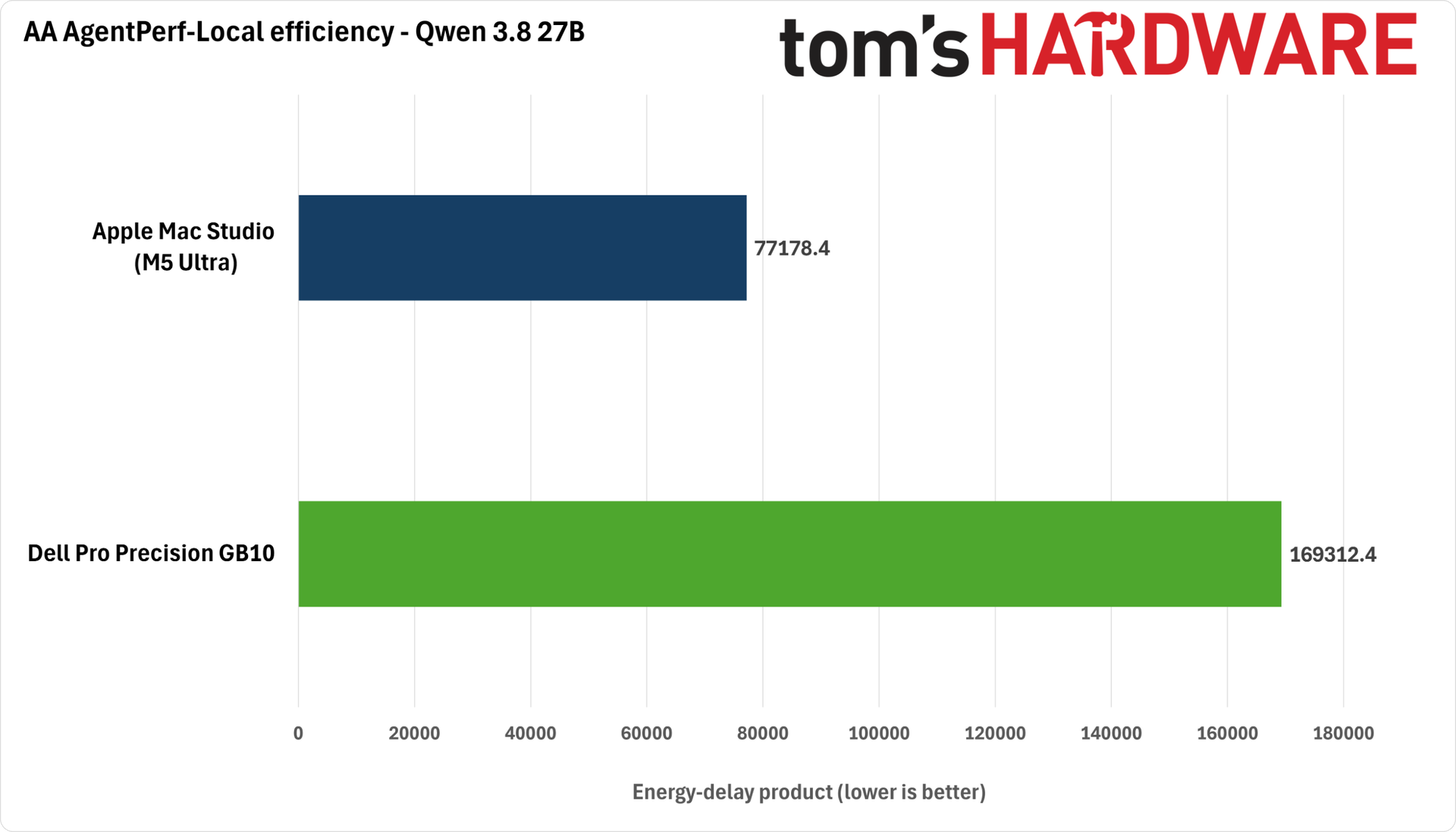
The Mac Studio’s EDP is under half that of the DGX Spark in this test, once again indicating its impressive efficiency and performance with this dense model and workload.
Going big with DeepSeek V4.1 Flash 1017 and GLM 5.3 Flash
Of course, Qwen 3.8 27B doesn’t need 256GB (or even 128GB) of RAM to do its thing. To really stretch the legs of the Mac Studio, we chose two larger open models that are near the top of capability benchmarks right now: GLM-5.3 Flash and DeepSeek V4.1 Flash 1017.
The M5 Ultra Mac Studio can natively fit quantized versions of these models (a four-bit quantization in the case of GLM 5.3 and a two-bit quantization courtesy of Unsloth for DeepSeek V4.1 Flash) in its 256GB of RAM, but there’s no way even those quantizations will fit on a single 128GB DGX Spark.
That’s where the clustering capability of Nvidia’s platform comes in. We’ve already seen how pairing up Sparks can scale up one’s local inference capacity, and that capability is critical when evaluating them against a Mac Studio like this.
But the rapidly rising prices of GB10 systems have frustrated our value analysis during the course of this testing. For just one example, Lenovo set all of its ThinkStation PGX systems to a “coming soon” status during our tests. And as we’ve already mentioned, the Dell Pro Precision GB10s we’re clustering here are an eye-popping $10K each. We have no reason to believe the rest of the GB10 systems on the market will be that much cheaper once this current volatility shakes out.
No matter how you slice it, getting even a pair of DGX Sparks with 4TB SSDs is going to end up costing quite a bit more than this single Mac Studio, even if $20K for a dual-Dell cluster is at the top end of the market. $15K or more is a relatively more reasonable benchmark, but even then, that’s 25% more money than a single M5 Ultra Studio.
We don't yet have end-to-end agentic tests for these larger models, but directionally, we can still consider prompt processing and decode performance to see which of these systems would deliver faster agentic turnaround.
Because of the limited choice of compatible inference engines for Apple Silicon, we have to use llama.cpp for DeepSeek V4.1 Flash 1017. Worse, the Mac Studio can't hold both the DeepSeek V4.1 Flash 1017 model weights and the DSpark speculative decoding model required to boost token output even with a two-bit quantization, so we’re forced to leave performance on the table.
In contrast, the DeepSeek V4.1 Flash serving recipe for our Spark cluster can take advantage of DSpark speculative decoding and the TensorFold inference engine, which can deliver higher performance than llama.cpp.
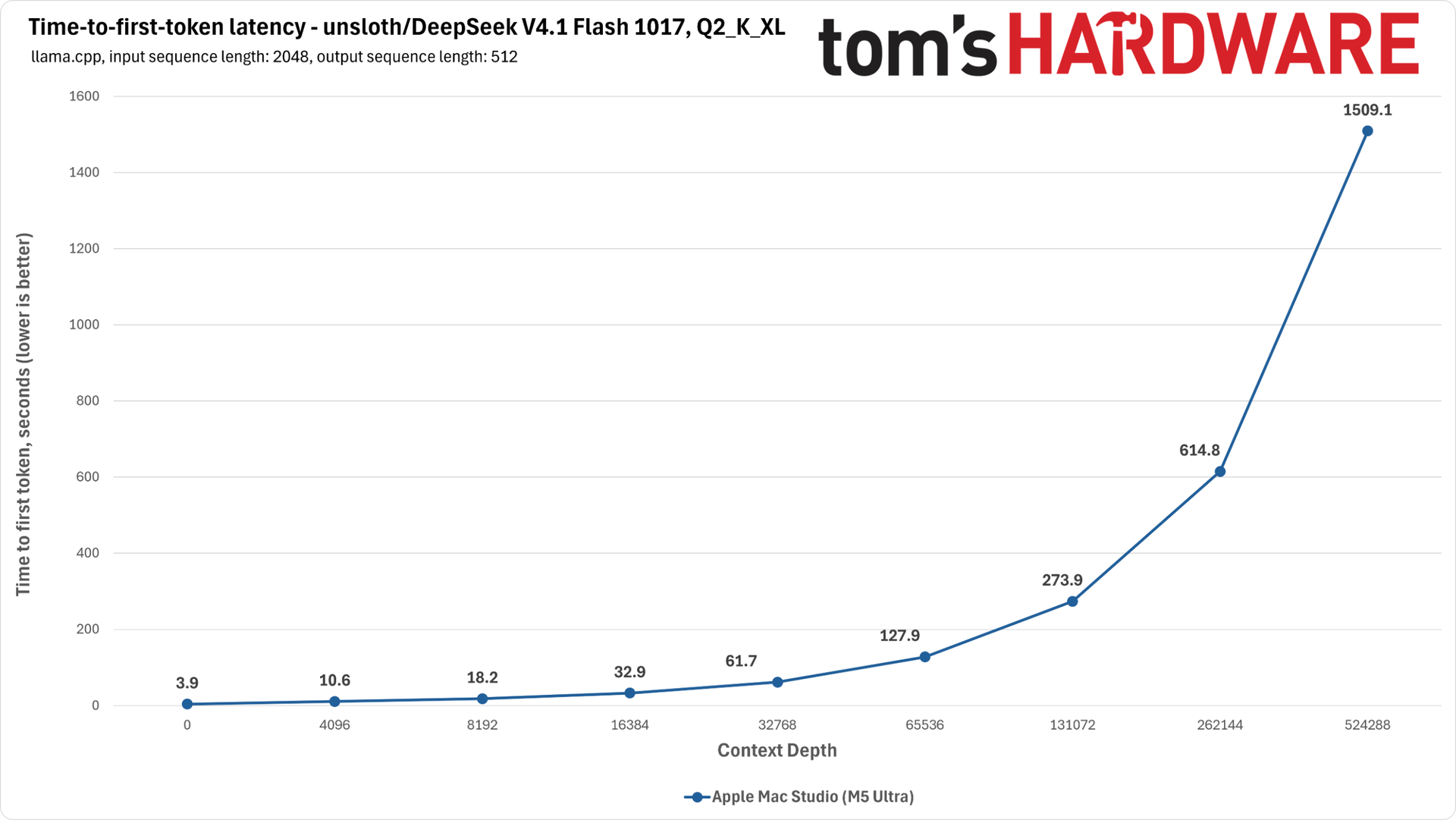
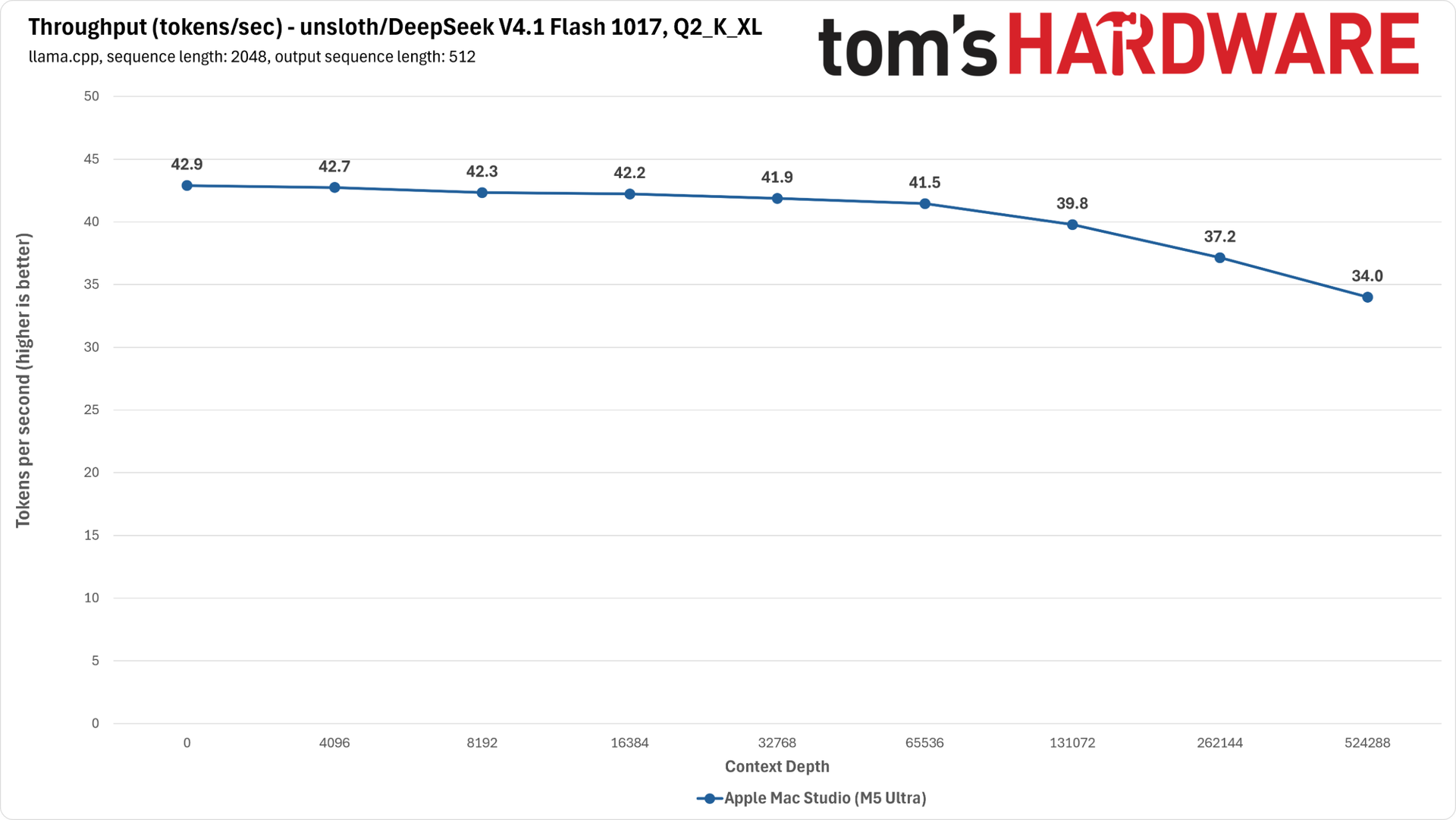
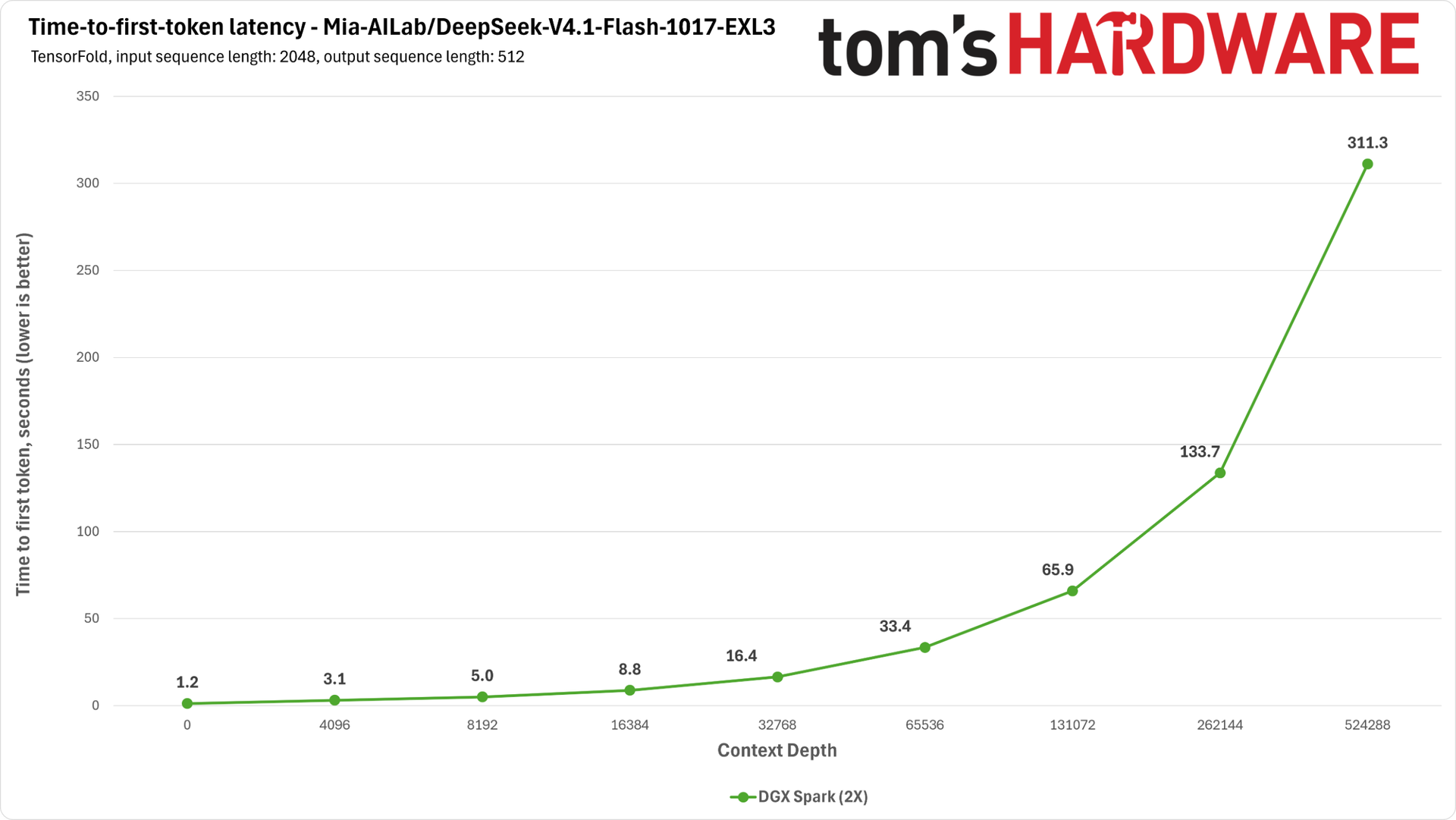
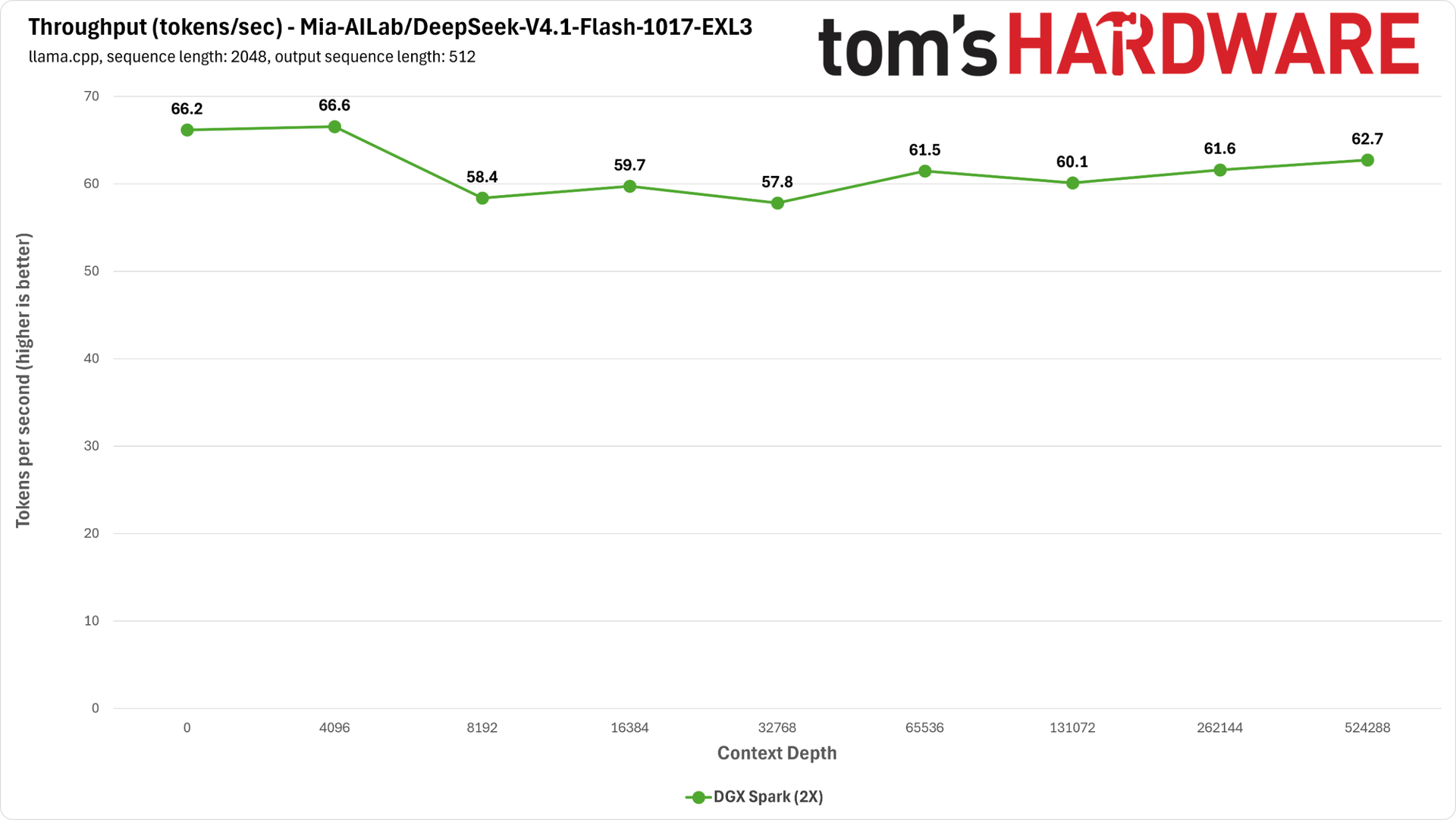
Even with MLX support, llama.cpp performance with DeepSeek V4.1 Flash on the Mac Studio is pokey next to the DGX Spark cluster. Between its slower prompt processing speed and unaugmented decoding, it would end up at a disadvantage in agentic work with this model.
The community two-Spark serving recipe from Mia’s AI Lab with TensorFold is a major asset for owners of those systems, even accounting for the bit of extra work involved in setting up and managing a Spark cluster.
Where the Mac running llama.cpp needs anywhere from 10 to 25 minutes to digest the longest context lengths we tested for DeepSeek V4.1 Flash, the Spark cluster needs under five minutes at most to do the same jobs with this recipe — and the TensorFold inference engine is much faster on the decode side, too. If you want to run this model locally, a pair of Sparks is the clear winner right now.
With DeepSeek out of the way, let’s consider GLM 5.3 Flash, another leading open model for local intelligence. Because MTP with GLM 5.3 Flash doesn't require a separate drafting model, we can give it a decode boost on the Mac Studio without the memory headroom issues we saw with DeepSeek V4.1 Flash. For our Spark cluster, we chose to run GLM 5.3 Flash using a recipe cooked up by Mia's AI Lab.
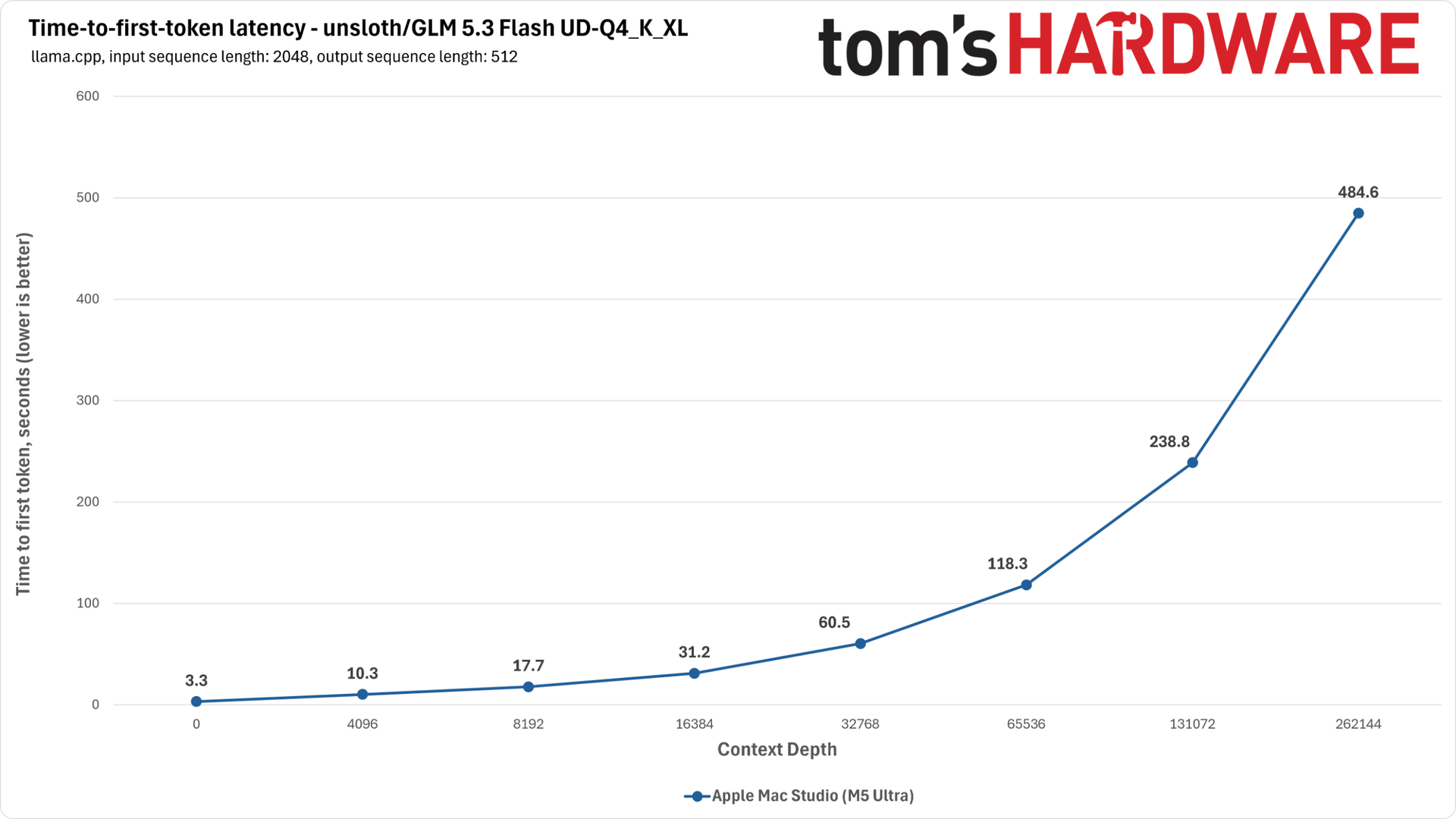
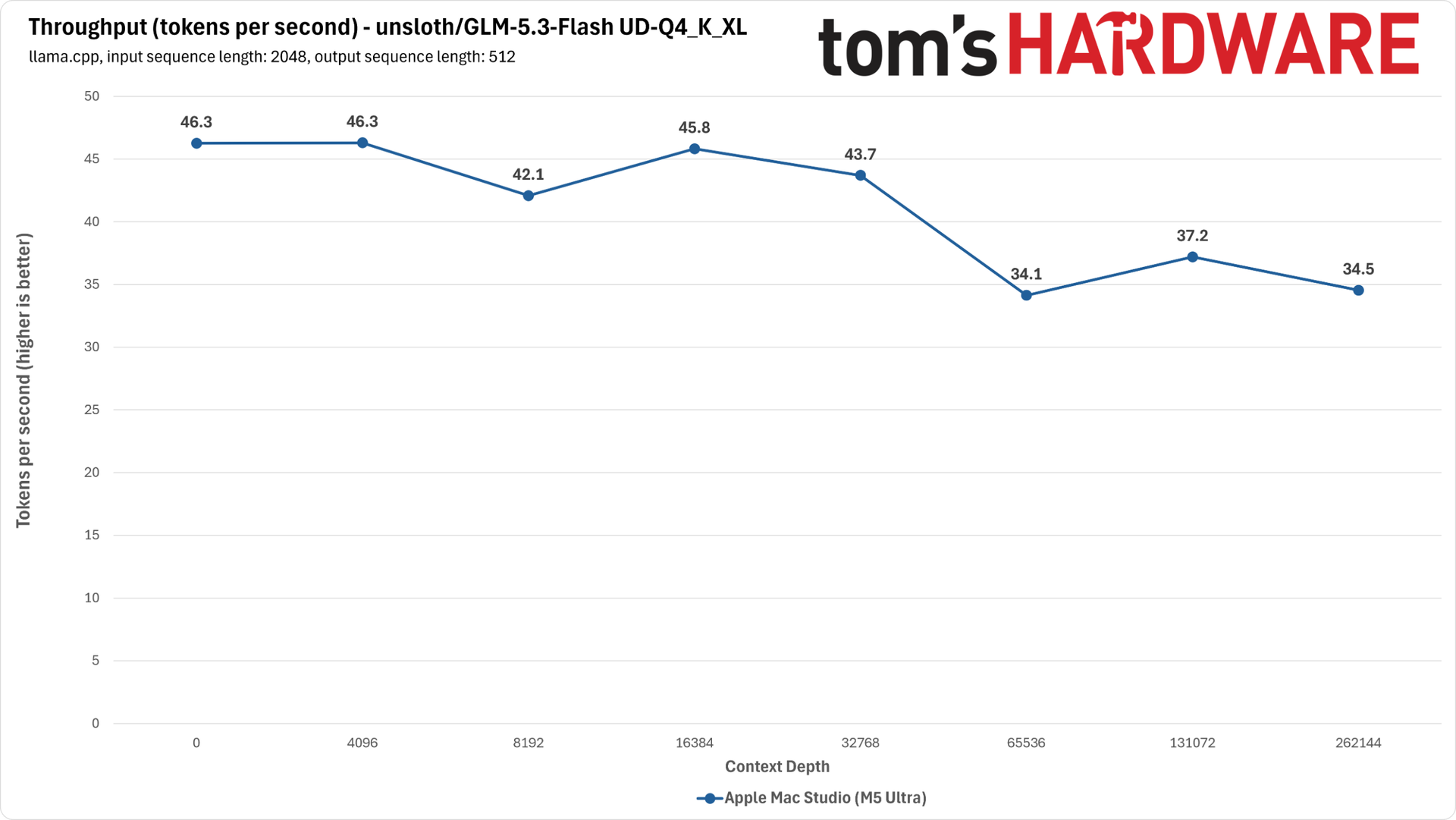
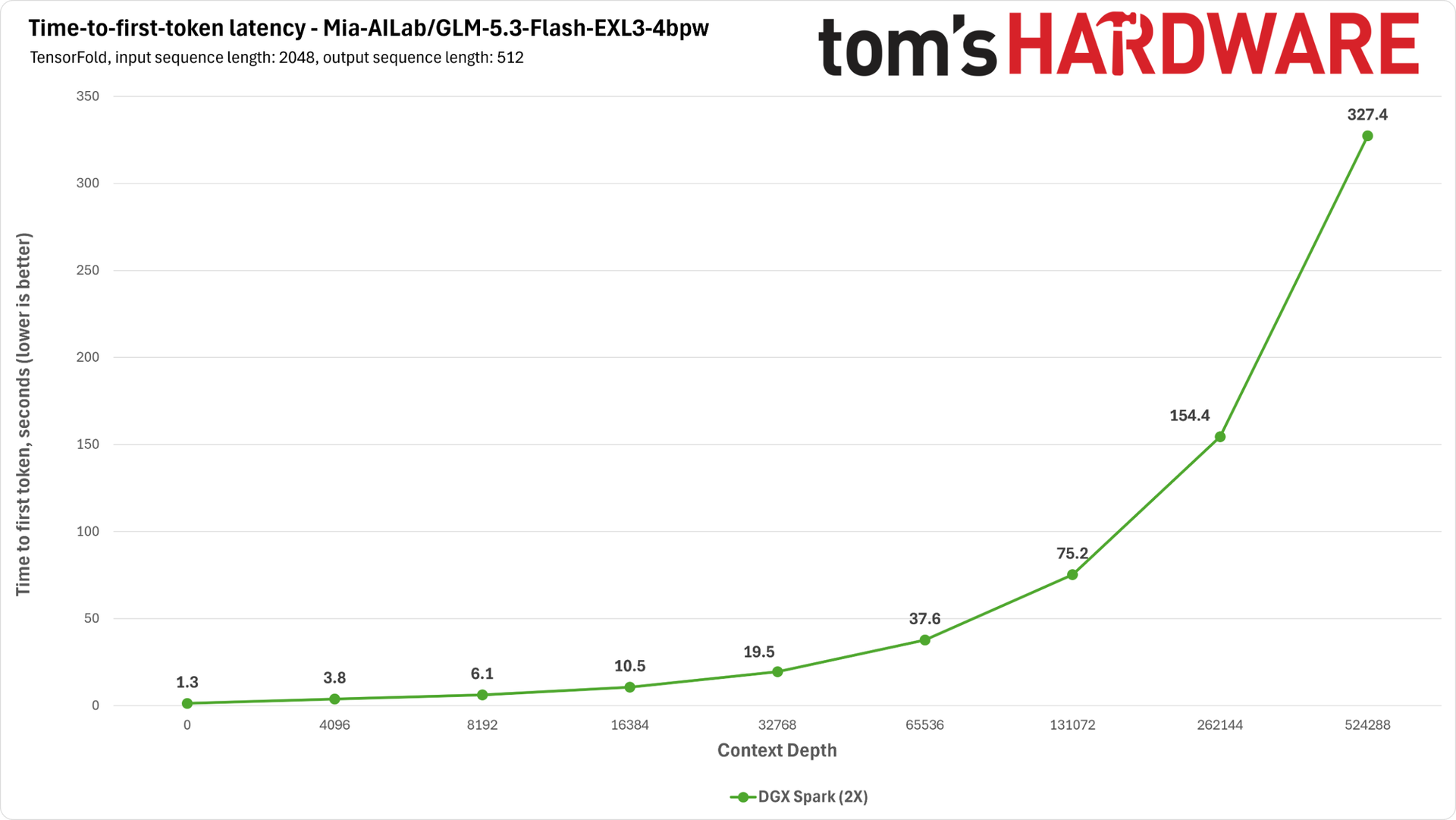
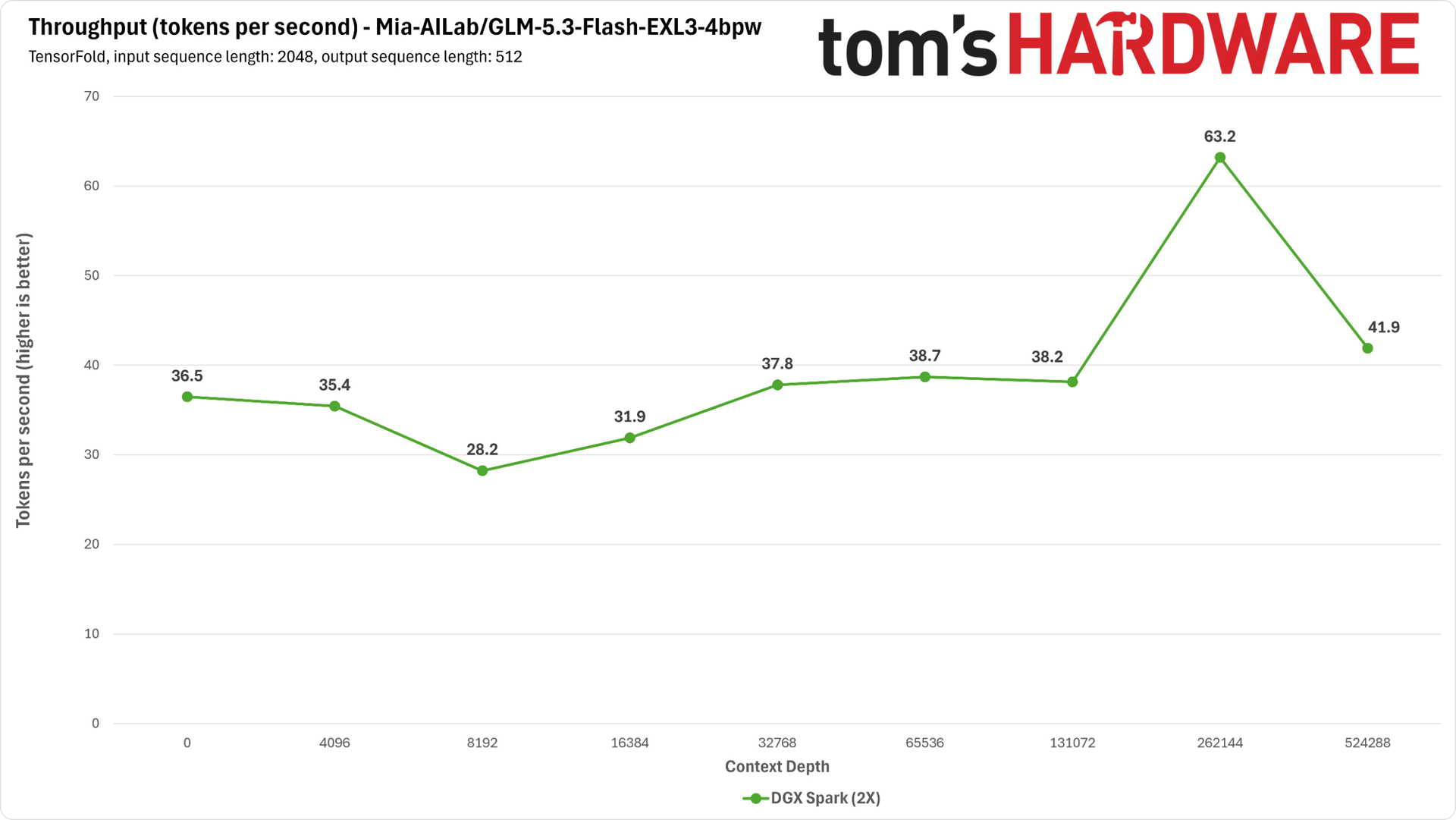
GLM 5.3 Flash runs much better on llama.cpp than DeepSeek V4.1 Flash does, but even so, the DGX Spark cluster delivers much faster prompt processing times across the board. The M5 Ultra's memory bandwidth advantage means the Mac is delivering higher tokens per second on the decode side, but it’s likely that any agentic turn would still finish faster on the Spark cluster.
Because a TensorFold serving recipe is available for GLM 5.3 Flash on Apple Silicon, however, we can see just how much extra performance is available from an MLX-specific four-bit model quantization and a theoretically higher-performance inference engine.
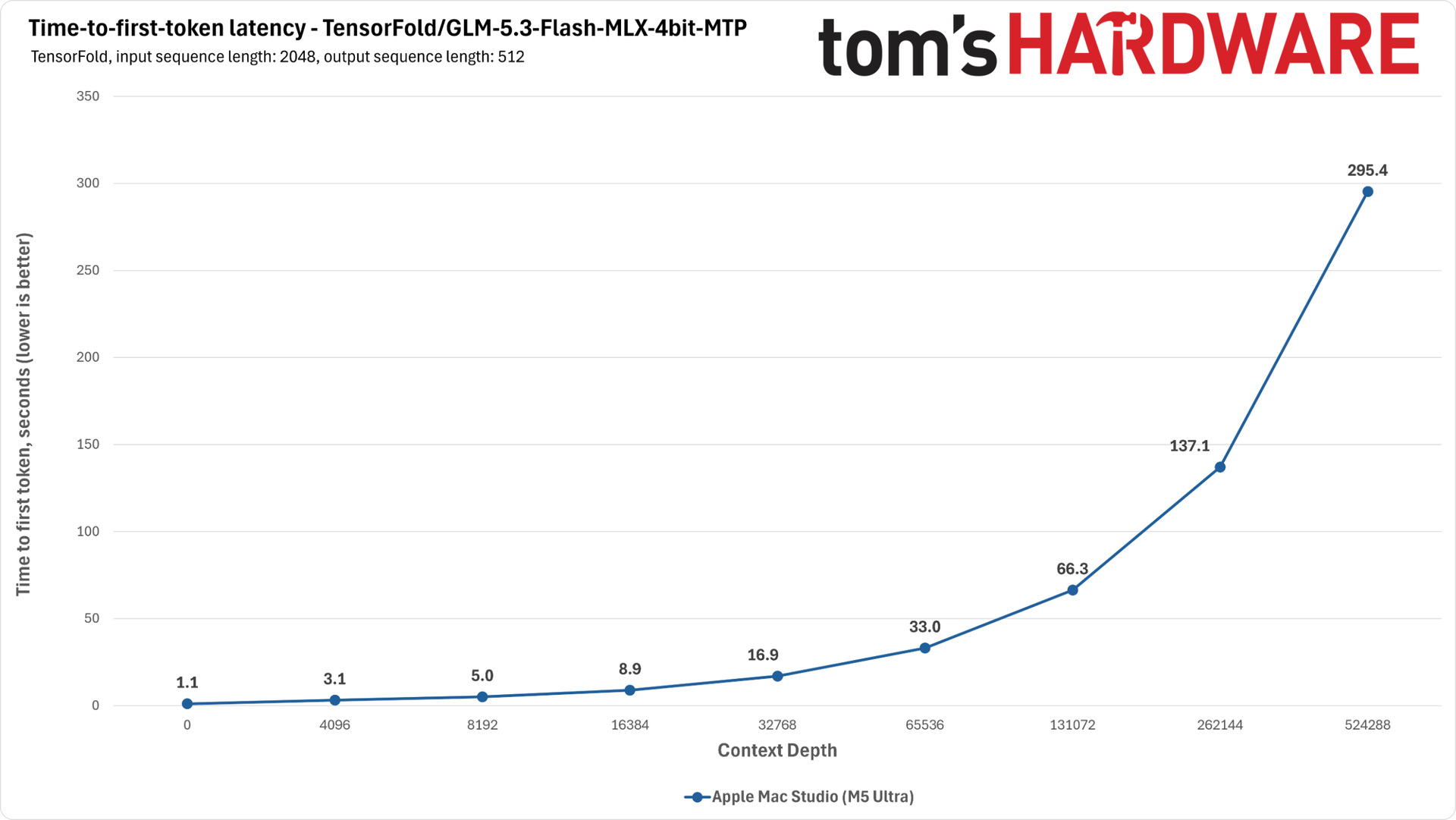
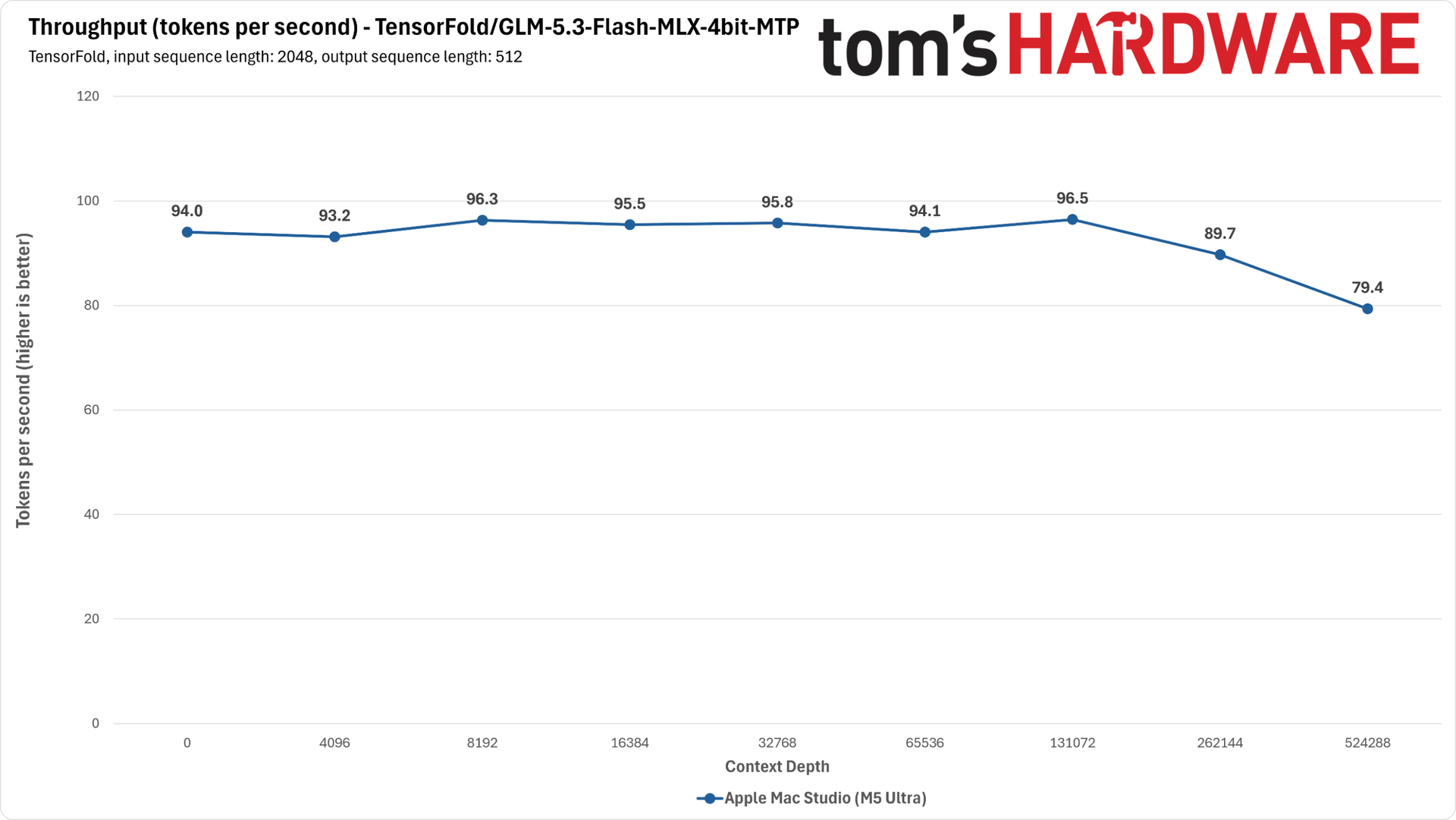
This serving recipe turbocharges the Mac Studio’s performance compared to llama.cpp. Prompt processing times with TensorFold get much closer to those of the Spark cluster, and decode throughput is a startling three times faster, on average.
We expect (and can only hope) that improved inference engine support and serving recipes for DeepSeek V4.1 Flash 1017 on the M5 Ultra will arrive in time as community members unleash their coding agents on this hardware, because the performance potential is clearly there for Apple Silicon.
Bottom line
A single M5 Ultra Mac Studio can deliver incredible local AI performance and power efficiency versus a single DGX Spark when all the puzzle pieces fall into place. And that's not as absurd a comparison as it might seem.
Prices for unified memory systems are ballooning to the point that a single Dell Pro Precision GB10 system with a 4TB SSD is now over $10K, closing in on the $12K-ish price of the Mac Studio configuration that we tested. We expect those trends will only continue as the RAM and NAND supply crunch becomes more acute.
But our broader experience shows that the M5 Ultra's impressive performance isn't assured from every model and inference engine, especially from the bigger and highly intelligent models you'll want to put in 256GB of RAM.
This Mac's prompt processing speeds can really rip with llama.cpp and smaller models like Qwen 3.8 27B, but you really want to ensure that you have a higher-performance serving recipe at your disposal for bigger models like GLM 5.3 Flash and DeepSeek V4.1 Flash 1017. The TensorFold engine runs GLM 5.3 Flash incredibly well, but it doesn’t support DeepSeek at all yet.
As we emphasized in our review of the M4 Max Mac Studio, memory bandwidth is just one factor in AI inference performance. You need to take the entire hardware-software stack into account in order to wholly judge the performance and model compatibility available from these extremely pricey unified memory setups.
Even as Apple closes the performance shortfalls of its hardware for AI inference, development and support around the MLX stack has a ways to go before it catches up with the maturity and performance, as well as the model and inference engine options, available on Nvidia hardware.
The enduring value of the DGX Spark platform beyond its raw performance and scalability is that the breadth and velocity of community software development and support around the platform has gotten to the point that you're virtually assured of a way to run a hot new model soon after its weights hit Hugging Face (at least assuming you have enough Sparks to cluster to provide the memory capacity necessary).
That assurance of community software support and ongoing development, along with the DRAM and NAND supply crunches, means high demand and ever higher prices for 128GB GB10 boxes. Two such Sparks with 4TB drives will run you an eye-watering $15K to $20K+, depending on the partner system and storage configuration you choose. And those prices are likely to continue rising, making a single Mac Studio a potentially appealing option as long as Apple doesn’t jack up its prices for these systems in turn.
If strong local AI performance is just one thing you need from a personal workstation, and you also want one of the world's fastest CPUs and a powerful GPU for general-purpose work in one well-rounded, efficient, and quiet compact chassis, the Mac Studio is a remarkable system.
If you can wait for software to catch up to this system’s incredible performance potential for local AI and don’t mind the possibility of narrower model and inference engine support compared to a DGX Spark setup, get in line, as lead times for these systems stretch into February 2027 as of this writing.
But if you're thinking about dropping well over $10K specifically for the purpose of building a local AI inference setup right now, perhaps for yourself or a small office, clustering a pair of Sparks gets you both the memory capacity and compute horsepower you need with the robust software support and broad model compatibility you’d expect for that outlay to be worthwhile. Those assurances may be worth the lower raw performance potential of such a cluster compared to the Mac Studio.


