Since version 1.7, Django has come with built-in support for database migrations. In Django, database migrations usually go hand in hand with models: whenever you code up a new model, you also generate a migration to create the necessary table in the database. However, migrations can do much more.
In this article, you’ll get comfortable with Django migrations and learn the following:
- How to create database tables without writing any SQL
- How to automatically modify your database after you changed your models
- How to revert changes made to your database
Free Bonus: Click here to get access to a free Django Learning Resources Guide (PDF) that shows you tips and tricks as well as common pitfalls to avoid when building Python + Django web applications.
The Problems That Migrations Solve
If you are new to Django or web development in general, you might not be familiar with the concept of database migrations, and it might not seem obvious why they’re a good idea.
First, let’s quickly define a couple of terms to make sure everybody is on the same page. Django is designed to work with a relational database, stored in a relational database management system like PostgreSQL, MySQL, or SQLite.
In a relational database, data is organized in tables. A database table has a certain number of columns, but it can have any number of rows. Each column has a specific datatype, like a string of a certain maximum length or a positive integer. The description of all tables with their columns and their respective datatypes is called a database schema.
All database systems supported by Django use the language SQL to create, read, update and delete data in a relational database. SQL is also used to create, change, and delete the database tables themselves.
Working directly with SQL can be quite cumbersome, so to make your life easier, Django comes with an object-relational mapper, or ORM for short. The ORM maps the relational database to the world of object oriented programming. Instead of defining database tables in SQL, you write Django models in Python. Your models define database fields, which correspond to the columns in their database tables.
Here’s an example of how a Django model class is mapped to a database table:
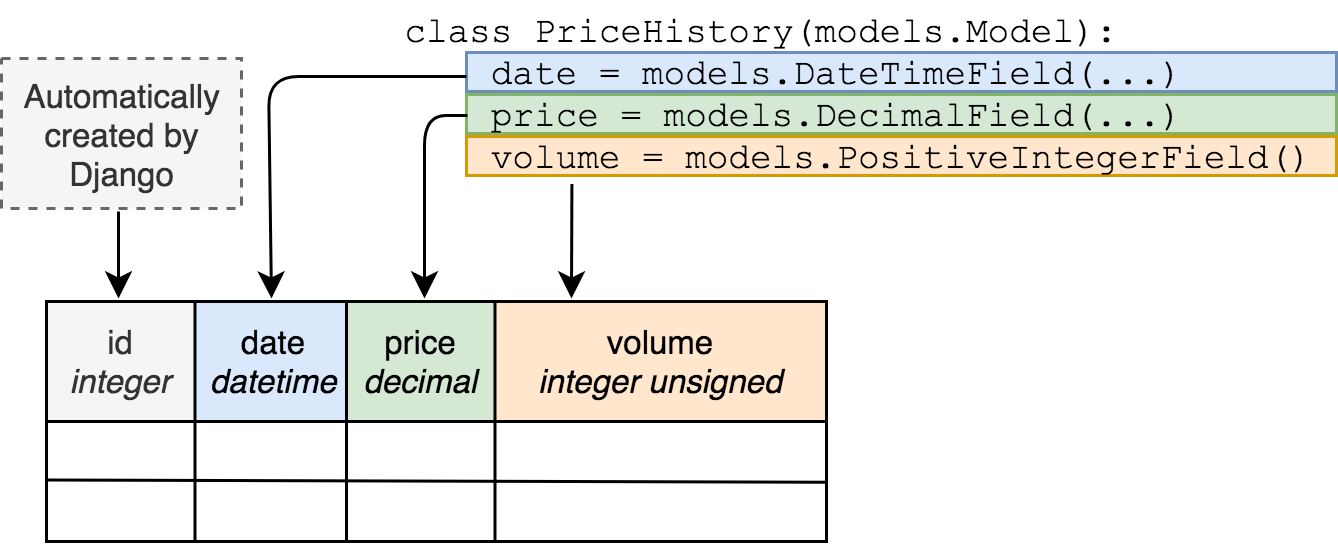
But just defining a model class in a Python file does not make a database table magically appear out of nowhere. Creating the database tables to store your Django models is the job of a database migration. Additionally, whenever you make a change to your models, like adding a field, the database has to be changed too. Migrations handle that as well.
Here are a few ways Django migrations make your life easier.
Making Database Changes Without SQL
Without migrations, you would have to connect to your database and type in a bunch of SQL commands or use a graphical tool like PHPMyAdmin to modify the database schema every time you wanted to change your model definition.
In Django, migrations are primarily written in Python, so you don’t have to know any SQL unless you have really advanced use cases.
Avoiding Repetition
Creating a model and then writing SQL to create the database tables for it would be repetitive.
Migrations are generated from your models, making sure you don’t repeat yourself.
Ensuring Model Definitions and the Database Schema in Sync
Usually, you have multiple instances of your database, for example one database for each developer in your team, a database for testing and a database with live data.
Without migrations, you will have to perform any schema changes on each one of your database, and you will have to keep track which changes have already been made to which database.
With Django Migrations, you can easily keep multiple databases in sync with your models.
Tracking Database Schema Change in Version Control
Read the full article at https://realpython.com/django-migrations-a-primer/ »
[ Improve Your Python With 🐍 Python Tricks 💌 – Get a short & sweet Python Trick delivered to your inbox every couple of days. >> Click here to learn more and see examples ]


